How Workflow Builder can support ERP processes

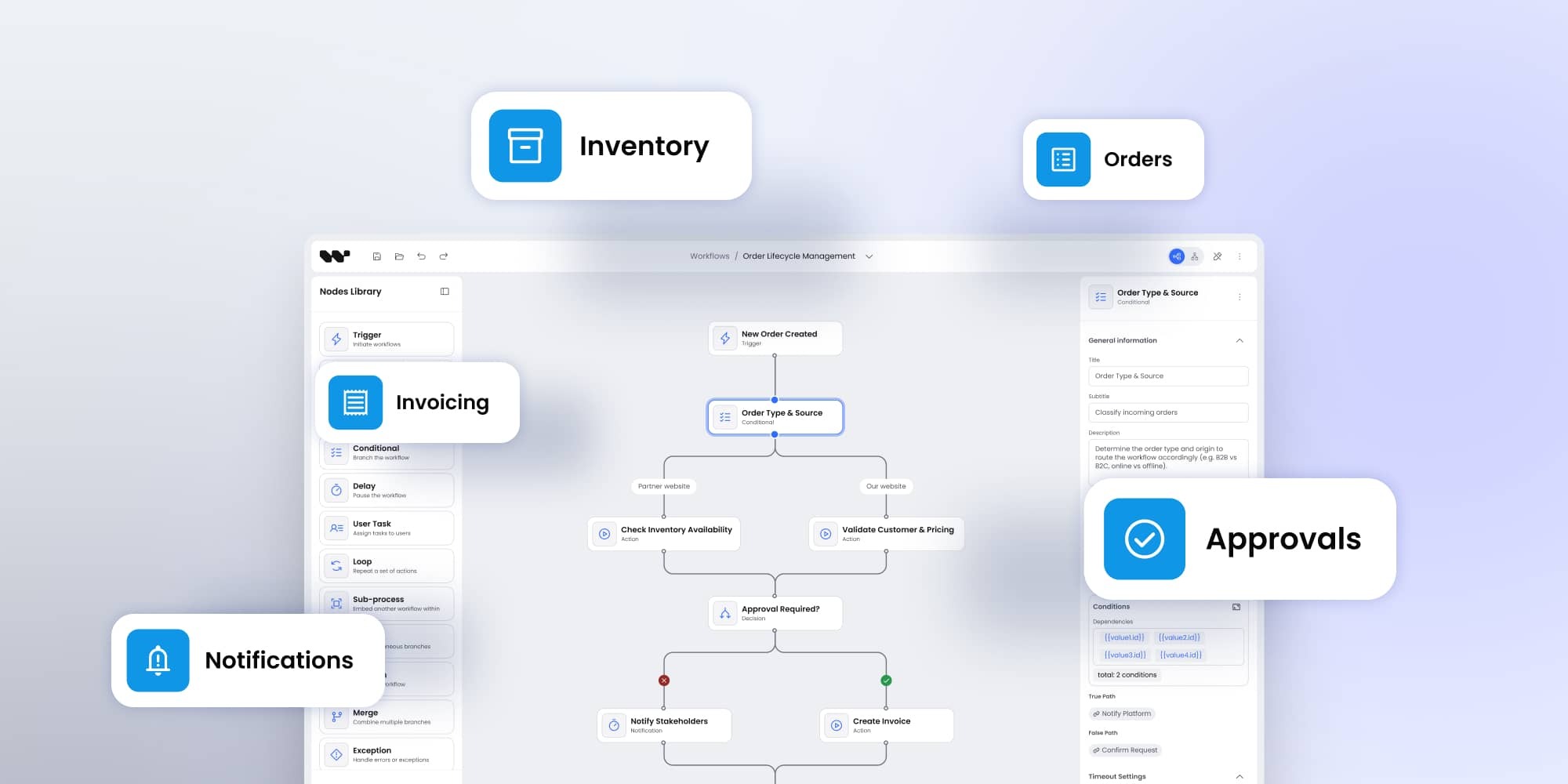
ERP systems run core business operations but often fall short on flexibility and transparency. Workflow Builder closes that gap by embedding visual, customizable workflows for accounting, order management, and MRP. The result: ERP solutions that are easier to adapt, faster to implement, and better aligned with how businesses actually work.
ERP flexibility: still a work in progress
Enterprise Resource Planning (ERP) systems are fundamental for managing day-to-day business operations. They unify accounting, order management, supply chains, and production planning into one central environment. Yet as powerful as they are, ERPs have a persistent weakness: workflows that are rigid, opaque, and hard to adapt.
Accounting rules are often hidden behind system logic. Order management processes don’t always match the real-world complexity of vendor and customer relationships. Material Requirements Planning (MRP) frequently relies on one-size-fits-all calculations that don’t reflect every company’s needs.
Workflow Builder was created to solve these gaps. Designed as a developer-first frontend SDK, it gives ERP vendors and developers a way to embed visual, transparent, and customizable workflows into their systems. Instead of forcing users to adapt to the ERP’s logic, teams can finally control processes on their own terms.
Why ERP workflows need a rethink
Most ERP systems were built with accounting at their core. Financial accuracy remains non-negotiable. But as businesses scale, operational areas like inventory management, sales, and production planning demand equal attention. That’s where many ERPs struggle.
Common ERP pain points:
- Hidden logic: Calculations and rules run in the background with little visibility for teams.
- Slow adaptation: Adjustments often require vendor involvement, new modules, or costly consulting.
- Rigid workflows: Pre-set flows can’t capture industry-specific exceptions or compliance needs.
- Limited user control: End-users lack transparency into how orders, invoices, or MRP rules are executed.
Businesses no longer want ERPs to simply record outcomes. They want ERPs to make the workflow logic clear, adaptable, and accountable.
Workflow Builder delivers exactly that.
Accounting processes: putting transparency first
Accounting is the backbone of every ERP. But it’s also the area most likely to frustrate finance teams. Adjustments are hidden. Reconciliations leave no clear audit trail. And when errors occur, finding the root cause can take days.
Workflow Builder makes accounting workflow-driven instead of system-locked:
- Every accounting adjustment is tied to a visible process diagram.
- Teams can track version history across workflow rules, with full accountability.
- Auditors get clear diagrams instead of unreadable logs.
- Finance leaders gain control over the flow of entries, not just the final outputs.
Quick checklist for accounting teams
- Do we have full version control for workflow rules?
- Can we track every change to accounting processes?
- Are all steps auditable without backend digging?
With Workflow Builder, the answer is “yes” to all three.
Order management: controlling the full lifecycle
Order management is where ERP workflows meet the customer and vendor ecosystem. It spans purchase orders, sales orders, invoicing, fulfillment, and accounting updates. Yet standard ERP flows rarely cover every exception.
Workflow Builder supports the entire order lifecycle:
- Purchase orders → generate orders, send vendor emails, attach PDFs, update ERP records.
- Sales orders → trigger “ship order,” update accounting, notify the customer.
- Custom triggers → handle priority customers, urgent approvals, or compliance checks.
This flexibility ensures that ERP order management reflects how the business actually operates, not just how the vendor coded it.
Myth-busting: ERP order workflows
- Myth 1: Standard ERPs already manage order workflows well.
→ Truth: They handle transactions, not flexible workflows around them. - Myth 2: Adding flexibility means expensive custom ERP modules.
→ Truth: Workflow Builder extends processes via frontend integration, not core rewrites. - Myth 3: More workflow layers slow down performance.
→ Truth: Workflow Builder is built for scale, with optimized performance for large diagrams.
Material Requirements Planning (MRP): moving past rigidity
MRP is critical to production and procurement. It determines how much to buy, when to buy, and how production schedules align with demand. Traditional ERPs calculate these numbers automatically, but their rigid formulas often clash with business-specific logic.
Workflow Builder empowers teams to take control of MRP logic:
- Define conditions like “If stock < 500 units → trigger purchase order.”
- Incorporate sales forecasts directly into replenishment flows.
- Let developers create custom calculation nodes for unique planning needs.
The result: MRP workflows that are transparent, adjustable, and more aligned with business realities.
Pros and cons of workflow-driven MRP
Pros
- Visibility into every calculation step.
- Adaptability for unique industries.
- Easy integration with purchasing and accounting.
Cons
- Requires developer involvement to define custom rules.
- Teams must shift mindset from fixed formulas to configurable flows
ERP workflows and compliance
Compliance is one of the biggest hidden costs in ERP projects. Whether it’s SOX, GDPR, ISO, or industry-specific rules, companies spend significant time proving that their processes are transparent and traceable. Standard ERPs often struggle here, since many decisions and calculations happen automatically in the background.
Workflow Builder helps compliance teams by making every step visible and auditable. Instead of static logs, auditors see diagrams that explain the logic behind accounting entries, approvals, and data changes. Version control means you can prove not just what changed, but why it changed. This turns compliance from a painful afterthought into a byproduct of well-structured workflows.
Key benefits of Workflow Builder in ERP integration
ERP vendors and developers integrating Workflow Builder gain a set of features designed to solve long-standing pain points.
Developer-first control
Unlike rigid ERP modules, Workflow Builder lets developers customize triggers, actions, and workflow logic. This flexibility ensures that operational rules reflect how the business works, not how the vendor designed them.
Transparency and version control
All processes are diagrammed visually. Every change is tracked. Teams gain clear accountability and compliance-ready audit trails — a major advantage for industries under regulatory pressure.
Seamless backend integration
Workflow Builder functions as a frontend solution that outputs JSON describing nodes, properties, and connections. This JSON can be integrated with any backend through APIs. Whether an ERP backend runs on Node.js, TypeScript, Next.js, or a legacy stack, Workflow Builder fits without imposing rigid pre-built integrations.
Customization and extensibility
ERP vendors can extend Workflow Builder by adding new node types, UI components, or input fields. For example:
- Asset pickers in inventory flows.
- User pickers in approval chains.
- Domain-specific nodes for industry-unique requirements.
All of this is done without rewriting ERP core logic.
Visual workflow building at scale
A drag-and-drop editor with configurable palettes makes workflow building accessible. Automatic layouts (horizontal or vertical) keep even large diagrams usable, and built-in features like minimaps and shortcuts support productivity.
Common ERP workflow mistakes
3 workflow mistakes most ERP teams make
- Treating processes as fixed: Businesses evolve, but workflows stay static for years. This mismatch drives inefficiency.
- Over-customizing ERP cores: Instead of extending through modular tools, teams hack the ERP itself — creating upgrade headaches.
- Ignoring transparency for speed: Quick fixes that hide logic lead to costly compliance and audit issues later.
Embedding Workflow Builder avoids these pitfalls by separating workflow logic from ERP cores, keeping both flexible and maintainable.
Benefits for ERP
Embedding Workflow Builder into ERP systems is more than a technical improvement. It’s a strategic business move.
- New value streams → Vendors can package customizable workflows as premium features, increasing adoption and differentiation.
- Efficiency in development → Building a comparable tool from scratch can take 600–700 hours. Workflow Builder eliminates boilerplate work, accelerating time-to-market.
- Developer-first positioning → Offering source code and documentation allows client teams to extend and own the solution. That’s a strong differentiator against rigid ERP competitors.
In other words: ERP vendors who integrate Workflow Builder give their clients something most ERPs can’t — freedom of control and transparency.
Conclusion: ERP that adapts
ERP success today isn’t just about accurate records — it’s about adaptability. Accounting, order management, and MRP all benefit when workflows are transparent, customizable, and easy to integrate. Workflow Builder makes this possible with a developer-first foundation that scales from MVPs to enterprise-grade systems.
Takeaways for ERP decision-makers:
- Use workflow-driven accounting to improve auditability and compliance.
- Extend order management with custom triggers to handle real-world exceptions.
- Replace rigid MRP formulas with workflows tailored to your planning needs.
- Shorten time-to-market by embedding Workflow Builder instead of building from scratch.
The bottom line: ERP systems powered with Workflow Builder are not just tools for record-keeping — they become engines of business adaptability.
An entrepreneur and tech enthusiast, with over 14 years of experience building innovative diagramming solutions and tools across industries. Our interfaces help technical and non-technical users make informed business decisions.