AI Agent
Delegates a step in the workflow to an AI model or agent with tool access.
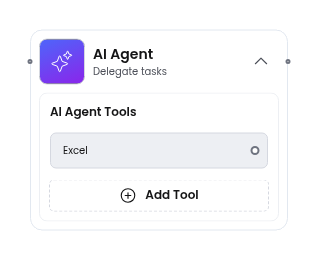
The AI Agent node represents a workflow step handled by an AI model. The editor captures the agent’s configuration - which model to use, what tools it can access, its system prompt, and memory settings. Your backend is responsible for invoking the actual AI service at runtime.
When to use
Section titled “When to use”Use an AI Agent node when a workflow step requires language understanding, generation, or decision-making that cannot be expressed as simple rules or conditions.
Common examples:
- Document processing - extract structured data from unstructured text (invoices, contracts, support tickets)
- Content generation - draft emails, summaries, or reports based on workflow data
- Classification and routing - analyze incoming requests and route them to the right team or process
- Tool-augmented agents - let the AI call external tools (Gmail, Jira, Slack, Airtable) to gather information or take action as part of a larger workflow
- Conversational steps - generate context-aware responses in customer support or onboarding flows
- Data enrichment - look up and synthesize information from multiple sources before passing it downstream
The AI Agent node connects to other nodes like any other step. It receives input from upstream nodes and passes its output to downstream nodes. The difference is that the “logic” is delegated to an LLM rather than coded explicitly.
Chat model
Section titled “Chat model”Select the AI model that powers this agent step. The models listed below are the defaults shipped with Workflow Builder - they are illustrative examples. You can replace them with any model your backend supports by editing the node schema.
| Model | Value | Icon |
|---|---|---|
| GPT-5.4 | gpt5.4 | OpenAiLogo |
| Gemini 3.1 Pro | gemini3.1pro | GeminiLogo |
| Claude Sonnet 4.6 | claudeSonnet4.6 | ClaudeLogo |
Tools give the AI agent access to external services. Each tool is a named integration the agent can invoke during its execution. Tools are configured as an array - you can add as many as needed. The presets below are examples bundled with the default configuration; you can define your own tools to match whatever services your backend integrates with.
| Property | Type | Description |
|---|---|---|
| Tool | Text | Name of the tool |
| Description | Text | What the tool does (passed to the model as context) |
| API Key | Text | Authentication key for the tool’s service |
Available tool presets:
| Tool | Icon |
|---|---|
| Gmail | GoogleLogo |
| Excel | MicrosoftExcelLogo |
| Airtable | AirtableLogo |
| Jira | JiraLogo |
| Slack | SlackLogo |
| Hubspot | HubspotLogo |
Memory
Section titled “Memory”Controls whether the agent retains context across invocations within the same workflow run.
| Option | Description |
|---|---|
| Window-based Memory | Retains a sliding window of recent conversation context |
System prompt
Section titled “System prompt”A free-text field for the system prompt that defines the agent’s behavior, persona, and constraints. This is passed directly to the model at runtime.
This field supports referencing data from earlier nodes — see Use Variable Picker. A plain {{…}} reference fails the run if the path is missing; use {{x.y?}} or {{x.y | default:'…'}} for fields that may legitimately be absent — see Missing values.
Properties
Section titled “Properties”| Property | Type | Description |
|---|---|---|
| Label | Text | Display name shown on the node card |
| Description | Text | Short description of the node’s purpose |
| Status | Dropdown | Active / Draft / Disabled |
Schemas
{ "type": "VerticalLayout", "elements": [ { "type": "MessageOnError", "scope": "#/properties/missingPreviousVariable", "text": "plugins.validation.missingDependency" }, { "type": "Accordion", "label": "General Information", "elements": [ { "type": "Text", "scope": "#/properties/label", "label": "Title", "placeholder": "Node Title..." }, { "type": "Select", "scope": "#/properties/status", "label": "Status" }, { "type": "Text", "scope": "#/properties/description", "label": "Description", "placeholder": "Type your description here..." } ] }, { "type": "Accordion", "label": "Operational Settings", "elements": [ { "type": "VerticalLayout", "elements": [ { "type": "Select", "scope": "#/properties/chatModel" }, { "type": "Select", "scope": "#/properties/memory" } ] } ] }, { "type": "Accordion", "label": "Tools", "elements": [ { "type": "AiTools", "scope": "#/properties/tools" } ] }, { "type": "Accordion", "label": "System Prompt", "elements": [ { "type": "VariableTextArea", "scope": "#/properties/systemPrompt", "placeholder": "Type your prompt here... Use {{ to insert variables", "minRows": 5 } ] } ]}{ "required": [ "label", "chatModel", "memory" ], "type": "object", "properties": { "label": { "type": "string" }, "description": { "type": "string" }, "status": { "type": "string", "options": [ { "label": "Active", "value": "active", "icon": "StatusActive" }, { "label": "Draft", "value": "draft", "icon": "StatusDraft" }, { "label": "Disabled", "value": "disabled", "icon": "StatusDisabled" } ] }, "chatModel": { "type": "string", "options": [ { "label": "GPT-5.4", "value": "gpt5.4", "icon": "OpenAiLogo" }, { "label": "Gemini 3.1 Pro", "value": "gemini3.1pro", "icon": "GeminiLogo" }, { "label": "Claude Sonnet 4.6", "value": "claudeSonnet4.6", "icon": "ClaudeLogo" } ], "placeholder": "Add Chat Model" }, "tools": { "type": "array", "items": { "type": "object", "properties": { "id": { "type": "string" }, "sourceHandle": { "type": "string" }, "tool": { "type": "string" }, "description": { "type": "string" }, "apiKey": { "type": "string" } } } }, "memory": { "type": "string", "options": [ { "label": "Window-based Memory", "value": "system", "icon": "Database" } ], "placeholder": "Add memory" }, "systemPrompt": { "type": "string" } }}See also
Section titled “See also”- Add Custom Node Type - register a new node type with custom properties
- Use Variable Picker - reference data from earlier nodes inside the system prompt
- Flow Runner plugin - turn a diagram into an executable flow function
- Action node - execute a task like an email, DB write, or external call