Conditional
Branches the workflow based on a true/false condition - if/else logic.
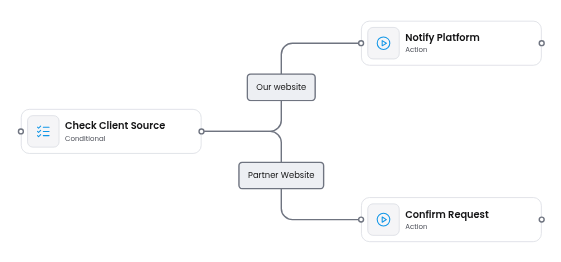
The Conditional node splits the workflow into exactly two branches based on a condition. One branch executes when the condition is true, the other when it is false.
When to use
Section titled “When to use”Use a Conditional node whenever your workflow needs binary branching - a yes/no, true/false, pass/fail decision point.
Common examples:
- Validation gates - check if the input data meets requirements before processing (e.g., “Is the order total above the minimum?”)
- Feature flags - route to different behavior based on a toggle (e.g., “Is the new billing system enabled?”)
- Error handling - branch based on whether a previous step succeeded or failed
- Eligibility checks - determine if a user qualifies for a promotion, discount, or approval
If you need more than two branches (e.g., route to one of several departments based on a category), use a Decision node instead.
Condition rules
Section titled “Condition rules”The Conditional node evaluates an array of conditions. Each condition compares two values using a comparison operator. Multiple conditions can be chained with logical operators (AND / OR).
| Property | Type | Description |
|---|---|---|
| X | Text | Left-hand value of the comparison |
| Comparison Operator | Dropdown | How to compare X and Y |
| Y | Text | Right-hand value of the comparison |
| Logical Operator | Dropdown | AND / OR - how to chain with the next condition |
Properties
Section titled “Properties”| Property | Type | Description |
|---|---|---|
| Label | Text | Display name shown on the node card |
| Description | Text | Short description of the node’s purpose |
Conditional vs Decision
Section titled “Conditional vs Decision”Both nodes handle branching, but they serve different purposes:
| Aspect | Conditional | Decision |
|---|---|---|
| Branches | Exactly 2 (true / false) | Any number |
| Logic | Evaluates a condition | Matches a value against multiple branches |
| Best for | Yes/no checks, validation gates | Routing, categorization, multi-way splits |
Schemas
{ "type": "VerticalLayout", "elements": [ { "type": "MessageOnError", "scope": "#/properties/missingPreviousVariable", "text": "plugins.validation.missingDependency" }, { "label": "Label", "type": "Text", "scope": "#/properties/label" }, { "label": "Description", "type": "Text", "scope": "#/properties/description", "placeholder": "Type your description here..." }, { "label": "Conditions", "type": "DynamicConditions", "scope": "#/properties/conditionsArray" } ]}{ "properties": { "label": { "type": "string" }, "description": { "type": "string" }, "conditionsArray": { "type": "array", "items": { "type": "object", "properties": { "x": { "type": "string" }, "comparisonOperator": { "type": "string" }, "y": { "type": "string" }, "logicalOperator": { "type": "string" } } } } }}See also
Section titled “See also”- Add Custom Node Type - register a new node type with custom properties
- Properties sidebar - schema-driven forms in the properties panel
- Validation plugin - detect broken references and missing edges
- Flow Runner plugin - turn a diagram into an executable flow function
- Decision node - route a flow to one of several paths by value