Decision
Routes the workflow to one of several paths based on user input or a data value.
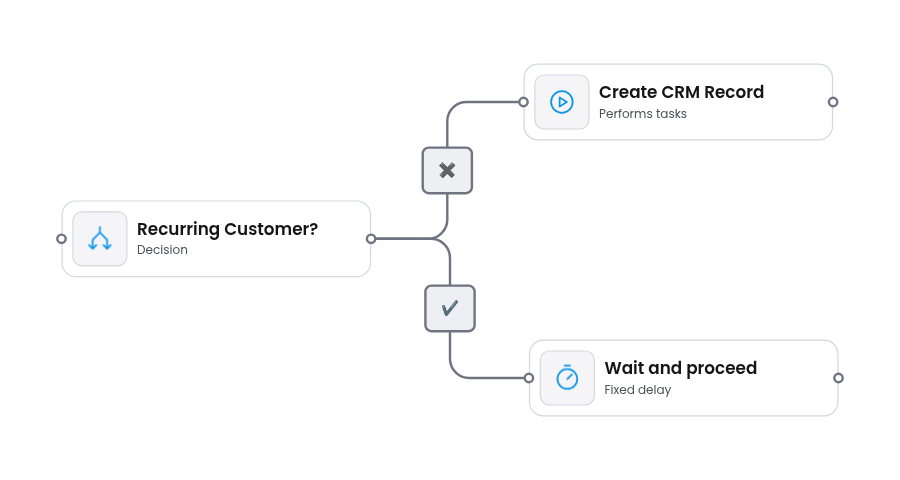
The Decision node routes the workflow to one of multiple possible paths. Unlike the Conditional node which handles binary true/false logic, the Decision node supports any number of named branches, each with its own set of conditions.
When to use
Section titled “When to use”Use a Decision node when your workflow needs to fan out into more than two paths based on a value or category.
Common examples:
- Routing by department - send a support ticket to Engineering, Sales, or Billing based on the ticket category
- Priority handling - apply different SLAs or escalation paths based on severity (Low / Medium / High / Critical)
- Multi-region processing - route orders to the correct fulfillment center based on the shipping country
- Approval workflows - direct a request to different approval chains depending on the request amount or type
- Status-based branching - take different actions based on a record’s current state (New / In Progress / Completed / Failed)
If you only need two branches (yes/no), use a Conditional node instead - it is simpler and more explicit for binary logic.
Decision branches
Section titled “Decision branches”Each branch is a named output with its own condition set. Branches are configured as an array in the properties panel. You can add as many branches as needed.
| Property | Type | Description |
|---|---|---|
| Label | Text | Name of the branch (shown as the edge label on canvas) |
| Conditions | Array | Set of conditions that activate this branch |
Each condition within a branch follows the same structure as the Conditional node:
| Property | Type | Description |
|---|---|---|
| X | Text | Left-hand value of the comparison |
| Comparison Operator | Dropdown | How to compare X and Y |
| Y | Text | Right-hand value of the comparison |
| Logical Operator | Dropdown | AND / OR - how to chain with the next condition |
X and Y support referencing data from earlier nodes and the trigger payload — see Use Variable Picker. A plain {{…}} reference fails the run if the path is missing; use {{x.y?}} or {{x.y | default:'…'}} for branches that need to fire on an absent value — see Missing values.
Properties
Section titled “Properties”| Property | Type | Description |
|---|---|---|
| Label | Text | Display name shown on the node card |
| Description | Text | Short description of the node’s purpose |
| Status | Dropdown | Active / Draft / Disabled |
Conditional vs Decision
Section titled “Conditional vs Decision”Both nodes handle branching, but they serve different purposes:
| Aspect | Conditional | Decision |
|---|---|---|
| Branches | Exactly 2 (true / false) | Any number |
| Logic | Evaluates a condition | Matches a value against multiple branches |
| Best for | Yes/no checks, validation gates | Routing, categorization, multi-way splits |
Schemas
{ "type": "VerticalLayout", "elements": [ { "type": "Accordion", "label": "General Settings", "elements": [ { "type": "MessageOnError", "scope": "#/properties/missingPreviousVariable", "text": "plugins.validation.missingDependency" }, { "type": "Text", "scope": "#/properties/label", "label": "Title", "placeholder": "Node Title..." }, { "type": "Text", "scope": "#/properties/description", "label": "Description", "placeholder": "Type your description here..." }, { "type": "Select", "scope": "#/properties/status", "label": "Status" } ] }, { "type": "Accordion", "label": "Decision Settings", "elements": [ { "type": "DecisionBranches", "scope": "#/properties/decisionBranches" } ] } ]}{ "type": "object", "required": [ "label" ], "properties": { "label": { "type": "string" }, "description": { "type": "string" }, "status": { "type": "string", "options": [ { "label": "Active", "value": "active", "icon": "StatusActive" }, { "label": "Draft", "value": "draft", "icon": "StatusDraft" }, { "label": "Disabled", "value": "disabled", "icon": "StatusDisabled" } ] }, "decisionBranches": { "type": "array", "items": { "type": "object", "properties": { "id": { "type": "string" }, "sourceHandle": { "type": "string" }, "label": { "type": "string" }, "conditions": { "type": "array", "items": { "type": "object", "properties": { "x": { "type": "string" }, "comparisonOperator": { "type": "string" }, "y": { "type": "string" }, "logicalOperator": { "type": "string" } } } } } } } }}See also
Section titled “See also”- Add Custom Node Type - register a new node type with custom properties
- Use Variable Picker - reference data from earlier nodes and the trigger payload inside conditions
- Properties sidebar - schema-driven forms in the properties panel
- Validation plugin - detect broken references and missing edges
- Flow Runner plugin - turn a diagram into an executable flow function
- Conditional node - branch a flow with true/false if/else logic