

Trigger
The Trigger node is the entry point of every workflow. It defines when and how a workflow starts.
Icon: Lightning
Node type ID: trigger
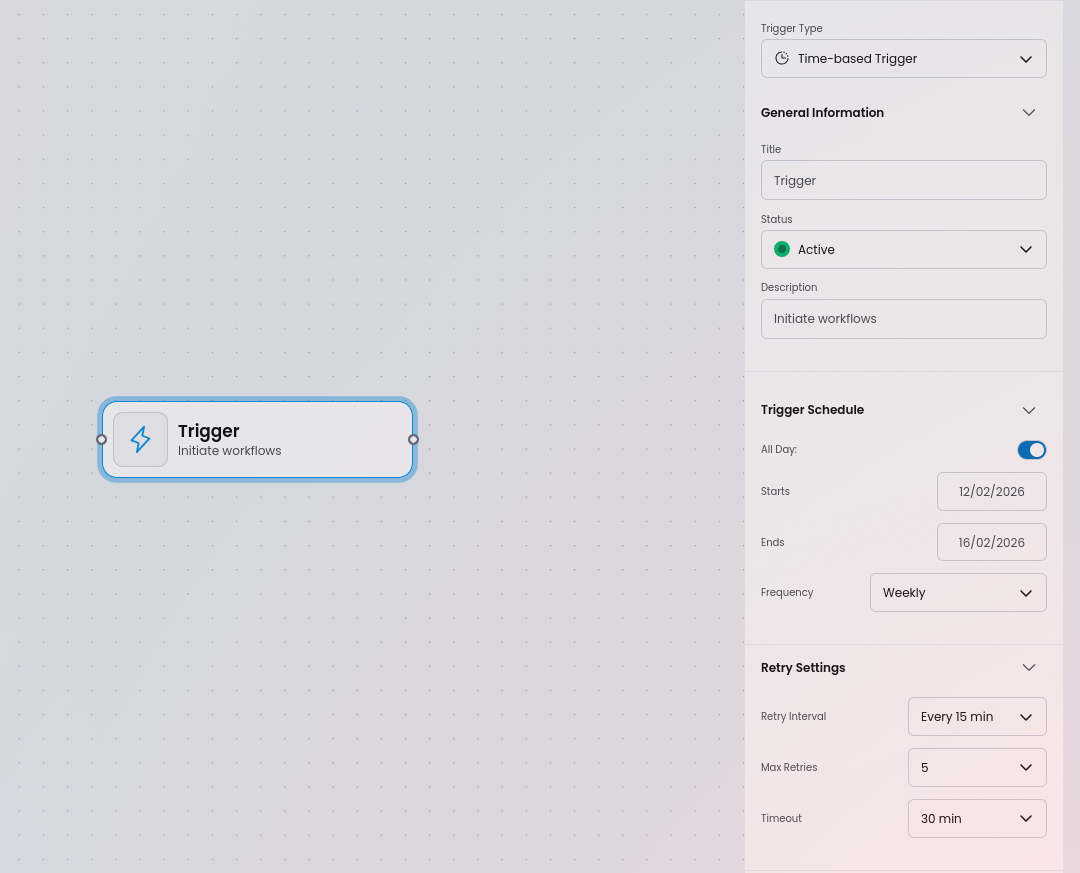
Trigger types
Section titled “Trigger types”Select the trigger type from the Trigger Type dropdown. Each type reveals its own set of configuration fields.
Time-based Trigger
Section titled “Time-based Trigger”Starts the workflow on a schedule.
| Property | Type | Description |
|---|---|---|
| All Day | Boolean | Whether the trigger fires for the full day |
| Starts | Date + Time | When the schedule begins |
| Ends | Date + Time | When the schedule ends |
| Frequency | Dropdown | None / Hourly / Daily / Weekly / Monthly / Yearly / Custom |
Event-based Trigger
Section titled “Event-based Trigger”Starts the workflow when an external event occurs.
| Property | Type | Options |
|---|---|---|
| Event Type | Dropdown | Form Submission / Record Change / API Call / User Action |
Conditional Trigger
Section titled “Conditional Trigger”Starts the workflow when a data condition is met.
| Property | Type | Description |
|---|---|---|
| Rule | Dropdown | Comparison operator (see below) |
| Value | Text | Value to compare against |
Available rules: Matches Regex, Does Not Match Regex, Is Equal To, Is Not Equal To, Is Less Than, Is Less Than or Equal To, Is Greater Than, Is Greater Than or Equal To, Contains, Does Not Contain, Formula is True, Formula is False.
System Trigger
Section titled “System Trigger”Starts the workflow in response to an internal system event.
| Property | Type | Description |
|---|---|---|
| System Value | Text | Identifier of the system event |
Shared properties
Section titled “Shared properties”All trigger types share the following fields:
| Property | Type | Description |
|---|---|---|
| Label | Text | Display name shown on the node card |
| Description | Text | Short description of the node’s purpose |
| Status | Dropdown | Active / Inactive / Draft (or as configured) |
Retry settings
Section titled “Retry settings”Configure how the system handles trigger failures:
| Property | Options | Description |
|---|---|---|
| Retry Interval | Every 15 min / Every 20 min / Every 30 min | How long to wait before retrying |
| Max Retries | 5 / 10 / 15 | Maximum number of retry attempts |
| Timeout | 30 min / 60 min / 90 min | How long before a trigger attempt times out |
JSON representation
Section titled “JSON representation”{ "id": "a954a959-9bc1-4f6e-bd9f-35807a220c0b", "type": "node", "position": { "x": 1137, "y": 12 }, "data": { "type": "trigger", "icon": "Lightning", "properties": { "label": "Incoming Call", "description": "Trigger", "type": "timeBasedTrigger", "status": "active" } }}When to use
Section titled “When to use”Every workflow must start with a Trigger node. Place it at the top (or left) of the diagram and connect it to the first action or condition in your flow.