
Custom Workflow Automation for B2B SaaS.
Ship in Weeks, Not Months.
Build custom workflow automation into your B2B SaaS product — without spending months on the editor. One React SDK. Full source code. Your infrastructure.


TRUSTED BY ENTERPRISE TEAMS
15+
Years of diagramming expertise
170+
Custom workflow tools delivered
20+
Enterprise teams (Siemens, Canon...)
THE PROBLEM
Your customers need self-service workflows. Your team can't keep up.
Every workflow change means a ticket, an engineer, and weeks of waiting. Meanwhile, your customers want to combine AI models with human validation, design approval chains, and have them running by morning.
The question isn't whether your product needs workflow automation. It's how to deliver it without derailing your roadmap for half a year.

Weeks per workflow change
Every customer request goes through engineering. It doesn't scale.

AI workflows demand flexibility
Customers want LLMs + human validation + business rules. Linear sequences aren't enough.

Compliance requires control
Insurance, finance, healthcare — data must stay in your infrastructure.
CASE STUDIES
Three options
Only one lets you ship fast and keep control.
Your customers are asking for self-service. They want to open a visual editor inside your platform, design a workflow that combines AI agents with human tasks, hit save — and have it running by morning. No tickets. No waiting.
OPTION 1
Off-the-shelf platform
Bolt on n8n Embed, Camunda, or similar. Their UI, their data layer, their limits.
Vendor lock-in, cost compounds
OPTION 2
Build from scratch
Your team knows React Flow. But production-grade canvas, nodes, auto-layout and performance — it’s 700+ engineering hours.
Full control, massive opportunity cost
Recommended
OPTION 3
Production-ready SDK
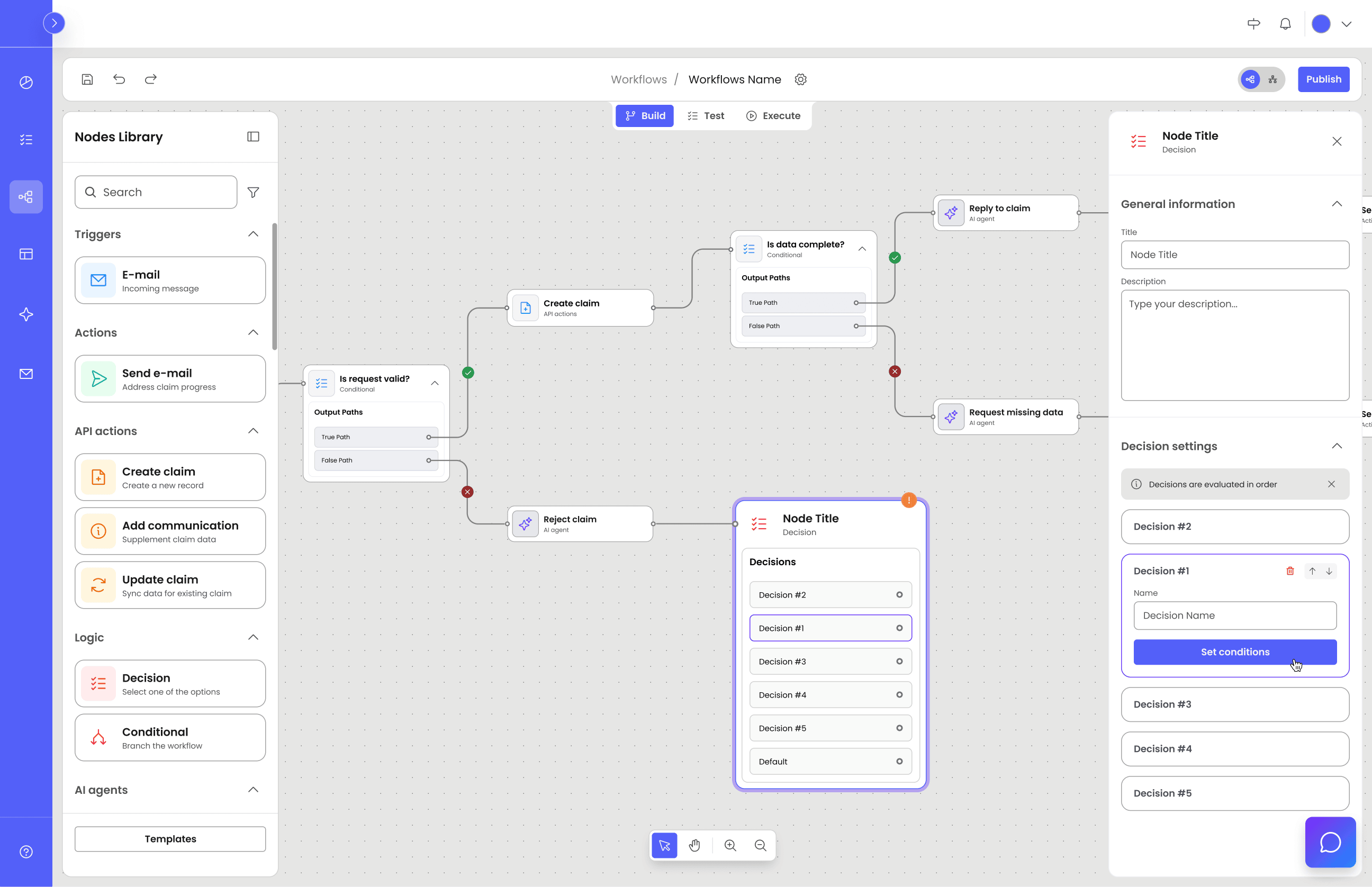
A React SDK for the visual editor layer. You own the UX, choose the execution engine, control the infra.
Ship fast, keep full control
architecture
Three layers. You only build one.
The cost difference over three years is dramatic. n8n’s embed license accumulates;
Workflow Builder’s doesn’t.
1
Visual Workflow Editor
Workflow Builder
Drag-and-drop canvas with triggers, AI agent nodes, approval tasks, conditions. Plugin architecture, JSON output.
Drag & drop canvas
AI agent nodes
Approval tasks
Conditions & branching
Plugin architecture
JSON export
Figma Kit
2
Execution Engine
Your choice
Coordinate task execution, manage retries, handle state and parallelism across your systems.
Included in Enterprise
Flow Runner
Traverses your workflow JSON and calls your developer-defined functions per node type. Runs in the browser for instant visual testing — no backend needed. Port the same engine to Node.js when you’re ready for production.
Full flexibility
Bring Your Own Engine
Map the JSON output to Temporal, Camunda, AWS Step Functions, or your own workflow orchestration engine. Full control over retries, state management, monitoring, and scale.
3
Your Systems & Integrations
You build this
LLM providers, APIs, databases — on AWS, Azure, GCP, or on-premise. Full control over data residency.
OpenAI / Claude
REST APIs
Databases
AWS
Azure
GCP
On-premise
BUILD OR BUY?
USE CASES
Common workflow automation patterns
Teams across industries build these with Workflow Builder.You don’t need to build from scratch or embed off-the-shelf platform.

AI + Human Validation
AI extracts data and scores risk. A human reviewer validates or corrects before the workflow continues.

Multi-persona Workflows
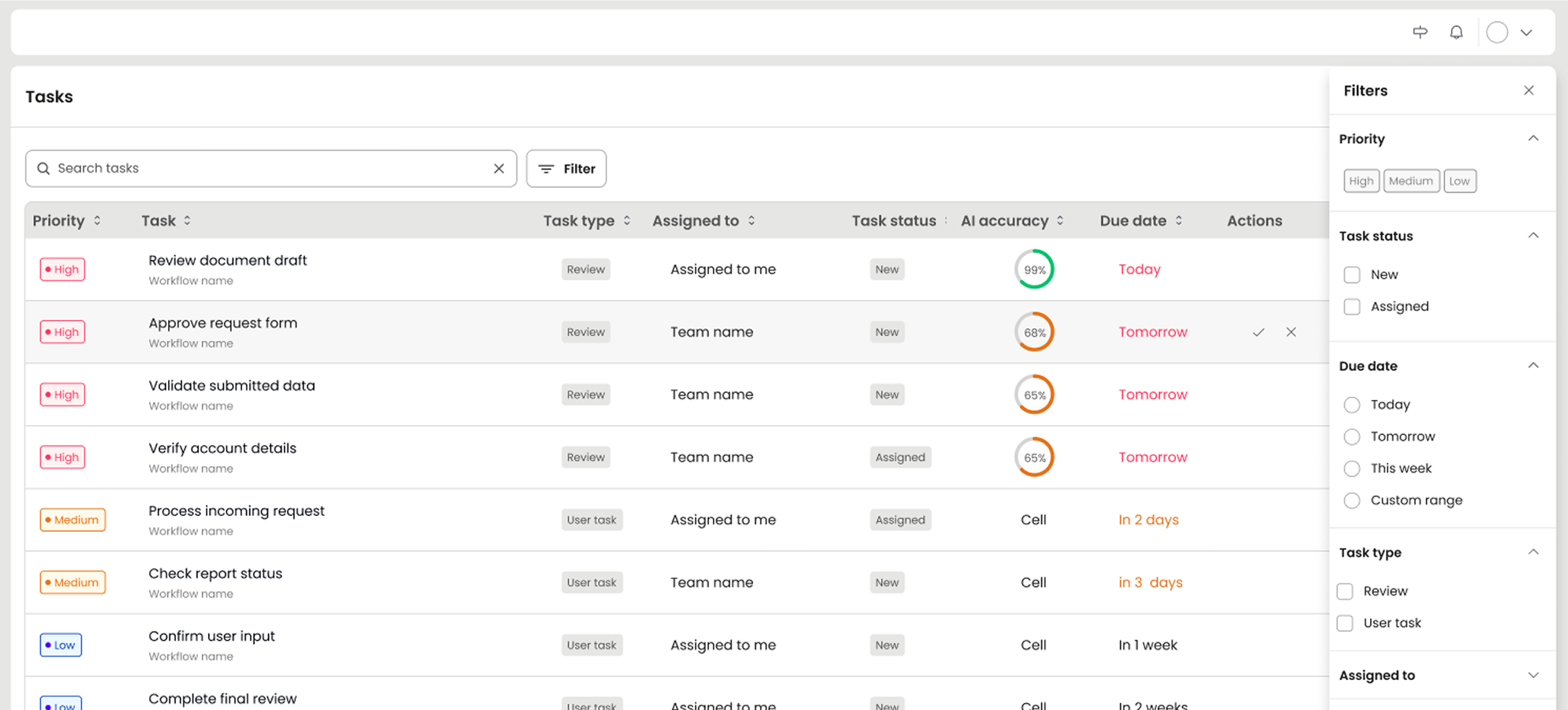
Builders design flows visually. Executors see only their task queue — approve, reject, move on. Separate interfaces, one platform.

Regulated Data, Full Control
Self-hosted, on-premise deployment. JSON definitions and task data never leave your environment. Full audit trail.
implementation
From eval to production in 4–6 months
Timelines vary with team size and domain complexity. Here's a realistic path.
1
Week 1–2
Evaluate & prototype
Install, embed the editor, wire JSON output to a backend endpoint.
2
Week 3–8
Customize & design
Match your design system with Figma Kit. Build domain-specific nodes.
3
Week 6–12
Orchestration & integration
Connect your workflow orchestration engine, integrate backend systems, set up monitoring.
Month 4–6
Production
Testing, iteration, and go-live with real customer workflows.
CASE STUDY
Insurance platform: from IT tickets to self-service

Workflow Builder gave us a complete, proven foundation — architecture, UX patterns, interaction design — all solved. Our team went straight to building what’s unique about our product. That saved us roughly €50,000 and months of trial and error.
~€50,000 saved
vs. building the visual editor from scratch
WHAT THEY BUILT
Claims workflow automation for European insurance carriers
An established insurance SaaS vendor. Their customers process claims, run underwriting decisions, and manage compliance workflows. Every change used to require an IT request, months of wait, and significant budget.
Layer 1
Visual editor for business analysts to design claims workflows with AI nodes, approval gates, and risk-based routing.
Layer 2
LangFlow for fast MVP, with a migration path to Temporal for production-scale workflow orchestration.
Layer 3
Cloud-hosted with full data sovereignty. LLM APIs, REST connections to core systems, email integration.
The result
Business analysts configure claims workflows in the visual editor
Case managers see a focused task queue: review AI data, approve or correct, move on
Process changes that took months through IT tickets now happen visually in minutes
What you end up with
Workflow automation inside your product — your brand, your UX
Builders design & modify workflows without filing tickets
Executors see only the tasks they need
Your backend, your cloud, full compliance control
Visual editor took weeks to integrate, not months to build
Get started
Whether you build with your own team or partner with ours
The path starts the same way.

Custom
Partnership
Extended engineering partnership.

15+ years of diagramming expertise
170+ delivered workflow projects
Temporal, LangFlow, custom engine integration
From discovery workshops to knowledge transfer
Your extended engineering team

€6,990
Enterprise Edition
One-time license. No recurring fees.
Full source code access
Flow Runner execution engine
Figma Design Kit
12 months of warranty and support
Community Edition available for evaluation
FAQ
- How do I add workflow automation to my B2B SaaS product?
You have three options: build a workflow editor from scratch (700+ engineering hours), embed an off-the-shelf platform like n8n Embed (~$50K+/year), or use a production-ready React SDK like Workflow Builder (one-time €6,990). Workflow Builder gives you a visual drag-and-drop editor with JSON output — you connect it to your own execution engine and backend systems.
- What is the difference between a workflow editor SDK and a workflow automation platform?
A workflow automation platform (like n8n, Zapier, or Camunda) is a complete product with its own UI, execution engine, and hosting. A workflow editor SDK (like Workflow Builder) is the embeddable UI layer you integrate into your own product. You keep full control over execution, data residency, and user experience — and your customers never leave your platform.
- How long does it take to build a custom workflow automation platform?
With Workflow Builder, the visual editor layer can be integrated in weeks. A typical path: weeks 1-2 for evaluation, weeks 3-8 for UI customization and domain-specific nodes, weeks 6-12 for execution engine integration, and months 4-6 for production readiness. The exact timeline depends on team size and domain complexity.
- What is workflow orchestration and how does Workflow Builder handle it?
Workflow orchestration is the coordination and execution of tasks across multiple systems — managing retries, state, parallelism, and error handling. Workflow Builder focuses on the visual editor layer and gives you full freedom to choose your orchestration engine: Flow Runner (included in Enterprise), Temporal, Camunda, AWS Step Functions, or your own custom engine.
- Can I self-host a workflow automation platform built with Workflow Builder?
Yes. Workflow Builder is a self-hosted React SDK — it runs entirely within your infrastructure. You get the source code with the Enterprise license. Your workflow definitions, task data, and user data never leave your environment. This makes it suitable for regulated industries like insurance, finance, and healthcare.