
Embed a visual workflow builder for code-first AI agents
Your team estimated 4 months to build an AI agent canvas in your product. Workflow Builder ships most of it - visual editor, reference back-end, and a swappable Temporal integration for your durable execution layer of choice.

Open-source AI workflow SDK. Star on GitHub
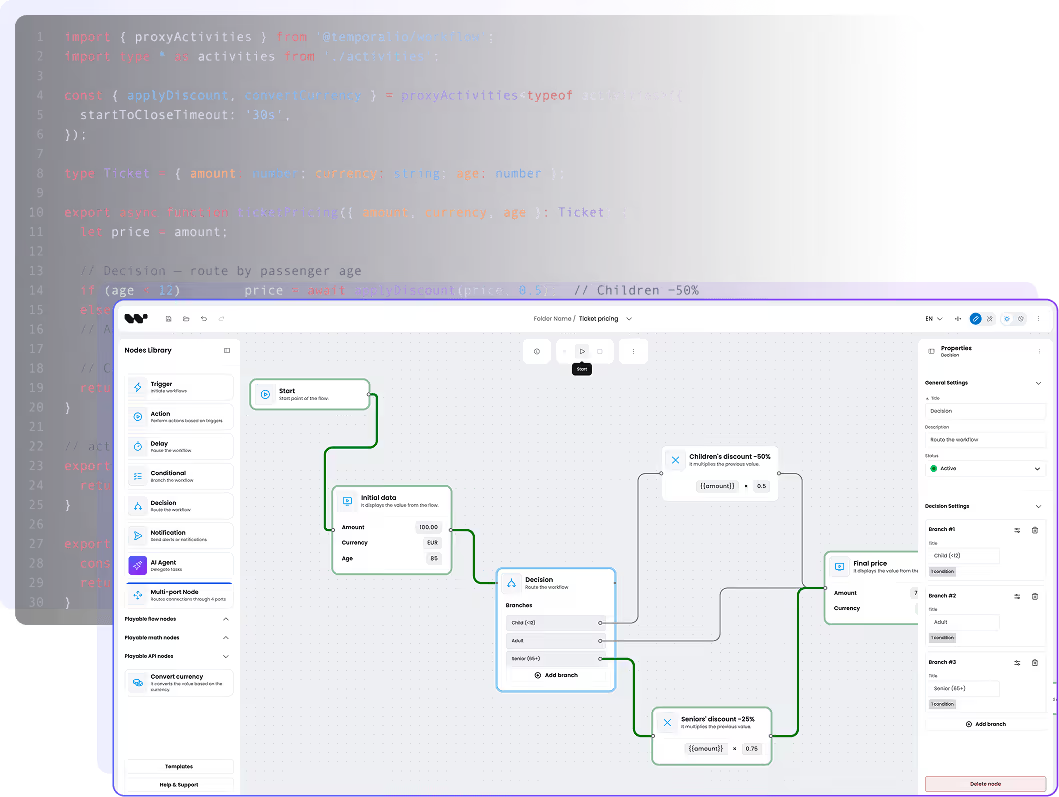







The problem AI product teams talk about today
Durable execution engine and AI agent canvas
The reliability infrastructure layer (Temporal, Inngest, Restate, LangGraph) hit $300M Series D and pivoted to "AI agents" as their primary use case recently.
Workflow Builder ships the surface - visual and the execution layer for your AI agent. You keep what should stay yours - models, data, engine choice.
In Q1 2026, Hacker News, r/MachineLearning, and r/LangChain threads pivoted from "which model" to "how reliable." Production AI teams aren't asking "Is GPT-5 better than Claude?" - they're asking "Will my agent finish what it started?", "How do I retry tool calls safely?", "Where do I store 30 minutes of state?"
What's missing is a visual layer - UI that lets how non-developers configure these durable workflows.
That's where Workflow Builder fits.
CASE STUDIES
What you would have to build
An AI workflow surface has three layers. Workflow Builder ships two.
Grouped by layer, not by feature. The visual AI workflow editor, the reference back-end, and the engine integration. Workflow Builder ships the first two as building blocks and an integration with Temporal for the third. Your team owns the parts that should stay yours.
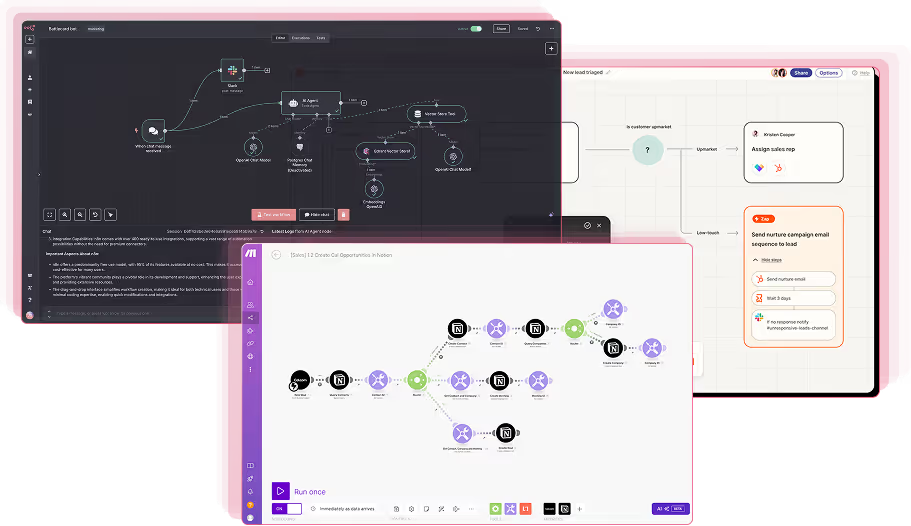
The React front-end your users see and edit.
Engine-agnostic API and graph runner.
/api/workflows and /api/executions. Topological graph runner with parallel waves and decision pruning. Public engine contract (three port interfaces). Structured event log and graph-level run history.Durable execution adapter.
* Edge routing and ELK auto-layout available in the Enterprise Edition.
Building a comparable visual AI workflow editor from scratch (Layer 1 only) takes 700+ engineering hours and 300+ design hours. The reference back-end and engine integration save more time on top of that, depending on which durable engine you target.
How code-first works in practice
Author nodes and plugins in code. Render them as a runnable graph.
Engineers define what the canvas can do in code: schemas, plugin factories, and adapter classes. The visual editor is a faithful surface for whatever you defined, no more, no less.

Define a node type in JSON Schema
Describe each node type once. The properties panel renders automatically, validation runs, the JSON serializer keeps your shape stable across saves.
// ai-agent-node.schema.json
{
  "type": "ai_agent",
  "label": "AI Agent",
  "schema": {
    "type": "object",
    "properties": {
      "model": { "type": "string",
        "enum": ["gpt-4o", "claude-sonnet-4-6", "gemini-2.5-pro"] },
      "systemPrompt": { "type": "string" },
      "temperature": { "type": "number",
        "minimum": 0, "maximum": 2, "default": 0.2 },
      "tools": { "type": "array", "items": { "type": "string" } }
    },
    "required": ["model", "systemPrompt"]
  }
}
The engine port — the contract that keeps you portable
Three TypeScript interfaces sit at the boundary between the back-end and your engine. Implementing them is what makes a new adapter possible. Temporal is the integration shipped today as the reference adapter. The architecture is ready for additional engines through the same contract.
// apps/execution-core/src/ports/workflow-engine.port.ts
export interface WorkflowEnginePort {
  submit(input: WorkflowExecutionInput): Promise<void>;
  cancel(executionId: string): Promise<void>;
}

export interface ActivityRunnerPort {
  executeNode(
    node: WorkflowNodeDefinition,
    ctx: ExecutionContext,
  ): Promise<NodeExecutionResult>;
}

export interface EventEmitterPort {
  emitEvent(executionId, type, payload?, nodeId?): Promise<void>;
  updateStatus(executionId, status, error?): Promise<void>;
}
Two adoption paths
No path is forced. The block contracts are public, so a path that fits your platform today does not paint you into a corner tomorrow.
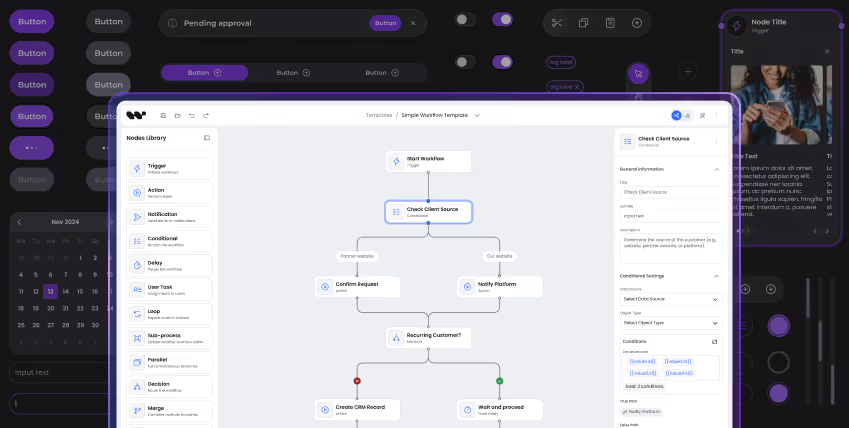
Visual editor only
Take the visual AI workflow editor (the React front-end) and embed it in your product. On save, your existing back-end and runner take the JSON and execute it however you already do. Fastest path when you already shipped execution and just need the editor inside your product.
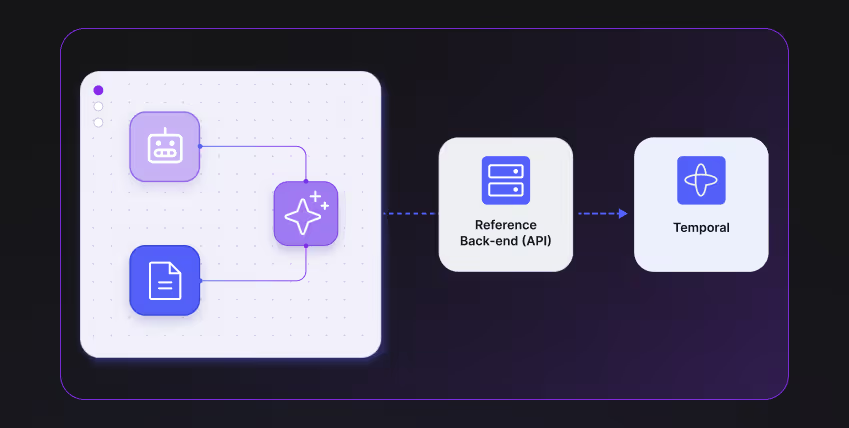
Visual editor + reference back-end + engine integration
Adopt the full Workflow Builder SDK. The reference back-end gives you the API surface and the structured event log. The engine integration ships with Temporal today as the reference adapter. The back-end is engine-agnostic by design. Additional engine integrations follow the same three ports.
BUILD OR BUY?
Honest comparison
Workflow Builder vs LangGraph, Temporal-only, n8n, and a custom build
Strengths of every alternative listed in the same row. The wrong tool fits some teams better than us - we say so.
| Capability | Workflow Builder | LangGraph | Temporal (alone) | n8n | Custom build |
|---|---|---|---|---|---|
| Embeddable inside your React product | Yes - the visual editor renders inside your React app | No - Python/JS framework, no UI | No - infrastructure layer | Partial - iframe or SaaS, not native | Yes - you build it |
| Visual editor for engineers and non-engineers | Yes - production canvas, libavoid routing* | No | No | Yes - aimed at end users | Only if you build one |
| Code-first authoring | Yes - JSON Schema nodes, plugin SDK | Yes - code only | Yes - code only | Limited - JS in nodes | Yes by definition |
| Execution engine choice | Open engine contract. Temporal shipped today; architecture ready for additional engine integrations. | n/a - no engine | Temporal only | n8n engine only | Your choice |
| Durable execution out of the box | Yes - Temporal integration shipped today. Architecture ready for additional engine integrations. | No - bring your own runtime | Yes - this is what Temporal does | Partial - own runtime, less hardened | No - you build retries and replay |
| License and source ownership | Apache 2.0 open source. Enterprise Edition available. | MIT framework | Apache 2.0 + paid cloud | Sustainable Use License + paid cloud | n/a |
| Pairs with your runtime (vs replaces) | Pairs with any (Temporal, LangGraph, Inngest, custom) | Itself is runtime | Itself is runtime | Itself is runtime + workflows | n/a |
| When this wins | In-product editor + your existing durable execution choice | Python-first agent framework, no UI requirement | Pure durable execution at hyperscale | Hosted automation tool for ops users | Unique constraint with time and budget |
* Edge routing and ELK auto-layout available in the Enterprise Edition.
Who this is for
What changes for the three people on the buying side
Workflow Builder lands on three desks. Each one needs a different answer.

For product owners
Speed to MVP, iteration velocity, user retention.
- Ship the in-product AI workflow editor in days, not quarters.
- Templates are the iteration unit. Add a vertical-specific flow without a sprint.
- Plugin patterns make in-product workflow review natural for your users.
- The canvas doubles as a debugging surface for power users.

For lead devs
SDK ergonomics, debuggability, escape hatches.
- Factory-function plugin contract. No module-load side effects.
- Public API surface. No deep imports needed for non-trivial plugins.
- Public engine contract lets you write an in-memory adapter for tests in a short spike.
- Live SSE execution stream. Hook into events and drive your own UI.

For CTOs
Architecture, vendor risk, governance.
- Source code in your repo. Apache 2.0 or perpetual Enterprise, no subscription.
- Engine integration story: Temporal shipped today, architecture ready for additional engines.
- Structured event log and graph-level run history feed your audit and compliance pipeline.
- Operational footprint is well-known: standard databases, your existing observability stack.
When this is the right tool
When to choose Workflow Builder, and when not to
The list runs both ways. Workflow Builder is not the right pick for every team.
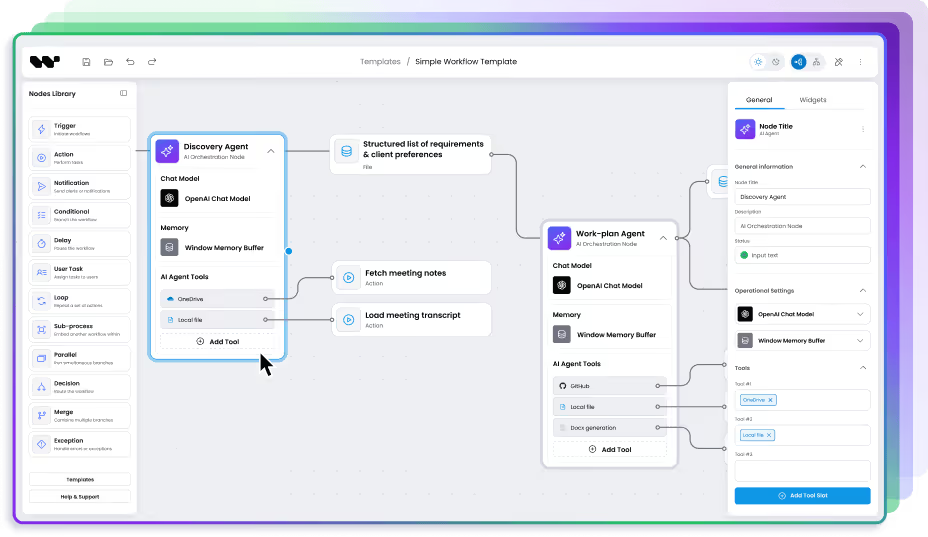
Choose Workflow Builder when
You ship a workflow or AI feature inside a B2B SaaS product, and the editor must live under your brand and auth.
Your users are a mix of developers and non-developers, and both need to read the same workflow.
You want code-first authoring with a visual canvas for review, debugging, and human approval gates.
You want durable execution as a default, with the freedom to pick which engine runs it.
You care about owning the source code and avoiding subscription lock-in.
You work in a regulated industry and want a clear audit footprint without locking in to a single vendor's stack.
Pick something else when
You need a SaaS app your end users sign up for directly. Use n8n, Make, or Zapier.
Your workflows are pure code with no graph structure to authorize or review. Use Temporal, Trigger.dev, or Inngest directly.
You are building a generic agent framework, not a workflow product. Use LangGraph or CrewAI.
You need a single LLM call, not a workflow. Use the SDK of your LLM provider and skip the editor entirely.
Architecture
How the blocks fit together in an AI orchestration platform
Four layers, clear seams. The visual editor lives inside your product. The reference back-end is the engine-agnostic shell. The engine adapter is the bridge. The engine itself is whatever your platform already runs.
Your B2B SaaS product
your React appReference back-end
engine-agnostic shell · WB shipsEngine adapter
swappable bridgeExecution engine, activities, your data
whatever your platform already runsThe reference back-end (Layer 2) is engine-agnostic. The engine adapter (Layer 3) is a separate, swappable block. Temporal ships today as the reference adapter. More engine integrations follow the same contract.
Built for the SDK, opinionated about the stack
The reference back-end records structured events for every run, exposes them via Server-Sent Events to the front-end, and stores a graph-level run history. That gives you a clean audit footprint without dictating which storage, IAM, or observability tool you use.
Building for a regulated industry (fintech, HR, healthcare, insurtech, edtech) where audit, human oversight, or vertical-specific compliance maps onto the workflow? Talk to the team behind Workflow Builder — the same engineers who built the SDK help you map compliance requirements onto it, without taking over the build.
Where it slots into your stack
Identity and authorization stay in your platform. The SDK and reference back-end do not touch auth.
Customer data stays where it already is. The reference back-end's tables sit alongside, not inside, your business schema.
LLM providers, vector DBs, and tools sit behind the engine contract. Swap any of them without touching the editor.
Observability is whatever you already run. The engine adapter you pick provides metrics; the SSE stream carries node-level events.
Built to pair with your durable execution choice
Workflow Builder doesn't replace your workflow runtime - it sits on top of it. Temporal adapter ships in the reference back-end on day one. LangGraph, Inngest, Restate, AWS Step Functions, or your in-house engine - implement one TypeScript interface (WorkflowEnginePort) and they swap in.
CASE STUDIES
Customers
AI product teams already shipping on Workflow Builder
Two of the AI-native companies that embedded the SDK as their workflow surface.
 AI orchestration
Athena Intelligence
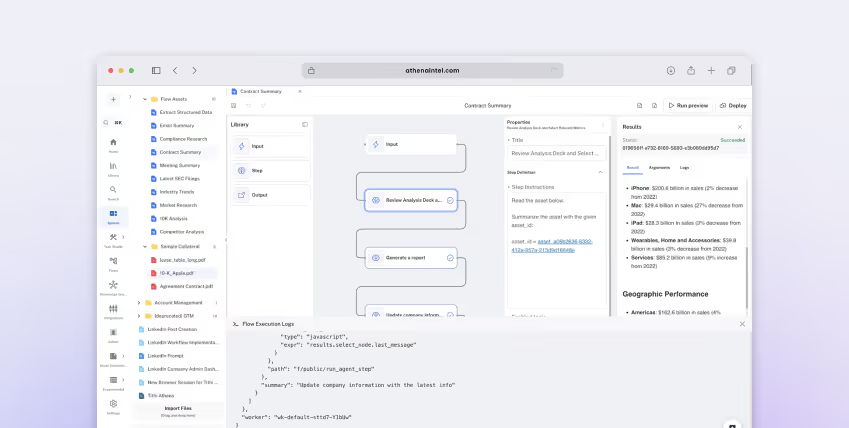
Athena Intelligence was building a data and AI orchestration platform. Their users needed to design multi-stage agent pipelines connected to a Neo4j knowledge graph. They had the canvas live in production within the first sprint - their execution engine, their brand, no compromise.
“The actual integration into our stack was very painless for how heavy the UI is.”
Athena Intelligence, engineering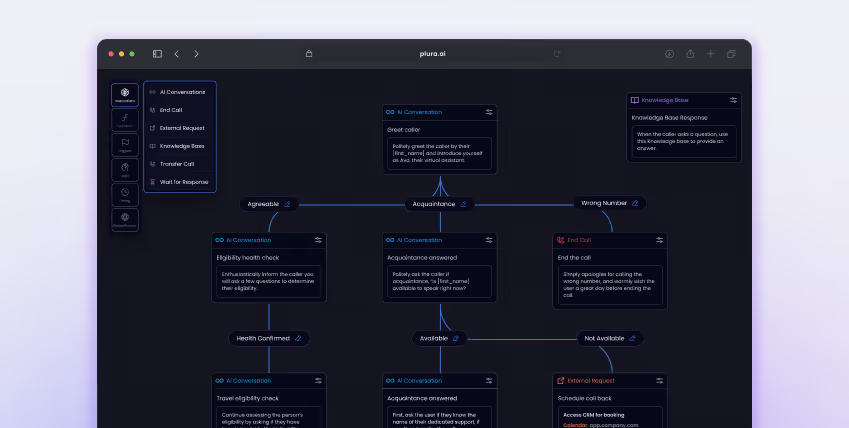 AI automation
Plura AI
Plura AI is an automation platform for AI-native workflows - the visual editor is the core product, not a side feature. They needed to ship fast, keep full white-label control, and own their execution layer. Workflow Builder gave them all three. Production-ready editor in weeks, not quarters.
“Why would we build this ourselves when we don’t have the expertise and could delegate to specialists?”
Plura AI, on the build vs SDK decision
The team behind Workflow Builder
Workflow Builder is built by the team who spent 15 years building workflow and visual configuration tools. The team is available if you are looking for a partner to guide you through implementation, customization, and development of your project on top of the Workflow Builder SDK.
CASE STUDIES
FAQ
Questions engineering teams ask before adopting
Direct answers, no padding. Each question came from a real procurement or technical-eval conversation.
- What is a code-first AI workflow platform?
A code-first AI workflow platform lets engineers define workflows in code (typed SDKs, schema files, plugin functions) and renders the result as a runnable graph. It pairs developer ergonomics with a visual surface for review, debugging, and human-in-the-loop gates. Workflow Builder is a code-first platform: a visual AI workflow editor (React front-end), a reference back-end with three port interfaces, and engine integrations you compose to fit your stack.
- What execution engines does Workflow Builder support?
The reference back-end is engine-agnostic by architecture. Workflow Builder ships a Temporal integration today as the reference adapter. The architecture is ready for additional engine integrations through the same public engine contract. Other engines can be added by your team, or as part of an engineering engagement with the team behind Workflow Builder.
- Can I embed an AI workflow editor inside my own SaaS product?
Yes. The visual AI workflow editor is the React front-end of the Workflow Builder SDK, published as the @workflow-builder/sdk npm package. You compose plugins, pass node types and templates, and render it inside your React app. The bundle is small, ships as ES modules, and exposes a public API surface for non-trivial plugins without deep imports. Embedding it takes hours, not weeks.
- How do I build durable AI workflows that survive crashes and retries?
Run AI workflows on a durable execution engine. Workflow Builder is engine-agnostic by architecture - the engine contract in the reference back-end lets any durable engine plug in. Today Workflow Builder ships a Temporal integration with deterministic replay, sandboxed runs, and per-activity retry profiles. The architecture is ready for additional engine integrations through the same contract.
- How does Workflow Builder pair with LangGraph?
Workflow Builder is the visual authoring layer. LangGraph is the runtime layer. They solve different problems. Workflow Builder exports a typed JSON graph definition; your back-end translates that to a LangGraph StateGraph with checkpointers, time-travel, and HITL primitives (interrupt() and Command(resume=...) in Python or new Command({ resume: ... }) in TypeScript). LangGraph runs the agent state machine; Workflow Builder lets your non-developer users author it visually.
- What is agentic AI workflow automation?
Agentic AI workflow automation is the practice of letting LLM agents drive a multi-step process with tool calls, decision branches, and feedback loops. It differs from classic automation because steps can be non-deterministic, retries are expensive, and human approval is often required. A durable execution engine and an editable visual graph make it manageable in production.
- How does Workflow Builder compare to n8n, Make, or Zapier?
n8n, Make, and Zapier are SaaS automation platforms aimed at end users automating their own tasks. Workflow Builder is an SDK (visual AI workflow editor + reference back-end + engine integration) aimed at product teams embedding a workflow surface inside their own product. If you want a hosted tool, pick the SaaS. If you ship workflows as a feature of your product, the SDK pattern wins on brand, data residency, and source ownership.
- What does the EU AI Act require for AI workflow audit trails?
Annex III of the EU AI Act (the high-risk AI category) takes effect February 2027 for fintech, HR, edtech, healthcare, and other named verticals. Workflow Builder's reference back-end records every workflow event in a structured log and exposes a graph-level run history through the SDK - useful inputs for an audit footprint. Full Annex III mapping in a regulated vertical is an engineering and compliance exercise; the team behind Workflow Builder offers consulting support to map those requirements onto the SDK.
- What is the difference between the Workflow Builder SDK, the reference back-end, and the Temporal integration?
The Workflow Builder SDK is the whole offering: three composable blocks. The visual editor is the React front-end you embed in your product. The reference back-end is the engine-agnostic execution shell: HTTP API, graph runner, three port interfaces. The Temporal integration is the adapter that wires the back-end to Temporal as the durable engine. You can adopt all three, swap the engine integration for one against your own engine, or take just the visual editor and run the JSON in your existing runtime.
Take the blocks you need. Pick the engine your team already runs.
Open-source AI workflow SDK. Ships with a Temporal integration and a one-command Docker Compose stack.
Need workflow editor for code-first AI agent?
We will show you how the canvas fits on top it.