
Build your workflow app in days, not months
Open source workflow orchestration reference architecture – engine-agnostic, Apache 2.0
Three apps, three port interfaces, one Apache 2.0 reference implementation you can clone today. Workflow orchestration on your terms – swap the engine without rewriting the editor, swappable by design and proven with Temporal. Built on 200+ workflow products of pattern recognition.



What is in the repo
Three apps. One command.
Clone github.com/synergycodes/workflowbuilder, run pnpm install && pnpm dev:ai-studio, get a working three-block stack. Each app is independently swappable.
REFERENCE ARCHITECTURE
Swap any block: replace the editor, fork the back-end, change the engine - contracts stay the same.

packages/sdk + apps/demo
The editor SDK (packages/sdk), with a reference React host in apps/demo. Properties panel, custom nodes for AI agents and human tasks, JSON serialization. Talks to the reference back-end over HTTP.
npm install @workflowbuilder/sdkapps/backend + packages/execution-core
Engine-agnostic HTTP API and graph runner. Reads workflow JSON from the editor, coordinates execution through the engine port, streams progress back. Stateless by default.
pnpm dev:backendapps/execution-worker
Reference Temporal worker implementing the engine port. Replace with your Inngest, Camunda, AWS Step Functions worker - the back-end does not change.
pnpm dev:workerThree port interfaces
The reference back-end talks to your engine through three contracts
No vendor coupling. The back-end is a shell that coordinates - your engine does the execution. Implement these three interfaces and you are integrated.
WorkflowEnginePort
Handles workflow lifecycle - start, signal, query, cancel. Your engine adapter implements this once and the reference back-end forwards every editor request through it. The Temporal adapter is ~120 lines of TypeScript across its folder.
ActivityRunnerPort
Handles per-node execution. Retries, heartbeats, compensation rules. The Temporal adapter delegates to Temporal activities. The Inngest adapter delegates to Inngest functions. Same shape.
EventEmitterPort
Streams progress events back to the editor over SSE. Node started, node completed, node failed, workflow done. The editor renders state changes on the canvas - no polling.
These three ports are not theoretical - they're the abstraction we landed on after building 200+ workflow products since 2011. Every workflow engine we've shipped against (Temporal, in-house, GoJS+custom executors, Camunda) reduces to these three concerns: lifecycle management, per-node execution, and event streaming.
If your engine doesn't fit, we got the abstraction wrong - open an issue and we'll fix it.
Small, readable TypeScript files.

Swap the engine
Temporal ships today. The rest is swappable by design.
Workflow Builder does not execute workflows. Your engine does. Pick the one that fits your team - the back-end and editor stay the same.

Temporal
Shipped
Production-ready adapter in apps/execution-worker. Durable execution, retries, signals, history.

Inngest
PRs welcome
Event-driven serverless execution. Function-per-activity model maps 1:1 to ActivityRunnerPort. Community PR welcome.

Camunda
PRs welcome
BPMN-compatible execution if you need enterprise process modeling alongside Workflow Builder.

AWS Step Functions
PRs welcome
Managed AWS execution. Map state machines to workflow JSON definitions.

In-house engine
You implement
Already have an execution engine in production? Implement the three port interfaces - the Temporal adapter is ~120 lines of TypeScript across its folder, as reference.
The key differentiator
We ship reference code, not runtime
Most workflow tools ship a runtime you cannot touch. Temporal Service, Inngest Runtime, AWS Step Functions - you take their model, you run their stack. Workflow Builder is different.
The reference back-end is exactly that - a reference implementation.

A runtime you rent
Temporal Service · Inngest · Step Functions
→
You run their stack, their way
→
You take their execution model
→
Closed runtime - no forking, no swapping
→
Your workflows live on their terms
No source. No fork. The engine is theirs, not yours.
The WB way

A reference you own
Workflow Builder · Apache 2.0 · fork-or-replace by design
→
A working, production-shape back-end you clone today
→
Three port interfaces - the editor-to-engine contract
→
A Temporal adapter as the reference integration
→
Your servers, your engine, your choice

You take the reference, make it yours. We don't run anything for you. Your data stays on your servers. Your engine stays your choice.
This is what "engine-agnostic" actually means.
Demo
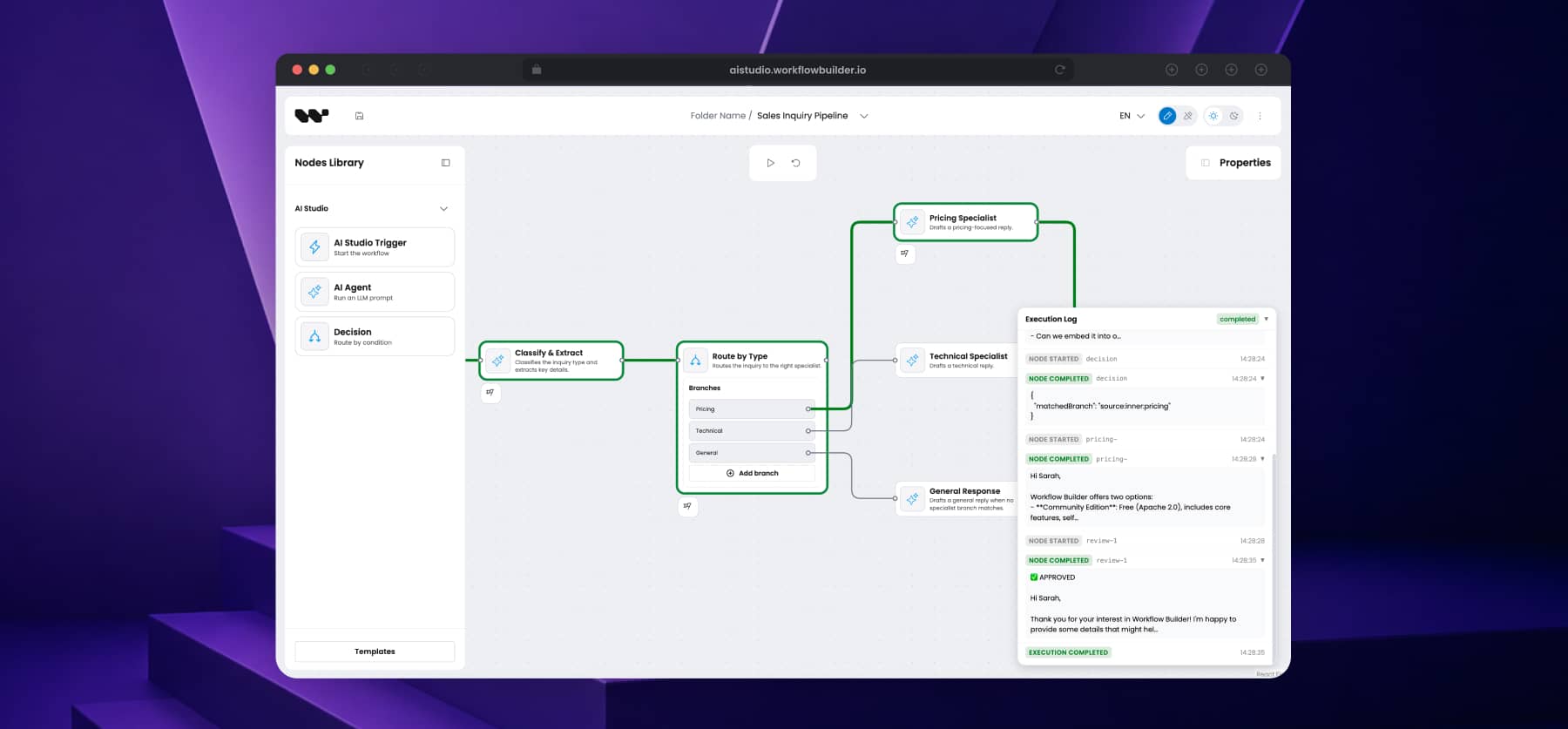
Same code powers AI Studio
The AI Studio demo runs the exact stack you can clone. Editor on top, reference back-end coordinating, Temporal worker executing. Click through it before you start cloning.
CASE STUDIES
Reference stack FAQ
Questions engineers ask before they clone
- Is the reference back-end open source?
Yes. The full reference back-end is part of Community Edition, Apache 2.0 licensed, public on github.com/synergycodes/workflowbuilder. Same with the Temporal integration adapter. You get the complete three-block stack open source.
- Do I have to use Temporal?
No. Temporal is the reference adapter. The reference back-end talks to your engine through three port interfaces - swappable by design and proven with Temporal. Implement the three ports to plug in another engine.
- What is in the dev environment?
Editor SDK (packages/sdk) with a reference host (apps/demo), reference back-end (apps/backend + packages/execution-core), Temporal worker (apps/execution-worker), local Temporal + Postgres via Docker. pnpm install && pnpm dev:ai-studio brings up the full stack and you can hit the editor on localhost.
- Can I fork the reference back-end and replace it?
Yes - that is the point. The reference back-end is a reference implementation, not a runtime. Apache 2.0, fork-or-replace by design. The Visual workflow editor talks to it over HTTP - swap the back-end and the editor does not care.
- What is the AI Studio demo?
AI Studio is our public demo that runs the same code as the reference stack. Editor on the front, reference back-end coordinating, Temporal worker executing. You can click through and see what end-to-end looks like before you clone the repo.