
Visual editor for LangGraph agents
LangGraph runs the agent state machine. Workflow Builder gives your end-users the canvas. Mount a React-embedded editor on top of your LangGraph backend in 1 day and let PMs, ops, and customers author flows - without writing Python.

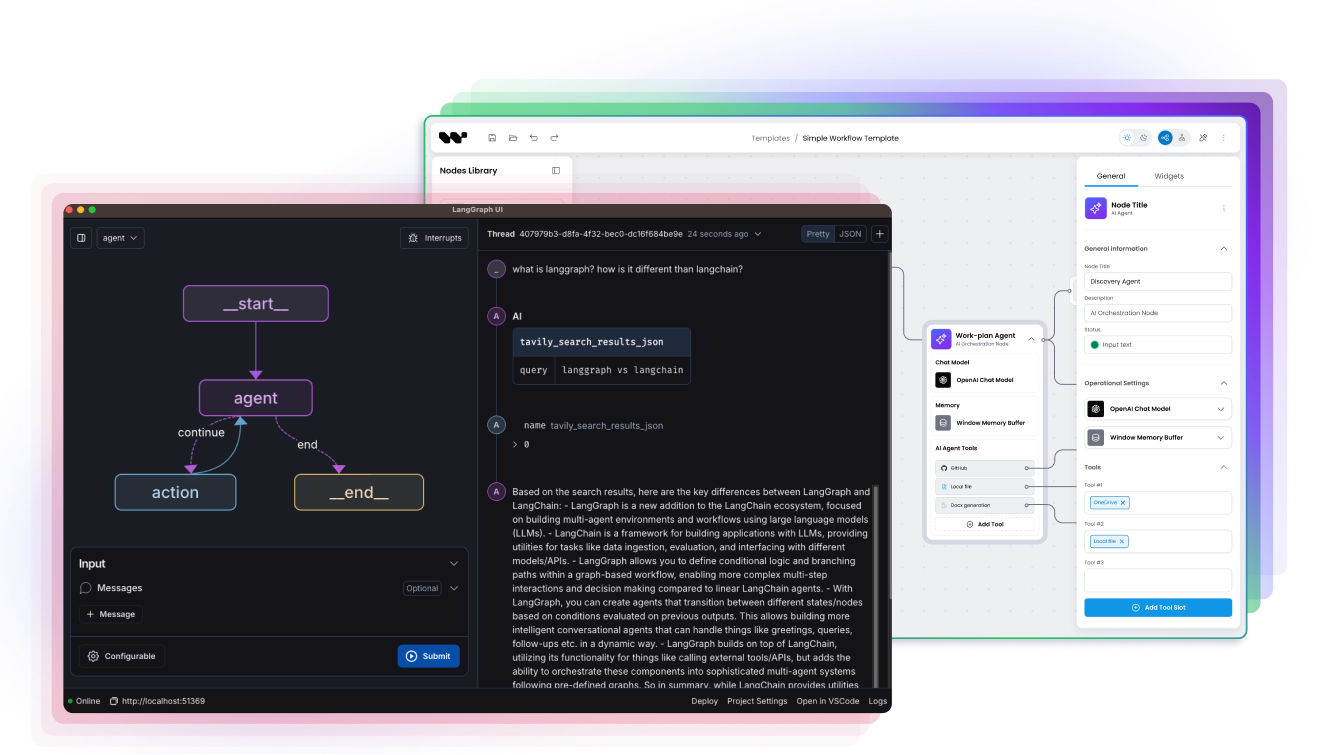
LangGraph for the runtime, Workflow Builder for the editor
LangGraph is a code-first stateful agent framework from LangChain, Inc. - Python and TypeScript SDK, MIT-licensed, with checkpointing, time-travel, and HITL primitives (interrupt() and Command(resume=...) in Python, new Command({ resume: ... }) in TypeScript) baked in. It runs your agent state machine.
Workflow Builder is a headless React SDK that mounts an editor canvas inside your product - visual authoring, end-user friendly, no Python required. It gives your authors the surface.
Together: LangGraph runs the agent. Workflow Builder lets non-developers author, inspect, and approve the flows. Both are open source, both self-host, both stay in your stack.
The 1-line summary: LangGraph for the runtime, Workflow Builder for the editor.
Last updated: May 2026 · Sources: LangGraph public docs, GitHub repository, Synergy Codes integration work.
The pairing problem
LangGraph runs the agent. Who builds the UI for your end-users?
LangGraph is the right tool for production agent backends. The state machine, the checkpointing, the multi-agent orchestration - all first-class. If your team builds AI agents that need durable state and HITL workflows, LangGraph earns its place.
The editor is your problem. Your PM cannot author a flow in Python. Your ops team cannot tune a graph in their IDE. Your customer cannot see what their agent is doing, let alone change it. LangGraph Studio is a developer-facing debugger (web-based, accessed through LangSmith / LangGraph Platform) - excellent for engineers, not packaged as a product UI for the people who actually use your product.
Workflow Builder fills that gap. The canvas lives inside your application. The end-user authors flows visually. The output is a typed JSON graph definition. Your backend translates that to a LangGraph state graph and runs it. You keep the LangGraph runtime you already trust, and add the editor your customers expect.
How LangGraph and Workflow Builder fit together
- Your product mounts the WB React component - one import, one component.
- End-users build flows on the canvas - drag-drop nodes, connect edges, fill custom node form schemas.
- WB outputs a typed JSON graph definition on save.
- Your backend translates JSON to LangGraph nodes + edges - a thin adapter, see the code example below.
- LangGraph compiles and executes with full state management (checkpointing, HITL, time-travel).
| Layer | Temporal | Workflow Builder |
|---|---|---|
| Agent state machine | Yes | No |
| Visual canvas | No | Yes |
| Checkpointing + replay | Yes | No |
| End-user authoring | No | Yes |
| HITL primitives (interrupt, Command.resume) | Yes | UI for them |
| Custom node form schemas | No | Yes |
| Multi-agent orchestration | Yes | UI for it |
What Workflow Builder adds to your LangGraph stack
Visual canvas for non-developers - PMs, ops, customers can author flows without writing Python.
Embeddable React component - mount it in your product, in your design system, on your URL.
Custom node form schemas - typed inputs end-users fill in (model, temperature, prompt, retrieval source, anything).
Production UX baked in - undo / redo, edge routing, auto-layout, minimap, snap-to-grid.
Theme tokens - CSS variables that match your product's design system.
No Python or LangChain knowledge required for authors - the JSON contract is the only thing they touch indirectly.
Generic node shapes alongside AI ones - data, approval, domain-specific nodes are first-class, not workarounds.
Code example: from canvas to LangGraph in 30 lines
The minimum wiring. Adapt to your schema, your auth, your storage.
import { WorkflowBuilder } from '@workflowbuilder/sdk';
import type { PaletteItemOrGroup } from '@workflowbuilder/sdk';

const nodeTypes: PaletteItemOrGroup[] = [
  { type: 'llm', label: 'LLM', category: 'AI' },
  { type: 'retriever', label: 'Retriever', category: 'AI' },
  { type: 'approval-gate', label: 'Approval gate', category: 'Human-in-the-loop' },
  { type: 'router', label: 'Router', category: 'Flow control' },
];

export function AgentEditor({ agentId }: { agentId: string }) {
  return (
    <WorkflowBuilder.Root
      name={`agent-${agentId}`}
      nodeTypes={nodeTypes}
      integration={{
        strategy: 'api',
        endpoints: {
          load: `/api/agents/${agentId}`,
          save: `/api/agents/${agentId}`,
        },
      }}
    />
  );
}from langgraph.graph import StateGraph, START, END
from langgraph.checkpoint.postgres import PostgresSaver
from typing import TypedDict
class AgentState(TypedDict):
input: str
retrieved: list
output: str
def wb_json_to_langgraph(graph_json: dict) -> StateGraph:
"""Translate WB canvas JSON to a LangGraph StateGraph."""
g = StateGraph(AgentState)
for node in graph_json["nodes"]:
g.add_node(node["id"], NODE_HANDLERS[node["type"]](node["config"]))
for edge in graph_json["edges"]:
g.add_edge(edge["source"], edge["target"])
return g
@app.put("/api/agents/{agent_id}")
async def save_agent(agent_id: str, graph_json: dict):
graph = wb_json_to_langgraph(graph_json)
compiled = graph.compile(checkpointer=PostgresSaver.from_conn_string(DB_URL))
save_compiled_agent(agent_id, compiled)
return {"status": "ok"}The full reference adapter is in our example repository - link in Quick start below.
Where LangGraph + Workflow Builder pays off
Human-in-the-loop approval flows
LangGraph ships HITL primitives - interrupt() pauses the graph, Command.resume continues with a human-provided value. In code, that is two functions. For your end-user, it is a flow on a canvas with an approval gate node, a reviewer assignment, and a notification step. Workflow Builder exposes the node types; your adapter maps them to LangGraph interrupts. PMs author the approval flow; LangGraph executes it. The reviewer never sees Python.
Customer-facing agent builders
Your B2B SaaS sells AI agents. Your customers - enterprise analysts, internal automation teams, line-of-business owners - need to configure their own flows. They are not developers. You can either build a custom canvas (3-6 months of engineering before you add a single LLM node) or embed Workflow Builder and run customer-authored flows on LangGraph. Athena Intelligence picked the second path - 1 day to integrate, 1 week to polish.
Visual production debugging for product teams
LangGraph Studio is a developer-facing debugger - graph inspection, time-travel with forking, prompt tuning, dataset experiments, all for engineers. Your ops team also needs to see what is happening: which node is running, where the flow paused, what data flowed through. Workflow Builder lives in your product and renders the same graph mental model for non-developers. Same source-of-truth state, different audience.
Multi-agent orchestration UI
Supervisor and swarm patterns are powerful in LangGraph but invisible to non-developers. Workflow Builder renders the agent topology - which sub-agent calls which, what the handoff condition is, where the supervisor sits. Product managers can reason about the system without reading code. When they need a new sub-agent, they sketch it on the canvas, and your adapter wires it into the supervisor.
Athena Intelligence: visual editor on top of an agent backend
Athena's specific backend is a custom Python runtime, not LangGraph, but the architectural pattern is identical - end-users author flows on a visual canvas inside the Athena product, and the backend translates and executes. The LangGraph pairing inherits the same shape.
Athena Intelligence is a US-based, VC-backed AI platform for legal and renewable-energy data intelligence. Their customers - enterprise analysts, not developers - need to build multi-step LLM pipelines without writing Python. Before Workflow Builder, Athena offered a Python SDK on a lambda-style runtime. End-users had to write code. That model did not scale to the non-developer customers the platform was built for.
If you are running LangGraph as the agent runtime, the integration pattern is the same. The reference adapter shape (see the code example above) shows how WB JSON maps to langgraph.StateGraph calls - the only shipped runtime adapter in the WB Reference backend today is Temporal, so the LangGraph adapter is a reference implementation you wire to your worker, not a drop-in package.
Pricing
Pricing: pair without paying twice
LangGraph
OSS: free under MIT, self-host, no usage fees.
LangGraph Platform (managed runtime, requires LangSmith): Plus is pay-as-you-go at $0.001 per node executed plus standby minutes (~$0.0007/min dev, ~$0.0036/min prod) and requires a LangSmith Plus seat; Enterprise is custom.
LangSmith (separate observability SKU, gates Platform Plus): Developer is free with 5K base traces/mo and 1 seat; Plus is $39/user/mo with 10K base traces/mo and unlimited seats; Enterprise is custom.
Workflow Builder
Enterprise license: EUR 6,990 one-time
React SDK + reference backend with LangGraph adapter example included.
Self-host on Apache 2.0: free, no addendum, white-label allowed.
No per-workspace, per-seat, or per-execution fee on the editor side.
LangGraph charges on the runtime side (deployments, traces, observability). Workflow Builder charges once for the editor SDK. No double-billing on the same dimension.
See full Workflow Builder pricing.
Three steps to your first LangGraph flow
Read the integration guide
The LangGraph adapter pattern, the JSON contract, and the node-type registry. Open the docs.
Clone the reference repository
A working canvas plus a Python backend with the LangGraph adapter, ready to run end-to-end. View on GitHub.
Book an architecture review
30 minutes with our team. We sketch the integration shape on a call. No slides. Book here.
CASE STUDIES
FAQ
LangGraph + Workflow Builder, answered
- Does Workflow Builder replace LangGraph?
No. They pair. LangGraph runs the agent state machine - checkpointing, time-travel, HITL primitives, multi-agent orchestration. Workflow Builder is the editor your end-users author on. The reference adapter shows the wiring: WB outputs a typed JSON graph, your backend translates that to a LangGraph StateGraph and compiles it. Both ship MIT or Apache 2.0, both self-host, no vendor lock-in on either side.
- Can I use Workflow Builder without LangGraph?
Yes. Workflow Builder is runtime-agnostic. The reference backend ships with a Temporal adapter; LangGraph is one of several supported runtimes. Pick what fits your stack. If you are not yet on LangGraph, you can still mount Workflow Builder and wire it to a custom executor, Inngest, or any backend that consumes a JSON graph definition.
- What is LangGraph?
LangGraph is a code-first stateful agent framework from LangChain, Inc., licensed under MIT. It models multi-step LLM applications as graphs with first-class state management - checkpointers, time-travel debugging, and HITL primitives (interrupt() plus Command(resume=...) in Python or new Command({ resume: ... }) in TypeScript). It is a runtime and a library, not a product UI. End-user authoring requires a separate editor layer.
- Why does LangGraph need a visual editor?
LangGraph graphs are defined in Python or TypeScript code. That works for developers. It does not work for the PM who needs to design an approval flow, the ops team tuning prompts, or the customer who buys your AI product and expects to configure it. LangGraph Studio is a developer-facing debugger - not a product UI for end-users.
- How does Workflow Builder integrate with LangGraph?
Workflow Builder exports a typed JSON graph definition when an author saves the canvas. Your backend reads that JSON and constructs a LangGraph StateGraph - one node per JSON node, one edge per JSON edge, custom config per node type. Compile the graph with your checkpointer (Postgres, Redis, SQLite, in-memory) and run. See the code example above.
- Does LangGraph Studio do this already?
LangGraph Studio is a developer-facing tool (web-based, accessed through LangSmith / LangGraph Platform) - graph inspection, time-travel with forking, prompt tuning, dataset experiments, observability via LangSmith. Excellent for engineers. It is not packaged as a product UI for your end-users, not embeddable in your application, and not designed for non-developers to author flows. Workflow Builder fills that gap.
- What does Workflow Builder cost when paired with LangGraph?
EUR 6,990 one-time for the Workflow Builder Enterprise license. That includes the React SDK, the reference backend with adapter examples for Temporal and LangGraph, and production UX features (undo/redo, edge routing, auto-layout, minimap, theming) that would take hundreds of engineering hours to build to production quality. LangGraph charges separately on the runtime side. No double-billing on the same dimension.
Ready to add a visual editor to your LangGraph agents?
A 30-minute architecture review will tell you whether Workflow Builder fits your LangGraph setup. We will sketch the adapter on a call. No slides.