Human-in-the-loop AI workflows: where approval gates belong


Human-in-the-loop has stopped being a question of "should we add a human gate" and started being a question of "where exactly does the gate go." For SaaS products embedding AI features, that placement decision quietly determines if the product earns customer trust, scales operationally, and clears enterprise procurement. Most teams get this wrong on the first pass – and the cost shows up in slow approvals, alert fatigue, and AI features that customers turn off.
The case for human-in-the-loop AI workflows is no longer interesting to argue. Anthropic, OpenAI, Cloudflare, and most of the durable execution platforms publish detailed guidance on it. Regulated buyers ask about it in security reviews. Customers in non-regulated markets ask about it because they have learned not to trust unsupervised AI for anything important. The pattern is now standard.
What is not standard is where the gate goes, what the human sees when they get there, and how the workflow handles the wait. Those design choices are the difference between a product where humans help AI do better work and a product where humans become the bottleneck the AI was supposed to remove.
Main placement patterns
Approval gates show up in four distinct positions in an AI workflow. Each one solves a different problem and has different operational implications. A team that can name which pattern they are using makes better design decisions than a team that just adds "and then a human approves" somewhere in the middle.
#1 Pre-action approval
The AI proposes an action; a human approves before it executes. The human reviews the proposed action with all of its inputs, and the action only happens after approval. This is the safest pattern, and the right one for irreversible side effects: sending an external email, charging a customer, posting to a public channel, modifying production data. The cost is latency – every proposed action waits for human attention before anything happens.
#2 Post-output review
The AI generates a draft or output; a human reviews it before it reaches the end recipient. The action – generating the draft – has happened, but the consequence has not. This is the pattern for AI-drafted communication, content moderation reviews, and AI-generated reports. Latency is similar to pre-action, but the AI's work is concrete and reviewable, not hypothetical.
#3 Exception-only escalation
The AI handles most cases autonomously and escalates only when uncertainty crosses a threshold. The human approves the edge cases; the routine cases run without human attention. This is the only pattern that scales for high-volume workflows. It depends entirely on the AI being able to recognize and quantify its own uncertainty, which is the technical hard problem underneath this design choice.
#4 Dual-track parallel
The AI takes its action immediately and a human reviews after the fact. The two tracks run in parallel; the human can override or rollback if something is wrong. This is the pattern for time-sensitive decisions where waiting is itself a cost – fraud detection, real-time pricing, latency-critical recommendations. It only works when the action is reversible and when rollback is operationally safe.
How to choose the right pattern?
The pattern that fits a given workflow falls out of three properties of the AI action being gated. Get all three right and the placement is almost obvious. Get them wrong and the gate ends up in the wrong place – too cautious, too lenient, or too late.
- The first property is reversibility. Some AI actions are recoverable: a draft email can be edited, a database write can be reverted, a recommendation can be ignored. Others are not: a payment captured cannot be uncaptured cleanly, an external email cannot be unsent, a public message cannot be unposted. Irreversible actions belong behind pre-action gates. Reversible ones tolerate dual-track or exception-only patterns.
- The second property is volume. A workflow that runs ten times a day can afford a pre-action gate on every run. A workflow that runs ten thousand times a day cannot – there is no human team that can review that volume, and the gate becomes a queue that fills up faster than it drains. High-volume workflows need exception-only patterns, with thresholds tuned so the human queue stays manageable.
- The third property is latency tolerance. Some decisions can wait hours or days for a human; others have to happen in seconds. A loan approval can wait. A real-time fraud check cannot. Latency-sensitive decisions either need dual-track patterns (the AI acts immediately, the human reviews after) or they need confidence thresholds tight enough that escalation is rare.
The honest version of the design conversation is short: rank the action on those three axes, pick the pattern that matches, and only depart from the obvious match when there is a specific reason to.

The wait is the part most teams underdesign
Once a gate is placed, the workflow has to wait for the human. That wait is the part that most product teams underdesign – and the part that determines if the human-in-the-loop pattern feels like product infrastructure or like a hostage situation.
A human gate is, technically, a long-running suspended workflow. The runtime has to hold the workflow's state – context, intermediate results, the proposed action – and release all worker resources during the wait. When the human responds, the runtime resumes the workflow with the decision injected. This requires durable execution underneath; it does not work cleanly on a queue-and-worker setup, and it absolutely does not work on a request-response handler.
Three properties of the wait separate good HITL implementations from bad ones. The first is timeout behavior. A human gate that waits indefinitely will eventually fill up with abandoned items – people leave companies, change roles, miss notifications. Every gate needs an explicit timeout policy: auto-approve, auto-reject, escalate to a different reviewer, or hard-fail. The timeout itself is a product decision, not a default.
The second is escalation paths. If the original reviewer is unavailable, the workflow should know who to ask next. This is not a feature that the runtime can decide on its own – it depends on org structure, time zones, and the criticality of the decision. The workflow definition has to encode it explicitly.
The third is reviewer context. By the time the human sees the request, they have lost most of the context the AI had at the moment of decision. The reviewer interface needs to surface what the AI was looking at, what it considered, what it recommended, and why – without forcing the reviewer to read a transcript. The right design shows the proposal first, the reasoning second, and the raw context third, all on one screen.
What the human sees at the moment of decision?
The reviewer interface is the part of human-in-the-loop AI that has the largest gap between what teams build first and what actually works in production. The first version is usually a notification with a link to a page that has the AI's output and two buttons: Approve, Reject. The reviewer clicks one of them based on a guess.
The second version is built after the team realizes that approval rates are nearly 100% – humans are rubber-stamping because there is nothing actionable on the page. The right interface is structured around what the reviewer needs to make a real decision in under a minute.
Five elements show up consistently in HITL interfaces that produce good decisions. The proposed action comes first, in plain language. The recommended decision is shown clearly: approve, reject, or – most usefully – edit. The AI's confidence and reasoning come second, summarized to one or two sentences with a click-through to the full chain of thought. Alternatives – what the AI considered and discarded – come third, so the reviewer can see why the chosen action was preferred. Time pressure, if there is any, is visible: the deadline, the SLA, and the consequence of timeout. And the escalation path is one click away – the reviewer should never have to ask "who else can decide this."
Where this connects to the rest of the workflow product?
Human-in-the-loop is not a standalone feature. It sits on top of three pieces of infrastructure that the workflow product has to provide.
The first is durable execution. Without it, suspended workflows lose their place during deploys, retries become problems, and the whole HITL pattern degrades into "the workflow runs once, prays nothing happens, and hopes the human responds before the timeout." Durable execution is the architectural prerequisite.
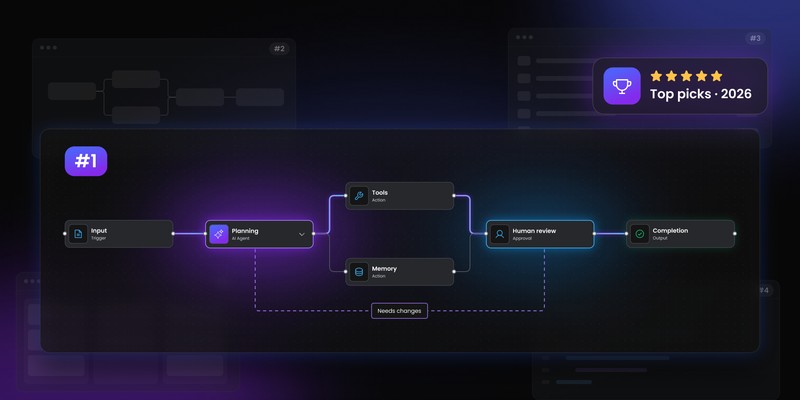
The second is the visual workflow canvas. Approval gates are graph nodes – they sit between AI agent nodes and action nodes – and the visual representation matters. A workflow author placing an approval gate on a canvas understands the placement decision in a way that a developer adding a function call does not. The canvas surfaces the placement choice; the code hides it.
The third is the audit trail. Every human approval is a record: who, when, what they approved, what they were shown at the moment of decision, what the AI was recommending. That record is part of the workflow's audit trail, which means HITL events have to be captured at the same fidelity as model calls and tool calls. A human gate without an audit record is a compliance failure waiting to happen.
For SaaS teams shipping AI features, this is the practical takeaway: HITL is a workflow product capability, not an AI product feature. It depends on workflow infrastructure that most teams build separately for each AI feature, and rebuild differently each time. The teams that get this right pick a workflow runtime – durable execution, visual canvas, audit trail, approval gates as a primitive – and build their AI features on top of that runtime, instead of next to it.
Human-in-the-loop done well is not the AI checking with a human. It is the AI and the human collaborating inside a workflow that knows about both of them.
Workflow Builder is an embeddable workflow editor SDK by Synergy Codes. Building for a regulated industry (fintech, HR, healthcare, insurtech, edtech) where audit, human oversight, or vertical-specific compliance maps onto the workflow? Talk to the team behind Workflow Builder – the same engineers who built the SDK help you map compliance requirements onto it, without taking over the build.
An entrepreneur and tech enthusiast, with over 14 years of experience building innovative diagramming solutions and tools across industries. Our interfaces help technical and non-technical users make informed business decisions.