What React Flow doesn't give you out of the box

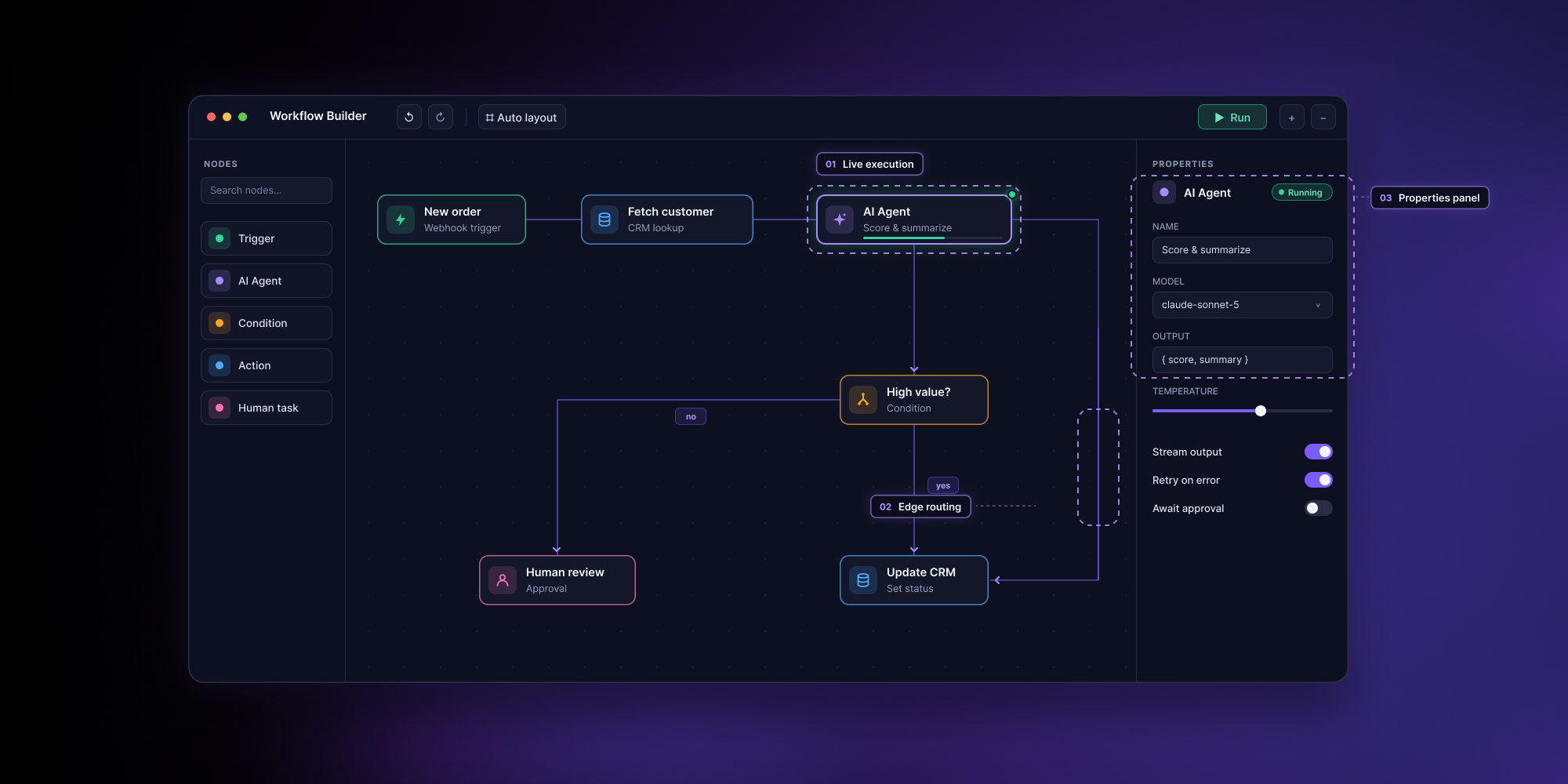
React Flow is an excellent rendering library, and it's what we build on. But it renders a graph, not a workflow. A properties panel, undo/redo, layout, execution state, and the data model behind them are all yours to build. AI makes that code cheaper to write; it won't tell you what to build or get the details right.
Standing up a React Flow canvas is the easy part, and with AI writing the code it's quicker than ever. Turning it into a workflow product your users can actually work in is the part React Flow leaves to you. Here's that gap, feature by feature.
This isn't a knock on React Flow. It's an MIT-licensed rendering library, deliberately unopinionated about what your nodes mean. The gap only shows up when your graph has to represent real business data – a workflow people configure, validate, run, and reason about. That gap is the one we kept hitting, so we built Workflow Builder: a React SDK on top of React Flow that adds the layer it leaves out. This article walks that gap feature by feature, and points to where Workflow Builder fills each one.
React Flow renders a graph. A workflow is more than a graph.
A graph is nodes and edges. A workflow is a graph where every node carries structured data, the connections mean something at runtime, and the whole thing can execute. React Flow gives you the first part completely and, by design, leaves the second to you. That's a deliberate line, not a shortcoming. Everything below follows from it.
Does React Flow have a properties panel?
No. React Flow ships MiniMap, Controls, Background, and a <Panel> component, but <Panel> is only a wrapper for pinning overlay UI to a corner of the canvas, not a data editor. There is no inspector, no config form, no way to edit what's inside a node without building it yourself.
What's missing runs deeper than a UI panel: it's a way to work with the data inside each node. In React Flow, node.data is documented as "arbitrary data passed to a node." The library never looks at it, types it, or validates it. So the moment a node represents a real thing – an API call with headers, an email step with a template, a decision with a threshold – you're building the entire editing experience from zero, plus the validation that keeps bad data out.
Workflow Builder treats this as the core of the product, not an add-on. Each node type declares a schema, and the properties panel renders a validated form from that schema automatically. Editing a node means editing structured business data, with validation built in – not poking at an untyped object.
.png)
Does React Flow have undo/redo and copy/paste?
Not built in, and the official examples for both are paid. React Flow's undo/redo and copy/paste walkthroughs are Pro examples, gated behind a subscription. On the free tier you get neither the feature nor the reference code; you implement snapshot history and clipboard handling yourself.
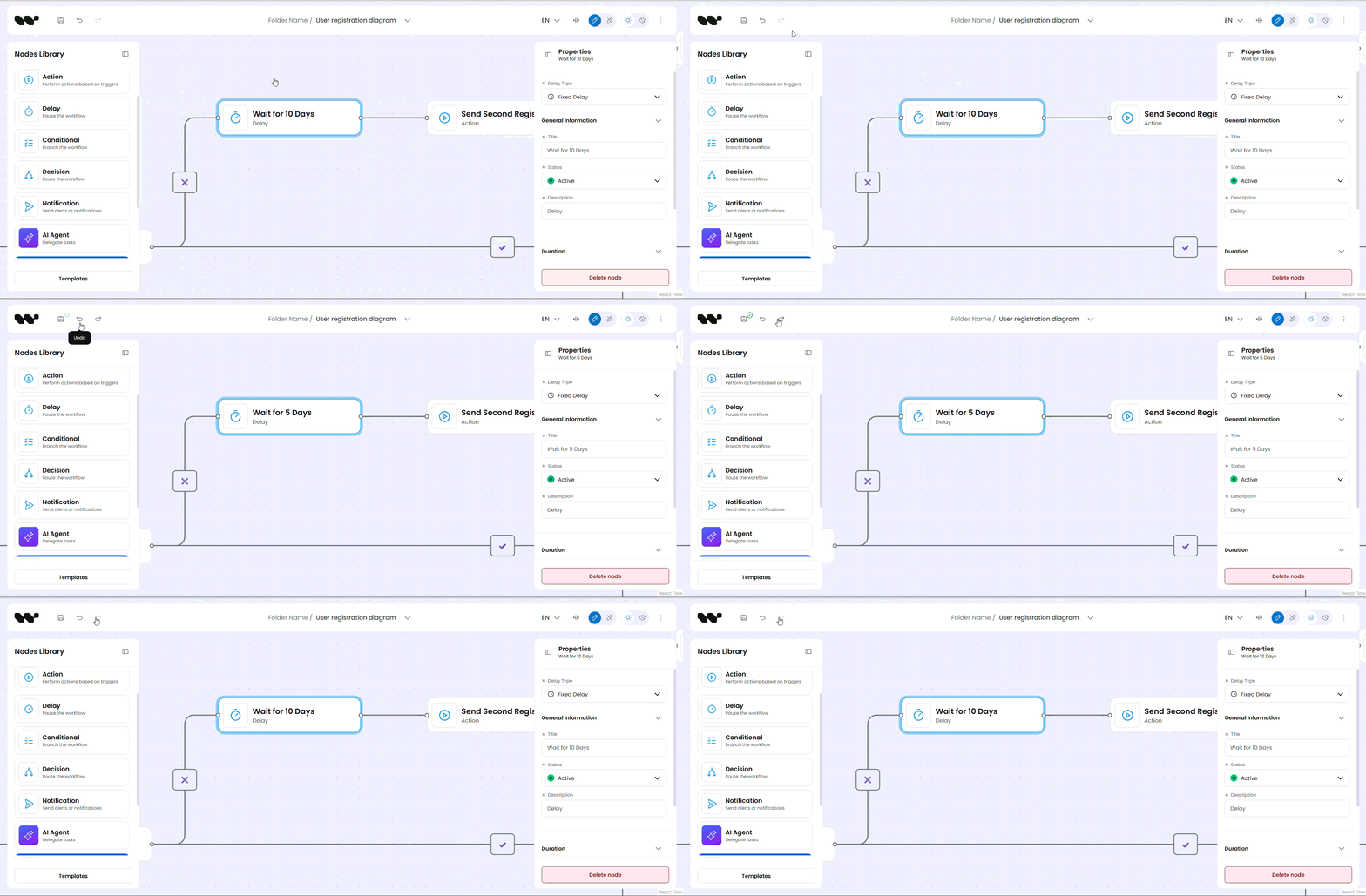
Undo/redo looks simple until you combine it with the properties panel above. Every field edit is a state change that has to enter the history stack, and every undo has to restore the data inside the nodes, not only their positions on the canvas. Get the granularity wrong and one Ctrl+Z wipes an entire form instead of one field. It's easy to get subtly wrong and tedious to get right, and no library ships that decision for you.
In Workflow Builder, undo/redo and copy/paste ship in the free Community tier and already account for property edits, so undoing a field change does the right thing. Copy/paste carries the node's full data with it, so a pasted node arrives configured rather than blank.
Does React Flow do automatic layout and edge routing?
No auto-layout ships in the core package. The docs say it plainly: "We have not implemented our own layouting solution yet." They point you to external libraries – Dagre, d3-hierarchy, d3-force, or ELK – and the configurable multi-engine example is itself a paid Pro example.
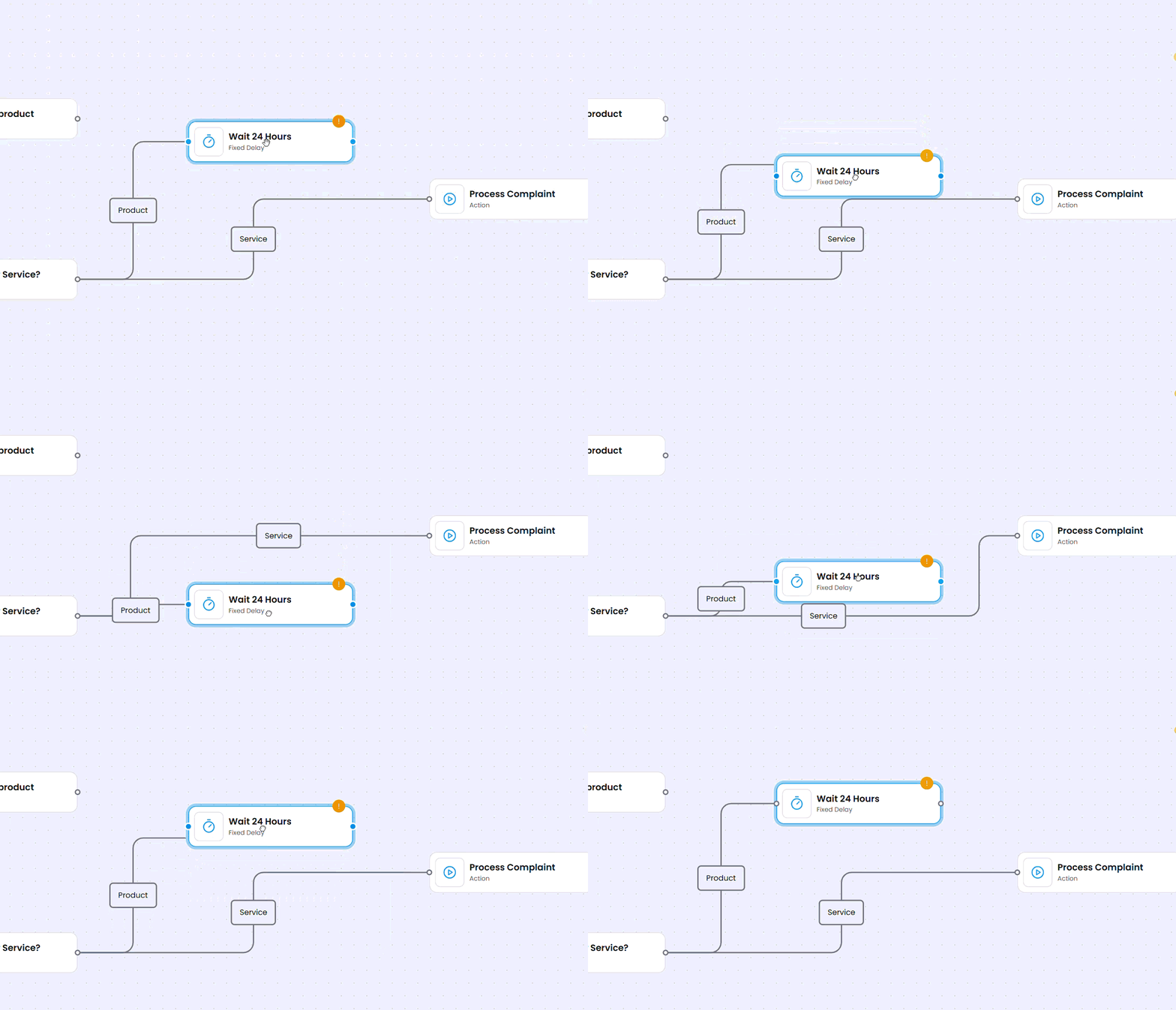
The subtler gap is edge routing. Most layout libraries only position nodes; as React Flow's own docs put it, you "let the edges fall wherever they may." So edges cut straight across other nodes – the tangle you get when the layout arranges the boxes but nothing routes the lines between them. React Flow's 4 edge types – bezier, straight, step, and smoothstep – include clean right-angled paths, but none of them route around obstacles. Node avoidance isn't there. And in a workflow that tangle isn't cosmetic: when edges disappear behind nodes, the flow gets hard to read and hard to trust.
Workflow Builder uses ELK for layout too, so the layout engine is the same. The difference is edge routing, and it applies in 2 places. When you auto-arrange a graph, Workflow Builder uses ELK's edge-route calculation as part of the layout, so connections bend around nodes instead of falling straight through them. When auto-layout is off and someone drags nodes by hand, a separate routing algorithm keeps those edges clear of the nodes they would otherwise cross. Both are tuned for workflow shapes, so the graph stays readable whether it was arranged automatically or by hand.
Does React Flow come with a design system or internationalization?
React Flow ships styling primitives, but not a design system – and no internationalization at all. You get a default stylesheet, a set of --xy-* CSS variables, and a colorMode prop for light, dark, and system themes. The basics of styling the canvas are covered.
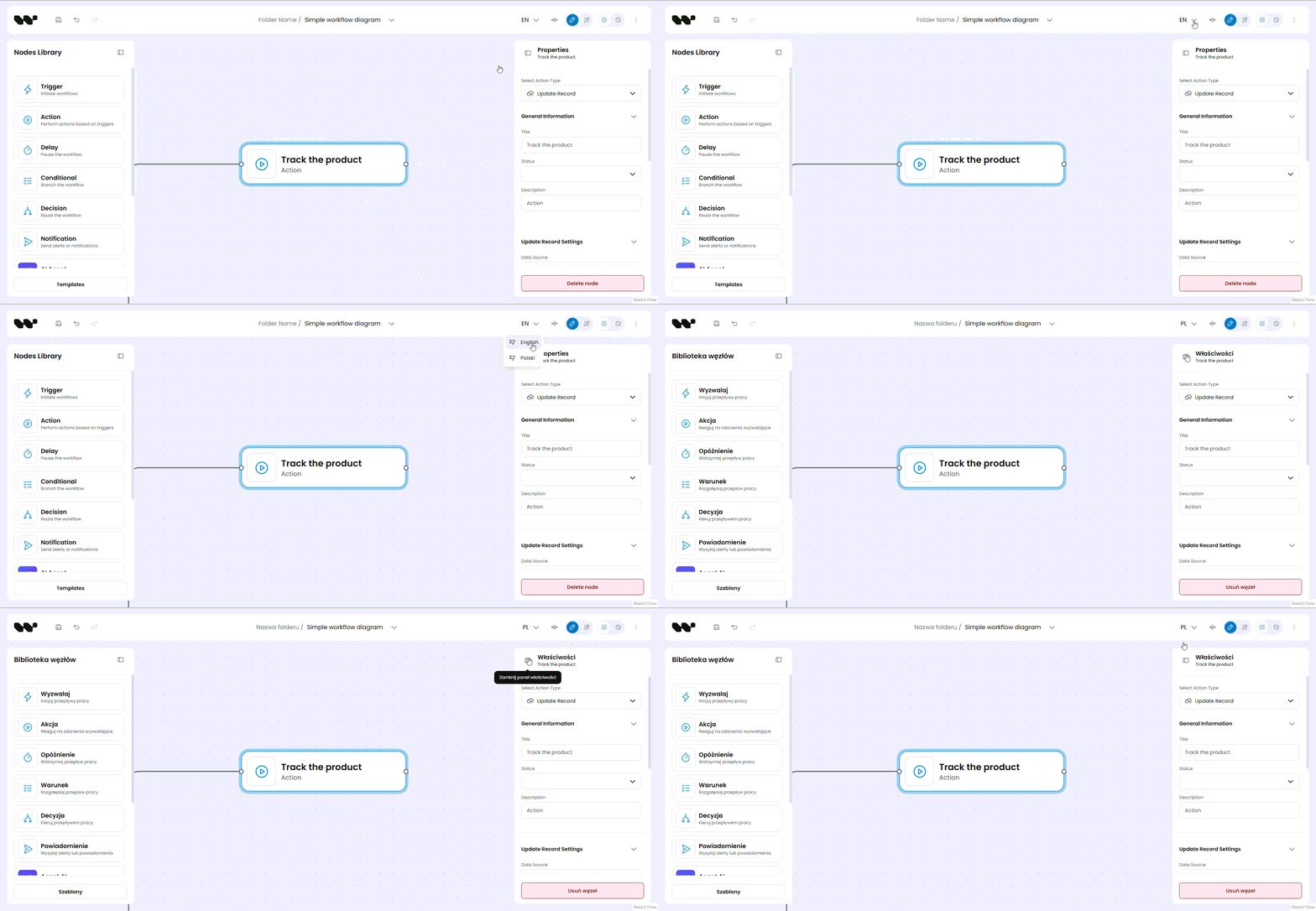
What's missing is a design-token system and any prebuilt node design. You can override the CSS variables, but keeping the canvas visually consistent with the rest of your product – buttons, panels, spacing, and typography – is on you. Without shared tokens and guidelines to hold it together, that consistency is easy to lose as the app grows and more people work on it. There's also no internationalization: React Flow's ariaLabelConfig lets you override screen-reader labels, which you can translate, but that's accessibility text, not a localization system for your UI.
Workflow Builder is built on a token-based design system that's consistent across the editor and the UI around it, so the canvas doesn't look like a bolted-on widget. Internationalization is built in, so the editor's interface localizes with the rest of your app instead of being the one untranslated corner.
Can React Flow run a workflow?
No. And when a workflow is meant to run, not just document a process on screen, this is the biggest gap. React Flow describes itself as a tool for "creating interactive flowgraphs." It's client-side only. There's no backend, no execution engine, no concept of running a graph, and no way to show what happens when you do.
In our own projects, clients cared less about drawing the flow and more about watching it run. React Flow has no notion of runtime state – which step is running, which branch a condition took, what the execution log says, and whether a step succeeded or failed. It also has no model for the data a workflow moves: no variables passed between steps, no conditions evaluated on those variables. Edges are visual connections; the library never executes or interprets them, because that was never its job.
Workflow Builder closes this end to end without locking you into one engine. It ships an Apache 2.0 reference back-end and a Temporal adapter as its reference integration, but it stays engine-agnostic – your engine runs the workflow through the same port interfaces. On the canvas, that runtime becomes visible: steps light up as they execute, a condition highlights the branch it takes, the execution log updates live, and each step shows success or error. The graph you designed and the workflow that runs are the same picture.
.png)
Where Workflow Builder fits
Workflow Builder is a production-ready React SDK for embedding visual workflow editors, built on React Flow. Rather than replace React Flow, it adds the layer that turns that graph into a workflow product: the properties panel, the data model, undo/redo, layout, the design system, and the execution view. Teams at Vercom, Athena Intelligence, and Plura AI run it in production rather than rebuild that layer themselves.
If you're evaluating React Flow, the honest summary is this: it will get you a canvas quickly, and it's the right foundation. Just account for everything above before you promise a workflow feature, because that's the part your users spend their day in. The economics of building that layer yourself are a separate discussion; we've broken down the cost of building a workflow editor in-house if you want the numbers.
- Does React Flow have undo/redo?
Not in the core library. React Flow's official undo/redo example is a paid Pro example, so on the free tier you implement snapshot-based history yourself – including making it work with any node-data editing you've added.
- Does React Flow have a properties panel?
No. React Flow ships MiniMap, Controls, Background, and a
<Panel>overlay wrapper, but no inspector or form for editing node data. Node data is untyped and unvalidated, so any config UI and its validation are yours to build. - Can you build a workflow editor with React Flow?
Yes, but React Flow only provides the rendering and interaction layer. A workflow editor also needs a data model, validation, layout, and execution – none of which React Flow includes. Workflow Builder adds those on top of React Flow.
- Does React Flow run or execute workflows?
No. React Flow is a client-side rendering library with no backend and no execution engine. It has no concept of running a graph, passing variables between steps, or evaluating conditions. Execution requires your own engine, which Workflow Builder connects through engine-agnostic port interfaces.
- Does React Flow support automatic layout?
Not out of the box. The docs recommend external libraries like Dagre or ELK, and the configurable auto-layout example is a paid Pro example. These position nodes but generally don't route edges around them, so laid-out graphs often have edges crossing nodes.
- What's the difference between React Flow and Workflow Builder?
React Flow renders interactive node-based graphs. Workflow Builder, built on React Flow, is a React SDK for workflow editors – adding a schema-driven properties panel, undo/redo, layout with edge routing, a design system, i18n, and a reference back-end with live execution visualization.
Mateusz is a Principal Developer and Solutions Engineer at Synergy Codes, where he works on Workflow Builder. With 7+ years of building interactive diagramming tools and data-heavy web applications, he joins client projects from the earliest conversations, shaping requirements into technical roadmaps and estimates, and stays hands-on through development.
Evaluating React Flow for a workflow product?
Tell us where you are – get a straight answer on what you keep from React Flow and what Workflow Builder adds on top.