Sales inquiry AI workflow: a practical blueprint for routing and answering inbound requests


Inbound sales inquiries arrive looking the same on the surface – a contact form, an email, a chat message – and look completely different the moment a human reads them. Some are real buyers asking concrete questions. Some are partnership pitches. Some are job seekers. Some are spam. The job of a sales inquiry AI workflow is not to answer them; it is to route them, enrich them, and produce the right response from the right person, fast. Below is a blueprint for that workflow, with the design decisions that separate a useful one from a noisy one.
The pattern is well-known by now. Inbound request lands. AI classifies it. Workflow routes it to the right team, with context attached. The right person responds. In high-volume SaaS pipelines, this whole thing has to happen in minutes – every minute of delay between inquiry and first response measurably drops conversion. Doing it well requires a multi-step AI workflow, with the right placement of human gates, durable execution underneath, and a visual representation that the sales operations team can actually edit.
This article documents one such blueprint end to end. Every step is described with what it does, what it needs to know, and what can go wrong. The blueprint maps to a five-step workflow that can be built on n8n, Temporal, Inngest, an internal runtime, or a workflow editor SDK with a packaged engine. The architectural shape stays the same.
The five steps to build a sales inquiry AI workflow
The full sales inquiry workflow has five logical steps. The naming matters – each step has one job, and conflating them produces workflows that are hard to debug and harder to change.
- Trigger. The inquiry arrives. The trigger captures the raw payload – the form data, the email content, the chat transcript, and starts a workflow run.
- Classify. An AI agent reads the inquiry and assigns it categories: intent, urgency, fit, language, and complexity. The output is structured, not free-form. This is the step that everything else depends on.
- Enrich. The classified inquiry is augmented with everything the system can find about the sender: company size, role, prior interactions, industry, technology stack. Enrichment turns “John from Acme” into “VP of Engineering at Acme, 2,400 employees, Series C SaaS, prior demo six months ago, no recent activity.”
- Route. Based on classification and enrichment, the workflow assigns the inquiry to the right destination: a specific sales rep, an account executive, a partnership team, a support queue, an auto-response, or the trash. Routing is a decision tree, not a single rule.
- Respond. The appropriate response is generated, drafted, or queued. For high-confidence routine cases, the AI drafts the response and a human ships it. For lower-confidence or higher-stakes cases, a human owns the response from scratch with the AI’s classification and enrichment as context.
Step 1 → Trigger: capture everything, normalize nothing
The trigger step is the easiest to underestimate. It looks like just receiving a payload. The mistake is normalizing the payload at this step – converting the form fields and email content into the schema that downstream steps want. The right design captures the raw payload first, stores it as part of the workflow run, and only then normalizes.
The reason: when something goes wrong six months later, the audit trail needs to show the original input the customer actually sent. Normalized payloads lose information – empty fields, malformed entries, attached files, the user-agent of the form submission. Some of those become evidence in compliance review or in dispute resolution. Capture them when they cost nothing.
The other reason: trigger types vary more than they should. Email triggers carry a different shape than form triggers carry a different shape than chat triggers. Normalizing in step 1 means every new trigger source requires an update to step 1’s schema. Capturing raw and normalizing in step 2 – as part of the AI classification step – keeps the trigger step trivial and stable.
Step 2 → Classify: structured outputs, fixed schema
Classification is the most leveraged step in the workflow. Every routing decision downstream depends on it being correct, and every audit-trail question downstream becomes much harder if the classification was free-form text.
The right design constrains the AI’s output to a fixed schema, validated on response. Five fields cover the cases that matter for inbound sales:
- Intent – what is the sender actually asking for? Categories: pricing, demo, support, partnership, careers, vendor pitch, press, other. The list is short, exhaustive, and named for the routing decision they imply.
- Urgency – is there a time pressure? Levels: now, this week, this quarter, no signal. “Now” maps to inquiries that explicitly mention deadlines, evaluations in progress, or a specific event. Most inquiries are “no signal.”
- Fit – does the sender match the company’s customer profile? Levels: high fit, possible fit, low fit, not a fit. The judgment is based on what the sender said about themselves, not on enriched data – enrichment happens in step 3, but the AI in step 2 only sees what was written.
- Language – what language is the inquiry in? This decides which sales rep can respond, and if translation is needed.
- Complexity – can this be answered with a templated response, or does it need a custom reply from a human? Levels: routine, standard, custom. Routine is “what is your pricing for X?” Custom is “we are evaluating you against three vendors, here are our specific requirements.”
The output is a JSON object with these five fields, validated against a schema before the workflow continues. If the AI returns malformed output, the runtime retries; if it retries past a threshold, the inquiry routes to manual review. The schema is the contract.

Step 3 → Enrich: be cheap about it
Enrichment is where most teams overspend. Every enrichment provider – Clearbit, Apollo, ZoomInfo, internal CRM lookup – has a per-call cost. Calling all of them on every inquiry burns budget on inquiries that turned out to be junk anyway.
The right pattern is conditional enrichment based on classification. Only enrich inquiries that classified as a viable lead – high or possible fit, with intent in the sales-relevant set (pricing, demo, partnership). Skip enrichment for vendor pitches, press inquiries, and clear junk. For high-volume pipelines this single rule cuts enrichment cost by half or more.
The output of enrichment is a structured customer record attached to the workflow run: company name, size, industry, role of the sender, prior interactions with the company, technology signals if available. Enrichment can fail – the company is too small to be in the data providers’ indexes, the email is generic, the form did not capture a name. Failure is normal; the workflow should continue, just with less context.
One subtle design point: enrichment output should be separate from classification output, even though both feed routing. Classification is “what does the inquiry say about itself.” Enrichment is “what do we know about the sender independently.” Keeping these separate matters during audit – six months later the question may be “did the AI route this to the wrong rep because it misread the inquiry, or because the enrichment data was wrong?” Two separate fields, two separate answers.
Step 4 → Route: a decision matrix, not a free-form prompt
Routing is the step where teams are most tempted to use a long natural-language prompt – “given this inquiry and this enrichment, decide who should handle it.” This works in demos and breaks in production, because routing logic encodes business rules that change weekly, and natural-language prompts are the wrong place for business rules.
The right shape is a decision matrix. Rows are intents. Columns are fit levels. Each cell is a destination, with a priority and an SLA. The matrix is a config file or a database table – readable, editable by sales operations without an engineer, version-controlled, and visible on the workflow canvas as part of the routing node.

Step 5 → Respond: AI drafts, humans ship the ones that matter
The response step splits based on the routing decision and the complexity field from classification. Three substeps cover the cases:
- Auto-respond. Routine, low-stakes inquiries (status questions, pricing requests from low-fit leads, support deflection to docs) get an AI-generated reply sent automatically. The response is templated, with personalization plugged in. The human gate here is implicit – the workflow author approved the templates once, and runtime auto-respond is just executing them.
- AI drafts, human ships. Standard sales replies for high-fit leads use the post-output review pattern from human-in-the-loop AI workflows. The AI generates a personalized first reply with classification and enrichment context attached. The assigned rep receives a notification with the draft, the inquiry, and the enrichment summary on one screen. The rep edits or ships in under a minute.
- Human owns it from scratch. Custom-complexity inquiries, partnership pitches, anything where the AI’s draft would be more harmful than helpful – the AI does not draft. The workflow assigns the inquiry to a human with classification and enrichment as context, and the human writes the reply themselves. The AI’s job here is upstream: it made sure the right human got the right context.
The choice between these three is the complexity field from step 2. The schema is doing real work.
What changes when this workflow lives on a canvas
This whole blueprint can be built as code – a Temporal workflow, an Inngest function, a series of n8n nodes wired together. It will run, and run reliably, and produce the right routing decisions.
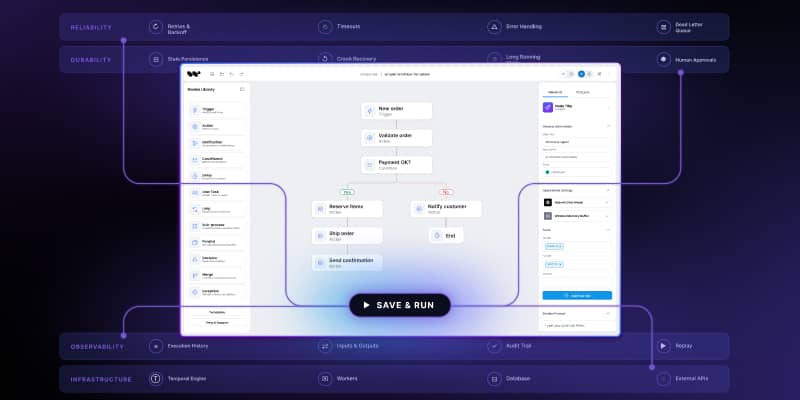
What changes when the same workflow lives on a visual canvas in the SaaS product is who can edit it. The classification taxonomy, the enrichment rules, the routing matrix, the response templates – all of these change frequently as sales priorities shift, new markets open, new partnerships start. In a code-only workflow, every change is a deploy. On a canvas, the sales operations lead opens the routing node, edits the matrix, hits save, and the next inquiry uses the new logic.
That is the embeddable workflow editor angle on this blueprint. The five-step shape is universal. The difference is if the team that owns the inquiry routing – sales operations – can change it without filing engineering tickets.
For SaaS teams shipping their own AI-driven sales workflows to customers, the same logic applies one layer up: the customer can see the workflow, understand it, and adjust it for their own routing rules without involving the SaaS vendor’s engineering team. That is the difference between AI features that ship once and AI features that customers actually adopt.
Workflow Builder is an embeddable workflow editor SDK by Synergy Codes. Version 2.0 ships with a packaged SDK and a reference execution backend on Temporal, so a sales-inquiry workflow like this one is authored on the canvas, exported as JSON, and executed durably.
An entrepreneur and tech enthusiast, with over 14 years of experience building innovative diagramming solutions and tools across industries. Our interfaces help technical and non-technical users make informed business decisions.