Workflow canvas vs workflow engine: why workflow UI alone is not enough

A workflow editor that only draws is half a product. The other half - the part that runs the thing - is where customer trust gets earned or lost. This is the difference between a workflow canvas and a workflow engine, and the reason most B2B SaaS teams underestimate what they actually need to ship.
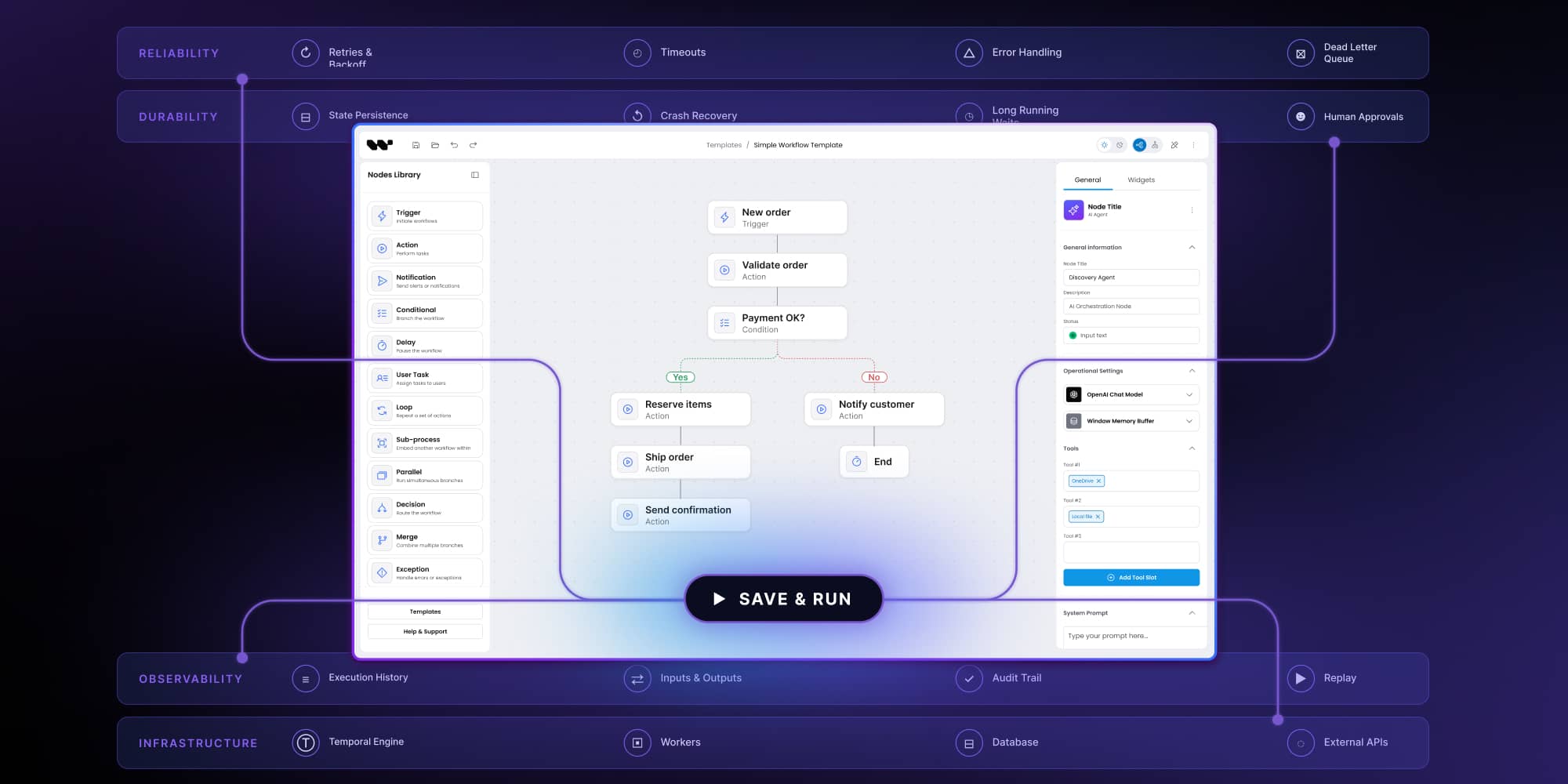
Walk into any product review of a workflow editor and the screenshots look the same: a clean canvas, drag-and-drop nodes, edges that route themselves, a properties panel on the right. It looks like a finished feature. The demo flows are smooth, the design system holds together, the CEO nods.
Then a customer hits Save and Run. And the question stops being about pixels.
Where does the workflow execute? What happens when step three calls an external API that times out? How does a user see what step a long-running flow is currently on? If the server restarts, does the workflow resume or start over? Who logs the inputs and outputs of every step, and for how long?
None of those questions are about the canvas. They are about the workflow engine - the runtime layer that takes a graph of nodes and turns it into something that actually moves data, calls services, waits for human approval, retries on failure, and tells you where it ended up. The canvas is the part your customers see. The engine is the part they trust.
Workflow canvas: what it is, what it does
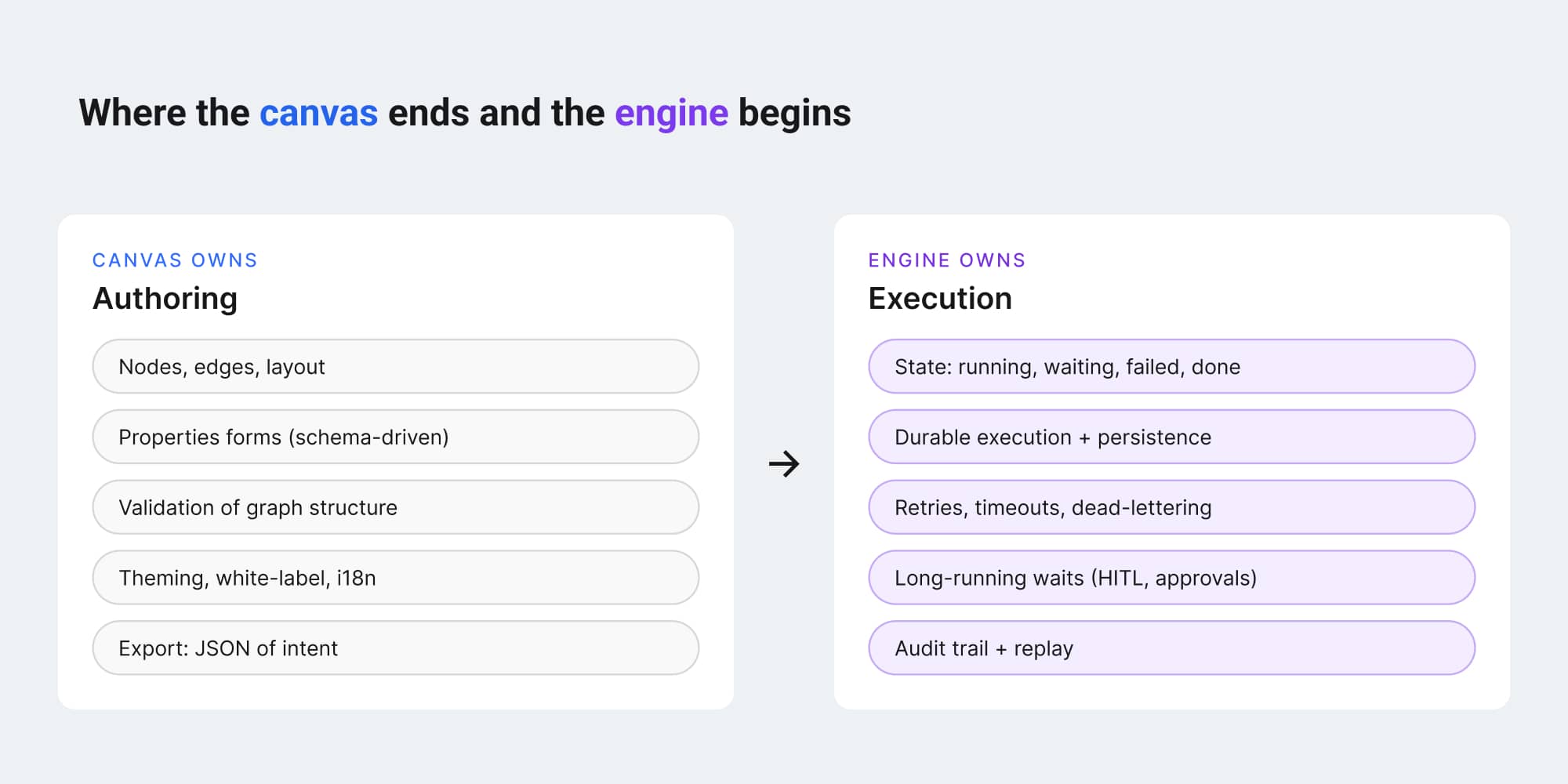
A workflow canvas is the authoring surface. Nodes, edges, layout, validation that the graph is structurally sound, properties forms for each node type, theming, undo, copy-paste, templates, internationalization. It is a serious piece of software, and anyone who has tried to build one in-house knows that the gap between "drawing a graph" and "shipping a production editor" is bigger than it looks.
What a canvas produces is a representation of intent. JSON, usually. A structured description of what the workflow should do, in what order, with what inputs and conditions. That JSON is the deliverable.
And that is also where many workflow editor projects quietly stop.
The team ships a beautiful canvas, exports JSON to the customer's backend, and assumes the rest is a backend problem someone else will solve. Sometimes someone else does solve it. More often, the backend gets a rushed worker process, a queue, a try/catch around an HTTP client, and a dashboard that says "Last run: succeeded" with no detail about which step ran, when, with what input, and what came out.
That is the gap a workflow engine fills.
What a workflow engine adds
A workflow engine is the runtime. It takes the JSON from the canvas and executes it as a real process: it knows the order of operations, it tracks state, it handles failures, it persists progress, and it makes the execution visible. The serious engines guarantee something specific - that a workflow, once started, will reach a terminal state even if the server crashes, the network drops, or an external service is unreachable for an hour. That property has a name: durable execution.
Concretely, an engine is responsible for things the canvas cannot do alone:
- Execution state. Which step is running, which has finished, which failed, which is waiting on a human.
- Persistence. If the worker dies mid-flow, the engine resumes from the last completed step, not from the beginning.
- Retries and timeouts. Configurable per node, with backoff, dead-letter handling, and explicit failure modes.
- Long-running waits. A step that pauses for an approval, for hours, days, or weeks, without holding a process or thread open.
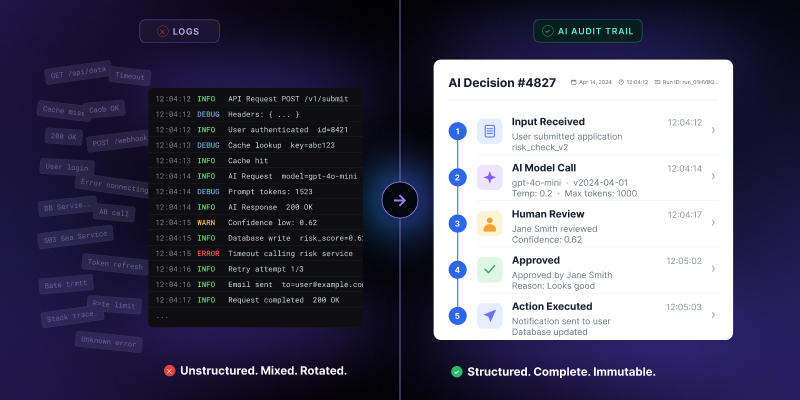
- Audit trail. Inputs, outputs, decisions, timestamps for every node execution, queryable after the fact.
- Replay. Re-running a workflow with the same inputs to debug an outcome or reproduce a customer issue.
This is the part that takes months to build well, and a multiple of that to operate at scale.
This is where the n8n model bundles everything (canvas + engine + integrations) into one product - useful for teams that want all three out of the box. For embedded SaaS where you own the canvas in your product, the n8n comparison shows when bundled fits and when it does not.
What happens when you stop at the canvas?
Teams that ship a canvas-only workflow editor do not get away with it for long. The bill arrives in three places.
Customer trust degrades quietly
The first time a customer's workflow silently stops at step four because a downstream API returned a 503 (and nobody noticed for two days), the conversation about your product changes. It stops being about features and starts being about reliability. Customers do not file tickets that say "your workflow engine is missing." They file tickets that say "I cannot trust this." Those are harder to fix.
Support load grows linearly with usage
Every "what happened to my flow" question is a support ticket. Without execution state, audit trail, and replay, those tickets become engineering investigations. The team starts grepping production logs to reconstruct what a user's workflow did three days ago. Every successful customer makes the support load worse.
Engineering keeps rebuilding the same primitives
The same team that shipped the beautiful canvas now builds a worker, then a queue, then state persistence, then retry logic, then a way to visualize execution status, then an audit log, then a replay tool. None of that work shows up in product demos. All of it is necessary. All of it is also a category of software - durable workflow execution - that has been built, debugged, and operated at scale by other people.
This is the moment most teams realize that "we'll add execution later" was a more expensive plan than they thought.
The importance of durable execution
The technical term that matters here is durable execution. A durable execution engine treats a workflow as a function that can run for milliseconds or for months, and it persists every step's progress so that the function can survive crashes, restarts, deployments, and infrastructure failure. Temporal popularized the model, and it is now the architecture used by Netflix, Stripe, and Uber for the kind of long-running, multi-step processes that cannot afford to lose state.
For a SaaS product embedding a workflow editor, durable execution is what lets you tell your customers: once your workflow starts, it will reach an end, even if the world breaks in the middle.
This is exactly the pairing pattern teams use in production: visual canvas as React SDK + durable execution (Temporal, Inngest, LangGraph) as your runtime choice. For how this pairing pattern looks in practice, see code-first AI workflows.
The architectural decision: one stack, or two parts?
Once a team accepts that they need both a canvas and an engine, the next question is structural: do these come as one integrated stack, or as two separately chosen components glued together?
Both approaches exist in the market.
Some platforms (n8n, Make, Zapier) bundle a proprietary canvas with a proprietary engine, take or leave.
Other tools are pure UI primitives (React Flow, xyflow, FlowGram) that hand you the canvas and assume you will pick (or build) an engine yourself. The first group is fast to adopt and slow to escape. The second is flexible but requires the team to take on the full cost of execution.
A third pattern, newer, and the one the embeddable SDK category is moving toward, is a canvas plus a reference engine, where the engine is real, documented, and ready to run, but also explicitly swappable. The team gets the canvas and an engine that works on day one, but the engine is not load-bearing in the architecture. If the customer already runs Temporal, Inngest, or n8n, those plug in. If they need to build something custom for a regulated environment, that plugs in too. The canvas does not care.
This is the architectural shape that scales: visual layer above, engine in the middle, execution backend below, with clean boundaries between them.
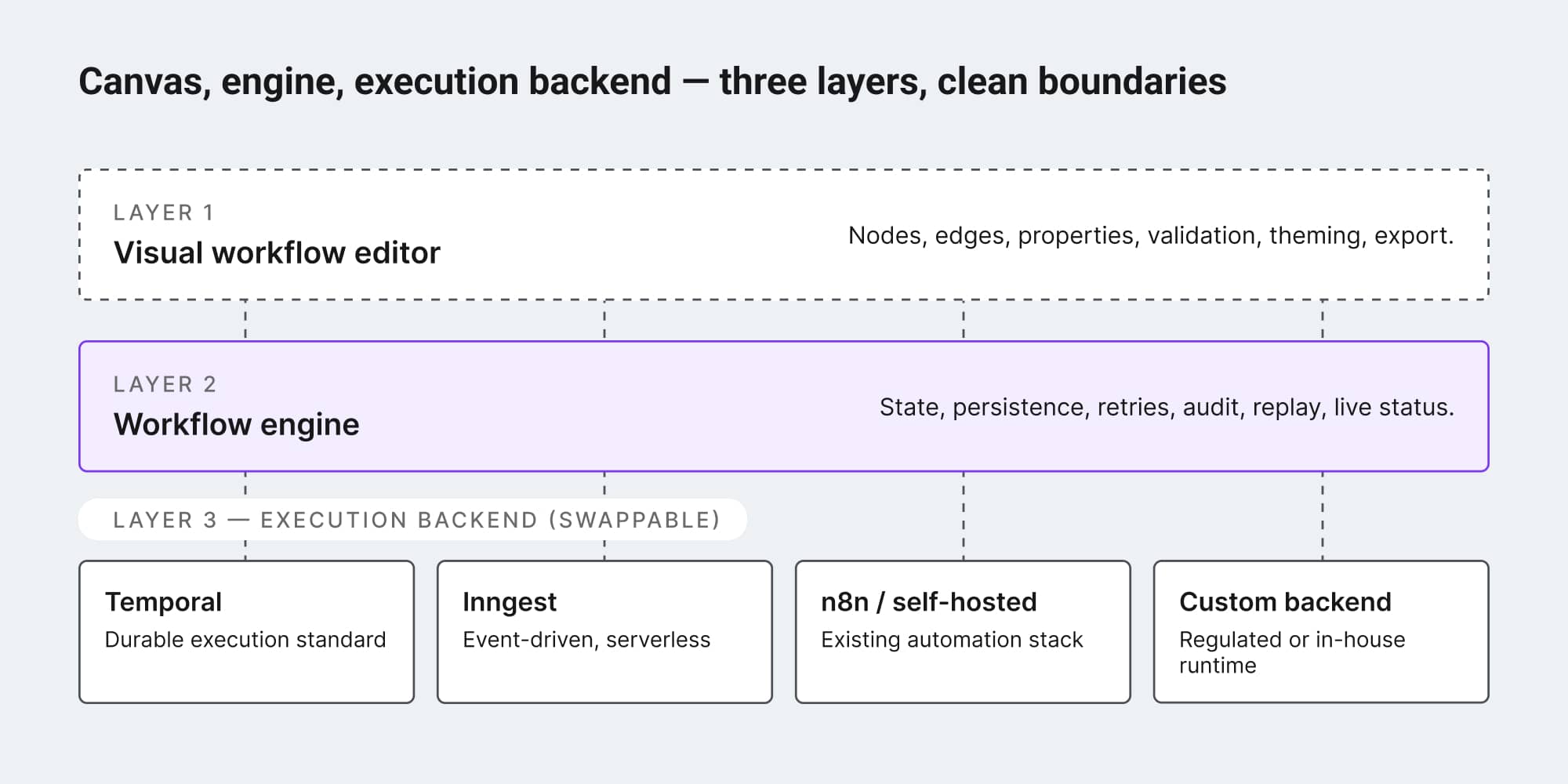
The "two parts" model is exactly what Workflow Builder ships: visual canvas as React SDK, reference back-end as separate orchestration shell, durable execution as your choice. The full four-layer architecture is laid out in code-first AI workflows.
Key learning for product teams
For a product team evaluating workflow editors - to embed in their own SaaS, or to build out internally - the practical takeaway is to evaluate canvas and engine as one decision, not two.
Three questions tend to clarify it:
What does the customer see when something fails? If the answer is "a generic error icon," you do not have an engine. If the answer is "the exact node, the input, the output, the timestamp, and a retry button," you do.
What happens to a workflow that pauses for two days waiting on a human? If the answer involves cron jobs, a process holding memory open, or a polling loop, you do not have durable execution. If the answer is "the engine wakes the workflow when the approval comes in," you do.
How much of your engineering team is going to spend the next year building observability and reliability for the canvas you already shipped? If the answer is "more than we want to admit," that is the engine work. It does not go away by being deferred.
The interesting move in the embeddable workflow SDK category over the last year has been the recognition that shipping the canvas without the engine was always a half-product. The teams that pretend otherwise pay the bill in support tickets, churn, and roadmap delay. The teams that take the engine seriously, by building it, buying it, or getting it as part of a stack with a swappable backend, end up with a product their customers can actually trust.
A workflow editor is a promise to a user: draw this, and it will run. Honoring that promise is the engine's job.
Workflow Builder is an embeddable workflow editor SDK by Synergy Codes. Version 2.0 ships with a packaged SDK and a reference execution backend on Temporal, with the engine layer designed to be swappable.
An entrepreneur and tech enthusiast, with over 14 years of experience building innovative diagramming solutions and tools across industries. Our interfaces help technical and non-technical users make informed business decisions.
Articles you might be interested in
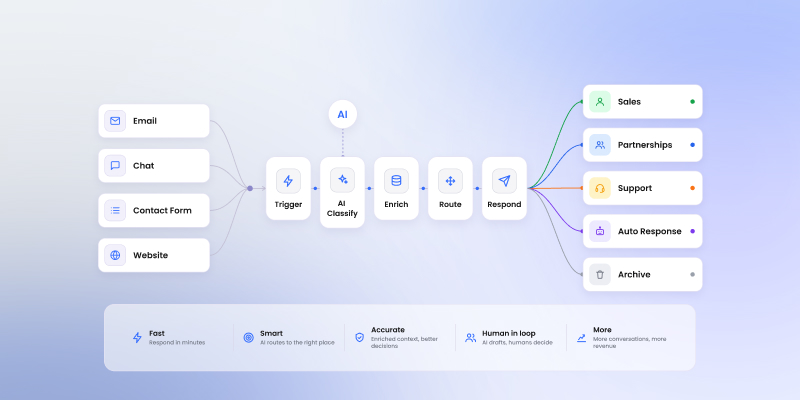
Sales inquiry AI workflow: a practical blueprint for routing and answering inbound requests
Inbound sales inquiries look the same on the surface and route to completely different teams. A five-step LLM workflow editor blueprint for classification, enrichment, and routing without the noise.