Temporal UI: why durable execution still needs a visual authoring layer

Temporal Web UI is excellent at what it does: letting engineers see, search, and replay workflow executions in production. It is not a workflow authoring tool, and it was never meant to be. The gap between watching a workflow run and designing one with stakeholders is where a visual authoring layer earns its place… and the question Temporal teams keep asking is what that layer should look like.
The Temporal community runs into the same conversation almost every quarter. Someone on a forum, in a Slack channel, or on a GitHub discussion asks the same thing: is there a visual builder for Temporal workflows? The answer the community gives is consistent and accurate. Temporal is code-first by design. Workflows are TypeScript or Go or Java functions. The Web UI shows you what those functions did at runtime – pending activities, event histories, queries, signals, the whole timeline.
That is the right design for the engineering audience Temporal is built for. It is also why the question keeps coming back. Engineers do not always need a visual builder. Their stakeholders sometimes do.
What Temporal UI actually is (and what it is not)
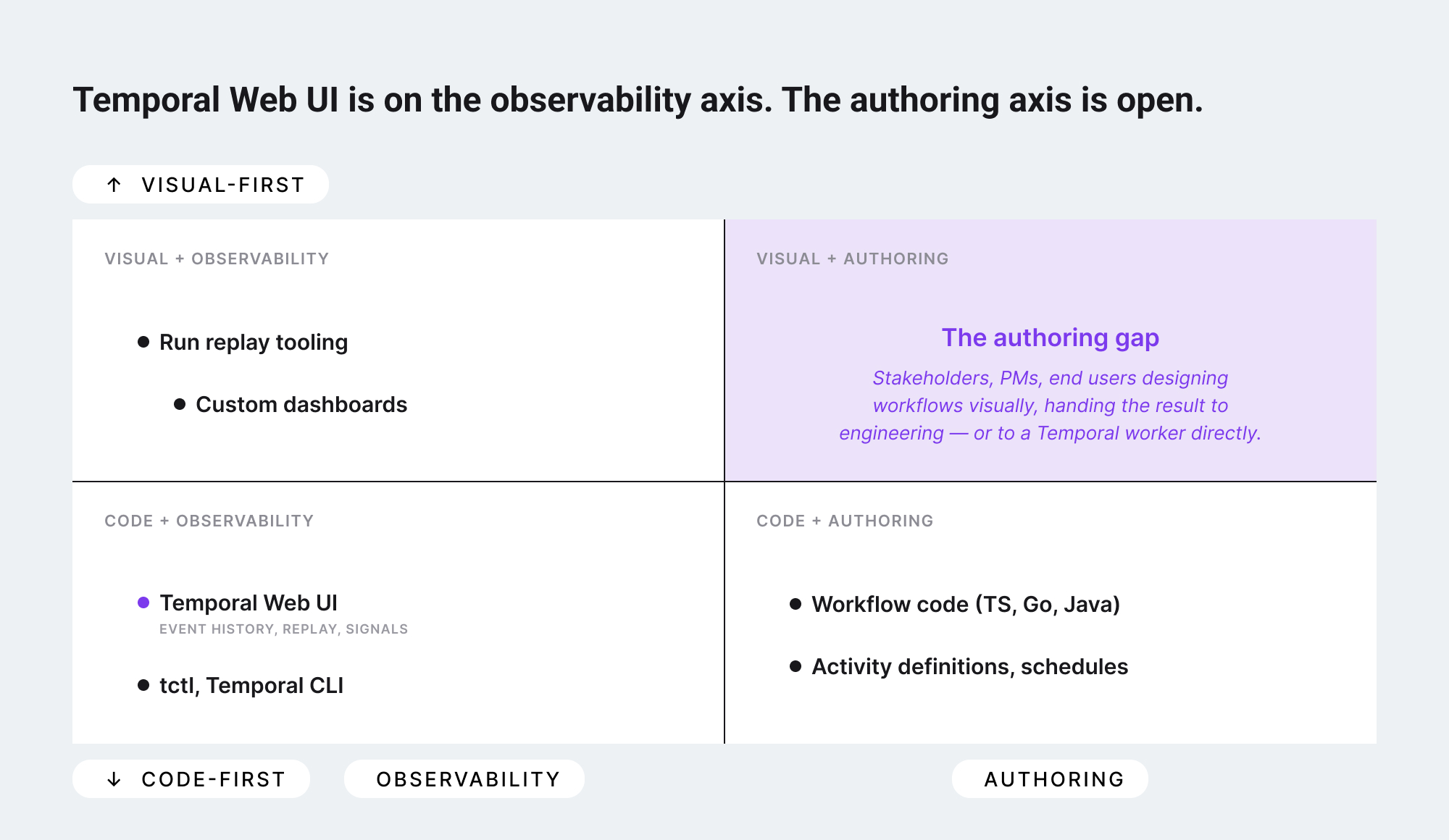
Temporal Web UI is an observability and operations surface. Open it during a production incident and you can find a specific workflow run by ID, namespace, type, or status. You can read the full event history of every step the workflow took, replay it locally to reproduce a bug, send signals to running workflows, and inspect activity inputs and outputs. For engineers operating durable execution at scale, this is exactly the toolkit they need.
What it does not do – and is not supposed to do – is help someone design a workflow before it exists. The Web UI is the surface where you see the consequence of a code commit. The code commit itself happens in an IDE, and the conversation that led to the code commit happens somewhere else entirely: a whiteboard, a shared diagram, a Notion page with arrows, a Lucid file. Somewhere a product manager and an engineer agreed what the workflow should do.
That earlier conversation – the authoring conversation – is where the gap lives.
Why a visual authoring layer matters even with great code
The argument against a visual builder for Temporal is that engineers can read code, and code is the source of truth. Both points are correct. The argument for a visual authoring layer is not that it replaces the code – it is that the code is not the only artifact a workflow needs.
Three audiences sit outside the codebase and have a legitimate need to see, edit, or contribute to a workflow:
#1 Stakeholders during design
When the conversation is "should the approval step branch on amount, or on customer tier, or both?" – that conversation goes faster on a visual canvas than in a TypeScript file. The output of the conversation becomes a spec, and the spec becomes the code. A visual authoring layer makes that whole loop tighter.
#2 Product managers and operations leads after launch
Once a workflow is live, the people closest to it are often the ones who cannot read its source code. They notice that step 4 should run before step 3, that a new node is needed for a regulatory check, or that a branch needs an extra condition. A visual layer lets them propose changes without filing a Jira ticket and waiting for a sprint.
#3 End users embedded in your product
If you are building a SaaS product on Temporal – and many durable execution use cases are SaaS products at the edges – your customers may need to author their own workflows inside your application. They are never reading your code. They need a canvas. Code-first is the right answer for the platform team. It is the wrong answer for the customer-facing surface.
None of this changes Temporal's value proposition. It simply means there is a layer above the runtime where authoring happens, and that layer needs its own surface.
What "visual authoring layer for Temporal" should mean
The phrase gets used loosely. Three different things have shown up in community discussions, and they are not interchangeable.
#1 Visualization of an existing workflow run
Temporal Web UI already does this for the timeline view. Some teams have built custom React components on top of Temporal's events to show a graph-shaped view of what a workflow did. This is observability, drawn as a graph – useful, but downstream of authoring.
#2 Code generation from a visual editor
A canvas where a user drags nodes and edges, then exports a TypeScript or Go file that compiles into a Temporal workflow. This works for narrow domains where the node types map cleanly to activities, and breaks down quickly for workflows with conditionals, loops, signals, and parent-child relationships. Most attempts at "drag-and-drop generates Temporal code" have hit this wall.
#3 A canvas that produces structured workflow definitions interpreted by a Temporal-aware runtime
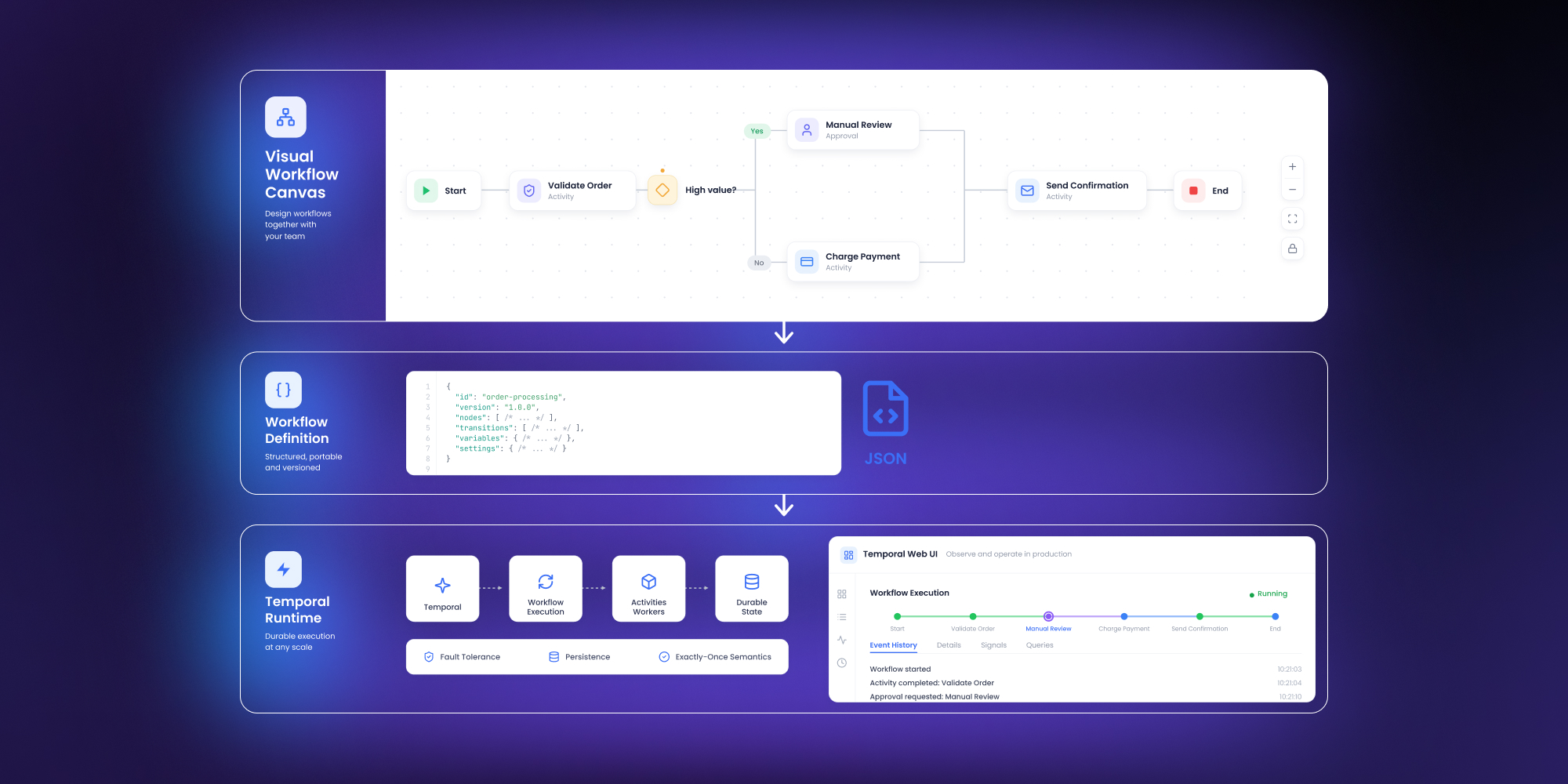
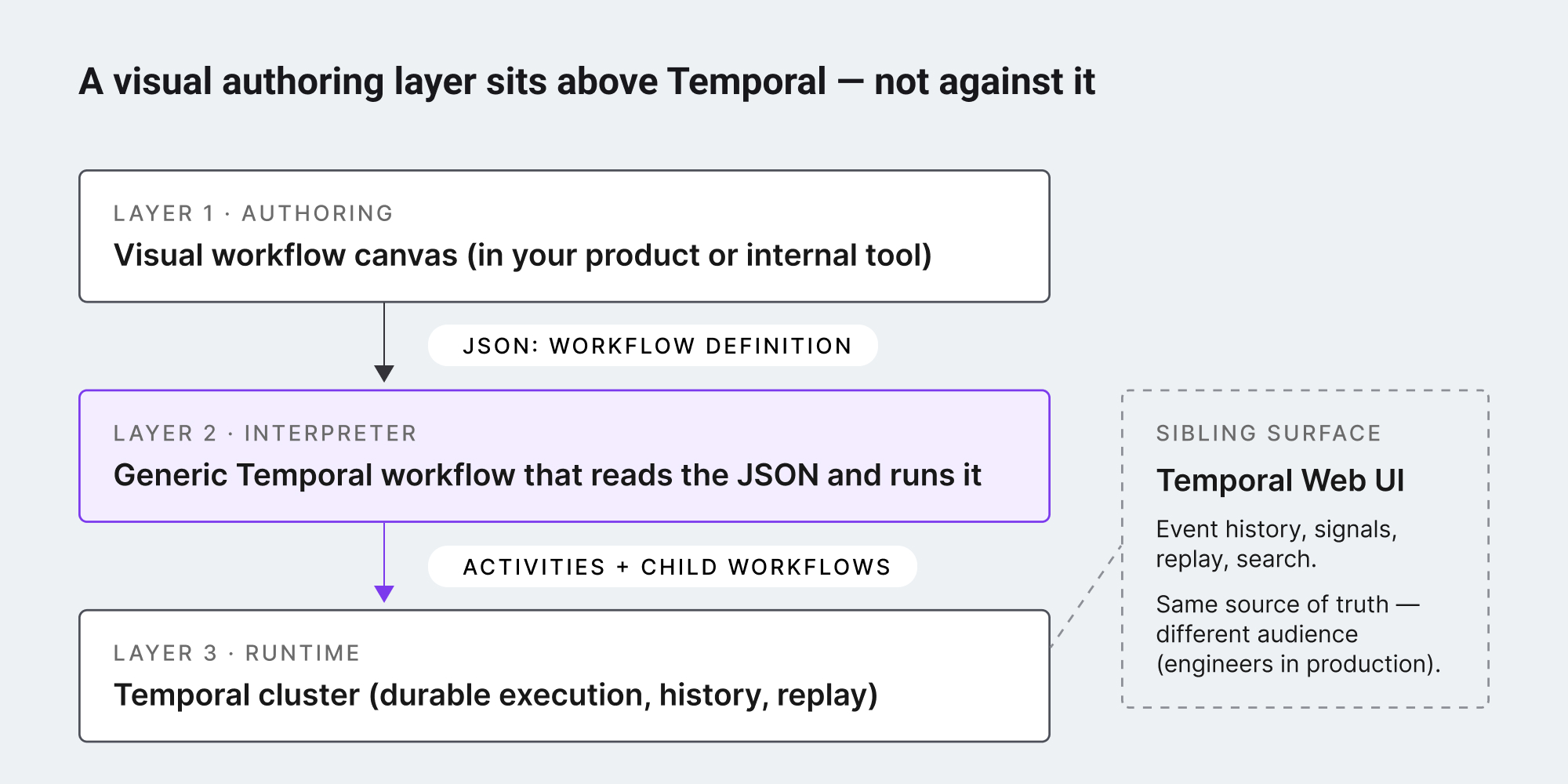
The user authors visually. The output is a structured document – usually JSON – that describes the workflow's intent. A small adapter on the Temporal side reads that document and runs it as an interpreted workflow, with each visual node corresponding to an activity or a child workflow. The code on the Temporal side is generic; the specifics live in the document.
The third pattern is the one that scales. It keeps Temporal where Temporal is best – running durable, recoverable, long-running execution – and puts authoring where authoring is best, in a canvas the right people can use.
Use case example
Concretely: a product or platform team wires up a canvas in their application – usually using a workflow editor SDK so they are not building drag-and-drop primitives from scratch. Each node type on the canvas maps to a known activity or a child workflow on the Temporal side. The user designs a flow, hits save, and the canvas exports a JSON document. That document is passed to a single, generic Temporal workflow – the interpreter – which reads it and executes the steps in order, branching on conditionals, waiting on signals, calling activities for each node.
The Temporal cluster never has to know about the canvas. From its perspective, it is running one workflow type, parameterized by a definition. The activities are normal Temporal activities. The retries, timeouts, and durability properties are exactly what they always were. A new node type on the canvas means a new activity on the Temporal side and a new entry in the interpreter's switch statement – not a new workflow definition deployed to production.
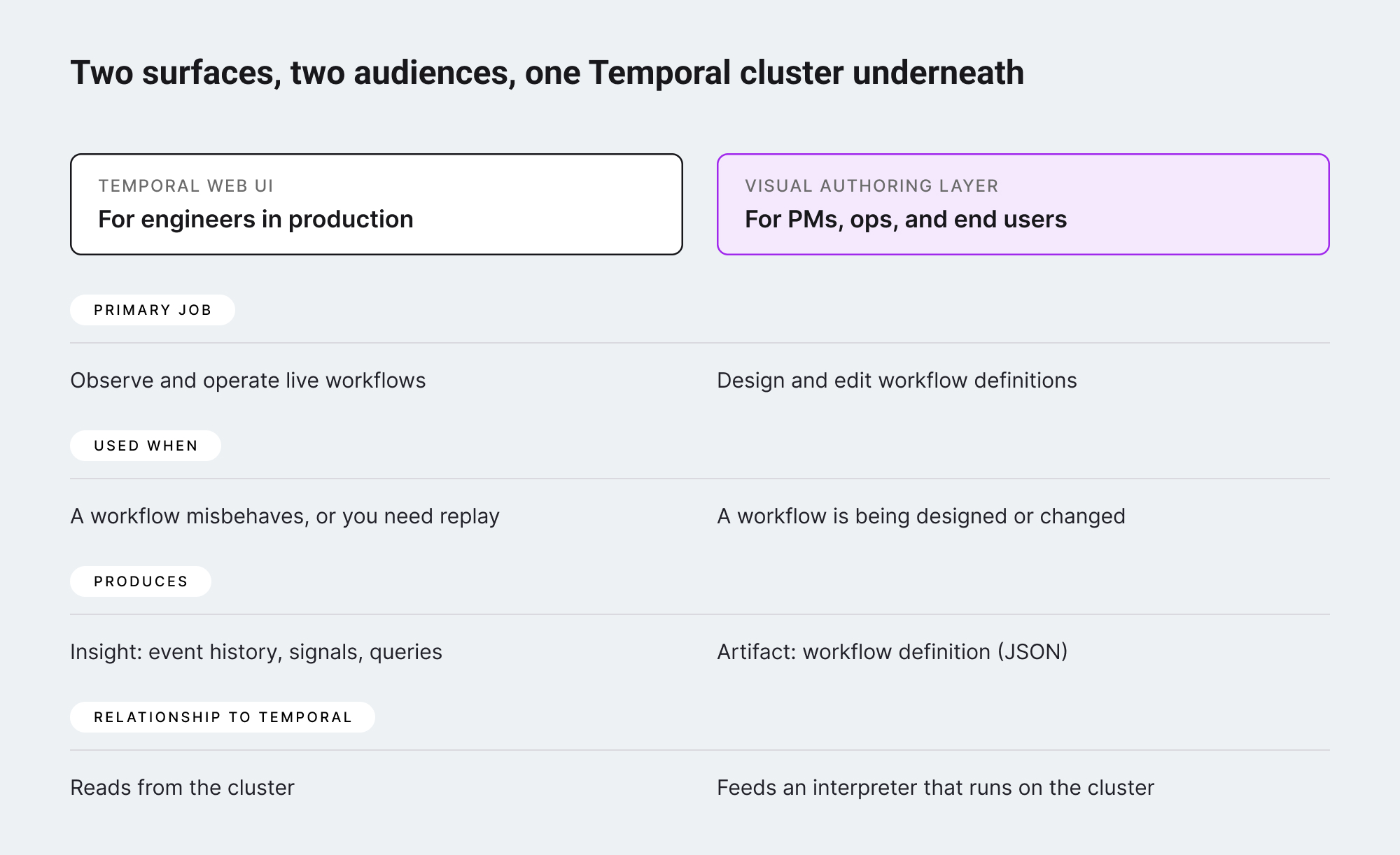
For Temporal teams the operational story stays clean. Temporal Web UI continues to show what is happening at the runtime level. Engineers debug by looking at activity inputs and outputs and event histories, exactly as before. The visual canvas adds a separate surface – owned by product, used during authoring – that does not interfere with operations.
Where the visual canvas helps Temporal teams specifically
Beyond the authoring story, a visual canvas integrated with Temporal solves three concrete problems Temporal users have raised:
- The "what does this workflow do" question for non-engineers. A new product manager joins, asks how the order-fulfillment workflow works, and the answer involves opening a TypeScript file. A visual canvas gives the same answer in a form the PM can read in twenty seconds.
- Shipping customer-facing workflow features. Some Temporal-backed products have customers who need to define their own logic – automation rules, approval flows, data transformations. Without a canvas, those features either require professional services to build or never ship. With a canvas wired to a Temporal interpreter, the customer authors their own workflow, and Temporal runs it durably under the hood.
- Faster iteration on workflow shapes. Even for engineers, sketching a workflow on a canvas before writing code can compress days of design discussion into one afternoon. The canvas becomes the design doc. The code that follows is shorter and more closely matches what the team agreed on.
What teams should look for in a visual authoring layer
If a team has decided that they need a visual layer above Temporal, the practical question is what to use.
The output has to be data, not code
A canvas that generates TypeScript is a code generator, and code generators tend to lose round-trip fidelity – the moment an engineer hand-edits the generated code, the canvas can no longer reopen it. A canvas that produces a structured definition (JSON, typically) is a data exchange format. The interpreter on the Temporal side reads it; the canvas reads it back when the user opens the workflow again. Round-trip clean.
The canvas has to be embeddable, not a standalone product
If the goal is to put the authoring surface in front of customers or non-engineering colleagues, it needs to live inside the existing product, with the existing auth, theming, and navigation. A separate web app at a different URL with a different login is a different product, and people use it less. SDK-shaped canvases (React components, configurable node types, themable) integrate cleanly. Hosted standalone canvases do not.
The canvas HAS to leave Temporal alone
The integration should happen at the JSON-definition level, not by trying to abstract over Temporal's API. Temporal teams already trust their cluster, their workers, their Web UI. A visual layer that asks them to give up direct access to those things is asking too much. A visual layer that produces a definition consumed by a normal Temporal workflow is asking very little.
Over to you
The Temporal community has been right to resist the framing of "visual builder vs code-first." The actual shape of the answer is: code-first runtime, visual-first authoring surface, with a clean adapter between them. Temporal owns the durable execution. The canvas owns the design conversation. The Web UI keeps doing what it does, for the audience it was always meant for.
For Temporal users who have been improvising with Lucid diagrams, Notion docs, and screenshot-driven design conversations – there is now a reasonable shape for what to put in their place. A visual workflow canvas embedded in the product or internal tool, producing JSON definitions, interpreted by a small generic workflow on the Temporal side. Three layers, clean boundaries, every team gets to do what they are best at.
That is the visual authoring layer Temporal has always made room for. It just took the rest of the stack a few years to catch up.
Workflow Builder is an embeddable workflow editor SDK by Synergy Codes. Version 2.0 ships with a packaged SDK and a reference execution backend on Temporal – the canvas exports JSON workflow definitions consumed by an interpreter on the Temporal side, leaving the cluster and Temporal Web UI exactly as they were.
An entrepreneur and tech enthusiast, with over 14 years of experience building innovative diagramming solutions and tools across industries. Our interfaces help technical and non-technical users make informed business decisions.