Why durable execution alone WON’T save your AI agent, and what comes after

.jpg)
A production AI agent needs more than a good model, a few tools and a retry loop.
That is no longer a controversial statement. Durable execution has become a serious part of the production AI stack. Temporal positions it as a way to keep AI applications reliable across failures, state changes and long-running work. Inngest focuses on step-level retries, persistence and resumable execution. LangGraph uses checkpointers to persist graph state, while Restate persists agent steps, tool calls and routing decisions so agents can recover after a crash.
That solves an important problem: the agent can survive a failed API call, a deployment, a rate limit or a delayed approval.
It does not solve the whole product problem.
A durable runtime can make an AI workflow reliable while the workflow remains impossible for a customer to understand, difficult for a product manager to adjust and painful for an operations team to inspect. The runtime knows how the work runs. Your product still needs to decide who can shape that work.
That is where the next layer appears: visual authoring.
Learn more about durable execution for AI workflows or read why reliability is becoming the real AI-agent bottleneck.
What durable execution actually protects
Durable execution is a way of running code so work can survive failures and continue from a known point. The implementation differs across platforms, but the core idea is consistent: persist progress, retry only what failed and resume instead of restarting the whole process.
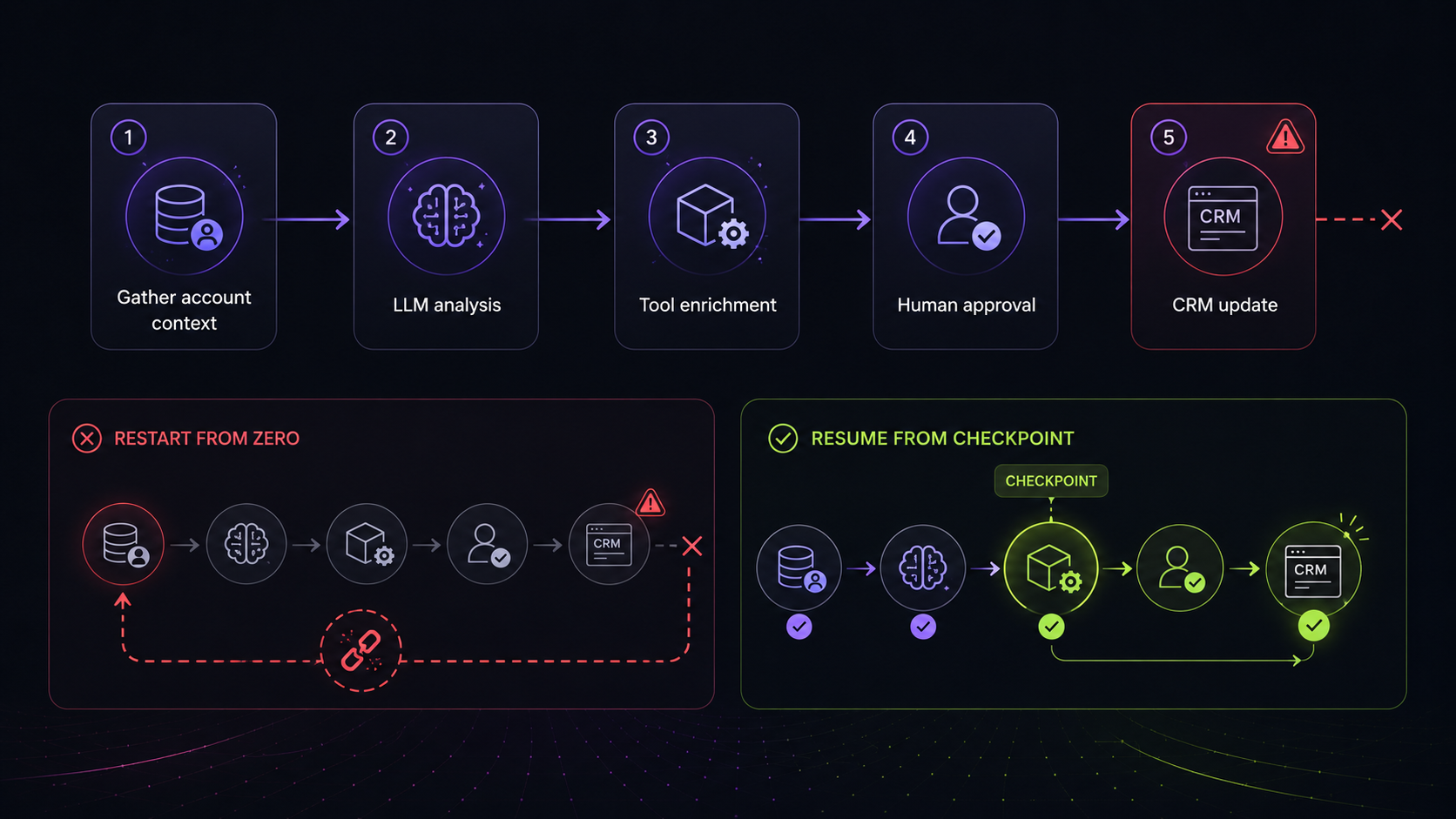
Consider a customer onboarding agent.
It collects account data, calls an LLM to generate recommendations, enriches the result through external tools, waits for a human reviewer and finally updates a CRM. The full journey may take minutes. In some products, it may take hours or days because a human approval step sits in the middle.
A conventional function can fail at any point. A third-party API times out. The model provider rate-limits a request. A deployment interrupts the worker. An approval arrives after the process has already disappeared from memory.
A durable runtime changes that behaviour. It stores progress as the workflow runs. When a later step fails, the runtime can retry that step or resume from the last completed checkpoint instead of repeating the entire chain. Inngest describes this as independent durable steps whose results are cached and retried separately. LangGraph checkpointers save graph state at each step to support persistence, human review and fault-tolerant execution.
That matters for more than uptime.
If an LLM call succeeded, repeating it may waste money and produce a different result. If a CRM update succeeded but the confirmation request failed, replaying the full chain may create duplicate records. If a human has already approved a sensitive action, a restarted workflow should not ask the same person to approve it again.
Durable execution gives teams a cleaner answer to those problems:
- persist the work already completed;
- retry only the failed part;
- preserve state across long waits;
- keep an execution history that engineers can inspect later.
This is why platforms such as Temporal, Inngest, LangGraph and Restate now frame durability as part of the AI-agent production stack. Temporal highlights state handling, retries and human-in-the-loop interactions. Restate describes durable agents as applications where LLM calls, tool execution and routing decisions are persisted for recovery. (temporal.io)
But reliability at runtime is only one layer of the experience.
A workflow that survives a crash can still be a workflow that nobody outside engineering can safely understand or change.
Read more about the difference between a workflow canvas and a workflow engine and why a Temporal workflow editor still needs a visual authoring layer.
The three product problems a runtime does not solve
Durable execution handles what happens when work fails. It does not decide who can author the workflow, what they can see or how they can improve it safely.
Those are product-design questions.
Durable execution does not solve authoring
Many AI products begin with code-defined workflows. That is sensible.
An engineering team needs full control over execution logic, permissions, tool access and failure handling. They should decide which actions exist, which data a node may access and what happens when something fails.
The problem appears when every workflow change becomes an engineering task.
A product manager wants to change the review branch for high-risk requests. An operations team needs a stricter approval route for one enterprise account. A customer wants to choose between approved retrieval strategies. A legal AI product needs different review rules for different types of documents.
None of those people should edit arbitrary runtime code.
They do need an interface where they can work within the boundaries that engineering has created.
That is the authoring problem. Engineering owns the primitives. Product users compose those primitives into a workflow that fits their context.
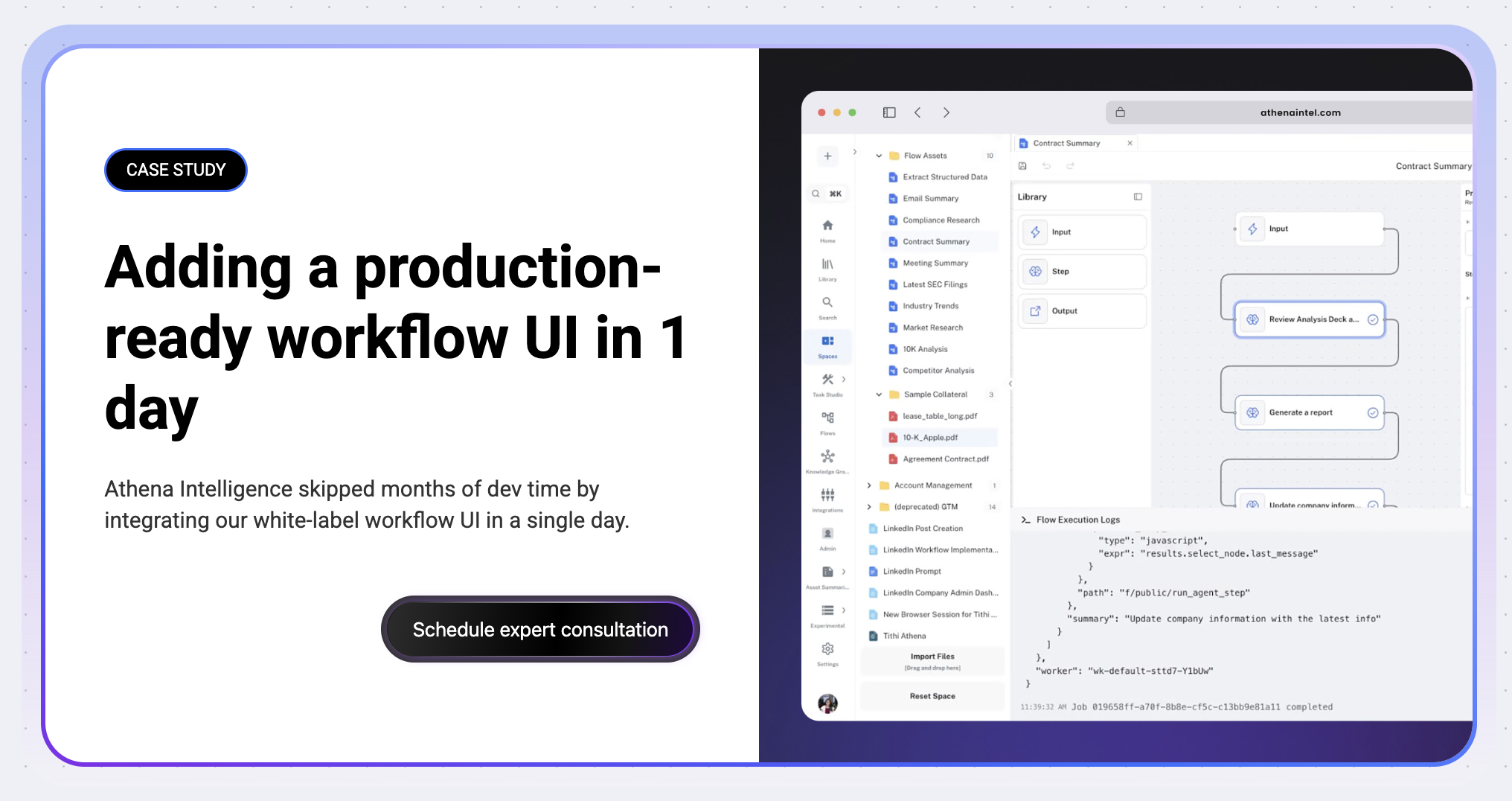
Athena Intelligence is a useful example. Its public case study describes an AI platform that needed a visual automation layer quickly, so enterprise analysts could work with multi-step AI flows inside the product instead of interacting with backend orchestration directly.
The right answer is not “replace code with drag and drop.”
The right answer is to define safe nodes, controlled inputs and approved paths. A visual workflow layer then gives users a way to configure what the product allows.
That distinction is important. A customer-facing workflow canvas should not expose every internal system decision. It should expose the decisions your product wants customers to own.
See how teams approach building AI agent pipelines with an SDK instead of from scratch.
Durable execution does not solve product-facing visibility
Runtime dashboards are useful. They should exist.
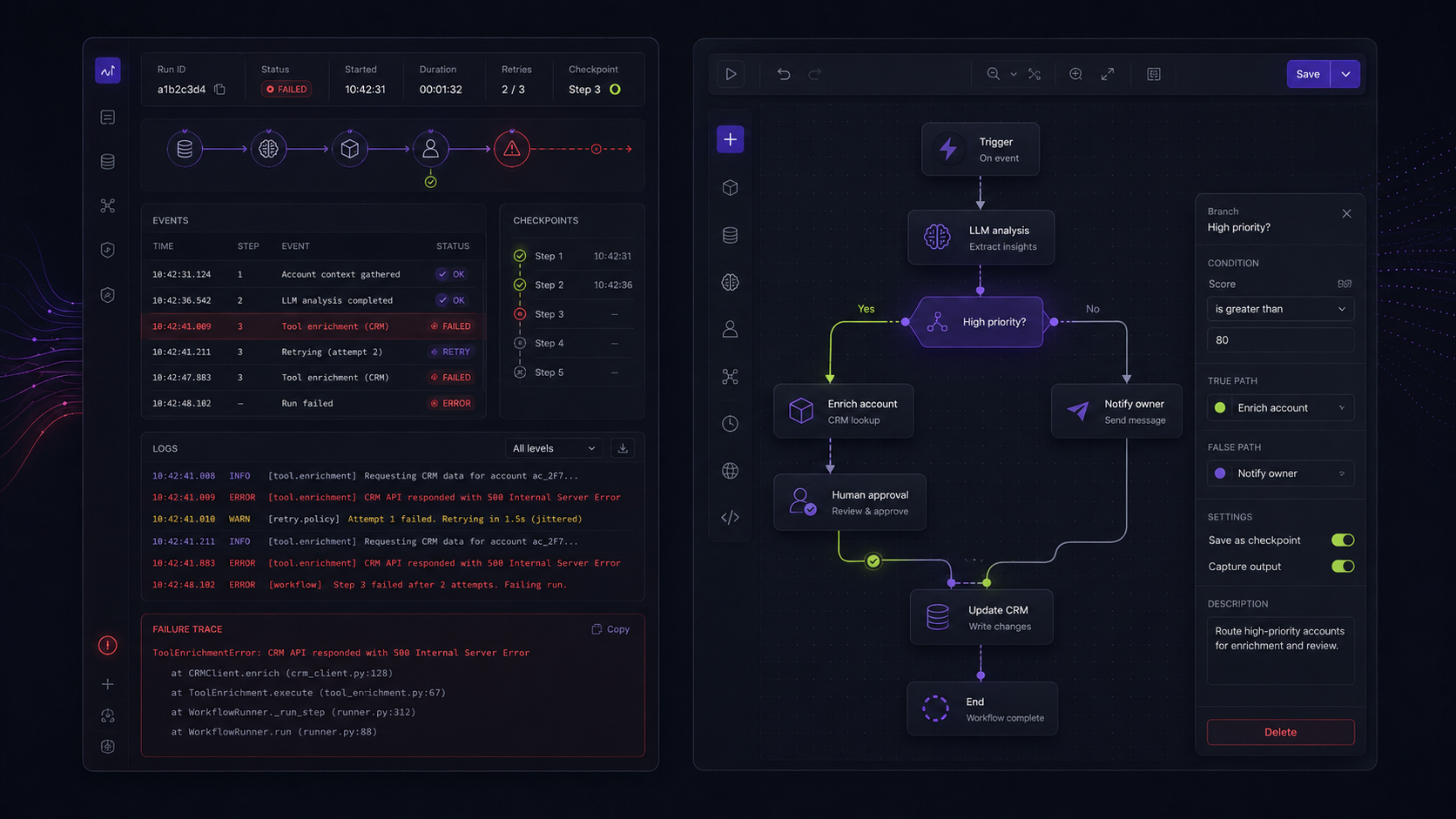
An engineer debugging a failed workflow needs to know which step failed, what input it received, how many retries occurred and whether the run can be replayed. Inngest, Temporal, Restate and LangGraph all provide different forms of execution state, tracing, persistence or debugging support.
But an operations console is not automatically a product interface.
A technical team asks:
- Did the workflow fail?
- Where did it fail?
- Can we retry it?
- What happened in the last run?
A customer, PM or operations lead asks something else:
- What does this agent do before it contacts a user?
- Where does the approval happen?
- Which rules apply to this account?
- Can we change the fallback route?
- Which steps can our team configure safely?
Those are not the same questions.
An execution console helps a technical team operate the system. A workflow canvas helps people understand and configure the system.
Trying to expose a runtime dashboard directly to customers often creates a confused product surface. The user sees implementation details that do not help them make a business decision. Meanwhile, the controls they actually need remain hidden in code or internal tickets.
A better product separates the two views:
- engineering gets the runtime-level view;
- product users get the configuration-level view;
- both views refer to the same underlying workflow.
Read why live workflow execution visualisation needs a separate user-facing experience.
Durable execution does not solve governed iteration
AI workflows change after launch.
Prompts need adjustment. Tool access changes. A retrieval strategy works well for one account but poorly for another. A human approval step becomes necessary after an incident. A new policy introduces a routing rule that only applies to one geography or customer tier.
Those changes should not always require a full engineering cycle.
That does not mean product users should have unrestricted power over the agent. It means they should be able to change the configuration that the product has deliberately made configurable.
For example, an engineering team might define:
- an approved set of LLM providers;
- several retrieval nodes with fixed security boundaries;
- a review node for sensitive decisions;
- a limited set of policy branches;
- validated inputs for each node type.
The product team can then decide which of those controls appear in the visual authoring layer.
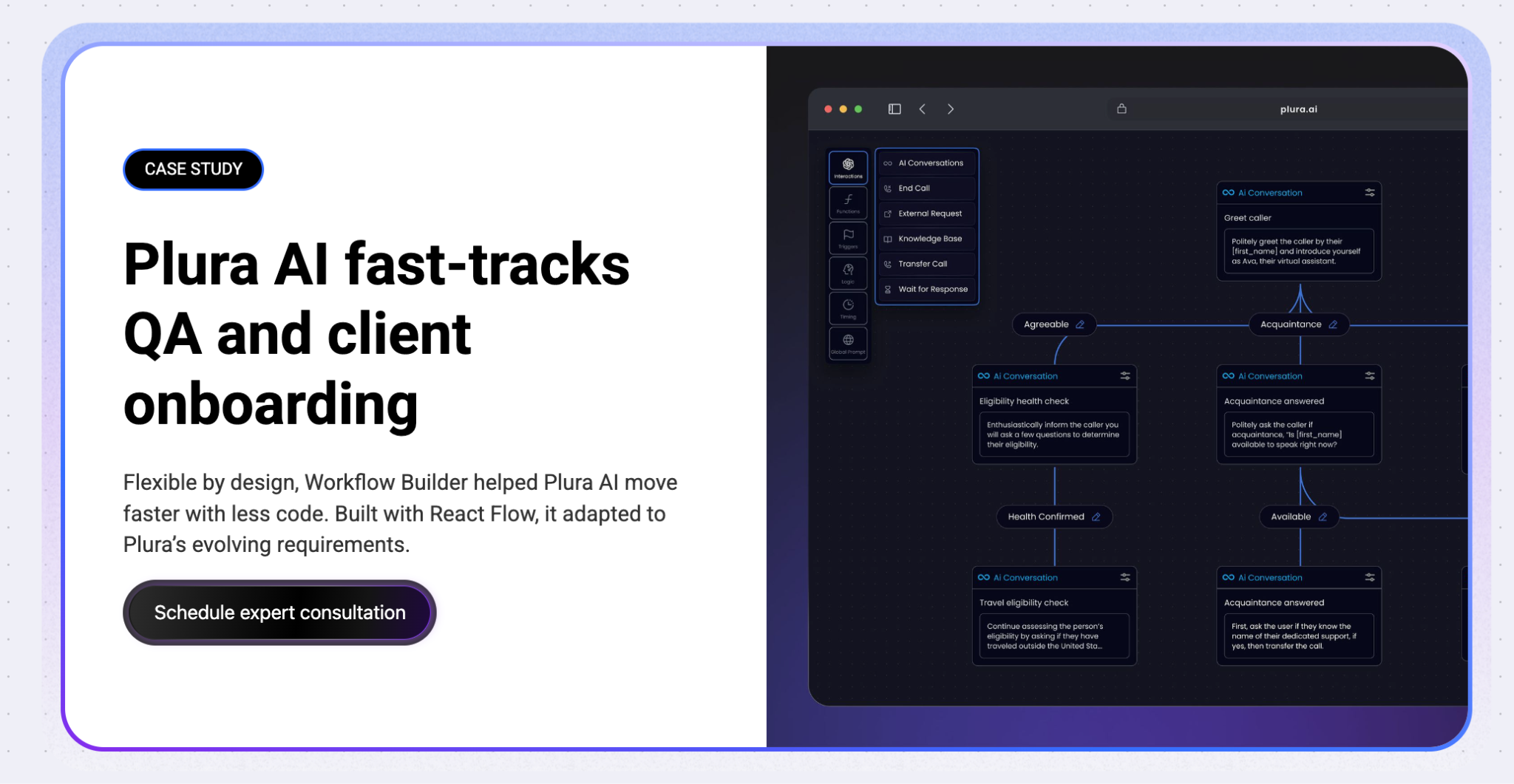
Plura AI is another example of why that flexibility matters. Its public case study focuses on visual AI workflow design, dynamic configuration and faster changes as requirements evolved.
The key idea is simple: visual authoring is not about making the runtime less technical. It is about making the product more governable.
Explore the hidden cost of building workflow editors in-house.
Three ways teams expose workflow state
Not every AI product needs a visual editor on day one. The right interface depends on who needs to work with the workflow.
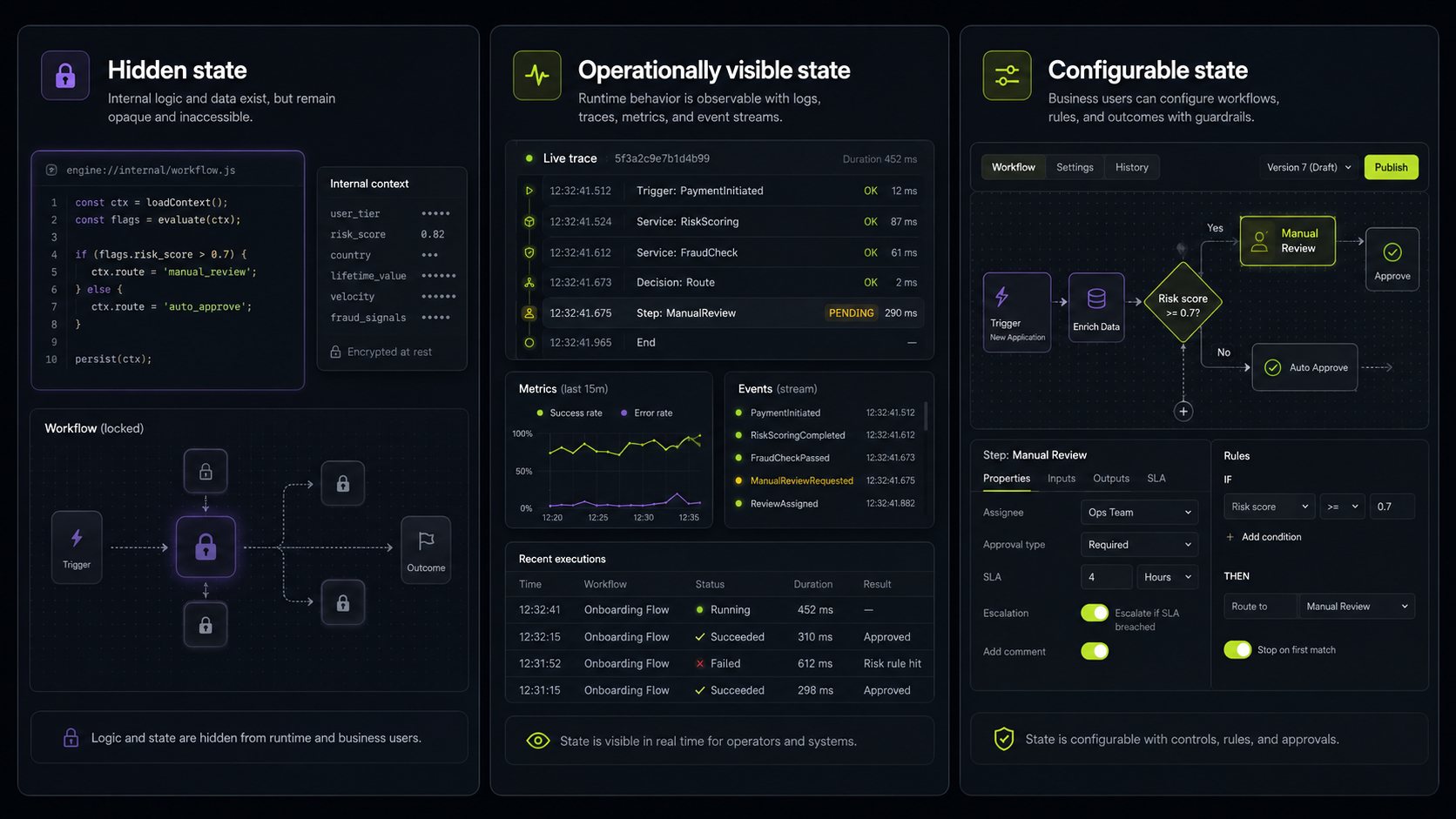
Pattern 1: Hidden state
In this model, workflows live in code.
Engineers define the graph, change the logic and operate the runtime. Users see the result of the workflow, but not the workflow itself.
This works well for internal systems, narrow AI features and stable processes where no one outside engineering needs to configure the flow. A batch document-processing pipeline may be complex, but it does not need a customer-facing canvas if the workflow rarely changes and only developers own it.
The weakness appears when a customer starts asking for visibility or control. At that point, the product has a workflow that matters to the customer but no safe way for the customer to interact with it.
Pattern 2: Operationally visible state
In this model, the runtime is visible to technical operations teams.
Platform engineers, MLOps teams or developers can inspect execution history, trace failures, replay runs and monitor step-level behaviour. This is where Temporal Web UI, Inngest traces and similar runtime tools provide real value. (workflowbuilder.io)
This pattern is right for teams whose main need is observability.
It breaks when a company treats operational visibility as customer-facing configurability. A runtime dashboard may tell an engineer why a workflow failed. It does not give a customer an intuitive way to redesign a routing path or choose a review step.
Pattern 3: Configurable state
In this model, the workflow becomes part of the product.
The SaaS application includes an embedded visual authoring layer. Engineering defines the nodes, permissions, validation rules and execution boundaries. Customers, PMs or operations teams configure workflows within that safe model.
This pattern is especially useful when workflow logic varies across accounts, teams or verticals.
A legal AI product may expose nodes for document intake, retrieval, review and escalation. A healthcare product may expose intake routes, approval points and patient communication rules. A customer-operations platform may let users control escalation paths or handoffs between an agent and a human.
Workflow Builder is designed for this third pattern. Its AI workflow positioning centres on an embeddable editor, a reference backend and a swappable Temporal integration, while the customer keeps control of the runtime, models and backend.
The case studies support that distinction.
Athena Intelligence used a visual workflow layer inside an AI platform. Plura AI used Workflow Builder to support changing requirements in a visual AI workflow product. Vercom provides a useful non-AI parallel: enterprise customers needed to build complex RCS journeys in the product, with no dependency on developers for every change.
Compare Workflow Builder and n8n if you need a product-embedded editor instead of a connector-led automation platform. You can also see how it differs from Langflow and Dify when the editor needs to live inside your own SaaS product.
Where the visual authoring layer fits in a production stack
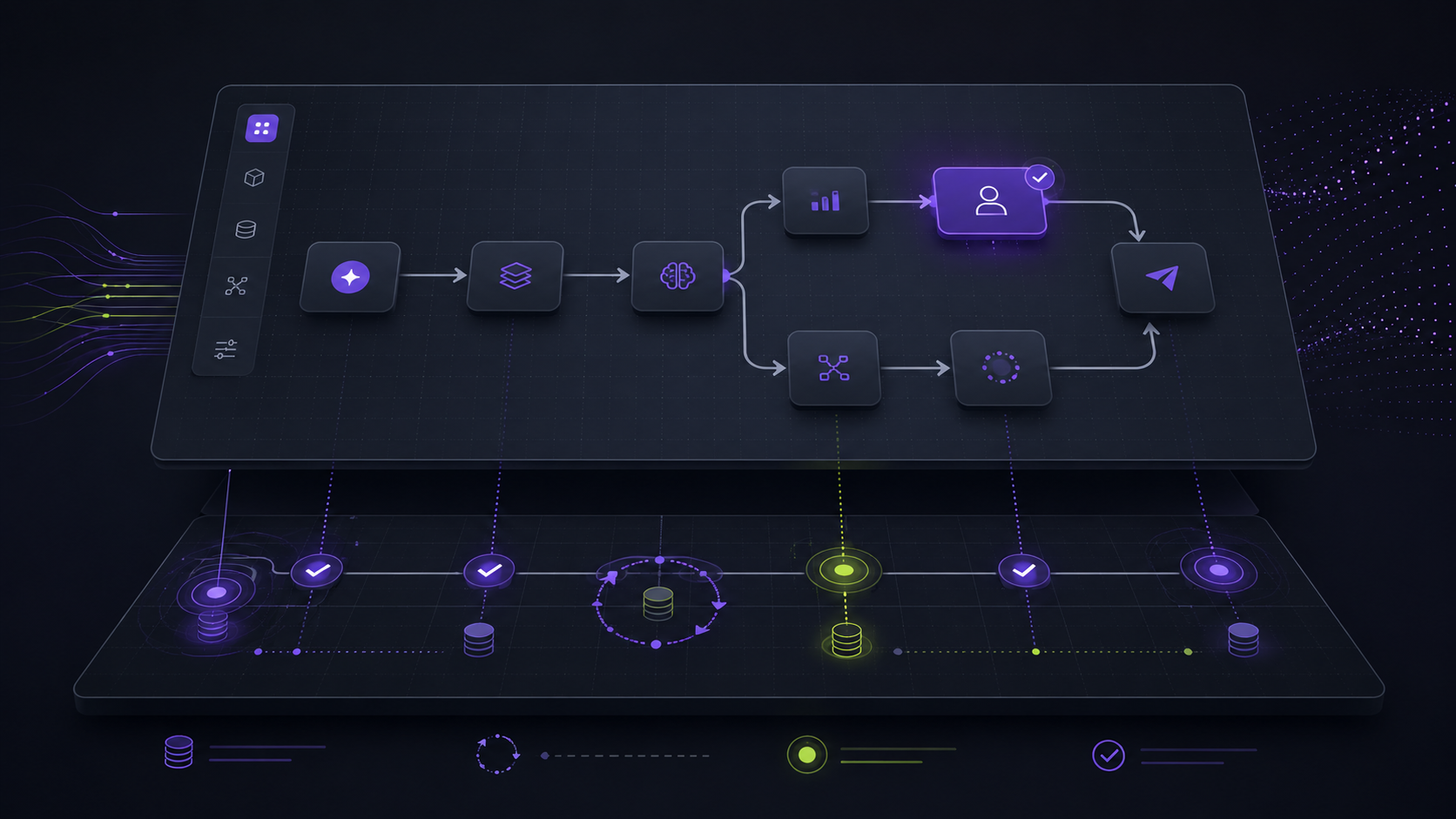
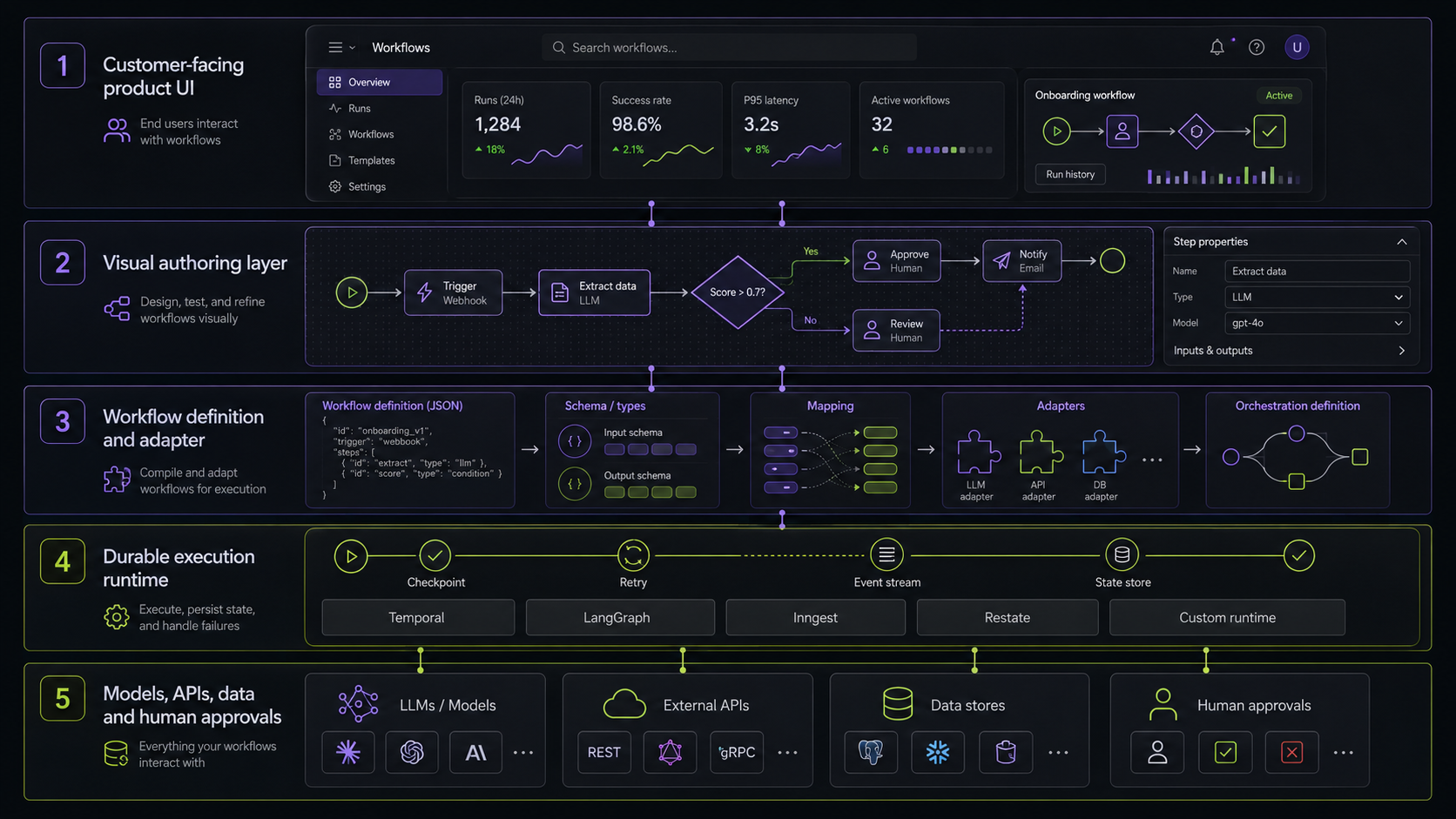
A production AI workflow has several layers. Confusion starts when teams expect one of them to do every job.
- Product interface. This is where a customer, operator or product user works. It needs to feel native to the SaaS product, reflect account permissions and show only the controls the user should have.
- Visual authoring layer. This includes the workflow canvas, node library, forms, validation, layout, templates and rules that make configuration safe.
- Translation layer. It takes a saved workflow definition, often represented as JSON, and maps it to the execution model your backend understands.
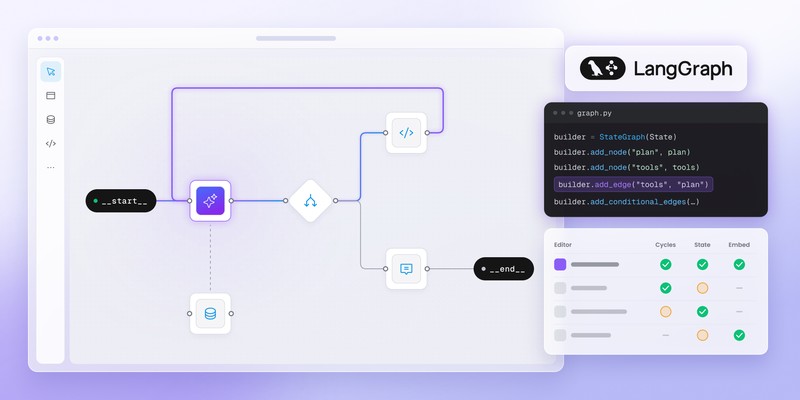
- Durable runtime. Temporal, LangGraph, Inngest, Restate or a custom executor handles persistence, retries, state recovery and long-running execution. LangGraph describes itself as an orchestration runtime for durable execution, streaming, human-in-the-loop work and persistence. Temporal positions its workflow engine around durable execution and recoverable long-running AI applications.
The final layer contains your business systems: LLM providers, internal APIs, retrieval services, CRMs, databases and human approval channels.
Workflow Builder belongs in the visual-authoring layer.
It does not need to replace your runtime. It should not replace your model provider, data layer or backend. The job is narrower and more useful: give your product an embeddable workflow interface while the execution engine remains where your engineering team expects it to be.
That separation is what makes pairing practical.
A team can keep Temporal for durable execution. It can use LangGraph for agent orchestration. It can build a custom backend around internal systems. The visual layer stays focused on designing and configuring the workflow experience.
Read how to add workflow execution to a visual workflow editor, or explore code-first AI workflows for product teams.
When should you add a visual authoring layer?
A visual authoring layer earns its place when the workflow itself becomes part of the product value.
Add one when customers need to configure multi-step workflows, when account-specific rules vary, when product teams need controlled iteration or when users need to understand why an agent takes a given route.
It is also useful when the product must demonstrate governance. In regulated contexts, users may need to see where review takes place, what data enters a decision and where a human can interrupt the flow. The visual layer does not replace runtime audit trails, but it makes the configured logic easier to inspect before the workflow runs.
Stay code-first when only engineers configure the flow, the product is still validating a narrow use case or a canvas would expose complexity that users do not need.
A visual editor is not a default requirement for every agent.
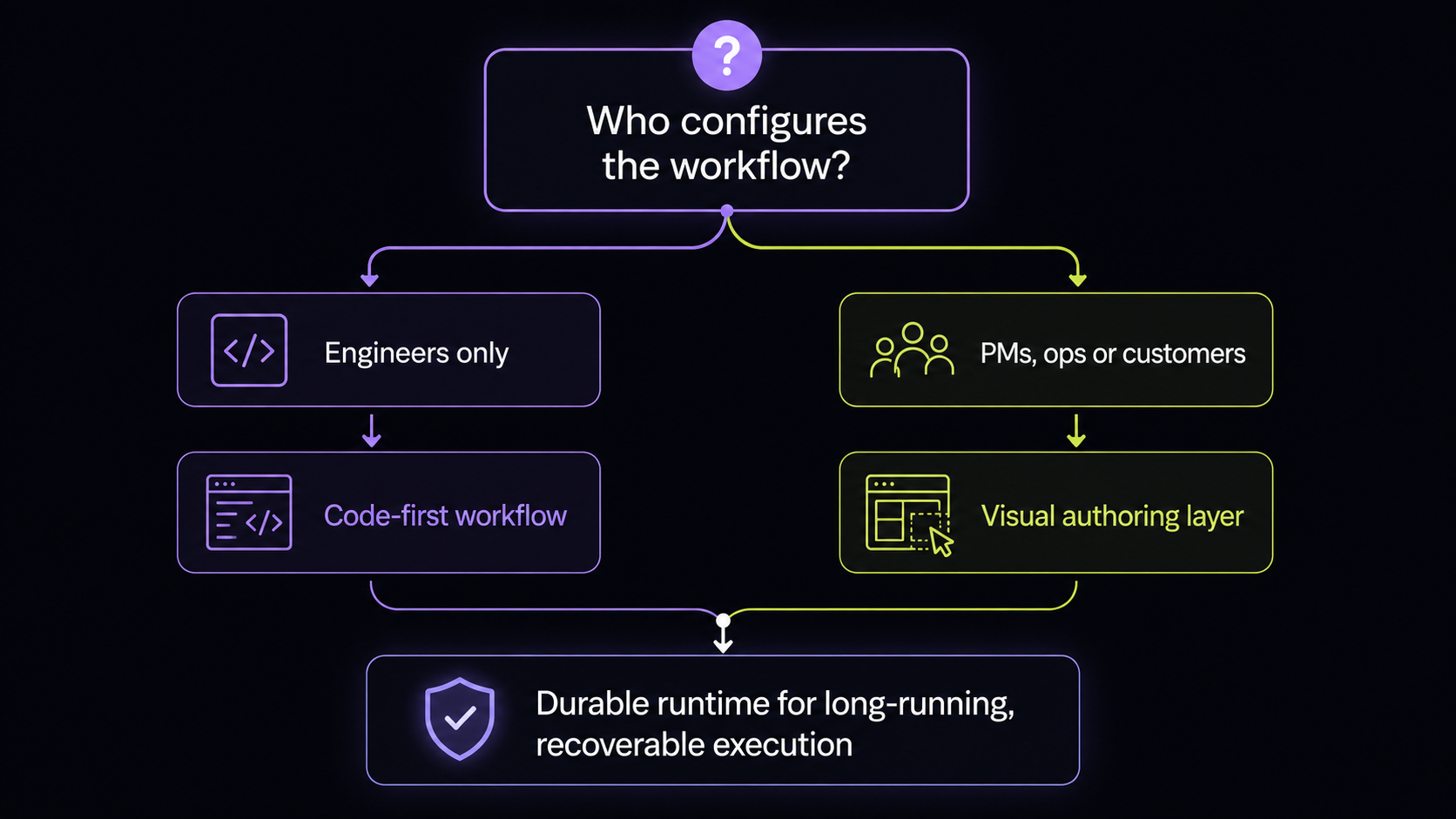
It becomes valuable when the answer to one question changes:
Who needs to shape the workflow after engineering has built it?
If the answer is “only engineers,” durable execution plus code-defined orchestration may be enough.
If the answer includes PMs, operations teams or customers, the product needs a controlled authoring surface.
Explore the build vs buy workflow editor decision, then see how an embedded workflow automation platform for B2B SaaS can keep workflow configuration inside your own product.
Durable execution is not the end of the architecture
Durable execution answers an important question: how does the workflow survive failure, delay and change?
It does not answer another question: who can understand, inspect and shape that workflow once it is part of a real product?
That is where visual authoring belongs.
The runtime owns recovery, retries, state and execution. The product owns the user experience, configuration boundaries and account-specific logic. A visual authoring layer connects those two responsibilities without forcing your team to turn a runtime dashboard into a customer-facing product or build a workflow editor from zero.
Your durable runtime can keep the agent alive.
Your visual layer helps people make it useful.
Explore AI workflows with Workflow Builder or see the workflow-editor build vs buy decision.
An entrepreneur and tech enthusiast, with over 14 years of experience building innovative diagramming solutions and tools across industries. Our interfaces help technical and non-technical users make informed business decisions.