
Agentic workflow patterns, drawn as graphs


Most agentic systems reduce to one building block – the tool-using agent – plus 5 recurring shapes: chaining, routing, parallelization, reflection, and human-in-the-loop. Seeing each one as a node graph makes the control flow obvious. It also exposes a trap: a reflection loop is a cycle, and many execution engines only run a directed acyclic graph.
Most production "agents" are not one clever prompt. They are a handful of repeatable graph shapes, wired together. Anthropic's own guidance on building effective agents makes the same point: composing simple patterns beats a single monolithic agent. The five shapes below are the agentic design patterns almost every system reuses.
Why patterns, and why draw them
Agentic systems converge on a small set of structures – a handful of agentic design patterns – because the hard part is rarely the model call. It is the control flow around it: what runs first, what runs in parallel, what happens when a step fails, and where a human steps in.
A pattern is just a shape. Nodes are steps. Edges are the flow between them. Once you see it that way, agentic workflow design becomes graph design, and a diagram tells you in one glance what a page of prose hides.
You do not need a canvas to build these agentic AI workflows – prompting an LLM works, code works. The structure is a graph either way: Google's ADK 2.0 just shipped graph workflows, agentic workflow patterns defined in code. You need the canvas for what comes after: checking that the flow is actually right, pausing it mid-run for a human decision, putting it in front of people who do not read code. There, a drawn graph beats both the chat transcript and the source file.
Drawing also forces a distinction people tend to blur. The editor models the structure. The engine runs it. A visual builder like Workflow Builder is execution-agnostic: each node maps to a step your backend processes, and nothing runs until your code says so. Keep that split in mind, because one pattern below breaks exactly where people forget it.
The building block: an agent that uses tools
Every pattern here is built from one unit: a step that hands work to a model.
That step carries a system prompt, optional memory, and a set of tools. Tools are named integrations the agent can call, such as Gmail, Jira, or Slack. Retrieval (RAG) is not a separate kind of node. It can be an upstream step that fetches context – the variant the figure shows – or just another tool the agent calls itself. In the upstream version the agent pulls the context in through its system prompt – a {{nodes.retrieve-1.response}} reference picked from the variable picker.
The node holds the configuration. Your backend makes the actual model call at run time. In Workflow Builder this unit is the AI Agent node, and the model is yours to pick – whatever your backend supports.

Prompt chaining
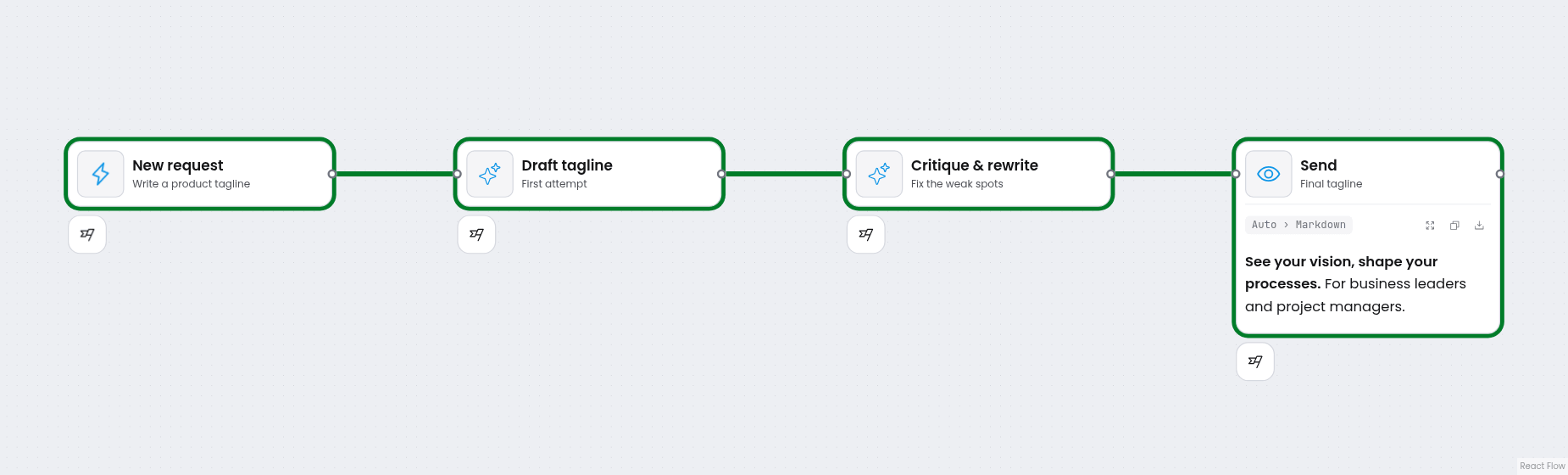
The simplest pattern is a straight line. Each step feeds the next.
Use it when a task splits into ordered subtasks, and each one is better with the previous step's output in hand: draft, then critique, then rewrite. The graph is a single chain, no branches.
The trade: inspectability for latency. Every intermediate result is visible on the canvas, but each hop is another model call – collapse steps when speed matters more.
Routing
Routing sends each input down a different path.
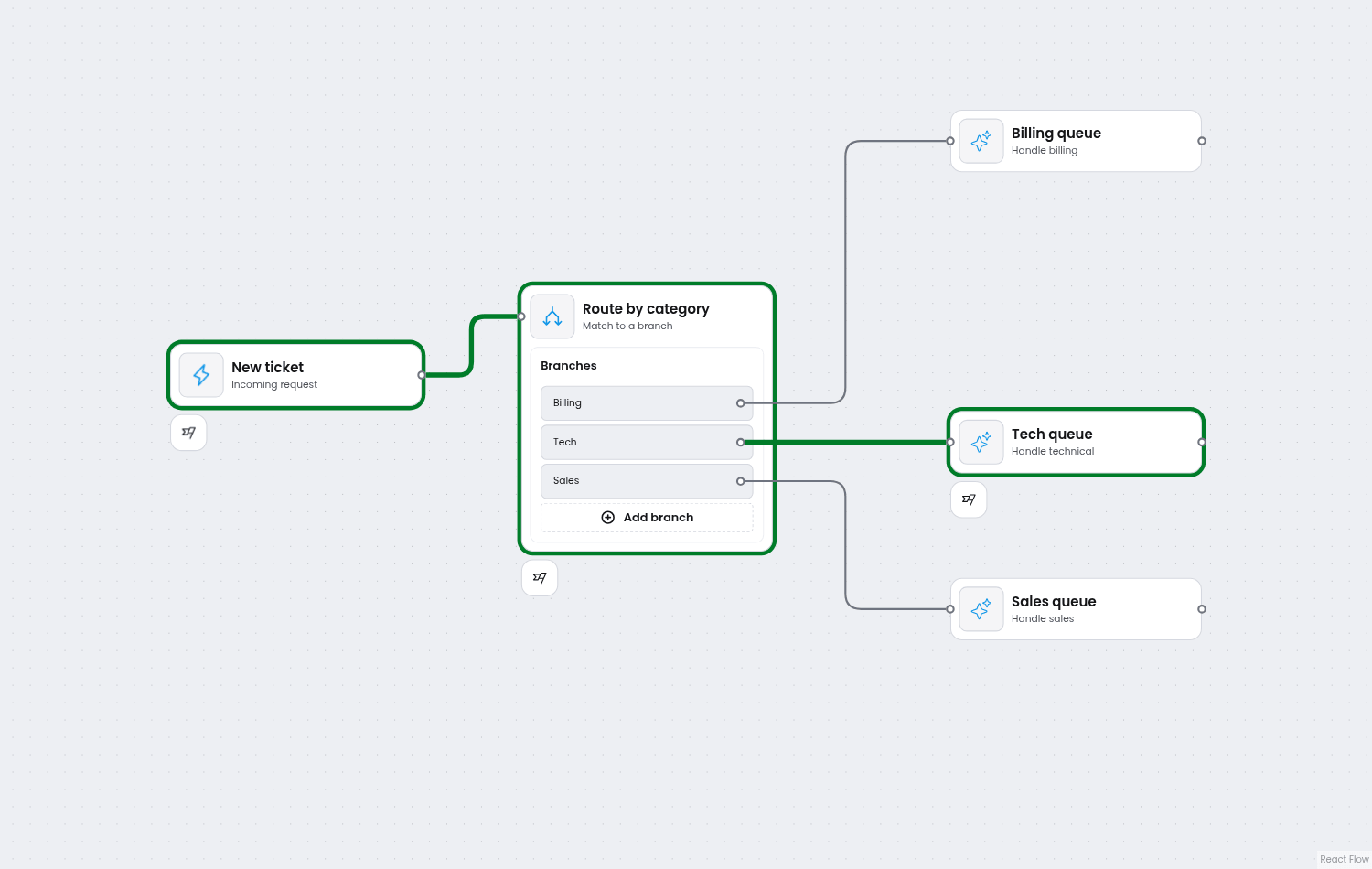
It comes in 2 flavors. A binary gate splits true from false: did the order clear the minimum, yes or no. A multi-way split routes by category into named branches: send the ticket to billing, tech, or sales.
The graph is a branch node with a named output per path. Failures can route too: send an error down its own branch toward a retry or a dead-letter path, instead of crashing the whole run.
Parallelization
When subtasks do not depend on each other, run them at the same time and merge the results.
The graph fans out into several branches and fans back in to a join. The join waits for every branch to finish before it runs, so it always sees a complete set of inputs.
A common variant is orchestrator-workers, where the number of parallel workers is decided at run time rather than drawn in advance. The agentic AI workflow diagram still shows the shape – one source, many workers, one join. Your engine decides how many workers actually spawn.

Reflection, and the loop that will not run
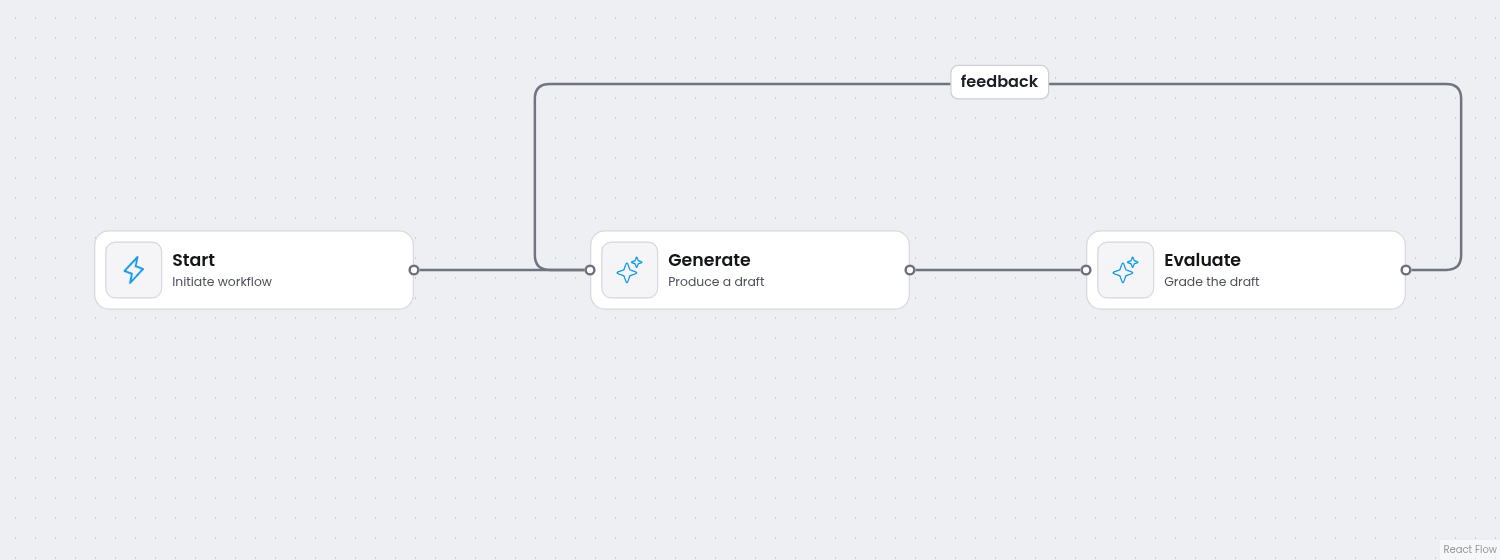
Reflection is an agent grading and improving its own work: generate, evaluate, repeat until it is good enough. Drawn the obvious way, it is a cycle. And that is where it breaks.
Many execution engines only run a directed acyclic graph. Draw a back-edge from Evaluate to Generate and nothing loops: Generate now waits for Evaluate's output, Evaluate waits for Generate's, and neither ever becomes ready. The run stalls and the engine fails it. The canvas lets you draw the loop. The engine cannot run it.
There are 2 clean fixes, and both turn the cycle back into a DAG. Unroll the loop into a fixed number of passes – generate, evaluate, generate again, evaluate again – and stop. Or keep the whole iteration inside a single step, so the loop lives in one node's code rather than in the graph.
Loops are having a moment. As agent orchestration shifts from fixed pipelines toward the model driving its own iteration, frameworks like LangGraph treat cycles as a first-class feature, and ADK ships Loop as a prebuilt workflow – the loop now comes for free; the exit condition still does not. The pattern is young, but one practice is already clear: bound every loop – an iteration cap, a stop condition, a budget – or "until it is good enough" can mean forever. A DAG engine takes the other side of that tradeoff: the graph you drew is the whole plan, so every run is bounded and easier to reason about.
This is the editor/engine split at its sharpest: the structure you can draw is not always the structure your engine will run. The DAG limit sits in the engine, not the editor – Workflow Builder's reference runner is DAG-only; swap in your own and you set the rules.
Human in the loop
Some steps need a person to approve or reject before the workflow moves on.
The graph is an approval step followed by a branch: one edge for approved, one for rejected. The shape is easy.
The hard part is the wait. Pausing for a human, timing out after a day, resuming exactly where it left off – that lives in your backend, and durable execution engines like Temporal handle it well. ADK's graphs ship a human-input node for the pause itself, but the gate around it is still a shape you draw. How a workflow actually runs is its own topic, from scheduling and retries to durable waits.

Putting patterns together
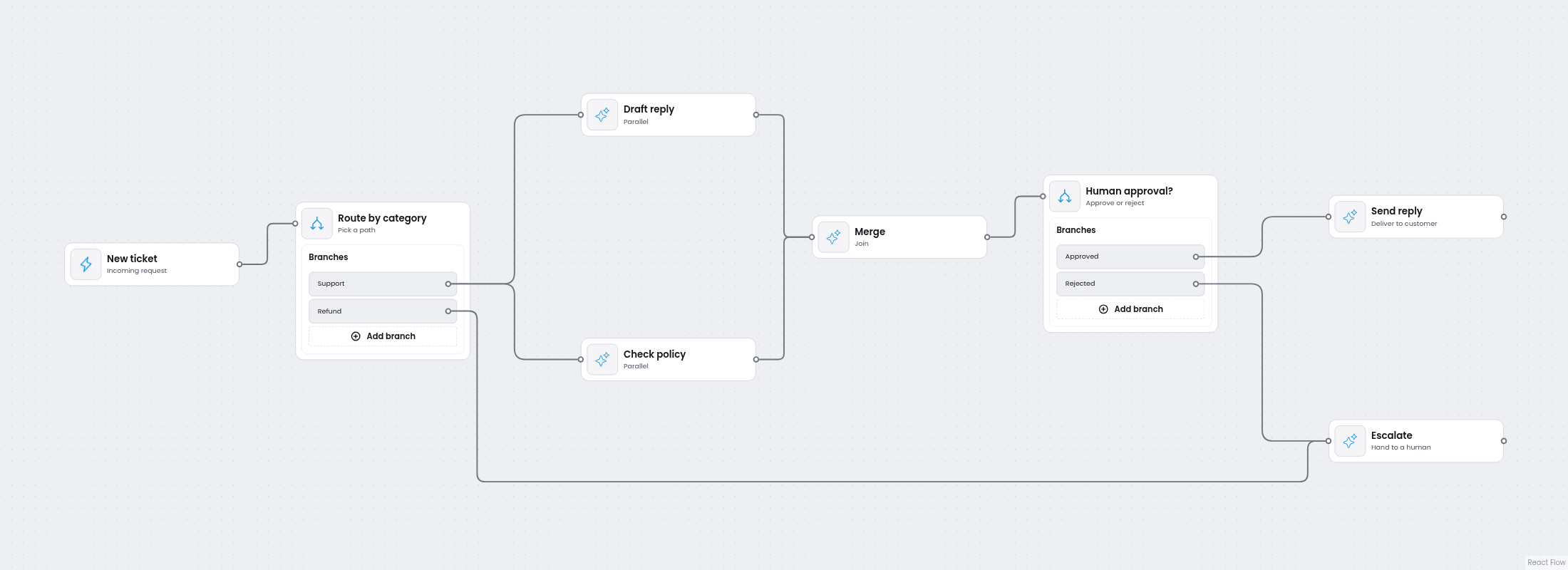
Real workflows are these shapes stacked – the five agentic design patterns, combined. A support flow might trigger on a new ticket, route by category, run a few agents in parallel to draft and check a reply, pause for human approval, then send it.
Drawing it pays off twice. You read the control flow at a glance, and each step's configuration lives in a properties panel instead of being scattered across code. The agentic workflow diagram is the documentation.
All of that assumes an editor to draw in – and building one is the part teams underestimate. A drag-and-drop canvas takes days. The long tail takes months: edge routing that avoids overlaps, undo/redo across every edit, auto layout that keeps a growing graph readable, interactive nodes and edges, a schema-driven properties panel, keyboard accessibility, and state that persists and stays smooth at hundreds of nodes. And the canvas earns its keep beyond engineering: it is the artifact designers, product, and backend can argue about together.
Workflow Builder is a production-ready React SDK from Synergy Codes that ships that editor as one of 3 composable blocks: an editor layer built on React Flow, an Apache 2.0 reference back-end, and swappable engine integrations with Temporal as the reference adapter. Every workflow serializes to JSON your execution layer runs. It comes as a Community Edition (open source, Apache 2.0) and an Enterprise Edition (a one-time license, no subscription) – either way, you build the nodes and logic specific to your product instead of the canvas underneath them. That build is its own deep dive; see building an agentic workflow builder UI.
Next time an agentic AI workflow turns into a wall of prose, draw it. If the shape is one of these 5, you already know how it runs – and where it breaks.
- What is an agentic workflow pattern?
A recurring structure for organizing AI-driven steps: one building block (the tool-using agent) plus 5 control-flow shapes – chaining, routing, parallelization, reflection, and human-in-the-loop. Each is a shape you can draw as a node graph.
- What's the difference between an AI agent and a workflow?
A workflow runs predefined steps in a fixed structure. An agent lets the model decide its own next step at run time. Most production systems are mostly workflow, with an agent at a few specific steps.
- Can agentic workflows have loops?
Conceptually yes – a reflection loop iterates until the output is good enough. But many execution engines run only a directed acyclic graph, so a literal cycle will not run. Unroll it into a fixed number of passes, or keep the iteration inside one step.
- Do frameworks like Google ADK make these patterns obsolete?
The opposite – they implement them: chaining, parallelization, and reflection ship prebuilt as Sequential, Parallel, and Loop. A framework gives the patterns a runtime; drawing the graph is still how you understand and communicate a process, whatever runs it.
- Do you need a visual editor to design agentic workflows?
No, but a graph makes the control flow explicit and reviewable in a way code does not. A tool like Workflow Builder gives you that editor without building one from scratch.
- How do you run a workflow built in Workflow Builder?
Workflow Builder serializes each workflow to JSON, and your execution layer decides how to run it – your own backend, the reference Temporal integration, or the Flow Runner plugin (Enterprise) in the browser. It is execution-agnostic by design, so you are never locked into a specific runtime.
Senior Frontend Engineer at Synergy Codes specializing in React and React Flow. Builds embeddable workflow editors and SDKs for B2B SaaS products, with hands-on experience in TypeScript, workflow orchestration tools, and durable execution engines like Temporal. Featured interview on justjoin.it.
Need more information about Workflow Builder?
Talk directly to our experts to discuss features, integration and onboarding options, or custom solutions– get clear answers for your next step.
Articles you might be interested in
.jpg)
Building a visual call flow editor for cloud telephony – and how to get it right
Every cloud telephony platform eventually hears the same request from partners: make call flow configuration visual. Here is what a good call flow editor looks like – and how to build one on Workflow Builder.

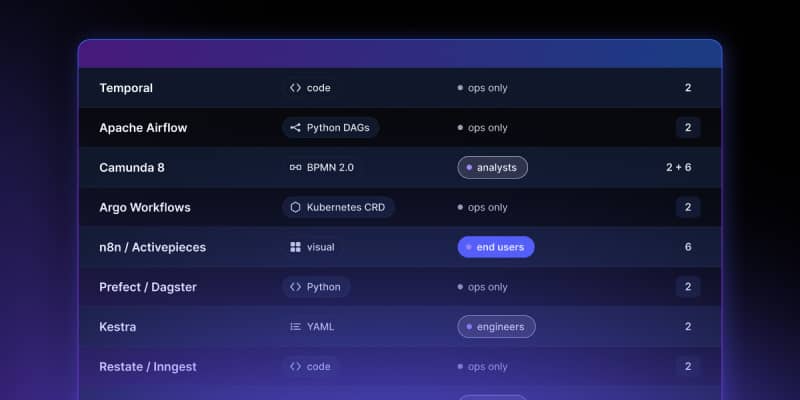
Open Source Workflow Engine Comparison: Licences, Layers and Gaps | Workflow Builder
Every automated workflow runs on a stack. Most conversations about choosing an open source workflow engine collapse that stack into one question – "which workflow tool should we use" – and then stall, because the tools being compared occupy different layers and solve different problems. Apache Airflow and Camunda are both called a workflow engine. They have almost nothing in common.
Temporal Human-in-the-Loop: What the Engine Gives You, What You Build | Workflow Builder
If you're implementing human-in-the-loop (HITL) approval on Temporal, the engine gives you more than expected on the waiting problem and less than expected on the accountability problem. This article is that split, with the documentation behind each claim.