Temporal workflow engine: why it became our default

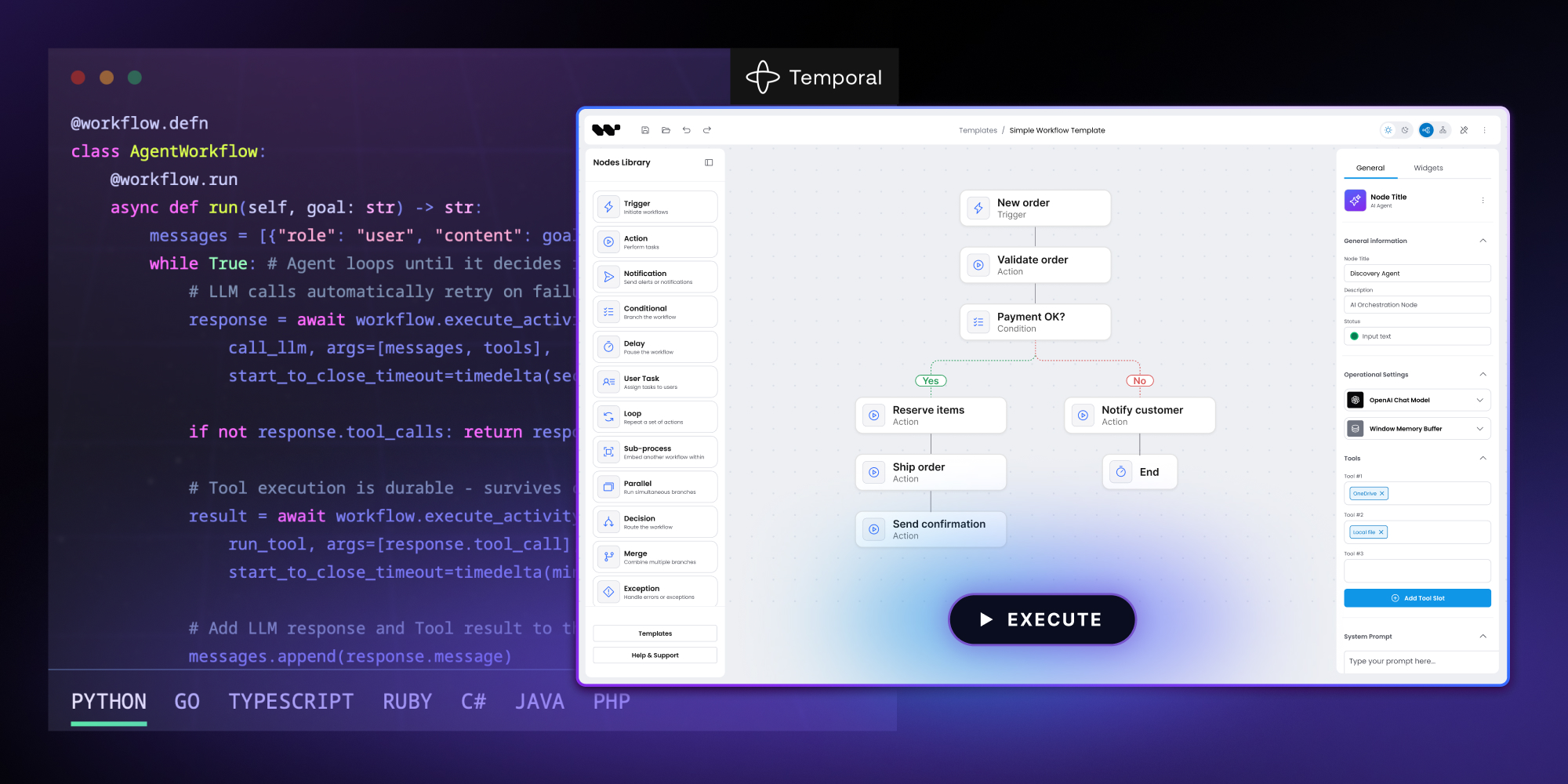

When we shipped Workflow Builder 2.0, we shipped it with one reference execution engine wired up: Temporal. It was a deliberate call after we evaluated the landscape. This post is why.
Workflow Builder is a React SDK for visual workflow editors, built by Synergy Codes on top of React Flow. The editor draws, configures, validates and serializes a workflow graph; it does not run one. That's the engine's job. Teams building agent canvases or LLM-heavy pipeline editors feel that gap first – durability and audit aren't optional once an LLM call costs real money or a regulator asks what happened.
Teams who adopted Workflow Builder before 2.0 kept rebuilding the same execution plumbing in whatever stack they already ran, so for the 2.0 release we drew a runtime contract – submit a workflow, run a node, emit events – and made the editor stay out of the engine business. Temporal is the first engine that sits behind that contract, and the one we recommend by default.
In short
Workflow Builder is the React layer for visual workflow editors – a drag-and-drop canvas, properties panel, and node-typing system. Behind it: ports you wire to your engine. The reference backend we built is wired to Temporal as proof, and that's our default recommendation. We'd used Temporal on a client project before; its Workflow/Activity model fit our domain ports without translation glue.
The execution problem behind every adoption
The pain wasn't subtle. Every team that adopted Workflow Builder hit the same wall around the same time. They could draw a workflow in our editor, save it, validate it, replay it visually. Then they had to make it run – and that's where the work began.
- Durable retries with backoff.
- Idempotency so a retried node doesn't double-charge a customer.
- Persistence so a long-running workflow survives the worker process dying.
- An audit trail so a regulator – or a customer – can ask what happened and get an answer.
- Cancellation that propagates from the editor through whatever's executing.
- Replay after a crash so the workflow picks up where it left off, not from scratch.
None of that is workflow-editor work. It is execution-engine work. But each team built it again, partly because the editor did not pick a side, and partly because most general-purpose job runners solve only a slice of the list.
Across the integrations we watched, that rebuild typically took around 6 weeks – a tax on every adoption, paid in code that was never going to be the team's competitive advantage.
When we drew the runtime contract for 2.0, we needed a default engine to recommend. The contract is engine-agnostic; the recommendation is not. Pick the wrong one and a team's first hour with Workflow Builder is a disappointment.
How we got to Temporal
The engineering case came first: Temporal's model is what a visual workflow editor actually needs. Deterministic orchestration on one side, side-effectful work on the other, replay-driven crash recovery that carries the audit trail with it. The next section unpacks why that fit matters.
What confirmed the choice was prior production use. We'd shipped a client project on Temporal before bringing it into Workflow Builder, and we'd watched it hold up under real conditions – worker crashes recovering by replaying the event history, retries that don't double-charge anyone, audit by construction. The model held up where it mattered most: under load.
For AI-heavy workflows the value compounds. The EU AI Act expects high-risk systems to log inputs, outputs, and tool calls captured at the execution layer - not narrated by the model afterward. Workflow Builder structures the flow; Temporal logs it deterministically. An agent that describes what it did doesn't qualify as evidence. An engine that logs every step does.
The rest of the durable-execution space exists, and each engine has its place. For a default we'd recommend to every team adopting Workflow Builder 2.0, the one whose model fit ours best was the natural answer.
Why Temporal won
The category. Temporal popularized "durable execution," and the category has hardened around them. The core engine is open source, the team has been on the same problem since 2019, and the project still moves fast enough that we trust the bet to keep holding.
Production maturity. When we recommend an engine to a regulated-industry buyer, the first question is whether someone bigger than us has load-tested it. Temporal's published case studies – Coinbase, Stripe, Datadog, Netflix – answer that without us having to. Temporal Cloud gives the same buyer a managed path without standing up a worker fleet on day one.
The model. Workflows are deterministic functions that orchestrate; Activities are the side-effectful pieces they call. TypeScript Workflows run in an isolated V8 sandbox, and every Workflow recovers from crashes by replaying its event history – which means the audit trail isn't a feature you turn on, it's how the engine knows where it was. The model has signals, queries and cancellation in the API. The SDK family covers TypeScript, Go, Python, Java, .NET, Ruby and PHP – so a team mixing languages between Workflows and Activities has a path.
Where Temporal's model fit ours
We expected impedance. The pure-domain graph runner is just a function; Temporal is a distributed system with its own programming model. Translating between them, we assumed, was going to take the kind of glue code that ages badly.
It didn't. Temporal's Workflow/Activity split maps cleanly onto our domain ports:
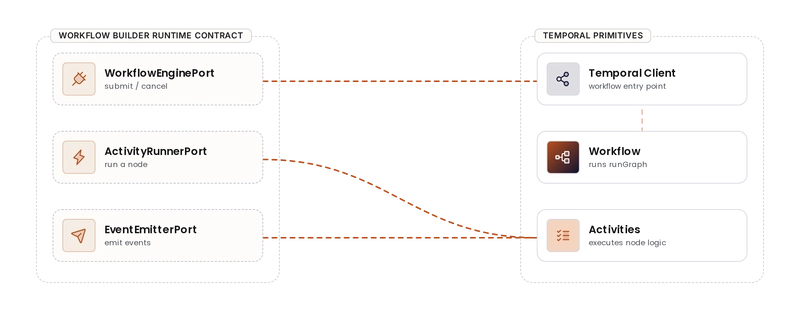
The deterministic graph traversal lives in the Workflow. Node executions and event emission – the side effects – live in Activities. proxyActivities lets each Activity have its own retry profile, which falls out of the model rather than us bolting it on. We give database writes short, aggressive retries because they should either succeed quickly or surface a real problem. We give node executions longer timeouts and fewer retries because some of them call LLMs, and we want to fail honestly rather than burn money pretending to recover.
// apps/execution-worker/src/engines/temporal/workflows/run-workflow.ts (abridged)
const databaseActivities = proxyActivities<Pick<Activities, 'emitEvent' | 'updateStatus'>>({
  startToCloseTimeout: '30s',
  retry: { maximumAttempts: 5 },
});

const nodeActivities = proxyActivities<Pick<Activities, 'executeNode'>>({
  startToCloseTimeout: '10m',
  retry: { maximumAttempts: 2 },
});

const runner: ActivityRunnerPort<AiStudioNode> = {
  executeNode: (node, context) => nodeActivities.executeNode(node, context),
};

const events: EventEmitterPort = {
  emitEvent: (executionId, type, payload, nodeId) =>
    databaseActivities.emitEvent(executionId, type, payload, nodeId),
  updateStatus: (executionId, status, errorMessage) =>
    databaseActivities.updateStatus(executionId, status, errorMessage),
};

export async function runWorkflow(input: WorkflowExecutionInput<AiStudioNode>): Promise<void> {
  await runGraph(input, runner, events);
}
What we see in production
The reference stack uses Temporal locally too. When you run pnpm dev:ai-studio the Temporal dev server comes up alongside the worker, and the Temporal Web UI (at localhost:8233 in the dev setup) is our first stop when anything gets interesting.
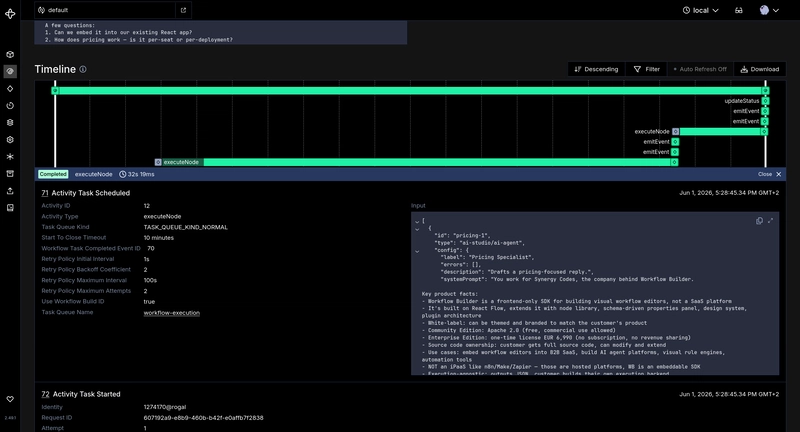
Every workflow execution shows up there:
- Activity retries with their backoff windows
- Cancellation requests propagating through to in-flight Activities
- The full event history that the Workflow replays from – which is also, as a side effect, the audit log a serious customer is going to ask us for
Things we'd otherwise have built piecewise – a retry log, a cancellation channel, a per-execution audit view – are there because Temporal's model put them there, not because we wrote dashboard code.
That part is hard to overstate when we recommend an engine. The buyer doesn't have to take our word for what's running; they open the UI and see it.
FAQ
Can I run Workflow Builder on a different engine?
Yes. The runtime contract – submit a workflow, run a node, emit events – is engine-agnostic. The reference backend we built is wired to Temporal and that's our default recommendation, but implementing the same 3 ports against another engine lets you swap it.
What is durable execution and why does it matter for workflow editors?
Durable execution is a model where a workflow's state survives crashes – the engine replays its event history to recover where it left off. For a workflow editor, that closes the gap between "the user drew a graph" and "the system ran it to completion" without us writing recovery, audit, or retry plumbing ourselves.
Can the Temporal adapter run against Temporal Cloud?
Yes. The reference adapter targets the Temporal protocol, so the same code runs against a self-hosted cluster or Temporal Cloud. Same retry profiles, same audit trail, same operational model.
How do visual workflow editors fit alongside declarative DSLs?
Different surfaces for different audiences. Declarative formats like CNCF Serverless Workflow or YAML DSLs cover workflow definition in code; visual canvases cover the drag-and-drop side for non-engineers. Both can end up sitting on the same durable execution engine – the surface is independent of what runs the graph.
Where this goes
We made Temporal our default recommendation. The runtime contract is still pluggable, so a team that already runs Inngest, Restate, or an in-house Postgres runner can wire it up against the same 3 ports – and we'll help them.
If you're building on Temporal and shipping a product around visual workflows – or you're thinking about Temporal for a workflow-editor product – we'd like to compare notes. Durable execution is the category that made the recommendation possible. We bet on Temporal because the bet has kept paying off.
Senior Frontend Engineer at Synergy Codes specializing in React and React Flow. Builds embeddable workflow editors and SDKs for B2B SaaS products, with hands-on experience in TypeScript, workflow orchestration tools, and durable execution engines like Temporal. Featured interview on justjoin.it.