Best embeddable workflow builders for SaaS products in 2026


Workflow Builder is a strong fit for SaaS teams that need customizable, customer-facing workflow authoring while keeping control of their backend and execution engine. Prismatic, n8n OEM and Activepieces offer broader embedded automation capabilities, including integrations and workflow execution. Paragon and Pipedream Connect provide integration infrastructure for teams building their own workflow interfaces, while Tray.ai Embedded focuses on customer-configurable integrations. The right choice depends on how much control you need over the user experience, workflow definitions, integrations and runtime architecture.
An embeddable workflow builder lets customers create or configure workflows without leaving your SaaS product. The products in this category vary widely, though. Some provide a deeply embeddable authoring SDK, while others package the editor together with integrations, credentials and execution.
Choosing the right option starts with deciding which parts of the workflow stack you want to own.
The embeddable workflow builder shortlist
Workflow Builder is best suited to SaaS products that need domain-specific customer authoring while retaining control over workflow definitions, backend architecture and execution. Prismatic and n8n OEM are stronger fits when integrations and managed execution are central. Activepieces offers an embeddable automation builder, while Paragon and Pipedream Connect provide integration infrastructure for teams building more of the workflow UX themselves. Tray.ai Embedded is particularly relevant when customers configure integrations designed by your team.
The list is not a simple ranking from best to worst. Each product places the boundary between your SaaS and the vendor's platform somewhere different.
What is an embeddable workflow builder?
An embeddable workflow builder is a workflow-authoring experience designed to become part of another software product. Customers can create, configure or modify workflows from inside the host SaaS rather than opening a separate automation application.
The architecture underneath can vary considerably. An editor-first product may produce a structured workflow definition that your backend interprets and executes. An embedded automation platform may also provide the runtime, credentials, connectors and monitoring. Integration infrastructure such as Paragon or Pipedream can supply external actions and authentication while leaving the workflow UI to your engineering team.
Looking only at drag-and-drop capabilities or connector count therefore misses most of the buying decision.
How should you compare embeddable workflow builders?
The most useful criteria are embedding model, workflow ownership, execution model, domain customization, integrations and licensing.
Before choosing a vendor, check:
- what actually appears inside your product
- how much of the workflow UX you can control
- where workflow definitions are stored
- who interprets and executes them
- how proprietary node types are modeled
- which integrations and credentials are included
- what you retain if you later change vendors
An npm component, an iframe containing a vendor application and an API toolkit for building your own interface can all be described as “embedded,” but they lead to very different products.
1. Workflow Builder: best for domain-specific workflow authoring in SaaS
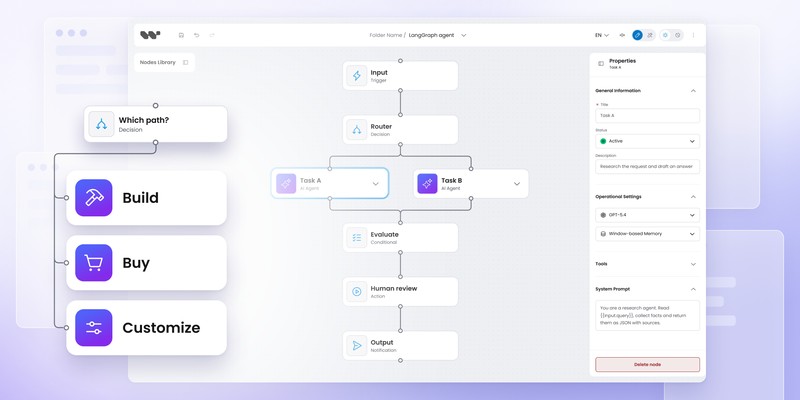
Workflow Builder is a strong fit when customers need to create workflows using the vocabulary of your product while your team retains control of the backend and execution architecture.
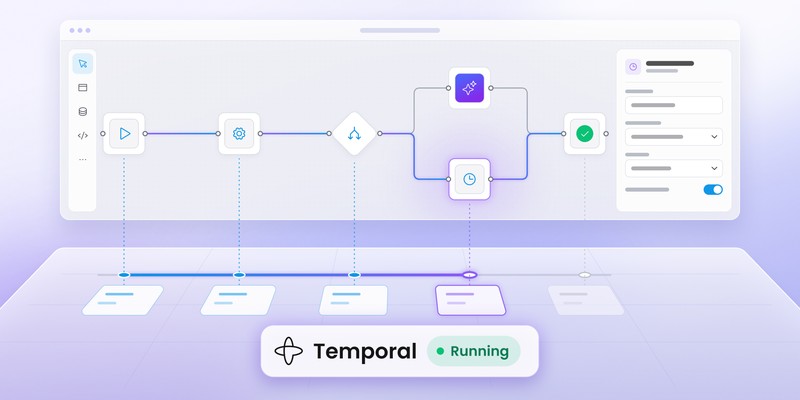
The React editor can be embedded directly in an existing application, but the current architecture extends beyond the canvas. Workflow definitions are serialized as structured JSON, while the open reference stack adds an execution core, engine adapter boundary and a reference backend for local development and architectural evaluation. Temporal ships as the reference engine adapter today.
Teams with an existing runtime can also connect the editor to their own backend instead of adopting the whole reference stack.
What makes Workflow Builder different?
The clearest differentiator is the separation between customer-facing authoring and runtime execution.
A customer can work with product-defined nodes such as:
- Evaluate AI response
- Send RCS message
- Run scoring model
- Escalate case
Your team can add approval or wait-style nodes too, but the shipped reference stack does not provide a ready-made human-approval primitive. The backend and execution layer map your product concepts to services, activities, APIs or other runtime behavior.
Workflow Builder's reference architecture uses structured definitions and explicit engine interfaces rather than binding the customer-facing graph directly to one runtime. The pattern is useful when a SaaS product already has its own APIs, authentication, domain model and orchestration infrastructure.
What does Workflow Builder include?
The current stack includes the visual editor, schema-driven properties, structured workflow serialization and persistence. The execution core defines three interfaces with different responsibilities: WorkflowEnginePort is the backend-facing contract for submitting and cancelling runs, ActivityRunnerPort is called by the graph runner to execute a node and EventEmitterPort records execution events and status transitions. The Temporal integration provides the corresponding engine-side pieces.
For teams evaluating that model, Workflow Builder for developers and the reference stack show the two implementation paths.
What do you still need to own?
Workflow Builder is not an embedded iPaaS. Your product can still own authentication, domain APIs, external integrations, operational infrastructure and the execution engine itself.
The trade-off is intentional: less bundled platform infrastructure means more architectural control.
Best fit: established SaaS products building customer-facing, domain-specific workflow functionality.
2. Prismatic: best for embedded integration workflows
Prismatic is designed for SaaS products where customer-facing workflows are primarily about integrations between the host product and external applications.
Its Embedded Workflow Builder gives customers a white-labeled, drag-and-drop experience for creating integrations and workflows inside another SaaS application. The broader platform also covers connectors, custom components, execution and customer-specific integration configuration.
When is Prismatic a good fit?
Prismatic becomes attractive when customers need workflows such as:
New record in your product → update Salesforce → send Slack message → sync data to another system
Connector infrastructure, authentication and execution are major parts of the requirement in that scenario. Prismatic also allows the embedded experience to be limited to the connectors and actions relevant to a particular product.
The trade-off is broader platform adoption. Your team is using Prismatic's workflow and integration infrastructure rather than treating the authoring layer as an independent part of your own architecture.
Best fit: SaaS businesses turning integrations into a configurable or self-service customer feature.
3. n8n OEM: best for embedding a complete automation platform
n8n OEM is one of the strongest options when you want the workflow canvas, integration catalog and execution engine from the same vendor.
The OEM product lets end customers create, edit, run and manage workflows from an n8n canvas embedded inside another product. It currently includes 500+ integrations on its OEM page (while its full integration directory lists over 2,000), custom nodes, JavaScript and Python steps, AI nodes, credential management, monitoring, RBAC, SSO and audit logging.
What are the advantages of n8n OEM?
The integration ecosystem is the biggest advantage. A team that would otherwise maintain dozens of third-party connectors can use n8n's existing catalog and runtime infrastructure.
Execution also comes with the platform, reducing the number of workflow systems your engineering team has to assemble and operate separately.
Can n8n OEM be fully white-labeled?
No. n8n's current OEM documentation says its branding remains visible in the editor. Full white-labeling is not offered, and n8n explicitly says OEM is not the right fit when full white-labeling is mandatory.
OEM pricing is execution-based, with customers committing to an annual execution volume pooled across their end users.
Best fit: SaaS products that want to expose a mature automation platform and connector ecosystem directly to customers.
For a deeper architectural comparison, see n8n alternative for SaaS: embedded workflow editor vs automation platform.
4. Activepieces: best for embedding an existing automation builder
Activepieces is a good option when its existing automation model already fits your product and you want customers to access that builder from inside your SaaS.
Embedding is sold on a dedicated commercial Embed plan, currently listed from $36,000 per year, although parts of the documentation still refer to embedding as an enterprise capability. Activepieces documents a flow where your SaaS provisions customers using JWT and loads the builder through its embedding SDK.
The platform can also handle connections, predefined connections and piece visibility filtering within the embedded experience.
How is Activepieces different from an editor SDK?
Customers are interacting with the Activepieces automation environment embedded in your application rather than a headless workflow-authoring component shaped entirely around your own product model.
The distinction can be beneficial when Activepieces already provides most of the automation behavior you need. Products requiring highly proprietary interaction patterns or domain models may want more control over the authoring layer.
Best fit: teams that want existing Activepieces automation capabilities exposed directly to customers.
5. Paragon: best for building your own workflow UX around integrations
Paragon fits a different part of the stack: your team builds the workflow experience while Paragon handles much of the third-party integration infrastructure underneath it.
Its documented embedded use case centers on authentication plus activation and configuration of vendor-built workflows in the Connect Portal rather than providing a turnkey visual authoring canvas.
A typical architecture could divide responsibility like this:
Your SaaS owns:
- workflow editor
- domain model
- node presentation
- business logic
Paragon provides:
- third-party authentication
- external integration actions
- integration infrastructure
The pattern works well when a first-party workflow UX matters but rebuilding OAuth and API integration infrastructure does not.
Best fit: SaaS products creating their own workflow experience while outsourcing third-party integration plumbing.
6. Tray.ai Embedded: best for customer-configurable integrations
Tray.ai Embedded works particularly well when your team designs the integrations and customers configure their own instances.
Tray packages Projects into reusable Solutions. End users then configure authentication and product-specific values through a Config Wizard to create their own Solution Instances.
Customers can select accounts, credentials, mappings, destinations and other configuration values without needing to design the underlying integration workflow themselves.
Is Tray.ai Embedded a full customer workflow builder?
Not in the same sense as an unrestricted node-based authoring SDK.
Tray's standard embedded model focuses more heavily on configuring and activating solutions created by the vendor's customer. The Config Wizard can be branded and customized at the styling level, while your own application controls how available integrations are presented. Tray advises against deeper layout changes because they can make future updates harder to adopt.
A typical use case might be:
“Let every customer configure our Salesforce integration.”
rather than:
“Let every customer invent an arbitrary workflow using our proprietary node library.”
Best fit: SaaS businesses productizing repeatable integrations with customer-specific configuration.
7. Pipedream Connect: best for integration infrastructure behind a custom workflow builder
Pipedream Connect is relevant when your engineering team wants to build the workflow UX but needs a broad layer of authentication, triggers and actions underneath it.
Pipedream sits closer to integration infrastructure than to a direct drop-in workflow canvas. It can supply external actions to a product-specific workflow system while your application owns the editor and domain model.
A SaaS implementation might use:
Workflow Builder or custom editor
↓
Your workflow definition
↓
Your backend
↓
Pipedream Connect
↓
External APIs
The modular structure can be especially useful in AI workflow products where customers need a domain-specific visual experience plus access to a large range of external tools.
Best fit: engineering teams creating their own workflow product while outsourcing integration actions and authentication.
Embeddable workflow builders comparison
The table below focuses on system boundaries rather than raw feature count.
A product that includes fewer layers is not necessarily less capable. In many cases, fewer bundled layers mean your engineering team retains more control over the rest of the architecture.
Which embeddable workflow builder is best for your use case?
The right shortlist depends on what already exists in your product.
Best if you already have a backend and execution engine
Start with Workflow Builder or another authoring-focused SDK.
Adding a full automation platform can duplicate runtime infrastructure your product already owns. An authoring stack lets customers configure workflows while the existing backend remains responsible for execution.
Best if customers need many SaaS integrations
Consider n8n OEM, Prismatic, Activepieces, Tray, Paragon or Pipedream, depending on how much of the editor and runtime you want to outsource.
Integration maintenance is easy to underestimate. OAuth changes, API versions, pagination, rate limits and vendor-specific behavior create ongoing engineering work.
Best if workflows use proprietary domain nodes
Start with Workflow Builder, a custom editor or an editor combined with integration infrastructure such as Paragon or Pipedream.
Examples include:
- Approve loan
- Run AI evaluator
- Send RCS card
- Score application
- Escalate patient case
- Configure machine stage
A generic connector catalog cannot define the UX for those concepts. Your domain model does.
Best if you need an automation platform quickly
Look closely at n8n OEM, Prismatic or Activepieces.
Bundled execution and integrations reduce the number of workflow layers your team needs to assemble independently.
Best if customers only configure integrations you create
Tray.ai Embedded deserves particular attention.
A free-form workflow canvas may add unnecessary complexity when customers mainly need to provide credentials, mappings and environment-specific settings for a workflow your team has already designed.
What is the difference between an embedded workflow builder and embedded iPaaS?
An embedded workflow builder gives users an authoring experience inside another product. An embedded iPaaS generally adds integrations, authentication and execution infrastructure behind that experience.
An authoring-focused stack might provide:
- canvas and nodes
- configuration panels
- workflow serialization
- validation
- backend contracts or adapters
An embedded iPaaS commonly adds:
- connector catalogs
- OAuth and credentials
- execution
- scheduling
- retries
- monitoring
- logs
The distinction matters because many SaaS products already own some of those layers.
Buying an entire integration and execution platform can duplicate existing infrastructure. Choosing an editor alone can create the opposite problem if your team still needs to build everything behind it.
Compare build, platform and SDK options
See which parts of a workflow product your team should own.
Explore the Build vs Buy guide
Can you combine a workflow builder SDK with an integration platform?
Yes. A modular architecture can combine one product for customer-facing authoring with another for external integrations.
For example:
Workflow Builder
↓
Structured workflow definition
↓
Your backend
↓
Paragon / Pipedream / internal connectors
↓
External APIs
\+
Temporal or another execution engine
The authoring layer controls the customer experience and product vocabulary. Integration infrastructure supplies external actions, while the execution engine remains responsible for runtime behavior.
More integration work is required than with an all-in-one platform, but the resulting architecture avoids putting the editor, runtime and entire connector ecosystem behind one vendor boundary.
Do you need an open-source embeddable workflow builder?
Open-source availability can reduce dependency on a vendor, but license terms and the scope of the open components matter more than the label itself.
Workflow Builder Community Edition uses Apache 2.0 and includes the authoring stack plus the open reference backend and Temporal adapter.
n8n makes its source available under the Sustainable Use License, which limits use to internal business purposes or non-commercial use. Enterprise-edition files with .ee. in the filename or an .ee directory sit outside that license and require a separate n8n Enterprise License. Customer-facing canvas embedding requires the commercial OEM offering. Activepieces also has open-source components, while its embedded builder sits on a dedicated commercial Embed plan; its documentation still refers to embedding as an enterprise capability.
Before choosing an open-source option, verify:
- commercial embedding rights
- white-label restrictions
- which components are actually open
- self-hosting requirements
- redistribution rights
- what happens to customer workflow definitions if you leave
The repository license alone rarely answers the complete SaaS embedding question.
What should you check before buying an embeddable workflow builder?
Can customers actually create and edit workflows?
Some “embedded” products expose a complete builder. Others expose authentication, configuration screens or pre-built integration templates.
Ask to see the exact end-user experience.
Is the editor a component or an embedded vendor application?
A React component that becomes part of your frontend gives you a different architectural boundary from an iframe or embedded vendor application.
Neither model is automatically better. Your product requirements determine which trade-off is acceptable.
Who owns the workflow definition?
Check the storage format, schema, export options and migration path.
A durable SaaS workflow feature should not depend on an opaque model you cannot access outside the vendor product.
Who interprets and executes the workflow?
Determine where runtime semantics live. The answer may be the vendor platform, your backend, a reference interpreter or a separate engine such as Temporal.
Can nodes represent your product concepts?
A custom connector and a domain-specific workflow node solve different problems.
Salesforce: Update record is an integration action.
Approve insurance claim is a business concept belonging to your product.
Can the workflow UX match your design system?
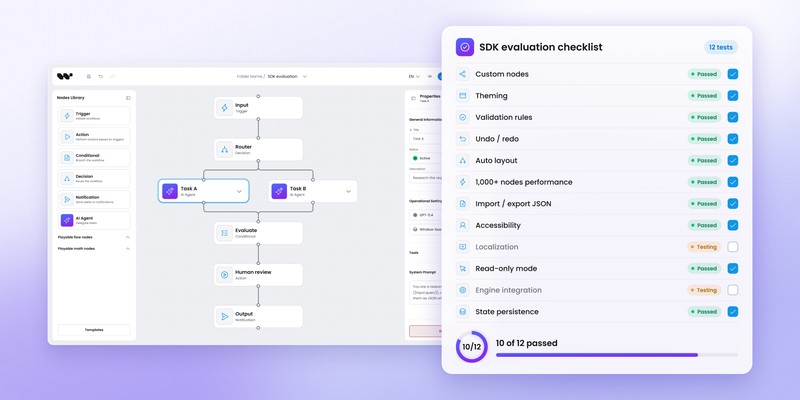
Check node rendering, panels, form components, typography, menus, keyboard behavior and read-only states rather than evaluating colors alone.
What happens if you change vendors?
Ask which assets remain usable:
- workflow definitions
- source code
- custom nodes
- customer data
- integration definitions
- execution history
Exit architecture becomes more important as customers begin relying on workflows for day-to-day operations.
Which embeddable workflow builder should you choose?
Choose Workflow Builder when workflow authoring needs to feel like part of your product and you want control over the domain model, backend and execution architecture.
Choose Prismatic when customer-built integrations are central and you want a broader embedded integration platform.
Choose n8n OEM when connector breadth and a bundled execution environment are more important than complete ownership of the editor UX.
Choose Activepieces when its automation model fits your product and embedding its existing builder gives you the shortest route to customer-facing automation.
Choose Paragon or Pipedream Connect when you want to build your own workflow UX but outsource much of the third-party integration layer.
Choose Tray.ai Embedded when your team designs the integration workflows and customers mainly need to authenticate, configure and activate them.
The useful buying question is not which vendor has the longest feature list. Ask instead:
Which parts of the workflow product do we actually want another vendor to own?
Content Marketing Specialist who's spent the last decade making tech topics actually readable. With an MA in Brand Communication, Ida has crafted content strategies for several IT companies. Her portfolio spans from Kubernetes tutorials to enterprise software guides, now focusing on data visualization and diagramming solutions.