
IVR call flow testing: what your visual editor should validate before a caller hits the flow

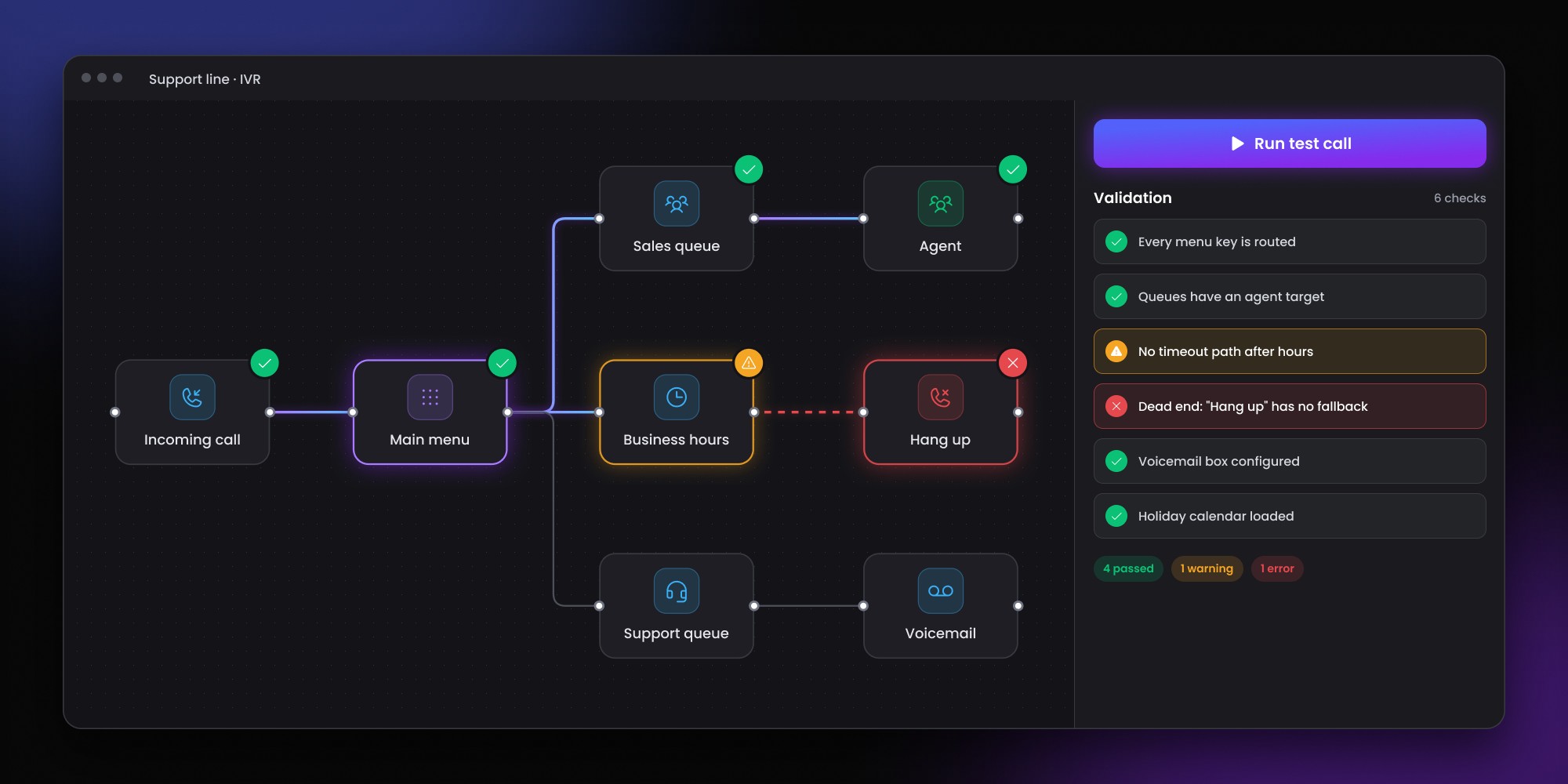
IVR call flow testing should start inside the visual editor, before a real caller enters the flow. Preflight validation can catch disconnected nodes, missing branches, invalid connections, broken resource references, and incomplete timeout handling. Schema-based checks and routing simulations help verify IVR menus, queues, business hours, and fallback paths. Real test calls are still needed to assess audio quality, DTMF recognition, provider latency, and telephony behavior. The goal is to catch configuration errors before deployment and reserve runtime testing for issues that static validation cannot detect.
An IVR call flow can look perfectly reasonable on a canvas and still fail once a real caller enters it. Even a basic validation rule such as "IVR must have at least 2 exits" can catch configuration problems before deployment. Missing fallbacks, invalid branches, broken queue references, and unintended loops need the same attention.
IVR call flow testing is the process of checking a call flow before deployment to catch structural errors, configuration problems, and routing paths that won't behave as intended. Some checks can happen directly inside the visual editor. Others still require a real or simulated call.
For teams building call routing into a CPaaS, CCaaS, or voice platform, separating those two layers of testing makes the editor much more powerful.
What is IVR call flow testing?
IVR call flow testing checks whether a configured voice flow can behave correctly once a caller enters it.
A flow may include an IVR menu, business-hours logic, queues, voicemail, ring groups, fallbacks, or integrations with external systems. Testing means checking the paths between those elements as well as the configuration stored inside them.
Some problems are visible before a call ever runs. A missing connection or empty timeout branch can be detected from the graph itself. Other issues only appear when the runtime is involved, such as poor audio, a provider timeout, or an integration that responds more slowly than expected.
A useful visual editor should catch as much as possible before the flow reaches that second stage.
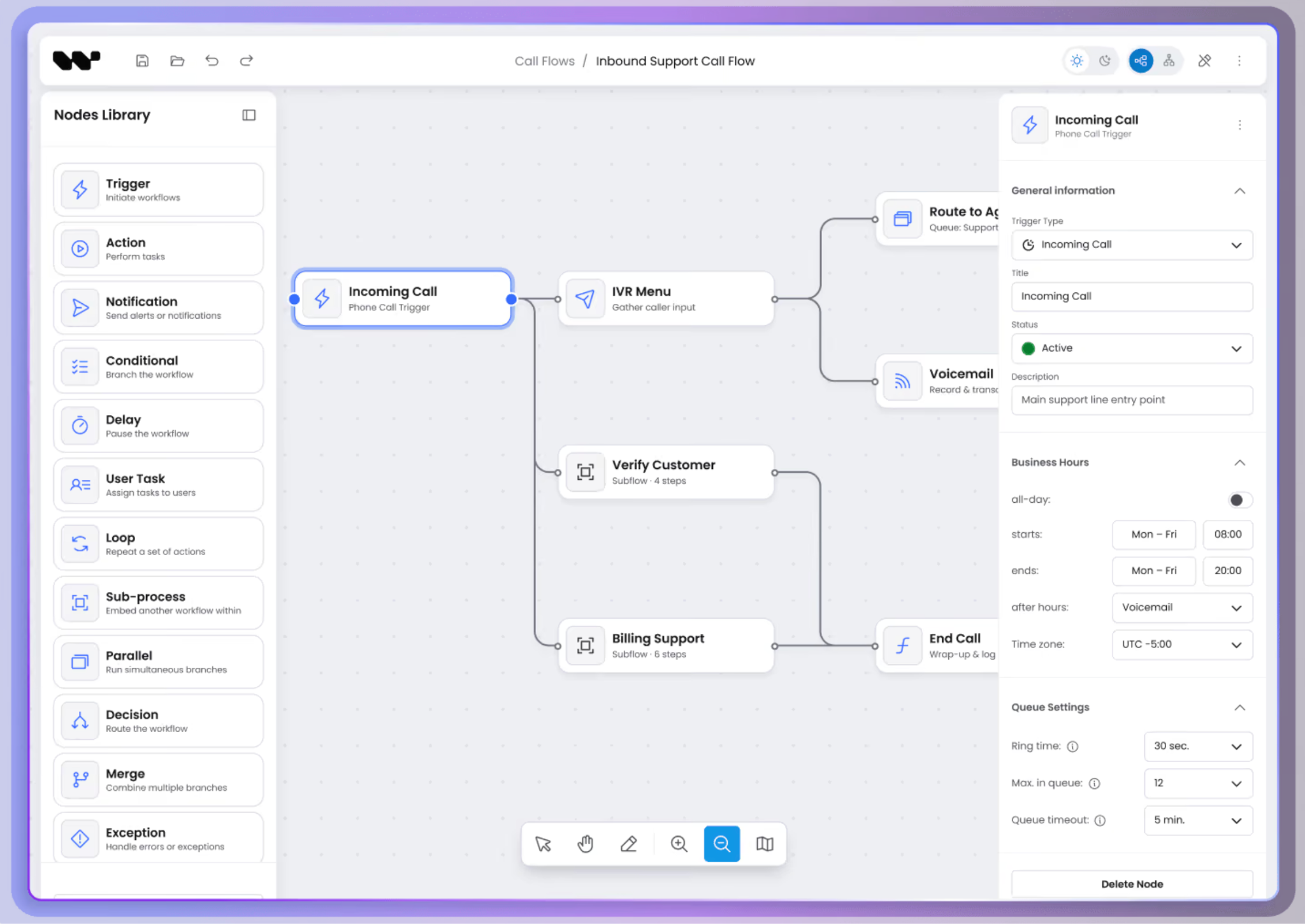
Workflow Builder already treats call flow configuration as more than drawing boxes. Our call flow builder use case includes schema-driven IVR nodes and connection validation for domain-specific routing rules.
Start with the structure of the call flow
Before testing prompts or provider behavior, check whether the flow itself makes sense.
A call needs a valid path from its entry point to a meaningful outcome. Any branch that leads nowhere or bypasses required routing logic creates a problem before runtime infrastructure is even involved.
A visual editor can inspect the graph for issues such as:
- no valid starting node,
- disconnected nodes,
- branches with no destination,
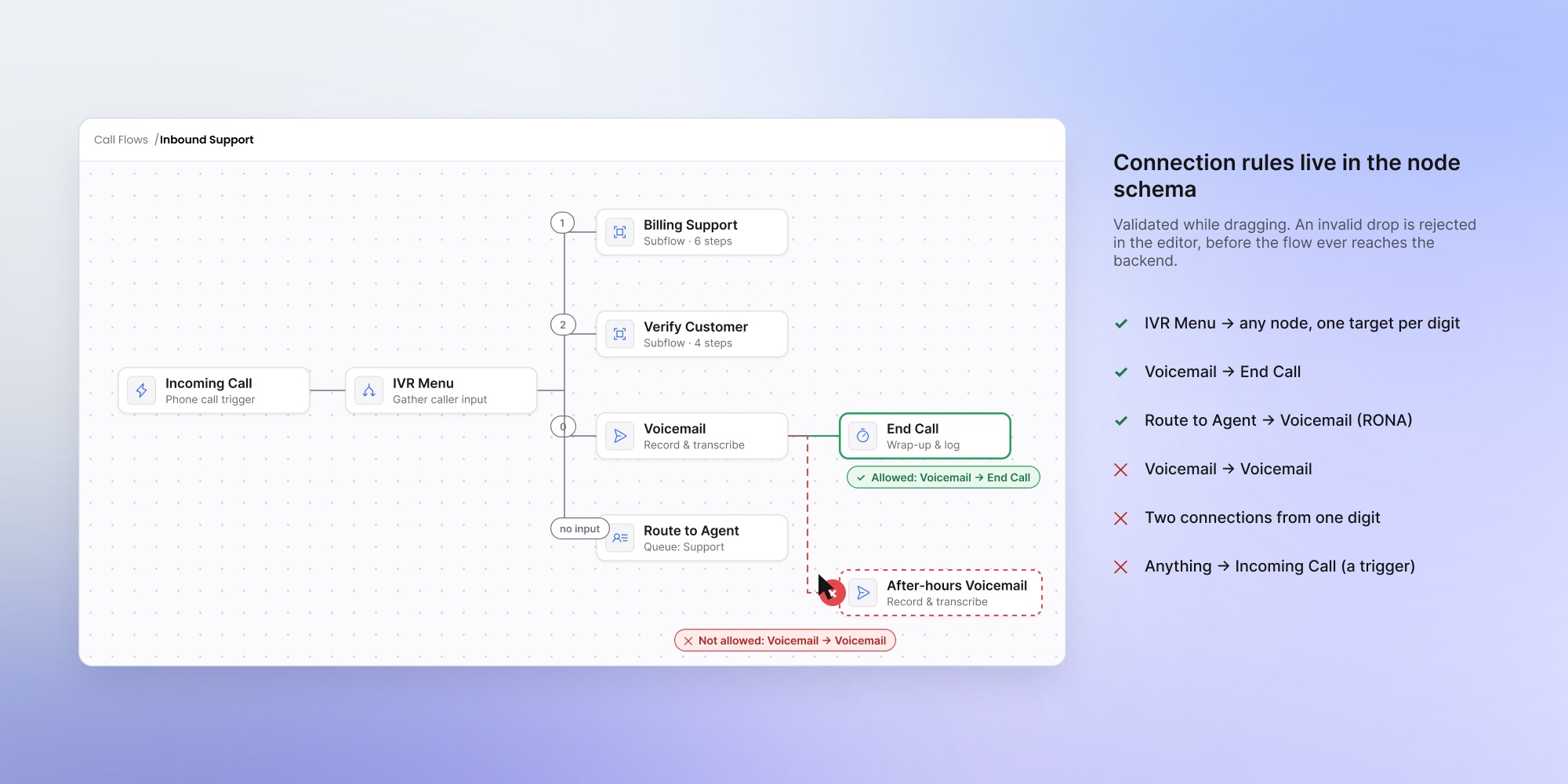
- unsupported node-to-node connections,
- accidental loops,
- paths that can never be reached.
Such structural validation belongs close to the canvas because the user can fix the issue while they still understand the context.
For example, a product-specific rule may require an IVR node to have at least two exits. If only one route is configured, the editor can flag the missing branch before the flow is published. This turns a routing requirement into a visible validation result rather than a problem discovered during a test call.
Workflow Builder already exposes connection validation for call-flow products. Its current CPaaS/CCaaS implementation rejects invalid links such as voicemail connected to voicemail, self-looping IVR nodes, or skipped no-answer branches.
Validate the configuration inside each node
A structurally valid graph can still contain nodes that aren't ready to run.
An IVR menu might exist on the canvas but have no prompt attached. A queue can point to a resource that was deleted. Business-hours routing may have no timezone or holiday behavior. A transfer step might contain a malformed destination.
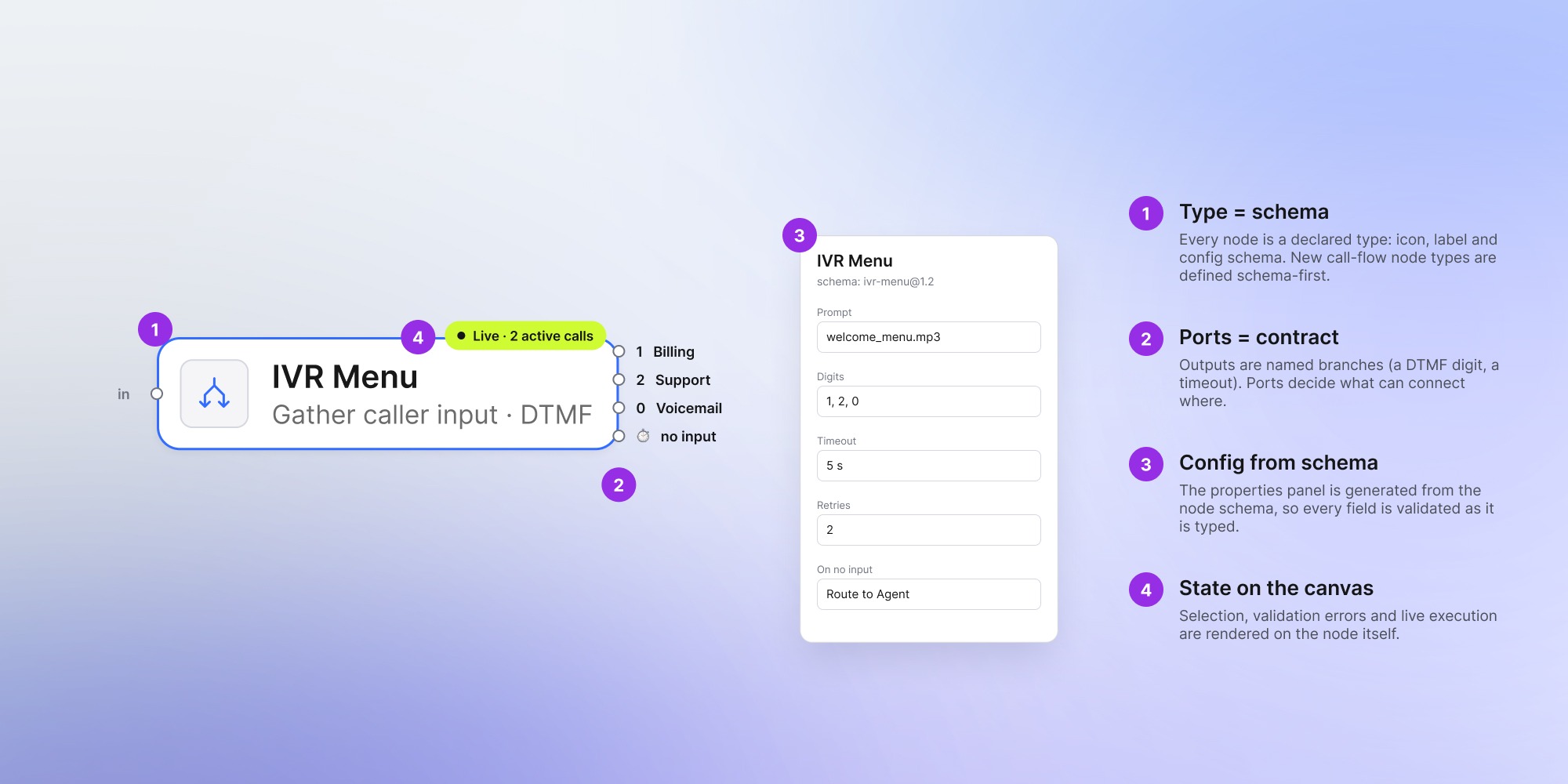
Schema-based validation can catch these issues before publishing. Checks may cover required fields, valid references, allowed value ranges, and dependencies between configuration options. For example, a transfer node may require a valid destination number, while an IVR node may require a prompt and configured fallback behavior. When one setting makes another field mandatory, the editor should identify the missing configuration before the execution backend rejects the workflow.
Workflow Builder uses JSON Schema for call-flow nodes such as IVR, business hours, holiday routing, and voicemail. Configuration panels can therefore be generated from the same model used for validation.
IVR menu testing needs to cover every possible input
An IVR menu creates several possible caller paths from one node, so testing only the happy path isn't enough.
A simple prompt such as:
Press 1 for Sales
Press 2 for Support
already raises more questions than those two routes suggest.
What happens when the caller presses 3? What happens when they don't press anything? Can they repeat the menu? Is there a maximum number of invalid attempts? Does timeout behavior eventually send them somewhere useful?
Each configured input should have a defined result, including the paths callers aren't supposed to choose.
A visual editor can make these omissions easier to spot because every output can be represented as a port or branch. Missing destinations then become graph problems instead of hidden settings.
Check timeout and no-input behavior
No-input handling deserves its own validation because it affects almost every IVR menu.
Callers may miss the prompt, hesitate, have trouble with DTMF input, or simply wait to see what happens. A flow that works only when someone responds immediately is incomplete.
Testing should confirm what happens after the first timeout and what happens after repeated silence. The final path might replay the prompt, send the caller to an agent, or move to voicemail depending on the product. The important part is that the behavior is deliberate and visible to the person configuring the flow.
Don't forget no-answer and overflow branches
Queues and ring groups introduce another set of paths that can be easy to overlook during setup.
A queue might work normally when agents are available but fail during busy periods because its overflow destination was never configured. A ring group may have no route for unanswered calls.
Those paths should be treated as part of the normal flow rather than exceptional edge cases.
Our existing Workflow Builder visual call flow editor brief guide describes call flows as combinations of IVR menus, queues, time-based routing, ring groups, and broader routing rules. Each of those components can add another failure or fallback path that needs validation before release.
Validate time-based routing with real calendar cases
Business-hours logic often looks simple until holidays and timezone differences enter the picture.
A rule such as “route to support during business hours” needs a clear definition of what those hours mean. Teams should test normal weekdays as well as days where the schedule changes.
Useful cases include opening time, closing time, weekends, holidays, and daylight-saving changes where relevant. One-off exceptions may also override the default calendar.
Static validation can confirm that the configuration exists. Scenario testing is better for checking whether a particular date and time produces the expected route.
Test references to resources outside the graph
Call flows often refer to objects that live elsewhere in the platform. A queue node may reference an agent group. A voicemail node could depend on a mailbox. Routing logic may use a CRM field or another data source. Those references can become stale after the workflow was created.
A useful validation layer should detect missing or unavailable resources rather than treating a saved identifier as proof that the target still exists. Depending on the product, checks may happen during editing, publishing, or both.
This also matters for templates. A flow copied between accounts can be structurally valid while still pointing to resources that don't exist in the new tenant.
Test loops deliberately
Loops aren't automatically wrong in voice applications.
A caller might return to the main menu after completing a branch or repeat a prompt after invalid input. Voice AI flows may also contain more cyclical structures than traditional IVR trees.
Problems appear when a loop has no practical escape path.
Validation shouldn't simply ban cycles. It should understand which types of loops are acceptable for the product and where additional safeguards are needed.
A traditional IVR menu that routes back to itself forever after invalid input is different from a deliberate “return to main menu” action with a retry limit.
Pre-deployment IVR call flow checklist
Before publishing a call flow, run through a checklist like this:
Structure
- The flow has one valid entry point.
- Every active branch leads somewhere.
- No nodes are accidentally disconnected.
- Connections follow the product's routing rules.
- Any loops are intentional and have an exit condition.
IVR menus
- Every advertised DTMF option has a destination.
- Invalid input has a defined route.
- No-input and timeout behavior is configured.
- Repeat-menu behavior works as intended.
- Retry limits won't trap the caller.
Queues and transfers
- Queue references still exist.
- No-answer routing is configured.
- Overflow has a valid destination.
- Transfer destinations are valid.
- Empty-agent scenarios have a fallback.
Time-based routing
- Business hours use the correct timezone.
- Weekend behavior is defined.
- Holiday routing has been checked.
- One-off exceptions override the normal schedule correctly.
External dependencies
- Referenced resources exist in the current tenant.
- CRM or API dependencies are available.
- Copied templates don't contain stale IDs.
- Failure paths exist for dependencies that can become unavailable.
Publishing
- No required configuration is missing.
- The full graph passes validation.
- Critical routes have been simulated.
- A test call covers the most important paths.
A checklist won't replace runtime testing, but it makes the editor responsible for errors it can reasonably detect before a real caller is involved.
Static validation and call simulation aren't the same thing
Static validation looks at the workflow definition. It can reason about nodes, connections, required fields, and known domain rules without running the call.
Simulation goes further by moving through the flow as if a caller were present.
A useful simulation mode can ask the editor to start at the inbound number, choose a DTMF option, advance through a queue, and show which path would be selected next. The system still doesn't need to place a real PSTN call to validate much of the routing logic.
Simulation becomes especially valuable when several conditions interact. Business hours, customer attributes, queue state, and IVR input may all affect the same route.
What can the editor catch, and what needs a real test call?
Keeping this distinction visible prevents teams from expecting graph validation to solve runtime problems.
A good editor should move as many failures as possible into the left column. Real call testing then becomes validation of the voice environment rather than the first time anyone discovers a broken graph.
Validation should happen while the user builds
Waiting until someone clicks Publish creates unnecessary rework.
Some errors can be rejected immediately. If two node types are never allowed to connect, there's little value in letting the user draw the edge and finding out later.
Other checks are better shown as warnings because the workflow may still be under construction. An unconnected branch can be normal halfway through editing and a serious problem at deployment time.
A useful model therefore has more than one validation moment:
while connecting → while configuring → before publishing → during simulation
The severity can become stricter as the workflow moves closer to execution.
Graph size also affects how validation feedback should appear in the editor. In Workflow Builder, custom virtualization becomes relevant at around 500 nodes. At that scale, validation results should help users locate the affected node or connection without manually searching through the entire canvas. Clear error locations become especially important as flows grow more complex.
Our current call-flow implementation already uses isValidConnection to reject invalid links during drag operations. Product teams can add their own domain rules to the same layer rather than embedding the rules separately in every node component.
Keep the editor and the call runtime separate
Validation also becomes easier when the visual editor has a clear job.
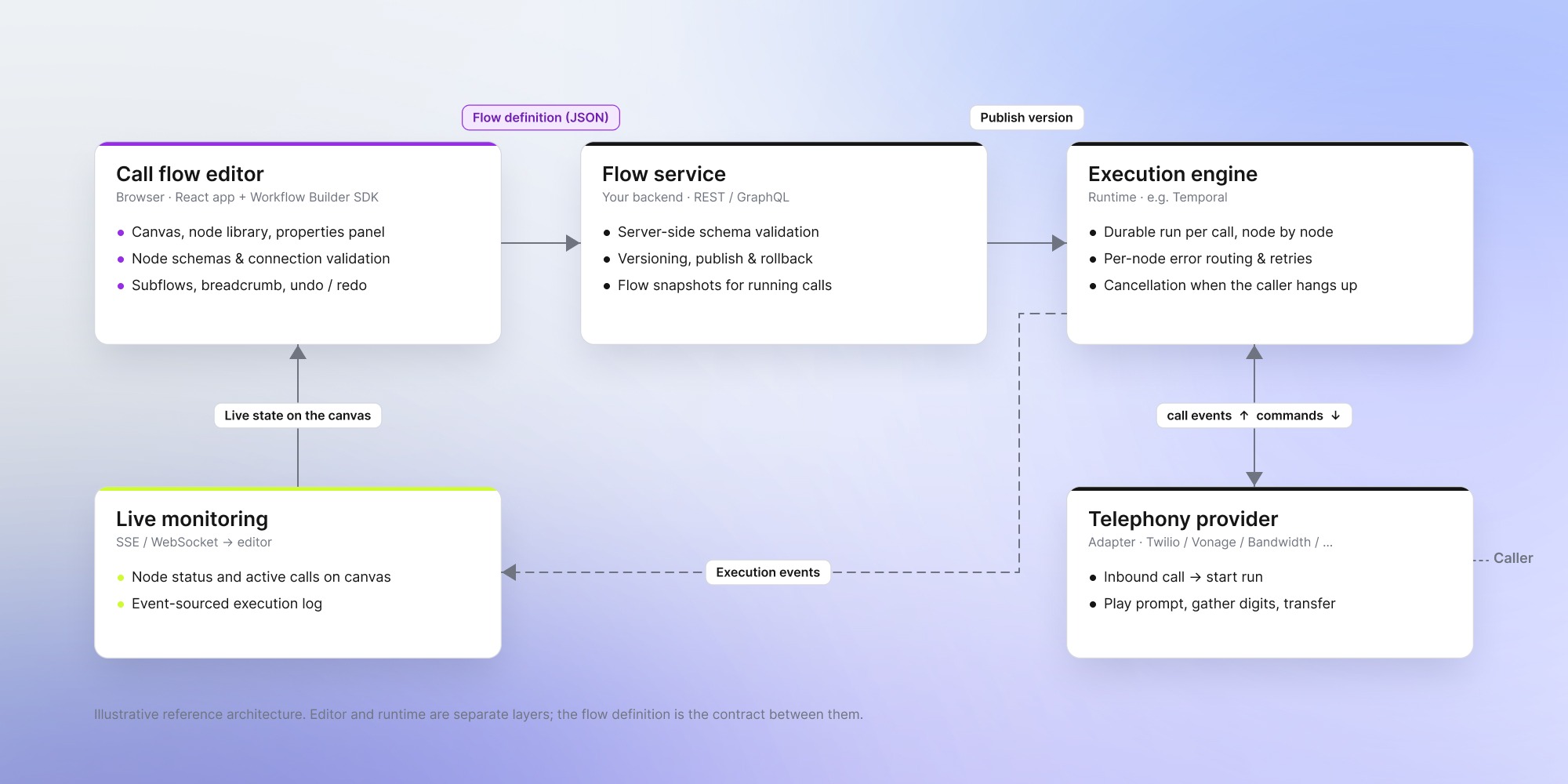
The editor defines the call flow and checks what can be known from that definition. The runtime handles the actual call, telephony infrastructure, and execution state.
Workflow Builder describes its voice architecture in the same way: the editor produces the graph, while a backend interprets and runs it. Temporal can be used as the reference execution layer, although the editor itself isn't tied to one engine.
Build testability into the call flow editor from the start
Testing is harder to add once every call-flow rule is scattered across visual components and backend services.
A cleaner model keeps the workflow definition explicit enough to inspect before execution. Node schemas can describe valid configuration, connection rules can describe allowed graph structure, and product-level validators can inspect the completed flow.
A Test Call or simulation action can then sit on top of the same model.
One platform may simulate routing entirely inside the editor. Another may initiate a real provider call. Larger voice systems may support both.
What should reach the caller?
Ideally, very little that could have been caught earlier.
A real caller is the right test for audio, telephony behavior, latency, and the overall experience of moving through the menu. They shouldn't be the mechanism that reveals a missing edge or an IVR option connected to nothing.
Moving those failures into the editor makes call-flow configuration safer for the people using it and reduces how much basic debugging has to happen in production.
For teams building the broader authoring experience, our guide to visual call flow editors covers how IVR menus and other voice-routing elements fit onto the canvas.
