Building a visual call flow editor for cloud telephony – and how to get it right

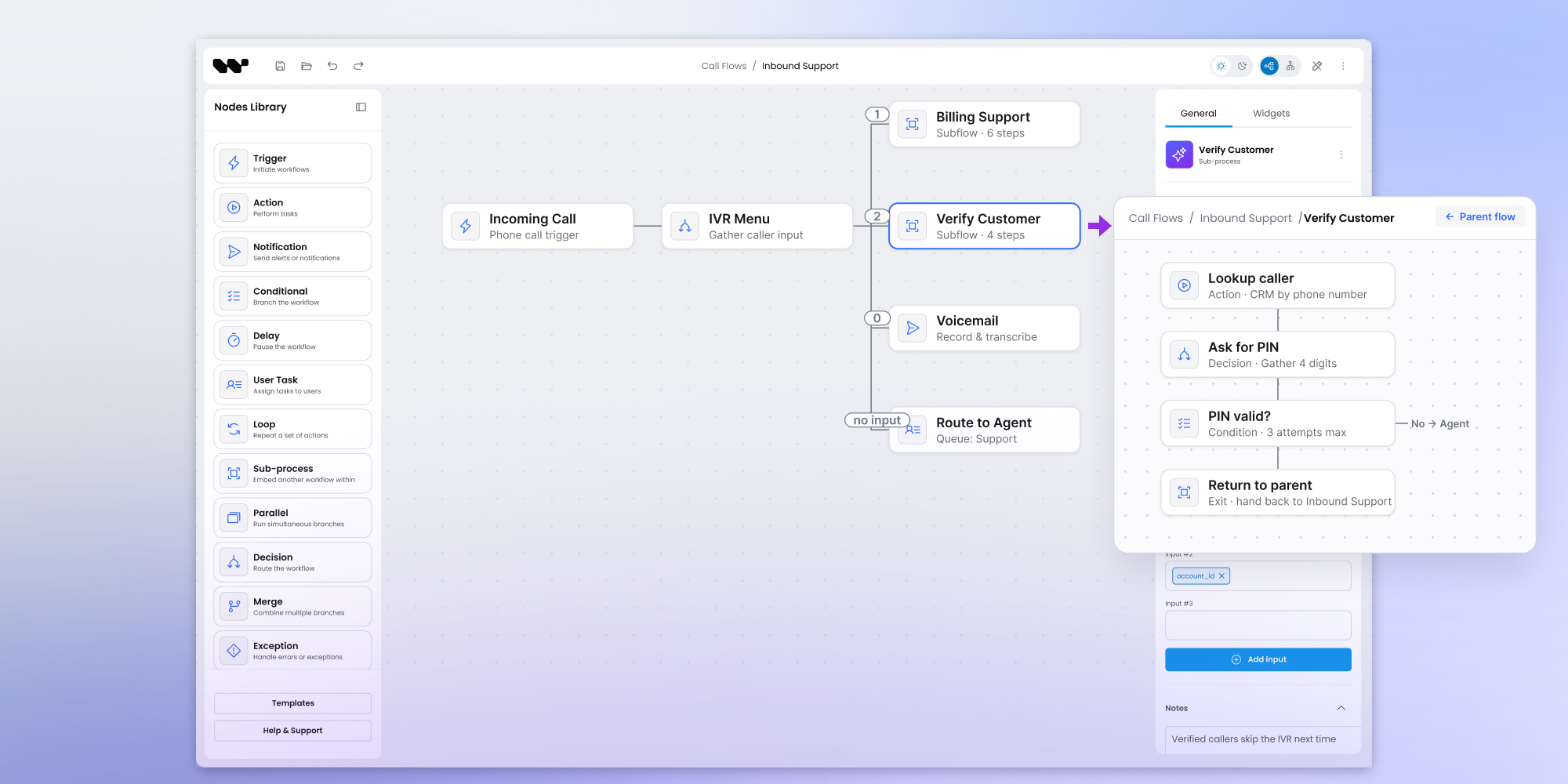
Cloud communications providers keep hearing one request from their partners: let us see and edit call flows visually, instead of piecing them together across settings tables, forms, and screens that never quite connect. A visual call flow editor is built from standard parts – numbers, IVR menus, queues, time-based routing, ring groups, and routing rules. The harder part is keeping it readable as accounts grow, which comes down to five design techniques. This article walks through that use case, and how you would build it on Workflow Builder: an embeddable editor and reference backend, rather than a canvas you build from scratch.
The use case for a visual call flow editor
Picture a cloud communications provider. It does not sell one phone line at a time – it serves business customers through a network of partners and administrators who set things up on their behalf. The person who actually configures call routing is one of those partners or admins: comfortable with an IVR (interactive voice response) menu, but not a developer, and rarely with time to spare.
For a provider like this, call flow configuration carries real weight. It is the surface a partner touches every week, the thing they judge the platform by, and one of the first items on their wish list when they compare vendors. Make it clumsy and every onboarding costs support time. Make it clear and partners set up accounts on their own schedule, without opening a ticket.
In most platforms, that configuration lives in settings pages. The partner lists an element, configures it, opens another page to build a group, then comes back to connect the group to a number or another step. It does the job. It is also slow, it is easy to lose track of, and it never shows the shape of the whole call flow in one place.
So the request that keeps landing on the roadmap is simple to state: let partners see the call flow, and change it without losing their place. A form tells you a setting; a diagram tells you how a call actually travels, which is what the partner is really trying to reason about.
What follows is one way to build that: a visual call flow editor for this kind of provider, on Workflow Builder.
The building blocks of a call flow
Every call flow editor, whatever runs underneath, works with the same handful of building blocks. They are worth naming, because the editor's whole job is to make each one legible at a glance:
- Numbers – the entry points. Each inbound number carries its own starting rule for where a call goes first.
- IVR menus – the interactive voice response layer: key-press navigation, timeouts, and the audio prompts a caller hears.
- Queues – where callers wait for a group of agents, with wait limits, overflow, and a ring strategy that decides who is offered the call.
- Time-based routing – the switch that changes behavior by business hours, holidays, and one-off exceptions.
- Ring groups – a set of people who ring all at once or one after another, with rules for what happens when nobody answers.
- Routing rules – the conditions that cover everything else, sending a call one way or another based on the data at hand.
In a form-based tool, each of these is a page you visit in turn. In a visual editor, each becomes a node on a canvas: you drag it in, connect it to the next step, and open a side panel to configure it, without ever leaving the picture of the whole flow. The editor lives inside the provider's own portal, styled as part of the product, so the partner never feels they left it.
How to keep a call flow editor usable at scale
A call flow editor is easy to demo and hard to scale. The demo has 20 nodes and looks effortless. The real account, a year in, has many more. Whether people trust the tool or quietly avoid it comes down to how it handles that growth.
A call flow is rarely a single tangled graph. It is a collection of mostly independent flows: onboarding, working hours, after hours, VIP routing, and holiday handling. A good editor leans into that structure instead of piling everything onto one screen. Five techniques do most of the work.
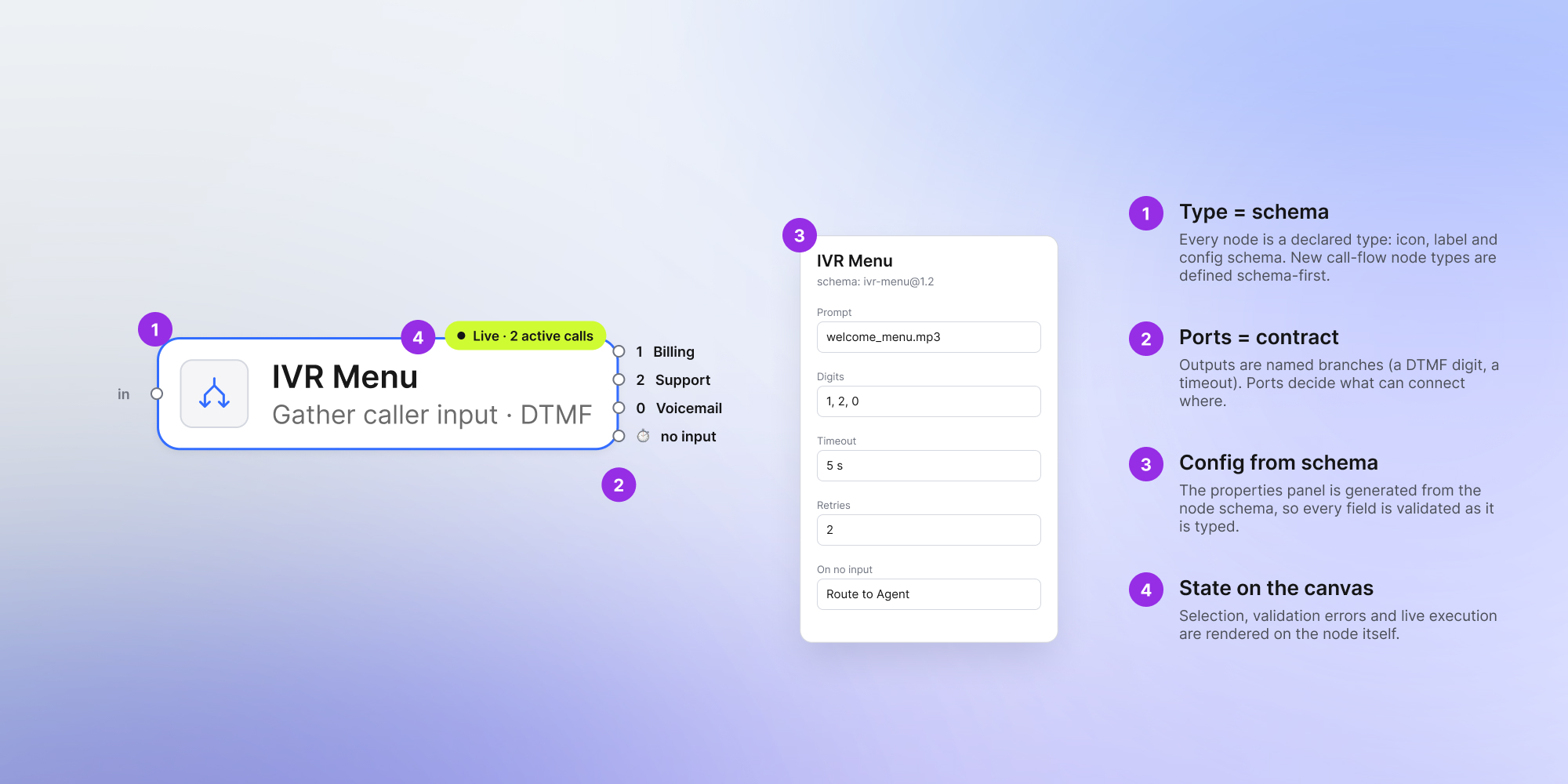
Progressive disclosure. A node shows its name and type by default; its full configuration opens in a side panel only when someone selects it. The canvas stays legible, and the detail is one click away. This is the baseline every other technique builds on: show the shape of the flow by default, and the detail only on demand.
Subflows and drill-down. The top level holds a short list of named sections – a table of contents for the account. Opening one drills into its own canvas, with a breadcrumb back, so each section stays small enough to read. A partner editing after-hours routing never has to see the holiday logic to do their job.
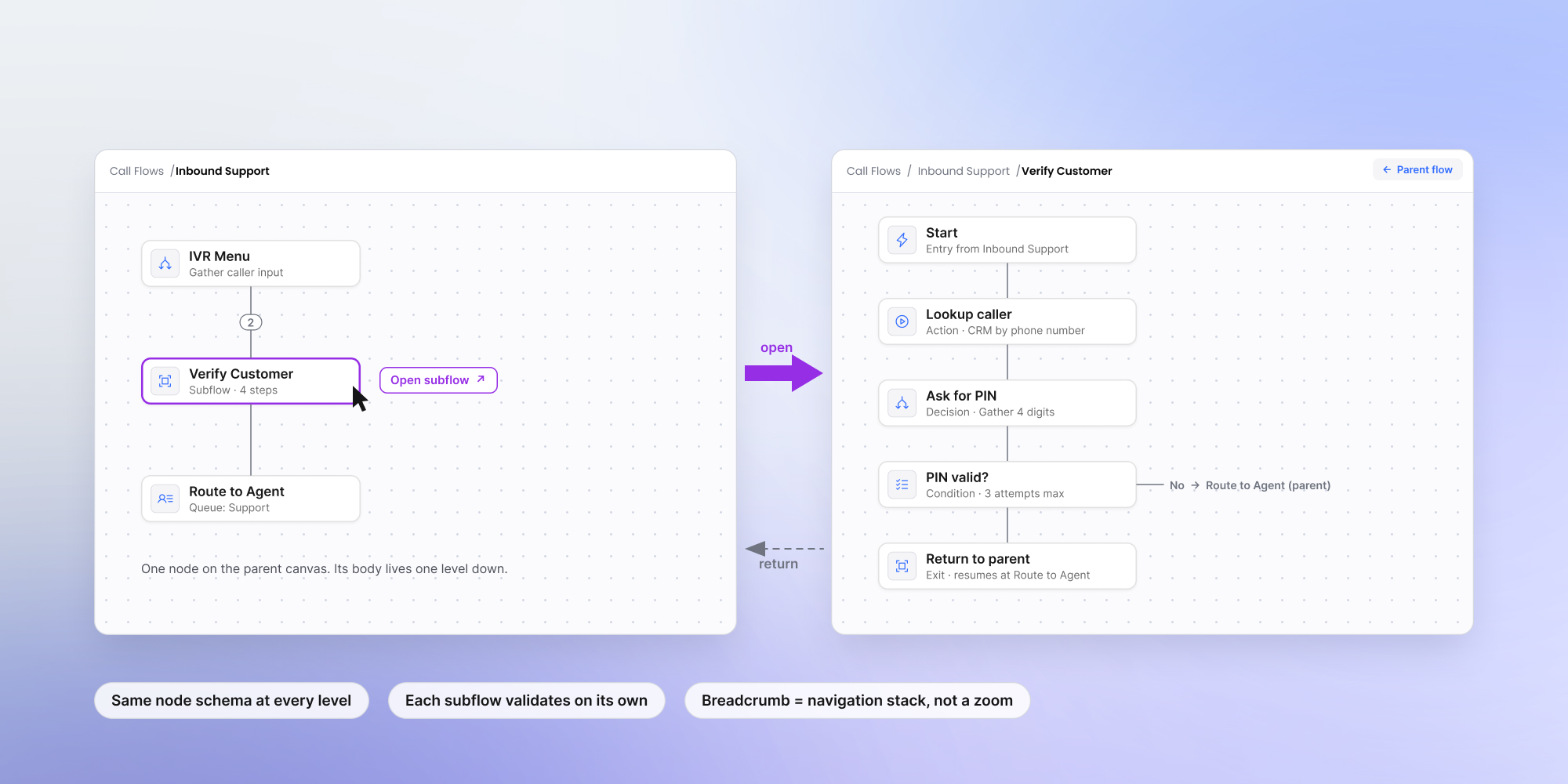
Focus mode. Branches fold away when they are not in use, and opening one group can close another, so the number of things on screen stays bounded no matter how large the account grows. It is the same idea as folding regions in a code editor: structure you expand on demand, not clutter you scroll past.
Filtered views. One flow in the data, several lenses in the interface: show only VIP routes, or only what is active during business hours, or only what changed this week. People work in the context they came for instead of scanning the whole graph for the one branch they need.
Separating data from logic. Not everything belongs on the canvas. A long list of numbers that all share one rule is data, not logic – it belongs in a table, with the flow opening in context when someone clicks a row. Keeping repetitive data out of the graph is often the single biggest gain in clarity.
None of these is a switch you turn on, and the right mix depends on how the account is actually used:
Reading that correctly – which pattern fits which behavior – is design and engineering judgment more than it is a feature list. It comes from the data and from watching how people work, and it is where experience with editors like this earns its keep.
Building a call flow editor on Workflow Builder
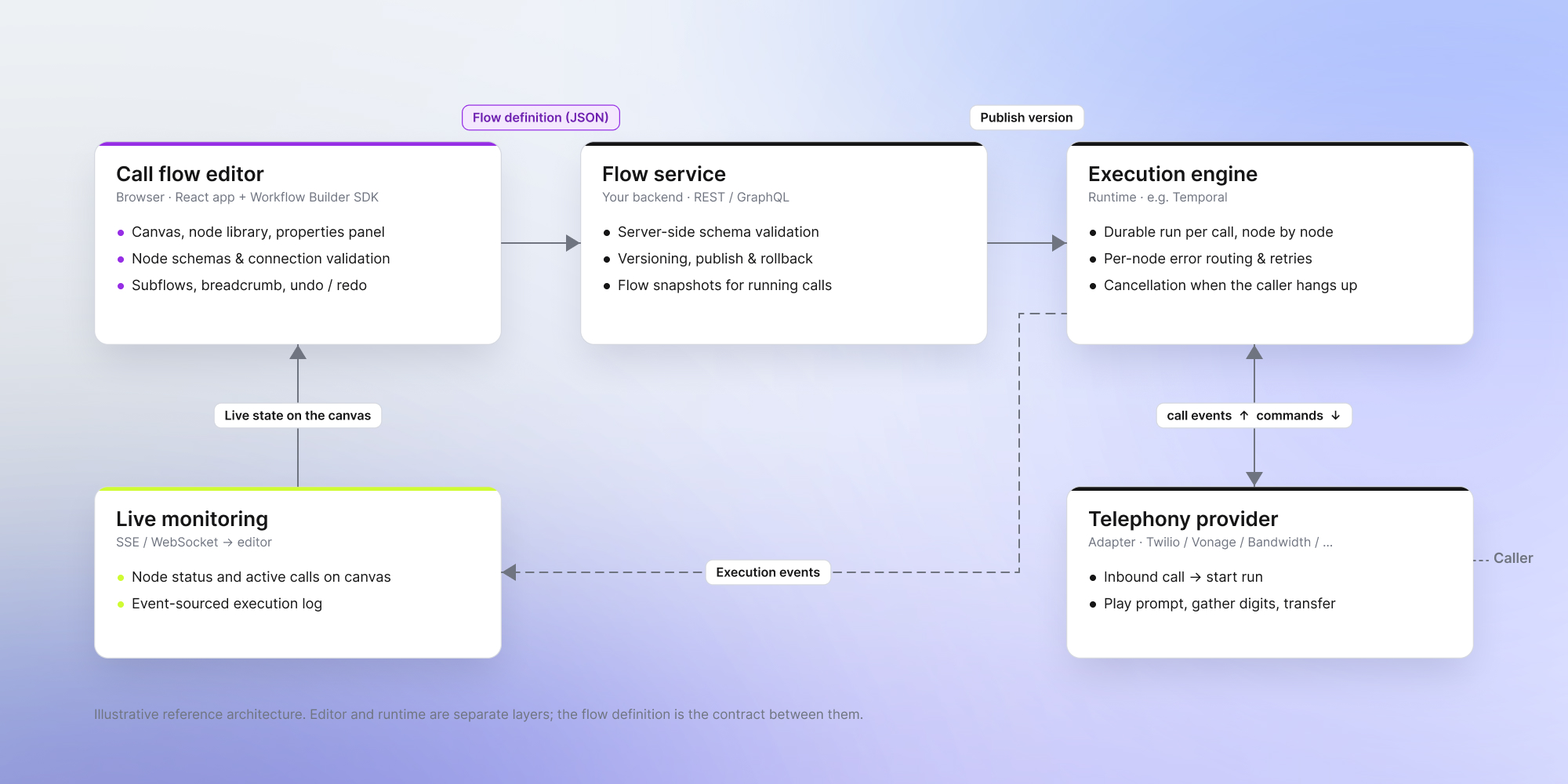
This is the kind of product Workflow Builder is built for: an embeddable, production-grade call flow builder a platform team drops into its own product, rather than a canvas library assembled from scratch. 3 things come in the box, and the last one stays yours.
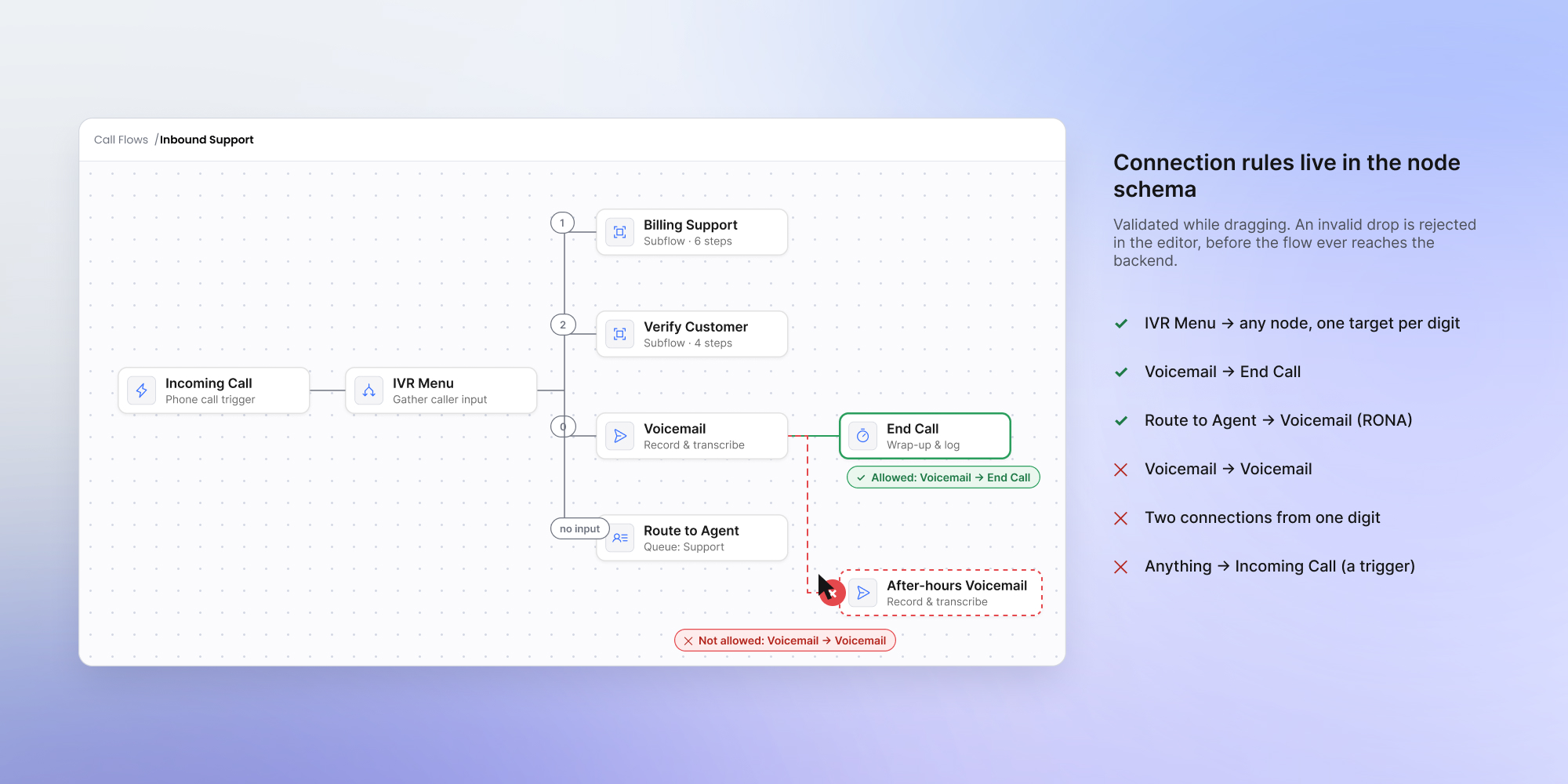
The editor. Distributed as an npm package @workflowbuilder/sdk, it is a React-based drag-and-drop canvas with schema-first nodes – you define a node as a JSON Schema, and the standard ones need no React code – plus custom node and edge templates, connection validation as you drag, a large icon set with telephony icons included, undo/redo and copy/paste, and CSS design tokens for white-labeling. A plugin system extends it without forking, so your changes survive upgrades.
The execution backend. A reference backend that interprets the graph and orchestrates its execution, wired to Temporal by default. It streams progress to the UI in real time, keeps an event-sourced log of every run, passes data between steps, and applies a per-node error policy: stop, absorb, or route to a fallback branch. Temporal is a showcase, not a requirement. The editor and the backend are engine-agnostic, so you plug in the engine you already run.
The scale patterns. Keeping a large call flow readable – the subflows, focus mode, filtered views, and data-in-tables are not pre-baked toggles – the right mix depends on the product and how people work in it, not on a default. The foundation is built to extend, so you add exactly what fits on a base made for it. That is engineering, and it is where experience with these editors pays off – the judgment about which pattern fits which account is the hard part, and it does not come from a library's documentation.
What stays yours. Your brand, your business logic, and the specific partner-facing experience that makes the product yours. You own the source code, and because the foundation is solved, your engineers stay on the voice infrastructure that is genuinely yours to build.
Should you build your own call flow editor?
You can build all of this yourself. The first version is not hard: React Flow or a canvas library, a handful of node types, and a prototype comes together fast. The cost hides later – in the layout patterns, the reference backend, and the clarity work that only surfaces once real accounts get large. That is the part teams underestimate, because it is invisible in the demo and unavoidable in production.
Starting with solutions like Workflow Builder means that the foundation is already handled, and the effort left to your team is the part specific to your product.
Either way, the choice of library – React Flow, a commercial canvas, or something in-house – matters less than one question: how will the people configuring call flows actually work with this as their flows grow? That answer comes from looking at how people actually use the editor, and it drives every other decision – which is why it deserves real discovery work up front, not a default. Answer that well and the technology choices follow.
- What is a call flow editor?
A call flow editor is the tool that decides what happens to an inbound call: which menu it reaches, which queue it joins, who it rings, and when. A visual call flow editor does this on a canvas, where each step is a node and the connections show how a call travels from the first ring to the last.
- Is a call flow editor the same as call routing software?
Not quite. Call routing software is the platform that actually moves calls; a call flow editor is the interface where someone designs and edits that routing. The editor produces the configuration, and the routing engine runs it.
- Why build a visual editor instead of configuration forms?
A form tells someone what a setting is. A diagram shows how a call moves through the system, which is what the person configuring it is trying to reason about. For partners and admins, matching how they already think cuts setup time and support tickets.
- How do you keep a call flow editor usable as accounts grow?
Treat the call flow as a set of independent flows rather than one canvas. Five techniques carry most of the load: progressive disclosure, subflows and drill-down, focus mode, filtered views, and separating data from logic. The right mix depends on how people actually work.
- Can you build a call flow editor on React Flow?
Yes, and it is a reasonable place to start. React Flow renders the graph. The work that follows – property panels, layout at scale, versioning, and the backend that runs the flow – is what turns a canvas into a product, and it is where most of the effort goes.
- What does Workflow Builder provide for this use case?
An embeddable, production-grade editor with schema-first nodes you shape to your domain, plus a reference backend that runs the flows – wired to Temporal by default, but engine-agnostic, so you can plug in the engine you already use. Keeping it clear at scale is engineering you build on the foundation rather than a feature that ships ready-made – subflows, focus mode, and filtered views, added as your product needs them. Your brand, business logic, and source code stay yours.
An entrepreneur and tech enthusiast, with over 14 years of experience building innovative diagramming solutions and tools across industries. Our interfaces help technical and non-technical users make informed business decisions.
Need more information about Workflow Builder?
Talk directly to our experts to discuss features, integration and onboarding options, or custom solutions– get clear answers for your next step.
Articles you might be interested in
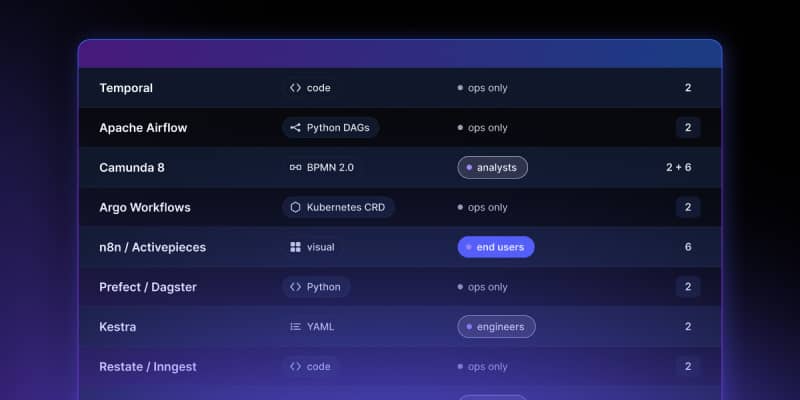
Open Source Workflow Engine Comparison: Licences, Layers and Gaps | Workflow Builder
Every automated workflow runs on a stack. Most conversations about choosing an open source workflow engine collapse that stack into one question – "which workflow tool should we use" – and then stall, because the tools being compared occupy different layers and solve different problems. Apache Airflow and Camunda are both called a workflow engine. They have almost nothing in common.

Temporal Human-in-the-Loop: What the Engine Gives You, What You Build | Workflow Builder
If you're implementing human-in-the-loop (HITL) approval on Temporal, the engine gives you more than expected on the waiting problem and less than expected on the accountability problem. This article is that split, with the documentation behind each claim.