Best Temporal UI tools and visual layers in 2026

The best Temporal UI depends on who uses it and what they need to accomplish. Temporal Web UI and Cloud UI help engineers inspect executions and manage the runtime, while Datadog, New Relic, and Grafana provide broader production monitoring. Workflow Builder adds an embeddable visual editor for customers or operations teams who need to create and modify workflows without working directly with Temporal. For users who only need to approve tasks, track progress, or provide information, a focused product interface is usually more practical than a workflow editor.
Searching for a “Temporal UI” can mean very different things.
A developer may need to inspect a failed Workflow Execution. A platform team may want metrics and alerts. A SaaS company may need customers to interact with long-running processes or visually change workflow logic.
All of those interfaces can sit around the same Temporal runtime, but they solve different jobs.
Which Temporal UI do you actually need?
There isn’t one best Temporal UI because the category covers several layers.
The distinction matters because a runtime console, observability dashboard and workflow editor may all contain graphs or workflow information without being interchangeable.
A developer debugging event history needs a very different interface from an operations manager configuring an approval process.
Temporal Web UI and Cloud UI: best for operating Temporal
Temporal Web UI is the natural starting point when engineers need to inspect, understand and operate Workflow Executions.
It gives developers and operators direct visibility into Temporal runtime behavior rather than translating it into business-facing product language.
Typical jobs include inspecting workflow state, navigating execution history, finding runtime problems and understanding how a particular Workflow Execution behaved.
Temporal has continued expanding the UI. Principal Attribution entered pre-release in April 2026 for both Temporal Cloud and self-hosted deployments to improve accountability and traceability for Workflow Executions. Cloud-specific Custom Roles followed in June, while Projects entered pre-release in August as a way to organize Temporal Cloud resources such as Namespaces and Nexus endpoints.
The Cloud interface extends the same ecosystem toward platform administration. A team may use it to organize Temporal Cloud resources, manage access or operate the environment rather than investigate the business meaning of an individual workflow.
A useful distinction is:
Temporal Web UI helps engineers understand workflow execution. Temporal Cloud UI helps platform teams operate the Temporal environment.
Neither interface is intended to become a general-purpose visual workflow authoring product.
For example, an engineer may need to see:
OrderProcessingWorkflow
Activity: chargeCard
Status: retrying
Attempt: 3
while a business user may need:
Payment failed
↓
Retry payment
↓
Request another card
↓
Continue order
The underlying execution can be identical. The interface serves a different user.
For the authoring side of that distinction, see Temporal workflow UI: what to use for visual authoring on top of Temporal.
Datadog, New Relic and Grafana: best for production observability
Temporal runtime inspection isn't the same job as application observability.
A production problem might start outside Temporal entirely:
API slowdown
↓
Worker backlog
↓
Workflow delay
↓
Customer-facing timeout
Platform teams need to see Temporal in the context of the rest of the system.
Temporal Cloud integrates with Datadog and New Relic at the metrics layer, allowing teams to bring service health, latency, replication lag, task backlogs and workflow-level success metrics into observability environments they already use. Those integrations do not replace per-execution inspection: Event History and individual Workflow state still belong in Temporal Web UI. New Relic ingests Temporal Cloud metrics through its Flex integration, while Datadog provides a pre-built Temporal Cloud dashboard.
Datadog
Datadog is the natural choice when the company already monitors applications and infrastructure there.
The advantage isn't simply getting a Temporal dashboard. Engineers can correlate Temporal behavior with APIs, databases, Workers and other services inside the same monitoring system.
New Relic
New Relic fills a similar role for teams already standardized on its dashboards and alerts.
Temporal expanded its observability integrations in 2025 to bring Temporal metrics into broader production monitoring environments. Datadog offers a dedicated Temporal Cloud integration and dashboards, while New Relic ingests Temporal Cloud metrics through its Flex integration.
Grafana and Prometheus
Grafana remains a practical choice for teams operating a Prometheus-heavy infrastructure stack, particularly in self-hosted environments.
It fits well when Temporal metrics need to live alongside Kubernetes, databases, Workers and other infrastructure rather than inside a dedicated SaaS observability platform.
The decision between these tools usually shouldn't be:
Which one is the best Temporal dashboard?
A better question is:
Where does the rest of our production telemetry already live?
Temporal Web UI can still handle detailed Workflow Execution inspection while the observability platform answers broader system-health questions.
Workflow Builder: best for customer-facing workflow authoring
A completely different problem appears when people need to change the workflow rather than inspect its execution.
Suppose Temporal already runs:
Application submitted
↓
Risk check
↓
Manual review?
↙ ↘
Yes No
↓ ↓
Review Continue
Temporal Web UI can show engineers what happened.
Datadog can tell the platform team whether Workers and services are healthy.
Neither gives a customer or operations user a product-native way to add another review step, change a condition or rearrange the process.
Workflow Builder's Temporal integration is designed for that authoring layer.
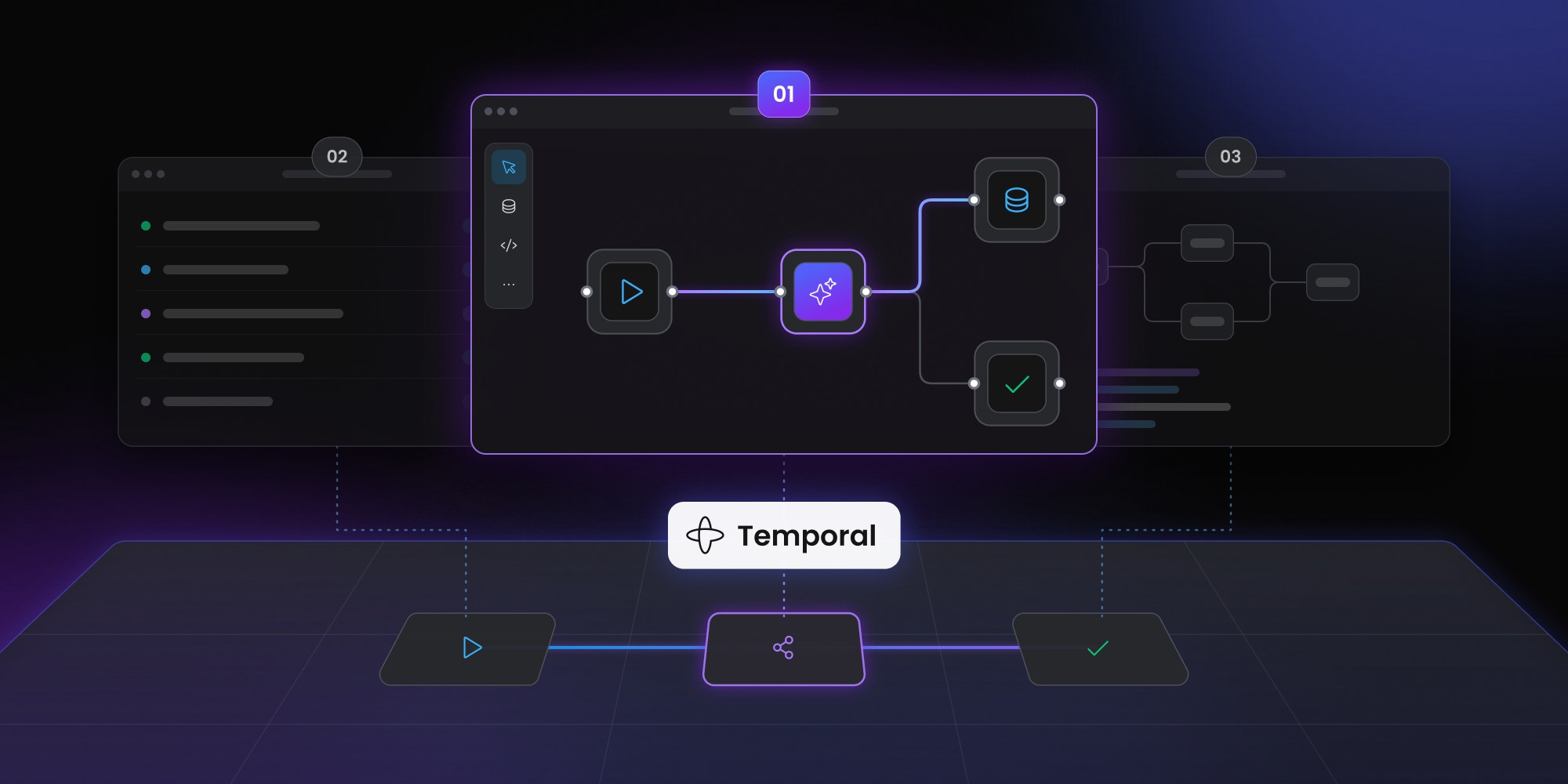
The editor sits inside the SaaS product and produces a structured workflow definition. The backend then coordinates the definition through an engine adapter, while Temporal continues to execute the durable process.
The current Workflow Builder reference stack separates the system into an editor, reference backend, execution core and engine integration. Temporal ships today as the reference adapter. The backend itself submits and cancels through WorkflowEnginePort; the graph runner uses ActivityRunnerPort for node execution and EventEmitterPort for recording execution events and status transitions.
Customer
↓
Embedded workflow editor
↓
Structured workflow definition
↓
Reference backend (local dev) / your backend
↓
Temporal adapter
↓
Temporal
The separation lets customers work with product terminology while engineers continue working with Temporal.
A customer might see:
Request compliance review
without needing to understand how the backend maps that node onto Temporal Workflows, Activities or other runtime behavior.
Workflow Builder's editor does not execute the workflow itself. The reference backend stores and submits the definition, the connected engine provides durable orchestration and node logic runs in the execution layer your team controls — in the shipped Temporal reference stack, that work is delegated through the execution core and worker activities.
For teams that already have their own backend, the React editor can also be embedded independently rather than adopting the entire reference stack.
CTA
Temporal already runs your workflows?
Add customer-facing authoring without replacing the runtime.
Explore Workflow Builder for Temporal
When a custom product UI is better than a workflow editor
A visual canvas isn't always the best Temporal interface.
Many users don't need to redesign workflows. They only need to interact with a process already defined by engineering.
Consider a customer onboarding flow. An end user may need to:
- see current progress
- upload a missing document
- approve a request
- retry an action
- provide additional information
- cancel the process
A focused application screen will usually be clearer than showing the user a node graph.
Temporal can keep the durable process running underneath while your SaaS presents only the controls relevant to that user.
The dividing line is simple:
If users need to interact with a running workflow, build a focused product UI. If they need to change workflow structure, add an authoring layer.
The same product can need both.
An employee may approve one task from a compact application screen, while an operations administrator uses a visual editor to decide where approval tasks belong in future workflows.
One Temporal workflow, four different interfaces
The easiest way to understand the stack is to follow one workflow through several users.
Imagine a customer onboarding process that includes identity verification, compliance checks and human review.
The developer uses Temporal Web UI
A Workflow Execution has failed.
The developer opens Temporal Web UI to inspect runtime state and execution history. They care about what Temporal actually did and why.
The platform engineer uses Datadog, New Relic or Grafana
Several workflows are running more slowly than usual.
The platform engineer checks Worker health, infrastructure metrics and surrounding services to determine whether the issue is local to Temporal or part of a wider production problem.
The customer uses your product UI
The customer doesn't care about event history or Task Queues.
They see:
Identity verification failed. Please upload another document.
Their interface exposes the business action rather than the orchestration system.
The workflow author uses Workflow Builder
An operations manager notices that failed identity verification should go through another review step before requesting a new document.
They edit the reusable process:
Verify identity
↓
Verification failed?
↙ ↘
Yes No
↓ ↓
Manual review Continue
↓
Request documents
The runtime hasn't changed.
What changed is who needs to interact with the workflow and at which level.
The model is more useful than trying to rank all four interfaces from best to worst. They aren't competitors.
How to choose the right Temporal UI layer
Start with the user and the action they need to perform.
If engineers need to inspect executions, use Temporal Web UI.
If platform teams need to monitor production health, connect Temporal to the observability stack the organization already uses.
If customers need to complete tasks or provide input, build a focused product interface.
If customers, operators or product teams need to change reusable workflow definitions, add a visual authoring layer.
A mature Temporal application may use all four.
Keeping those boundaries explicit also reduces unnecessary duplication. There's little value in recreating Temporal Web UI inside a workflow editor or rebuilding infrastructure dashboards inside a customer-facing application.
Temporal can remain responsible for durable execution. The observability platform monitors production. Your SaaS exposes business interactions. The visual editor handles workflow authoring.
For a deeper technical view of the authoring-to-runtime boundary, see the Workflow Builder reference stack.
Content Marketing Specialist who's spent the last decade making tech topics actually readable. With an MA in Brand Communication, Ida has crafted content strategies for several IT companies. Her portfolio spans from Kubernetes tutorials to enterprise software guides, now focusing on data visualization and diagramming solutions.