Best visual workflow editors for Temporal and durable execution engines


Visual workflow editors for durable execution engines differ mainly in how they connect workflow design to execution. AWS Step Functions Workflow Studio, Camunda Web Modeler, and Conductor UI let teams design workflows directly in their engine’s native format, while Workflow Builder provides a separate, embeddable authoring layer that can connect to Temporal through an adapter. Engine-native editors work best for developers and process specialists, whereas independent editors give SaaS customers a simpler, product-specific experience. The right choice depends on who creates the workflows and whether the authoring model should belong to the product or the execution engine.
Workflow engines are good at keeping processes alive through retries, failures, long waits and infrastructure restarts. They’re much less consistent about how humans are supposed to design those workflows.
The category also isn’t uniform: Temporal is a durable execution runtime where workflow logic is ordinary code replayed from an event history, while Camunda 8 and Conductor are process and task orchestration engines built around an executable model — BPMN in one case and a versioned JSON workflow definition in the other. That difference is exactly what decides who gets to draw the picture.
So rather than ranking canvases by feature count, there’s a better way to compare them:
What happens to the workflow after you draw it?
Two very different ways to get a visual editor
Most visual tooling around durable execution falls into one of two camps.
The editor belongs to the engine
AWS Step Functions Workflow Studio, Camunda Web Modeler and Conductor UI all work this way.
You visually create a workflow in the model understood by that execution platform
Visual editor
↓
Engine-native definition
↓
Same engine executes it
The upside is tight integration. The editor knows what the runtime supports because both come from the same system.
The downside is equally clear: the authoring model is tied to that engine.
The editor belongs to your product
Workflow Builder takes the opposite route.
The product-facing editor creates a structured workflow definition first. A backend and engine adapter then connect that definition to Temporal or another runtime.
Product-facing editor
↓
Workflow definition
↓
Backend / adapter
↓
Execution engine
That extra boundary only makes sense when you actually need it.
If developers are creating Step Functions state machines for AWS infrastructure, Workflow Studio may be exactly right. If SaaS customers are creating business workflows and your team wants freedom over the runtime underneath, a separate authoring layer becomes more interesting.
That architectural split is the real comparison.
The same workflow, four completely different implementations
Imagine a workflow with one long-running step, automatic retries and a human approval:
Order received
↓
Charge customer
↓
Retry if payment fails
↓
High-value order?
↙ ↘
Yes No
↓ ↓
Manager approval Continue
↓
Fulfill order
All four tools below can represent workflow logic around that general shape.
What changes is whose language you’re writing it in.
Temporal + Workflow Builder: when the authoring model belongs to your SaaS
Temporal itself doesn’t provide a general-purpose visual authoring canvas for building arbitrary workflows. Its Web UI is aimed at runtime visibility and operations rather than replacing code-based Workflow definitions.
That’s a reasonable design choice for Temporal developers. Workflow code stays code.
The gap appears when your customers need to decide how a process should work.
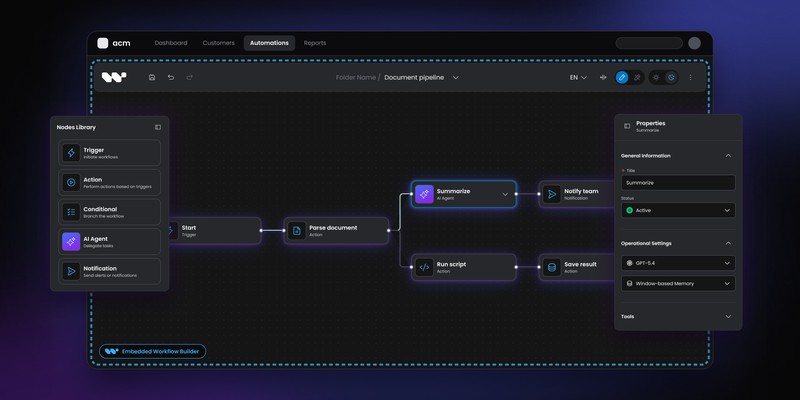
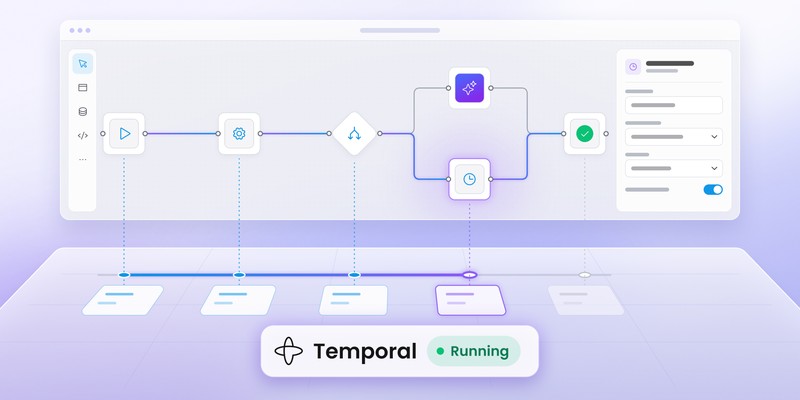
Workflow Builder's Temporal integration separates those concerns. Customers work in a visual editor embedded inside the host application, while Temporal continues handling durable execution.
The flow becomes:
Customer
↓
Workflow Builder
↓
Structured JSON definition
↓
Reference backend (local dev) / your backend
↓
Temporal adapter
↓
Temporal
The current reference stack ships with a production-ready Temporal adapter. The backend communicates with the engine through three contracts for workflow lifecycle, node execution and event streaming.
Temporal is the adapter that ships today. Inngest, Camunda and AWS Step Functions are listed as swappable targets rather than shipped integrations, so they shouldn’t be presented as ready-made adapters. Teams using another engine need to implement the port interfaces themselves.
Why add another layer at all?
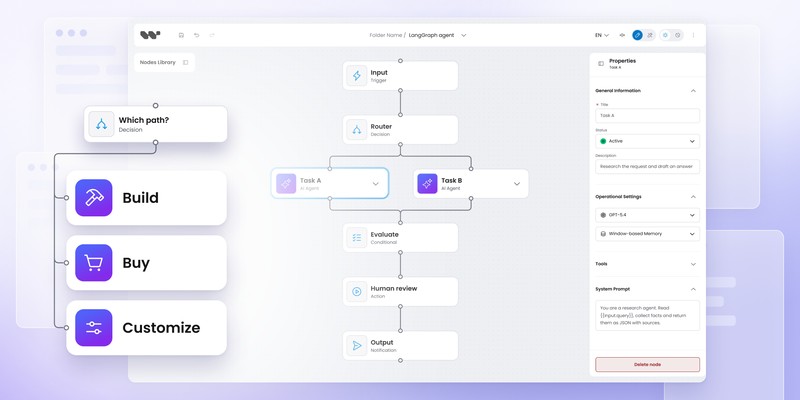
Because the product workflow doesn’t necessarily need to look like the execution engine.
An end customer could author:
Fraud check
↓
Finance approval
↓
Issue refund
while the implementation underneath uses Temporal Workflows, Activities, Signals and application-specific services.
Your frontend vocabulary remains stable even if engineering changes how individual nodes execute.
That separation matters most when workflow authoring is a customer-facing product capability, not an engineering tool.
It matters much less when developers are the only people defining workflows.
Good fit: SaaS products already running Temporal or another runtime that need embedded, domain-specific authoring.
For the narrower Temporal UI question, see Temporal workflow UI: what to use for visual authoring on top of Temporal.
AWS Step Functions Workflow Studio: when visual design and runtime should share one model
AWS takes almost the opposite route.
Workflow Studio is built directly into Step Functions and visually authors Amazon States Language (ASL) state machines.
Its Design mode lets developers drag states and AWS actions onto a canvas. Code mode exposes the underlying ASL definition and updates the graph as the definition changes. Config mode handles state-machine settings.
There’s very little ambiguity about where the visual model goes:
Workflow Studio
↓
ASL definition
↓
AWS Step Functions
The editor and runtime speak the same language.
Why is that powerful?
There’s no translation problem between an abstract customer model and Step Functions.
You can visually configure states, input/output transformations and error handling, then inspect the ASL being generated. AWS also lets you export definitions in JSON or YAML and publish versions of state machines. Workflow Studio documentation covers the visual editing and version-publishing flow.
For AWS-centric engineering teams, that’s a very compelling setup.
Where does it become less natural?
When the person authoring the workflow shouldn’t be designing an AWS state machine.
A logistics customer may want to add:
Request warehouse approval
They probably don’t want to configure a Step Functions Task state, JSONPath transformation or AWS service integration.
Workflow Studio is excellent at making Step Functions workflows visual.
It isn’t trying to turn Step Functions into a white-label customer workflow product.
Good fit: development teams building directly on AWS Step Functions who want visual and code-based editing of the same executable state machine.
Camunda Web Modeler: when BPMN is the shared language
Camunda approaches the problem from process modeling rather than developer graph primitives.
Camunda Web Modeler lets teams create executable BPMN processes, DMN decisions and forms in the browser. Current Camunda 8 tooling also includes collaboration, reusable element templates, Git synchronization and process application support.
Here, the diagram isn’t a UI representation that later gets translated into something unrelated.
The BPMN process is part of the executable model.
Web Modeler
↓
BPMN / DMN / Forms
↓
Camunda 8
That makes Camunda very different from an embedded editor sitting above Temporal.
BPMN changes the collaboration model
A process such as:
Application
↓
Automated check
↓
Human review
↓
Decision
can be modeled using standardized process notation rather than a proprietary node vocabulary invented for one SaaS application.
For organizations where business analysts, process specialists and developers genuinely collaborate through BPMN, that’s a strength.
Camunda's current Modeler documentation supports both browser-based and desktop modeling, while Web Modeler adds the collaborative layer around executable process design.
The question isn't “Is BPMN better?”
It’s whether BPMN is the right authoring language for your users.
An insurance operations team may be perfectly comfortable with it.
A customer buying a vertical SaaS product may expect:
Escalate claim
rather than BPMN gateways, service tasks and process-engine terminology.
Camunda Web Modeler is therefore strongest when process modeling itself is part of how the organization works.
Good fit: enterprise process automation where BPMN/DMN is an intentional shared language between business and technical teams.
Conductor UI: when the orchestration platform includes visual workflow definition
Conductor adds another variation.
The Conductor UI, available in open-source Conductor as well as the Orkes platform, includes a visual workflow builder where users can add tasks, configure inputs and outputs, version workflows and run them from the same environment.
Conductor workflow definitions can be created visually or through SDKs and APIs, with definitions stored as JSON.
The relationship is therefore:
Conductor UI
↓
Conductor workflow definition
↓
Conductor
Like Step Functions and Camunda, the editor is tightly aligned with the execution platform.
Conductor's sweet spot
Its visual model can be attractive for teams building distributed application workflows where developers still want explicit control over tasks, workers and orchestration.
You get a lower-code authoring path without introducing a completely separate customer-facing workflow abstraction.
The same characteristic also defines the boundary.
If users create workflows in Conductor UI, they’re authoring Conductor workflows. For an internal platform team, that can be exactly what you want.
For a SaaS vendor trying to make workflow creation feel like an original feature of its product, exposing a dedicated product-facing editor may still be preferable.
Good fit: teams already standardizing orchestration on Conductor that want visual definition and execution within the same platform.
Now change one thing: replace the execution engine
The easiest way to expose the architectural difference is to imagine a runtime migration.
Suppose the original product starts on Temporal.
Two years later, the company wants one deployment to use an internal engine or another orchestrator.
With an engine-native editor, the visual definition is part of the engine model:
Workflow Studio → ASL → Step Functions
Camunda Modeler → BPMN → Camunda
Conductor UI → Conductor JSON → Conductor
Changing the engine means changing the execution model and often the authoring model with it.
With an independent authoring layer:
Product editor
↓
Product workflow definition
↓
Engine adapter
↙ ↘
Temporal another engine
the editor can potentially stay stable while the adapter changes.
“Potentially” is important.
Engines have different semantics. Retries, compensation, signals, timers, child workflows and execution guarantees don’t map perfectly from one system to another.
An engine adapter isn’t magic portability.
The value is having an explicit boundary where those differences can be handled rather than encoding the runtime directly into the customer-facing canvas.
Workflow Builder's reference architecture describes that model as “swappable by design,” while currently shipping Temporal as the working reference adapter. Other engines still require implementation work.
The workflow definition is the real lock-in point
Teams often focus on the editor because it’s the visible component.
The more consequential artifact may be the definition saved behind it.
Consider four outputs:
Workflow Builder → product JSON graph
AWS → ASL
Camunda → BPMN
Conductor → Conductor workflow JSON
None is inherently superior.
Each definition optimizes for a different relationship between authoring and execution.
Engine-native definitions
They make runtime capabilities explicit.
The editor can expose exactly what the engine understands and validate against that model.
That’s excellent for technical authors.
Product-owned definitions
They can describe workflow concepts independently of one particular engine.
The cost is a translation or interpretation layer that your architecture must own.
That’s attractive when customer-facing authoring matters enough to justify the additional boundary.
A useful procurement question is therefore:
Should our saved workflow definition describe our product or our execution engine?
Once you answer that, much of the shortlist disappears.
A five-minute shortlist
If your team says…
- “We're already all-in on AWS and developers create the workflows.”
Start with AWS Step Functions Workflow Studio. - “BPMN is how our organization designs processes.”
Start with Camunda Web Modeler. - “Conductor is our orchestration platform and we want visual definitions too.”
Use Conductor UI. - “Temporal already executes everything, but customers now need to build workflows in our SaaS.”
Look at Workflow Builder. - “We use an in-house durable engine and can't replace it.”
A separate authoring SDK becomes more relevant, but expect to implement the engine boundary yourself. - “Our users only need to approve, retry or provide data.”
You may not need a workflow editor at all. Build the focused product screen they actually need.
That last option is easy to overlook.
A canvas is useful only when users genuinely need to manipulate workflow structure.
What about Inngest, Restate and other code-first durable runtimes?
Not every durable execution system needs or offers the same kind of first-party visual authoring environment. Code-first runtimes often prioritize execution primitives, developer APIs and operational tooling instead.
Inngest is an important exception to a blanket “no visual authoring” claim. Its open-source Workflow Kit provides React-based editor components for user-defined workflows built from actions your product exposes. It is an embeddable reference implementation for end-user workflow authoring, not a visual way to rewrite arbitrary Inngest functions themselves. Restate remains much closer to the code-first, operations-focused side of the spectrum.
If engineering owns every workflow definition, adding a canvas may provide little value.
The authoring problem appears when another persona enters the system:
- customers
- operations teams
- solution designers
- business users
- product administrators
At that point, teams have two options:
Expose an engine-specific visual model, if one exists.
Or introduce a product-facing definition above the engine.
Workflow Builder's reference stack currently names Temporal, Inngest, Camunda, AWS Step Functions and in-house engines as possible engine targets, but only the Temporal adapter ships today. The others are explicitly listed as integrations teams can implement against the common ports, not ready-made connectors.
That distinction matters when estimating integration work.
Visual authoring isn't the same as workflow observability
Another source of confusion is a request like:
“Can we see our durable workflows visually?”
Seeing and editing are different requirements.
A runtime UI can show:
- execution state
- history
- retries
- failures
- timings
An authoring UI needs:
- editable nodes and edges
- configuration panels
- validation
- serialization
- permissions
- publication rules
- version handling
Temporal Web UI belongs mainly to the first category.
AWS Workflow Studio, Camunda Modeler and Conductor UI cover both authoring and engine-specific definition within their own ecosystems.
Workflow Builder focuses on authoring above the runtime.
If your problem is primarily operational visibility rather than design, the previous guide to Temporal UI tools and visual layers is the better starting point.
Which visual workflow editor fits a durable execution engine?
There are really two valid answers.
Use the engine's own editor when developers or process specialists are comfortable authoring workflows in the runtime's native model.
Use a separate product-facing editor when the people defining workflows shouldn't need to understand the execution engine underneath.
AWS Workflow Studio, Camunda Web Modeler and Conductor UI make the runtime model visual.
Workflow Builder does something different: it lets the product own the authoring model while an adapter connects that definition to the runtime.
The question isn't which canvas is more advanced.
It's where you want the durable engine to become visible.
For engineering teams, exposing it directly may be ideal.
For SaaS customers, the best durable execution engine is often the one they never have to think about.
CTA
Already have the execution engine?
Keep the runtime and add the workflow authoring layer your product is missing.
Content Marketing Specialist who's spent the last decade making tech topics actually readable. With an MA in Brand Communication, Ida has crafted content strategies for several IT companies. Her portfolio spans from Kubernetes tutorials to enterprise software guides, now focusing on data visualization and diagramming solutions.