LangGraph vs LangChain: which one for production agents?

The choice between LangGraph and LangChain in production is no longer about "checkpointing vs. no checkpointing". Since LangChain 1.x, the standard create_agent API runs directly on the LangGraph runtime, meaning both options offer durability and human-in-the-loop support. The real decision comes down to orchestration control:
- Start with LangChain (
create_agent) if: Your workflow fits a standard model-and-tools loop. You get prebuilt middleware (for PII, summarization, and human-in-the-loop approvals) without the overhead of manually designing nodes, transitions, and state. - Use Direct LangGraph (
StateGraph) if: Your application requires custom execution logic—such as deterministic multi-stage pipelines, branching workflows, parallel execution with dynamic routing, custom rollback/replay boundaries, or editing structured state mid-flow. - The UI Misconception: LangGraph is a backend computation engine (a Pregel-style execution model), not a drag-and-drop no-code UI.
If the line between LangGraph and LangChain feels less obvious than it did a year ago, that's not just you.
One developer, revisiting an agent they'd built on LangGraph nine months earlier, recently noted that React-style agent patterns now seem to live inside LangChain itself – a boundary that had moved since they'd last checked.

That's exactly why "LangGraph vs LangChain" is still a live question people search for. LangGraph came out of the LangChain team and originally sat on langchain-core; today the relationship runs the other way for LangChain's standard agent API. LangChain 1.x's create_agent is built on the LangGraph runtime, while LangGraph itself can still be used without LangChain.
Current documentation states both sides of that relationship directly. You don't need LangChain to use LangGraph. At the same time, LangChain's recommended create_agent API builds a graph-based agent runtime on LangGraph, with middleware for human-in-the-loop review, summarization, PII handling, retries, and other production controls. The practical comparison is therefore not "checkpointing or no checkpointing." It's whether LangChain's standard agent loop fits your application, or you need to own the graph itself.
What LangChain does
LangChain is the higher-level agent layer. Its create_agent API gives you a production-ready model-and-tools loop, integrations, middleware, and common controls without asking you to define every node and transition yourself. If you need a tool-calling agent whose execution still fits that standard loop, LangChain's abstraction is a legitimate shortcut, not a compromise. Current LangGraph documentation points people toward LangChain's agent abstractions when they're getting started or don't yet need to control the lower-level orchestration model.
There's a real, ongoing debate about whether frameworks like this are worth adopting at all for simpler cases. A recurring argument in developer communities is that a lot of LLM applications genuinely only need API calls, ordinary control flow, and maybe retrieval; and that reaching for a framework introduces abstraction overhead and a degree of lock-in that a straightforward script wouldn't have. That's a fair challenge, and it leads to a more useful framing than "always use a framework": ask whether your problem is actually a workflow-modeling problem before reaching for tooling built to solve one.
What LangGraph adds
LangGraph's contribution, when you use it directly, is control over the execution graph underneath the agent: explicit state, nodes, conditional edges that let execution branch or loop, and checkpointing that persists state between steps so a crash or a multi-hour pause doesn't lose the agent's place. Human-in-the-loop is a first-class primitive through interrupt(), which pauses execution and waits cleanly for a person to weigh in.
One clarification worth making directly, because it's a common misconception baked into the name: LangGraph is not a visual programming tool. "Graph" describes the execution model – a computation graph, closer to a Pregel-style processing model than anything resembling a no-code builder – not a promise that end users get a drag-and-drop interface. That distinction matters enormously once you're evaluating LangGraph for a product with non-technical users; the graph is a backend concept, not a delivered UI.
The clearest signal for when direct LangGraph earns its cost
The most useful distinction practitioners actually use isn't "simple versus complex". It's whether the standard create_agent loop still matches the shape of the system. Direct LangGraph starts earning its cost when execution state needs to be modelled outside that loop, or when the application needs custom branches, deterministic stages, recovery boundaries, inspection, or rewinding that the default topology can't express cleanly.
A concrete example that keeps coming up in community discussion: a document moving through multiple review stages, where an analyst corrects part of the output midway through, tries an alternate approach, rewinds to an earlier state, and continues from there. That's not a hypothetical edge case – it's exactly the kind of enterprise workflow where explicit state modeling stops being architectural overhead and starts being the actual feature. If your workflow has that shape – branching, a human who needs to interrupt and resume, or steps that must survive a crash without losing context – LangGraph's explicitness pays for itself.
If the standard agent loop already fits the work, the same explicitness is just cost. One developer working in a regulated banking context, building a multi-agent product handling large ticket volumes, put it plainly: the LangGraph/LangChain stack forces you to think in a particular way. They found that constraint worthwhile for their system and reported solid production results at meaningful scale; the question is whether the model matches what your system actually needs to do.
Where LangGraph gets harder than the pitch suggests
It's worth being specific about where the "explicit state" promise runs into real friction, because a fair comparison should say so.
Combining features tends to be where things get complicated.
Developers have reported that using dynamic routing (parallel execution via Send objects) alongside checkpointing has run into state-serialization conflicts — exactly the kind of combination a more advanced production agent is likely to need. Human-in-the-loop interrupts inside nested subgraphs have also shown surprising resume behavior in reported cases: a structural choice in how a graph was composed changed whether a step re-ran or correctly reused its prior output.
Checkpoint storage also has a real cost. One open community issue reports substantial storage bloat around checkpoint serialization, but its broader claims are contested and shouldn't be treated as a neutral benchmark. LangGraph exposes SerializerProtocol and a serde parameter on checkpointers, so teams can supply a different serializer. The practical concern is storage volume across checkpoints, streams, stores, and subgraph hand-offs, not model-token overhead from the checkpoint format itself.
These are the kinds of costs that only show up once you're past the tutorial stage, and they're worth planning for rather than discovering under deadline pressure.
None of this means LangGraph doesn't deliver on its core promise; the failure-recovery behavior is real and valuable. It means the "graph in a diagram" and the "graph running in production with real state volume" are different levels of reality, and it's worth knowing that going in.
API churn inside the ecosystem
There's a second-order frustration worth mentioning, separate from LangGraph itself: the LangChain ecosystem has gone through enough API iterations – initialize_agent, AgentExecutor, create_react_agent, LCEL, and now LangGraph's newer APIs – that a tutorial from a few months ago can point to a different "correct" approach than current documentation recommends.
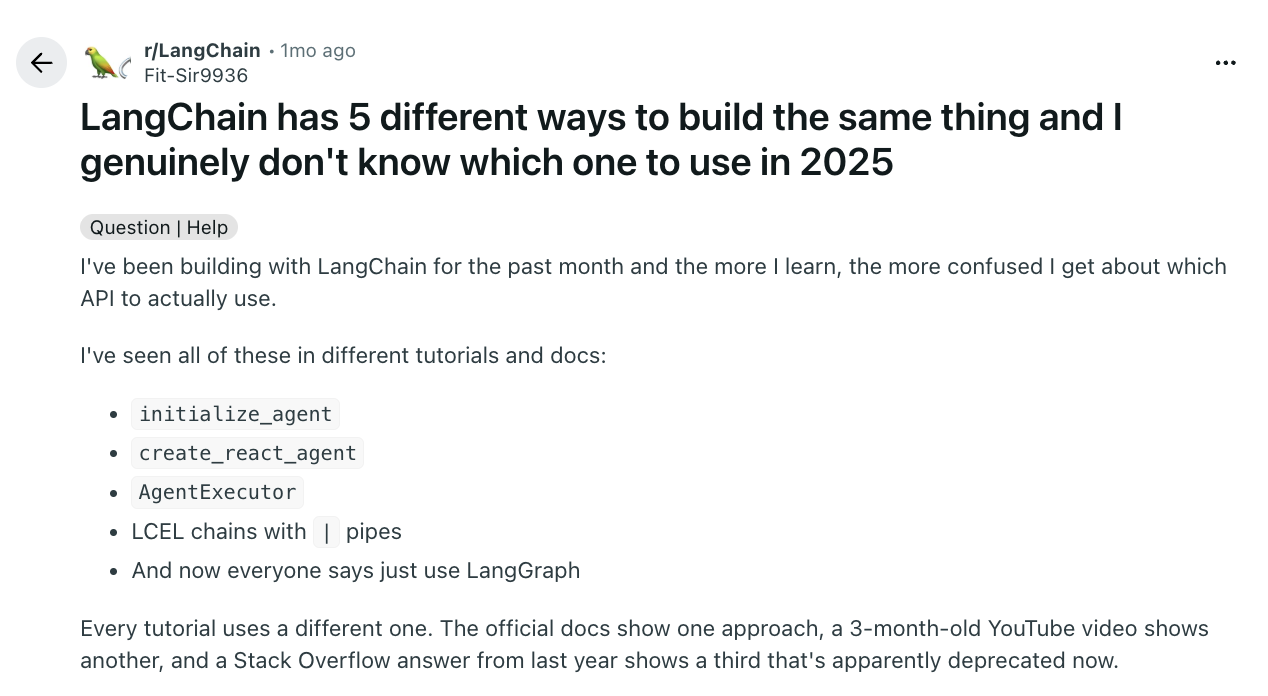
Developers experienced with the ecosystem have described this as less a conceptual problem with agents and more a practical problem of figuring out which of several historical API layers is actually the current one.
Part of that frustration has historically extended to breaking changes between versions, too – developers have described the experience of upgrading to a new release and finding existing code no longer worked, which, while an older complaint that shouldn't be read as a claim about current release stability, is useful context for why "LangChain vs LangGraph" confusion runs deeper than a simple naming question.
If you're evaluating either LangChain or LangGraph based on a tutorial or blog post, it's worth checking the publish date and cross-referencing current docs before treating it as gospel.
A simple decision test
Rather than asking "am I building an agent" — which almost every LLM application can answer yes to and which therefore doesn't help — ask a sharper question: does LangChain's standard model-and-tools loop fit the application? Can create_agent, its middleware, and a checkpointer express the workflow without repeatedly working around the default topology?
If the honest answer is yes, start with create_agent. You still get LangGraph's runtime underneath, including persistence and human-in-the-loop support, without defining the graph node by node. If the workflow is just a short sequence of calls, a plain script may still be enough.
If the answer is no — because you need custom branches, deterministic stages, multiple coordinated agents, or project-specific recovery boundaries — direct LangGraph is the thing you're actually paying for.
The "ditching LangChain" debate, and why it's really about LangGraph
A recurring, sometimes heated thread in developer communities asks a blunter version of this question: why are so many teams moving away from LangChain specifically?
The substance behind that sentiment is less about LangChain being broken and more about scope mismatch. Some of the criticism comes from earlier API generations; in LangChain 1.x, create_agent already runs on LangGraph. The gap still appears when a standard agent loop becomes a workflow-orchestration problem with custom state, conditional branching, deterministic stages, or recovery rules. At that point, teams often reach for LangGraph directly because they need to control the graph rather than use the prebuilt one.

There's also a more contrarian read worth including for balance: a vocal segment of developers believes LangGraph and CrewAI both over-complicate what agents actually need to do, arguing that a sizable share of "agent" use cases are still better served by direct API calls and ordinary control flow than by any graph or crew abstraction. That's a fair caution against reaching for either framework reflexively. The useful synthesis of both positions isn't "always use LangGraph" or "never use a framework" – it's checking, honestly, whether your actual problem is workflow state management before adopting tooling built specifically to solve that.
What happens after you pick LangGraph
If your evaluation lands on LangGraph specifically because you need that explicit state model, there's a second decision waiting right behind the first one, and it's easy to miss: LangGraph gives you a graph that's readable and modifiable by whoever wrote the code. It doesn't, on its own, give a non-developer — a support lead, a compliance reviewer, a customer — any way to see or operate that same graph once it's running in production.
That's a different tool than LangGraph Studio, which we cover in detail in our LangGraph Studio guide — Studio is built for the developer debugging the graph they wrote, not for the person downstream of them who needs to configure or approve what it does. It's also a separate decision from the runtime and framework layers we lay out fully in our orchestration pillar. Picking LangGraph well is a real, defensible architecture decision. It's just not the same decision as picking who gets to touch the graph once it ships.
A practical checklist before you decide
Run your workflow through these questions before choosing LangChain's create_agent, direct LangGraph, or no framework at all:
- Does the workflow fit a standard model-and-tools loop?
- Can human review happen around selected tool calls rather than as a custom stage in a larger process?
- Does the path need deterministic steps before, between, or after agent calls?
- Do you need real branching between named stages, not just tool selection inside the agent loop?
- Will several agents need custom routing or explicit hand-offs?
- Do different stages need different retry or recovery boundaries?
- Could a human edit structured state or redirect execution to another branch?
- Do you need replay, rollback, or forking across specific checkpoints?
- Is the business state larger than the message history handled by the standard agent?
- Are you repeatedly working around create_agent's default topology?
Mostly standard loop?
Start with LangChain's create_agent.
You still get LangGraph's runtime, persistence, and human-in-the-loop middleware without defining the graph yourself. For a short non-agent process, simpler application code may still be enough.
Several custom-topology needs?
Direct LangGraph is more likely to earn its complexity.
Its explicit state, nodes, routing, and recovery boundaries are solving problems the standard agent loop no longer covers cleanly.
Revisit the decision later
You don't need to make a permanent framework choice on day one.
A reasonable path is to start with create_agent and move the surrounding workflow to StateGraph once requirements around custom state, routing, recovery, or human intervention become concrete.
- Is LangGraph part of LangChain, or a separate product?
As of current documentation, LangGraph is technically independent and doesn't require LangChain to run. The relationship also works in the other direction: LangChain's create_agent uses the LangGraph runtime underneath. The packages can be used separately, but they're often used together in practice.
- Can I use LangChain and LangGraph together?
Yes. LangChain 1.x agents already run on LangGraph, and a create_agent agent can also sit inside a larger StateGraph as a node or subgraph. That lets LangChain handle the standard tool loop while LangGraph controls the surrounding workflow.
- Is LangGraph overkill for a simple chatbot?
A hand-built StateGraph usually is. For a chatbot that needs a standard tool loop, LangChain's create_agent gives you the LangGraph runtime through a higher-level interface. A basic chatbot without tools or persistent workflow state may need only the model SDK and ordinary application code.
- Does picking LangGraph mean my customers get a visual workflow editor automatically?
No, and this is one of the most common misconceptions the name itself creates. "Graph" describes LangGraph's internal execution model, not a delivered user interface. Giving a non-developer a way to see or edit that graph is a separate, additional layer.
Lead Product Engineer at Synergy Codes, specializing in workflow tooling and embeddable editor SDKs. Builds visual workflow editors on top of React Flow, with 10+ years across React, Angular, and TypeScript, and a background in .NET/C#. Creator of Workflow Builder (workflowbuilder.io) and ngDiagram (ngdiagram.dev).
Need more information about Workflow Builder?
Talk directly to our experts to discuss features, integration and onboarding options, or custom solutions– get clear answers for your next step.