How deeply can you configure a workflow editor? The palette, panels, and theme are data


Workflow Builder is data-driven. A backend serves the node palette, the property panels, and the theme as JSON and CSS variables. So you customize the editor by editing data, not by rewriting code. The real win is flexibility: one editor can serve many use cases, clients, and brands. You can try the demo live or read the source.
What "data-driven" means for a workflow editor
Workflow Builder is a React SDK you embed to get a visual workflow editor inside your own product. Data-driven means its configurable surfaces are data, not code. You would normally hard-code these parts. Here they are just data the editor loads when it opens: the node palette, the property panels, and the theme. The code that draws them stays the same.
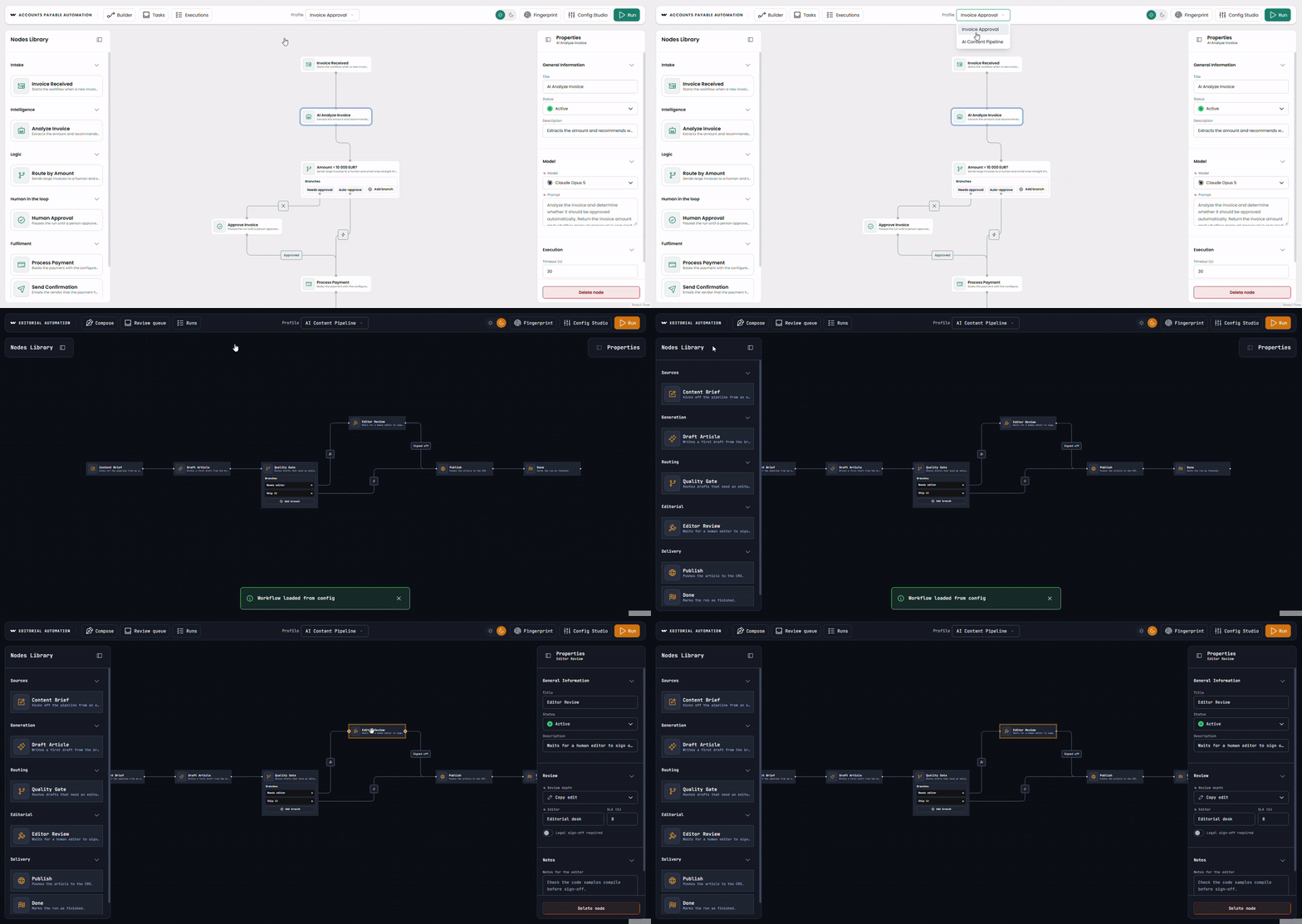
To see how far it went, I built two editors that share every line of code. One is an invoice approval tool, teal and calm, top-down, light mode. The other is an AI content pipeline, amber and sharp, left-to-right, dark mode. When I switched between them, the palette, the panels, the seeded diagram, and the whole look changed. My source tree did not.
What I liked most was how easy that was. The hard part, a working editor, was already there. I only had to touch the data.
Getting the configuration from a server, not the bundle
I gave myself one rule: the configuration had to arrive over the network, the way it would from a real backend. Nothing gets imported from the config folder, and nothing sits in public/. A small Vite middleware plays the part of the backend and serves each profile as JSON:
GET /api/profiles.json           -> the switcher menu
GET /api/profiles/:id.json       -> the four files, assembled into one document
GET /api/profiles/:id/:part.json -> a single file (feeds the in-app editor)
The routes end in .json on purpose. The build can freeze them into static files, so a plain static host answers the exact same requests. The editor cannot tell a live backend from a folder of files.
You can watch the configuration land in the browser's Network tab. A profile is just JSON: a palette, a theme, a seeded diagram, and the chrome around them. The app fetches it and hands it to the editor as it loads. Point the same code at a real API, and nothing else changes. The editor already treats its own configuration as remote data.
So the config comes over HTTP, from a mock backend. But how much of the editor can it actually describe?
The palette is a list, not code
The palette is the clearest case. It is a list you hand to the editor, so instead of registering node types in React, you describe them in JSON. Here is one node from that config:
{
  "type": "ai.analyze",
  "label": "Analyze Invoice",
  "icon": "Robot",
  "properties": {
    "model": {
      "type": "string",
      "label": "Model",
      "options": [
        { "label": "Claude Opus 5", "value": "claude-opus-5", "icon": "ClaudeLogo" },
        { "label": "Claude Sonnet 5", "value": "claude-sonnet-5", "icon": "ClaudeLogo" }
        // … more options
      ]
    },
    "prompt": { "type": "string", "label": "Prompt", "placeholder": "…" }
    // … timeoutSeconds
  },
  "required": ["model", "prompt"],
  "ui": {
    "preset": "general",
    "elements": [
      {
        "type": "Accordion",
        "label": "Model",
        "elements": [
          { "type": "Select", "scope": "#/properties/model" },
          { "type": "VariableTextArea", "scope": "#/properties/prompt" }
        ]
      }
      // … an "Execution" accordion with the timeout
    ]
  }
  // … defaults, outputSchema
}
One quick warning before you copy this. This short shape is the demo's own. It is not what the SDK reads directly. The app first turns each entry into what the SDK wants: a JSON Schema and a JSON Forms ui schema. So it will not work if you paste it in. And that is the point. You can design your own config format. You just convert it to what the SDK expects afterward. You shape the data to fit your product. The custom node types guide shows the full node format the SDK expects.
The content pipeline's palette is a different list: a content brief, a draft node, a quality gate, an editor review.
The app even has a fingerprint button. Turn it on, and every node points back to the config entry it came from. The canvas is a projection of the data.
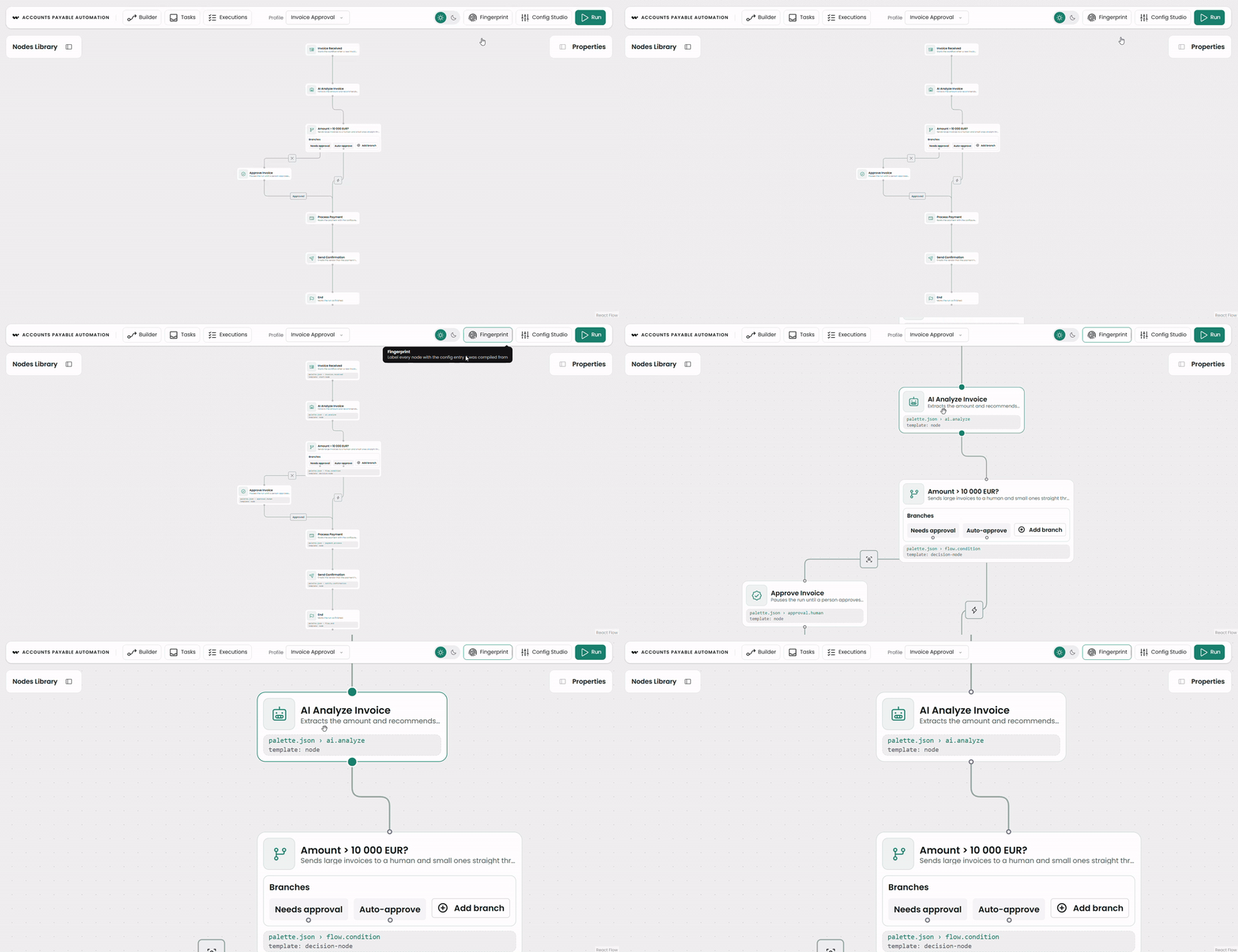
The palette places the nodes. The panel is where each node earns its properties, and it is the surface I most expected to need code.
The property panels are JSON Schema and JSON Forms
The panel is the deepest data surface of all. Each one comes from two structures the profile carries: a JSON Schema that declares the fields and their rules, and a JSON Forms ui schema that declares the layout. No form component here is written by hand, except a few deliberate custom controls I will come back to. It is the one place where config runs out and you drop to code.
Form validation lives in the schema. On the human-approval node, an allOf block turns on an extra rule under a condition. When the approval mode is auto, the threshold must be at least 1:
"allOf": [
  {
    "if":   { "properties": { "approvalMode": { "const": "auto" } } },
    "then": { "properties": { "thresholdAmount": { "type": "number", "minimum": 1 } } }
  }
]
Because the schema is data, you can tighten a rule while the editor runs. The demo has a Config Studio, a panel that edits the live config. Raise a field's minimum there. Reopen a node that is already on the canvas, and a validation badge appears on it. The diagram never moved. Only the rule it is checked against did.
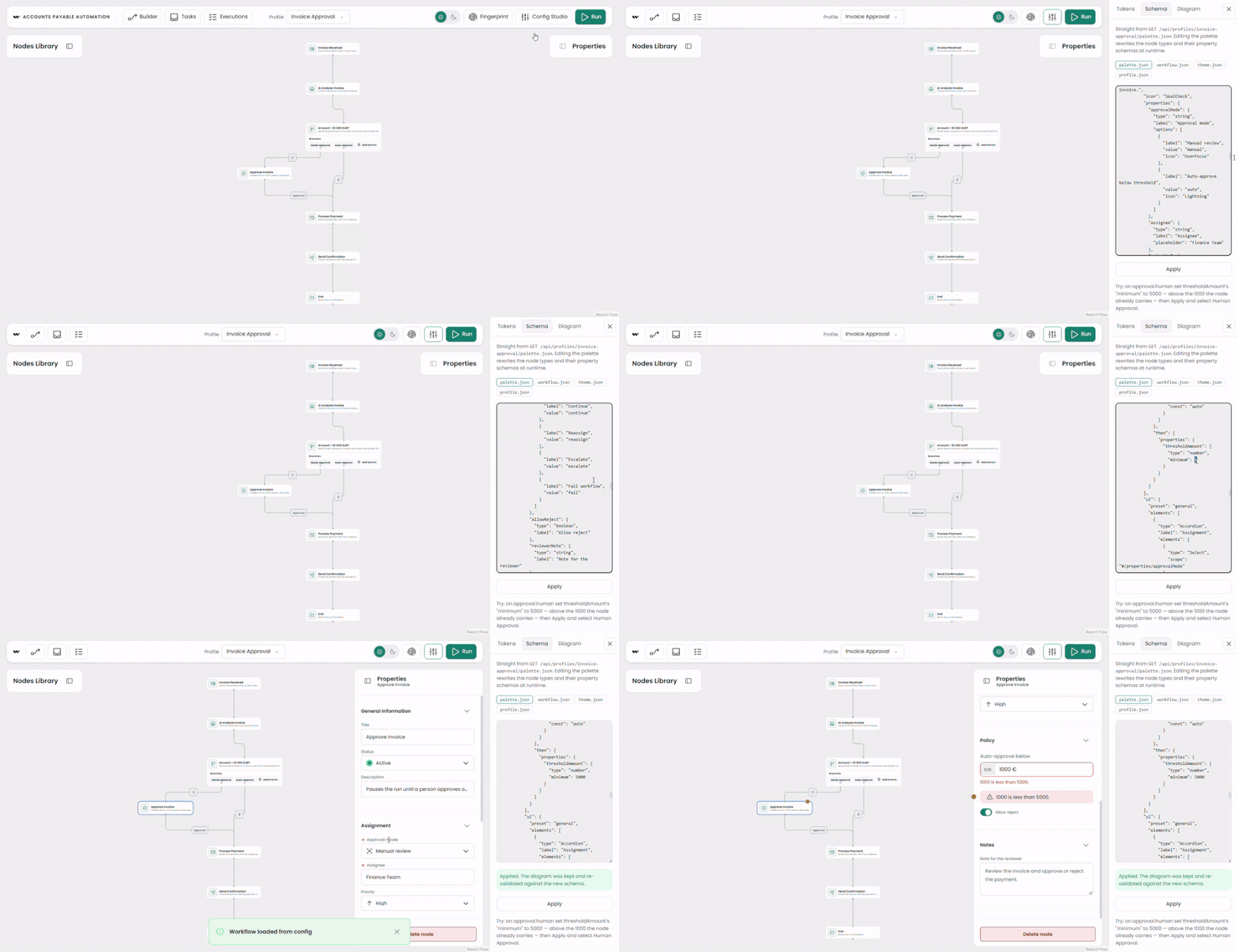
Layout and conditional visibility sit in the ui schema. Controls fall into accordions and columns, and a rule shows or hides one based on another field's value. Here the threshold appears only when the reviewer picks auto-approval:
{
  "type": "Text",
  "scope": "#/properties/thresholdAmount",
  "options": { "customRenderer": "CurrencyAmount", "currency": "EUR" },
  "rule": {
    "effect": "SHOW",
    "condition": { "scope": "#/properties/approvalMode", "schema": { "const": "auto" } }
  }
}
The same mechanism does HIDE, ENABLE, and DISABLE. Which fields a reviewer sees, when they are required, whether they can be edited: the profile decides all of it. So you change the form by editing data, not by editing code.
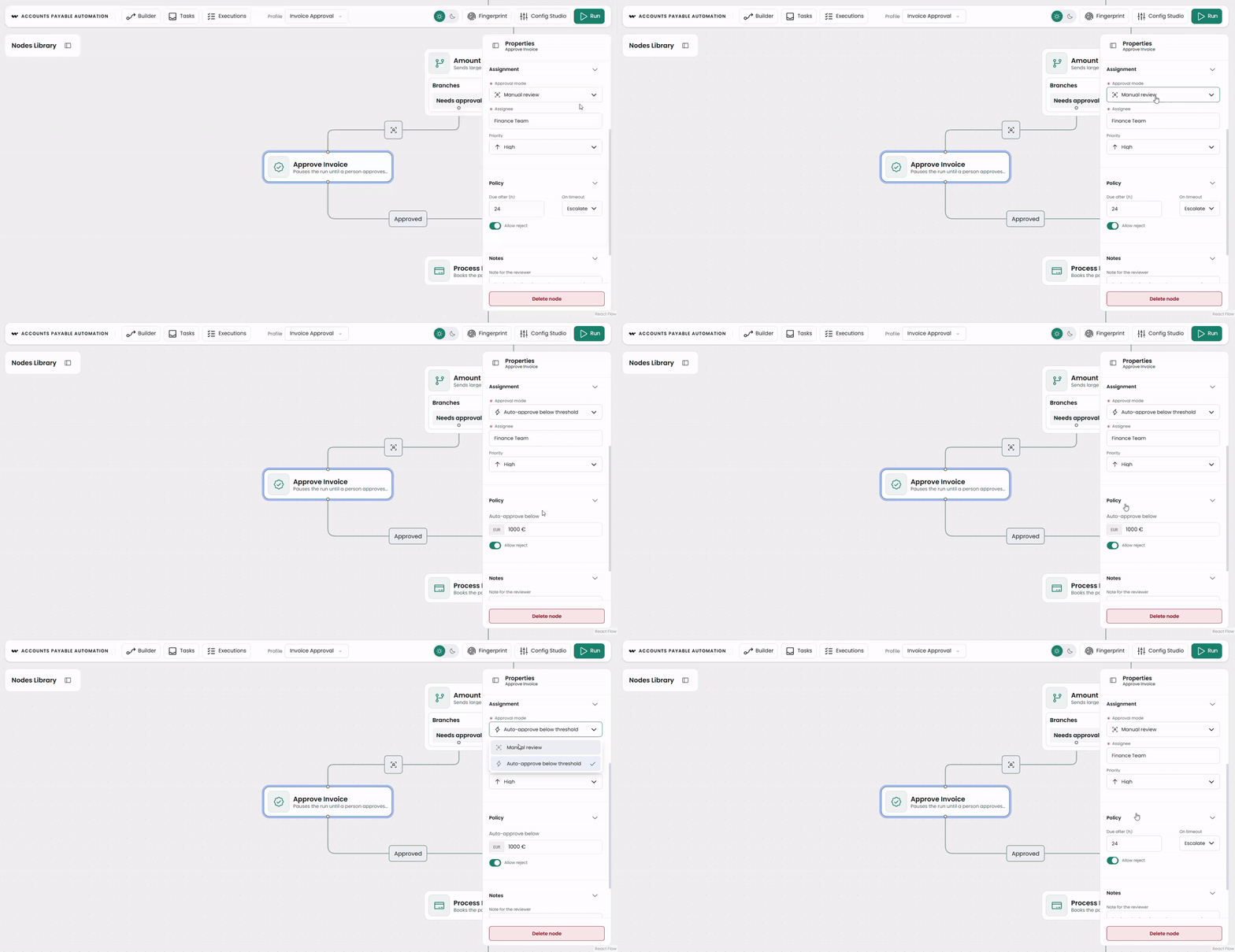
This part surprised me the most. I did not have to build the form or style it. For example, to put controls side by side, I just wrote HorizontalLayout in the data. Normally you do all of this by hand: the node look, the panel styling, the form logic. Here the basic controls come ready. That saved me a lot of time.
Fields and rules covered behavior. The last surface to move was the look.
The look is a set of tokens
The theme is a map of design tokens. They use the SDK's own CSS variable names, split across a base, a light mode, and a dark one. My two profiles differ here by only a few values. Yet they read like products from different companies. The shell and the canvas draw from the same tokens:
// Invoice approval – theme.json (light)
{ "--wb-ds-colors-acc1-500": "#0f766e", "--wb-public-font-family": "\"Poppins\", sans-serif",
  "--wb-public-node-border-radius": "12px", "--wb-public-transition": "160ms" }

// Content pipeline – theme.json (dark)
{ "--wb-ds-colors-acc1-500": "#d97706", "--wb-public-font-family": "\"JetBrains Mono\", monospace",
  "--wb-public-node-border-radius": "0px",  "--wb-public-transition": "0s" }
Change one brand value and everything repaints together: buttons, node borders, active ports, icons, the task inbox, the timeline. Changing the brand means editing token values, not CSS. A design system, in this setup, is a file you serve rather than a build you ship.

Where the data stops
Almost everything is data. The exception is custom rendering: the React that draws a control or a node when the built-in ones are not enough. A node's fields, validation, layout, icon, and built-in shape all come from config. But when a control has to behave in a way JSON Forms cannot express, you write a custom renderer in React, like the currency input on the threshold field. Even then the choice stays in data: a single key, customRenderer, says which field uses it.
A few things are code by nature: a custom node or edge, a plugin, and connection validation. Connection validation is the rule for which ports may link on the canvas, not the form validation the schema does. Knowing where that line sits is useful. It tells you when a config change is enough, and when you have to open the editor's source.
The subject: a human-in-the-loop workflow
The workflow the demo is built around is a human-in-the-loop invoice approval: an automated run reaches a decision, pauses for a person, and continues once they approve. The demo mocks the execution with local state. So the run, the task inbox, and the timeline show the experience, not a real engine. A production build would show the same, with live workflow execution wired to a backend.
Even the routing is a configured value, not a coded one. The branch that sends large invoices to a human is just a condition in the data. Raise its threshold past the mocked amount, and the next run auto-approves. No task is created.
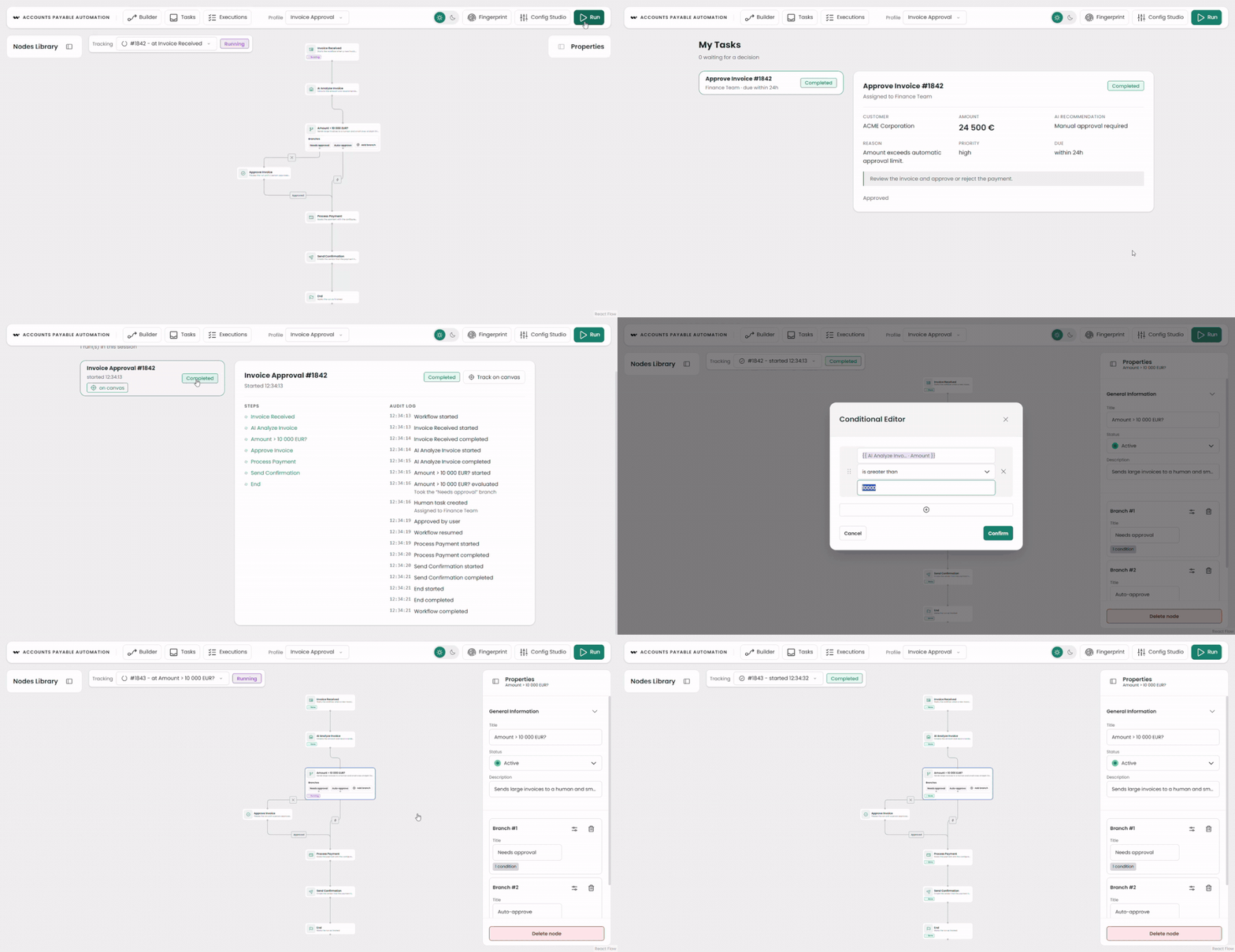
Here is the business case underneath the demo, and it is the part I find exciting. Because the configuration arrives from a server, a profile is really a tenant. Serve a different profile per customer. Each one gets its own node vocabulary, its own validation, and its own branding, all from data and one deployment. One editor, many tenants, no fork. From one codebase, you can build different views, profiles, or whole product variants. Anyone who can edit the data can extend the app, without touching the code. It is an app each customer configures like a car rather than one you re-manufacture per account.
If I had to sum up working with Workflow Builder: get the base right, and the data does the rest.
Workflow Builder is a production-ready React SDK for embedding visual workflow editors, built on React Flow with a schema-driven properties panel, plugin architecture, and JSON serialization. It ships as Community Edition (open source, Apache 2.0) and Enterprise Edition, and it stays engine-agnostic: the editor is decoupled from whatever runs the workflow. Everything in this post uses the free Community Edition. The data-driven surfaces above let one embed adapt to many use cases without a rewrite. It is the same trade-off you weigh in any build vs buy decision about a canvas.
- What does it mean that Workflow Builder is data-driven?
It means the configurable parts of the editor, the palette, the property panels, and the appearance, are described as data rather than code. You change what the editor shows and how it behaves by editing JSON and design tokens, not by rewriting components.
- Which parts of the editor are configured from data, and what still requires writing code?
Almost all of it: the palette; node icons and built-in look; the property panel with its form validation and layout; show and hide rules; the seeded diagram; layout direction; navigation; tagline; theme. Custom control renderers, custom node or edge templates, plugins, and connection validation are React.
- Can you do form validation and show or hide controls based on other fields?
Yes. Form validation lives in JSON Schema, including conditional rules with
allOfthat add extra checks only in certain states. Show, hide, enable, and disable are JSON Forms ui rules keyed to another field's value. This is form validation, separate from the connection validation that governs the diagram. - Can each customer get its own configuration?
Yes, and it is the strongest reason to build this way. The config is served per profile, so a profile acts as a tenant. Serve a different one per customer. Each gets its own node vocabulary, validation, and branding from data, with one deployment and no fork.
- Is this the open-source edition?
Yes. Everything in this post runs on the Community Edition of the SDK, open source under Apache 2.0 on npm. The palette, the JSON Forms panel, theming, and plugin hooks are all in the free package.
- Can Synergy Codes build this for our product?
Yes. Synergy Codes builds embedded diagram and workflow interfaces and maintains Workflow Builder, so a data-driven setup like this can be tailored to your node vocabulary, validation rules, and design system. You can try the live editor in the Workflow Builder playground or book a call to talk through your use case.
Frontend Engineer at Synergy Codes, specializing in interactive diagramming interfaces and visual process editors. Builds workflow editors, diagram canvases, and node-based UIs for B2B products with 7+ years of hands-on experience in React, Angular, TypeScript, and diagramming libraries like GoJS. A committed Claude Code power user and enthusiastic token spender, applying AI-assisted workflows to ship frontend features faster.
Need more information about Workflow Builder?
Talk directly to our experts to discuss features, integration and onboarding options, or custom solutions– get clear answers for your next step.