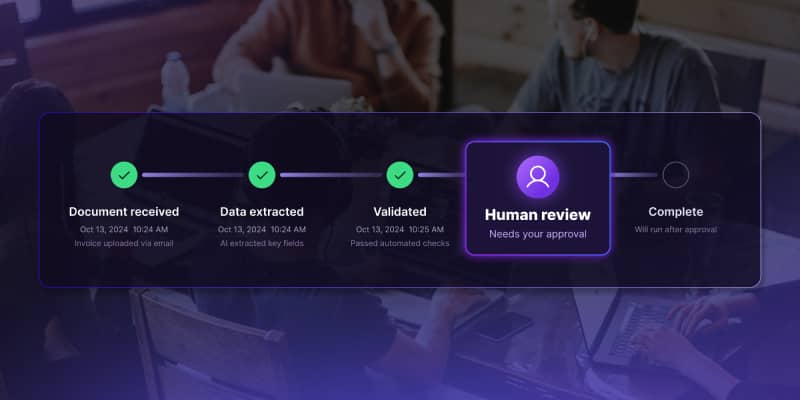
Open Source Workflow Engine Comparison: Licences, Layers and Gaps | Workflow Builder

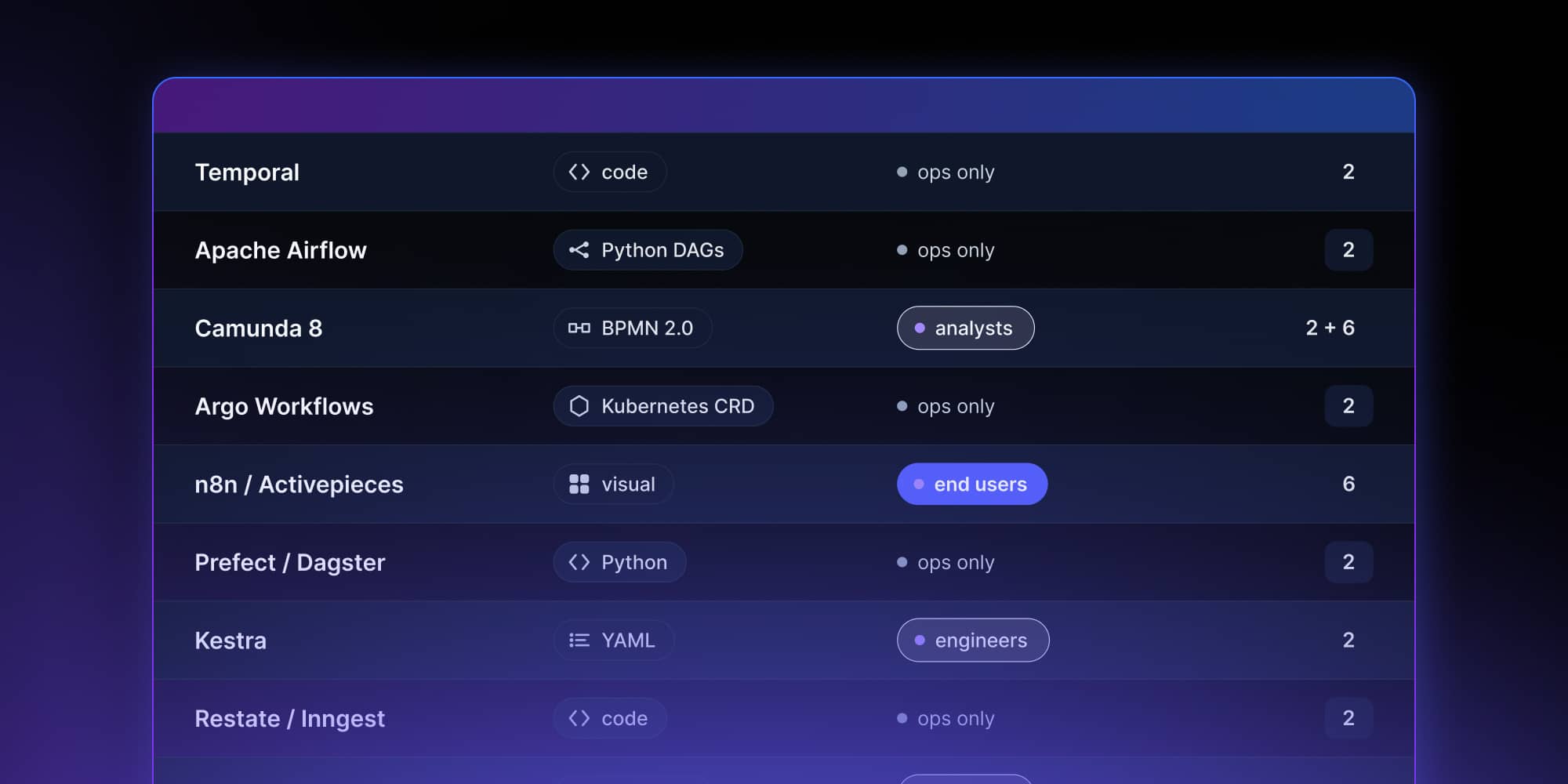
There is a second problem with these comparisons, and it's more embarrassing: several tools routinely listed as open source workflow engines aren't open source. That is covered first, because it changes which options are actually available to you.
First: which of these are actually open source?
"Open source" has a definition, maintained by the Open Source Initiative. A licence either meets it or it doesn't. Several popular workflow tools use source-available licences that restrict production use, hosting, or resale – which matters a great deal if you're building a product on top of one.
Licences verified against the LICENSE file in each project's repository, August 2026.
If you're embedding a workflow engine inside a product you sell, the right-hand column is the first thing to check and the last thing anyone remembers to.
Why teams choose an open source workflow engine
Three reasons come up in every evaluation.
- No licence cost, so a workflow engine can be trialled without procurement.
- No vendor lock-in, because the source code is yours to inspect, fork and self-host.
- And deployment freedom: most open source workflow automation software runs on Docker or Kubernetes, on-premise, in the cloud, in a hybrid setup, or air-gapped.
A fourth reason matters more than it sounds.
Open source workflow management software puts the workflow definitions in your own database. For a business process you sell to your own customers, that isn't a preference – it is the difference between owning a product and renting one.
The six layers
1. Runtime
Cloud infrastructure, containers, queues, schedulers. Docker and Kubernetes live here, and every workflow engine on this page deploys onto them.
What it doesn't do: it has no concept of a workflow. It runs code when told to and knows nothing about what that code is part of.
2. The execution engine
This is what most people mean by "open source workflow engine", and it's where the interesting choices are. Covered tool by tool below.
What it doesn't do: it doesn't know why the work exists. The engine executes steps reliably and has no opinion about the business processes those steps belong to, who should see the workflow, or who is allowed to approve a step inside it.
3. Workflow and agent definition
LangGraph, CrewAI, Mastra, LlamaIndex Workflows, Pydantic AI. This layer describes the sequence – including sequences an AI agent chooses at runtime.
What it doesn't do: the workflow logic lives in code. Nobody outside the engineering team can read it, change it, or see what it did.
4. Orchestration above the engine
Mostly things teams build themselves. What belongs here: interpreting a workflow definition, versioning it, deciding what happens to in-flight runs when the definition changes, and keeping the record of every execution.
Why it's mostly self-built: engines version your worker code, not a workflow definition stored as data. And their run history records that an approval arrived, not who sent it. Both are documented behaviour, not oversights – they sit outside what an engine is for.
This is the first gap.
5. The layer people touch
React Flow and other canvas primitives, Workflow Builder, LangGraph Studio, Temporal Web. What belongs here: designing a workflow, watching it execute, approving a step inside it.
What's actually available: canvas primitives you assemble yourself, or tools built around the development and operation of the system rather than around the business decision inside it. LangGraph Studio is a development and testing environment, with a chat mode its own documentation describes as useful for non-technical stakeholders. Temporal Web is for browsing, filtering and debugging workflow executions. Neither is an approval queue for the person in a business unit who has to sign off on a claim.
This is the second gap, and the more expensive one, because it is the layer your customers see.
6. Ready-made platforms
n8n, Zapier, Make, Camunda, Flowise, Dify. They do all six layers at once, well, immediately. The price is that the workflow lives with them: their runtime, their limits, their roadmap – and, as the licence table above shows, often their permission.
Open source workflow engines, tool by tool
Temporal
Written in Go, with official SDKs for Go, Java, Python, TypeScript, .NET, PHP, Ruby and Rust. Workflows are code, not BPMN or YAML, and the engine replays event history to recover state after a failure. Activities carry a retry policy by default – one second initial interval, backoff coefficient of two, maximum interval of one hundred seconds, and no default cap on attempts. Best for application backends and long-running business processes.
Stops at: no visual workflow designer for end users, and no concept of a human approver beyond a signal arriving. Temporal Web is an operations console.
Apache Airflow
The default engine for data pipelines. Workflows are Python DAGs, with a mature ecosystem of operators, a huge GitHub community, and Docker-based deployment everywhere. Primarily time- and dependency-based, though Airflow 3.0 added native event-driven scheduling with asset watchers and event triggers.
Stops at: built for data orchestration. Using Airflow for application logic or business process management is a well-documented way to be unhappy.
Camunda
BPMN 2.0 with a visual modeler and a strong business process management heritage. Camunda 8 executes processes on Zeebe, a distributed broker architecture written in Java; job workers can be implemented in Java, Node.js, TypeScript, Python and C#. If your organisation already models business processes in BPMN, Camunda is the obvious candidate – but note the licence.
Stops at: the modeler is for analysts, not for your customers. Embedding it inside your own product as a white-label visual workflow editor is not what it is for.
Argo Workflows
A container-native workflow engine for orchestrating parallel jobs on Kubernetes. Each step is a container; workflows are Kubernetes custom resources. Excellent for CI/CD, machine learning pipelines and infrastructure automation.
Stops at: tightly coupled to Kubernetes, and no business-facing layer at all.
Kestra
Declarative YAML workflows with a built-in editor, both scheduled and event-driven triggers, and a plugin ecosystem. Deploys with Docker in minutes.
Stops at: the editor is aimed at engineers writing YAML, not at end users drawing a workflow.
Prefect and Dagster
Both Python-first. Dagster positions itself as a data orchestrator built around assets modelled as Python functions. Prefect builds workflows from Python code and now positions across data, machine learning and agent workflows rather than pipelines alone.
Stop at: the workflow definition is Python. There is no surface a business user can read.
Restate and Inngest
Newer durable execution engines targeting application backends. Restate combines durable execution with built-in persistent state, including an embedded key-value store for virtual objects and workflows. Inngest is an event-driven durable execution platform that runs in serverless environments as well as on conventional servers.
Stop at: the same layer-five gap as Temporal, with smaller ecosystems – and both carry source-available rather than open source licences today.
n8n and Activepieces
Low-code workflow automation tools with a visual workflow builder and hundreds of integrations. Fast to deploy and genuinely useful.
Stop at: they are layer six. You automate inside their platform. And n8n's licence does not permit offering it as a commercial hosted service.
Flowable and Imixs
Two BPMN engines in the Java ecosystem, both Apache 2.0 and EPL 2.0 respectively. Worth evaluating if BPMN 2.0 compliance is a hard requirement and Camunda 8's licensing does not fit.
Comparison
How to choose the right open source workflow engine
Is it actually open source?
See the table above. If you are building a product on top, the licence decides whether you can ship.
What are you orchestrating?
Data pipelines, infrastructure automation, application backends and business processes are four different problems. Apache Airflow for the first, Argo for the second, Temporal or Restate for the third, Camunda or Flowable for the fourth. Using the wrong workflow engine for the job is the most expensive mistake in this decision.
Which language?
Some engines orchestrate tasks written in any language; others tie your workflow logic to Python or Java.
What deployment model?
On-premise, cloud, hybrid, air-gapped. Check scalability limits against your actual volume, not the benchmark on the homepage.
Who needs to see the workflow?
This is the question that gets skipped, and it determines whether the project finishes. If the answer is "only developers", any engine works. If it includes an operations manager, a compliance officer, or your own customers, you need layers four and five as well – and no engine listed here provides them.
What governance requires
Enterprise adoption adds requirements that sit above the engine, not inside it: role-based access control, audit logs, multi-tenancy, and versioning of workflow definitions that users can change.
Engines cover this partially. Temporal retains execution history for a configurable window – 30 days by default on its cloud, 72 hours by default self-hosted – and can export complete histories to object storage. That is the right shape for reconstructing a case after the fact. It's not a queryable approval log, and it does not record which person approved a step: the event written when a signal arrives identifies the worker that delivered it, not the human behind it.
Regulation is getting more specific about this.
Under the EU AI Act, Article 14 requires that high-risk AI systems be designed so they can "be effectively overseen by natural persons during the period in which they are in use" – including the ability to detect anomalies, avoid automation bias, and override, disregard or reverse an output. Obligations for high-risk systems under Annex III apply from 2 December 2027, and for high-risk systems embedded in regulated products under Annex I from 2 August 2028. The NIST AI Risk Management Framework asks parallel questions: GOVERN 2 on accountability structures, GOVERN 3.2 on roles in human-AI configurations, and MAP 3.5 on documented human oversight processes.
Every one of those requirements is answered by the layer above the engine.
Where AI agents fit
Agentic workflows are now one of the use cases for durable orchestration. Inngest's 2026 benchmark of 130 backend and AI engineers found 68% running AI or LLM workflows and 63% running data pipelines, behind event-driven workflows at 93% and background jobs at 87%.
The pattern in those AI workflows is consistent: an agent framework describes what the agent does, an engine makes sure the run survives a crash, and the expensive question is what happens when the agent proposes something a person should approve first. Agent frameworks don't solve that and neither do engines – it's a layer four and five problem.
Temporal documents the approval pattern itself, and there are public examples of teams wiring human approval into Slack or a custom review screen on top of a durable engine. What none of those examples get from the engine is the queue, the approver's identity, or a record a compliance officer can query.
What the map is saying
There is no shortage of open source workflow engines. There is a shortage of two specific layers in a form you can own – and, as the licence table shows, fewer open options than the category name suggests.
Ready-made platforms have all six layers. That is exactly their offer, and the price is tenancy. Everyone else has layers one through three solved and builds four and five themselves, usually twice: once quickly, then again properly after the first version meets a compliance requirement.
If you are deciding what to build and what to adopt, the question is not which workflow engine is best. It is which layer you are missing, whether the version you can buy leaves the workflow in your hands, and whether its licence lets you ship.
Method and scope
Licences verified against the LICENSE file in each project's repository. Technical descriptions taken from each tool's official documentation. Tools are placed on the layer their own documentation claims; a tool occupying more than one layer is listed on its primary one. Current as of August 2026.
Something wrong or missing? We would rather fix it than defend it; tell us and we will update the map and the date.
Workflow Stack Map 2026 · version 1.0
- What is an open source workflow engine?
Software that executes a defined sequence of steps reliably – retrying failures, persisting state, resuming after a crash – under a licence meeting the Open Source Definition, so you can inspect, modify and self-host it.
- Which popular workflow tools are not actually open source?
Camunda 8, Restate, Inngest, n8n and Dify all use source-available licences with restrictions on production use, hosting or multi-tenancy. Restate and Inngest convert to Apache 2.0 after four and three years respectively.
- What are the benefits of using open source workflow engines?
No licence cost, no lock-in, deployment freedom including air-gapped environments, and an active community that finds bugs faster than a closed vendor's QA.
- Can open source workflow engines handle enterprise-scale automation?
Yes. Temporal, Airflow and Argo all run at very large scale. The scaling question that catches teams is governance – access control, audit, multi-tenancy – not throughput.
- Which open source workflow engine is best for data pipelines?
Apache Airflow for the largest ecosystem, Dagster or Prefect for a better developer experience, Kestra if you prefer declarative YAML to Python.
- How does open source workflow management software differ from proprietary software?
Beyond cost and source access, the practical difference is where the workflow lives. Proprietary platforms host your business processes; open source engines let you run them yourself.
An entrepreneur and tech enthusiast, with over 14 years of experience building innovative diagramming solutions and tools across industries. Our interfaces help technical and non-technical users make informed business decisions.
Need more information about Workflow Builder?
Talk directly to our experts to discuss features, integration and onboarding options, or custom solutions– get clear answers for your next step.
Articles you might be interested in
.jpg)
Building a visual call flow editor for cloud telephony – and how to get it right
Every cloud telephony platform eventually hears the same request from partners: make call flow configuration visual. Here is what a good call flow editor looks like – and how to build one on Workflow Builder.
Temporal Human-in-the-Loop: What the Engine Gives You, What You Build | Workflow Builder
If you're implementing human-in-the-loop (HITL) approval on Temporal, the engine gives you more than expected on the waiting problem and less than expected on the accountability problem. This article is that split, with the documentation behind each claim.