What is a workflow engine? How it runs workflows and where the visual editor fits

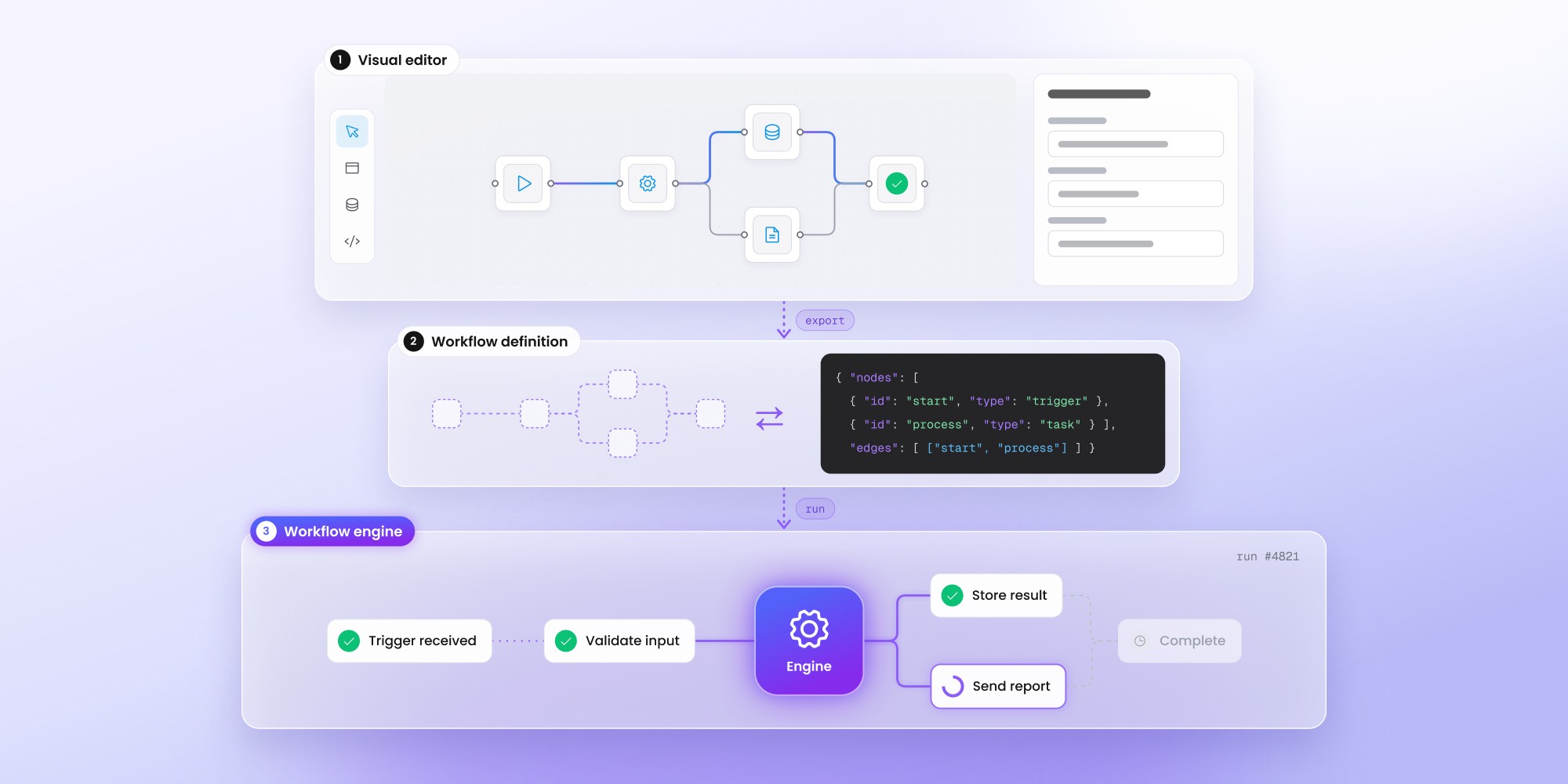
A workflow engine is the runtime that executes process definitions. The engine tracks each instance's state, coordinates tasks, evaluates branches, retries failures, and resumes long-running processes. An engine doesn't automatically give customers a way to create those processes, so SaaS products often add a visual editor such as Workflow Builder.
A workflow engine is the runtime that executes a workflow definition. It tracks progress, decides when the next step can run, and handles processes that have to wait, retry, or recover after a failure.
In many SaaS products, the place where someone creates the workflow is a separate part of the system. Users may work in a visual editor, while the execution itself stays in a backend engine. Keeping those responsibilities separate can make the overall architecture easier to evolve.
What is a workflow engine?
A workflow engine is software that runs workflows according to a defined process. The workflow describes the available steps, the order in which they can run, and the conditions that affect what happens next.
During execution, the engine needs to keep track of the current state and determine how the process should continue. A workflow may need to wait for an API response, pause until someone approves a request, or resume after an application restart. Even when several instances use the same workflow definition, each one can be at a different stage.
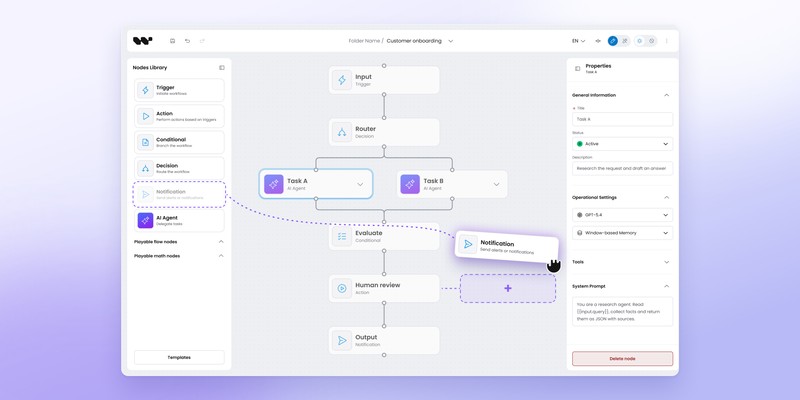
A visual workflow editor solves a different part of the problem. It gives someone a practical way to create or change the process, while the execution layer is responsible for running the resulting definition.
Some products package both parts together. Embedded SaaS products often keep them separate so the product team can design the authoring experience around its own users without replacing an established execution stack.
How does a workflow engine work?
Every engine has its own terminology and execution model, but the basic lifecycle is similar.
A workflow starts with a definition describing its steps, transitions, conditions, and configuration. Once an instance begins, the runtime reads the current state, determines which work is ready to run, and updates the workflow as each task completes.
A simplified version looks like this:
Trigger → workflow definition → engine → task → state update → next step → completion
Production workflows are rarely that linear. A process might wait for another system, pause for human input, or retry a failed task before it can continue. The engine needs to preserve enough information to resume from the correct point rather than starting again from the beginning.
Workflow state
Consider a customer onboarding workflow with 10 steps. One customer may be almost finished, another could still be waiting for identity verification, and a third might be blocked because an external service failed.
All 3 instances use the same workflow definition, but each has its own execution state. The engine stores that state and uses it to determine what each instance should do next, including after long pauses or infrastructure failures.
Task coordination
A workflow engine doesn't need to perform every piece of work itself. Individual steps may be handled by application code, external services, or dedicated workers.
The engine coordinates when those tasks should run and how their results affect the process. A completed task might unlock another step, trigger a branch, or leave the workflow waiting for an event that arrives later.
Teams that already have a visual editor and are now dealing with this part of the architecture can go deeper in our guide to adding workflow execution to a visual workflow editor.
Conditions and branches
Many workflows include decisions rather than a fixed sequence of steps. An order might need additional approval above a certain value, while another can continue automatically. A support case may take a different route depending on its priority or customer type.
The workflow definition describes those possible paths. During execution, the engine evaluates the relevant condition and continues along the matching branch.
Failures and retries
Temporary failures are common in distributed systems. An external API may time out, a worker can restart, or a network dependency may become unavailable for a short period.
A workflow engine can preserve the current state and apply retry rules without forcing the entire process to restart. Once the underlying service recovers, execution can continue from the point where it stopped.
Long-running workflows
Some workflows finish quickly, while others remain active for days or weeks. Customer onboarding may pause until a user completes an action. A claims process can wait for supporting documents, while infrastructure provisioning might depend on another system reporting completion much later.
A runtime designed for long-running processes persists execution progress rather than keeping one application process alive the whole time. This is closely connected to durable execution, where workflow state survives interruptions and the process can resume later.
Workflow Builder uses Temporal as its reference execution engine. Our article on why Temporal became the default workflow engine for Workflow Builder looks more closely at persistence, recovery, and long-running execution.
Execution history
Reliable execution is only part of the problem. Teams also need to understand what happened after a workflow ran, especially when a process spans several systems or remains active for a long time.
Execution history can show which steps completed, where an error occurred, and when a process resumed after waiting. That information is useful for debugging, support, and operational visibility.
For the user-facing side of this problem, see our guide to live workflow execution visualization.
Where the workflow engine sits in the stack
Using "workflow engine" as shorthand for an entire workflow platform can make architecture discussions confusing because execution is only one part of the system.
Some tools bundle these layers into one product. A SaaS platform doesn't necessarily have to.
One team may already have execution covered and need a better way for customers to define workflows. Another may start with a visual canvas and add a dedicated runtime later, once reliability and long-running execution become more demanding.
Our open-source workflow engine stack map goes deeper into how different workflow technologies fit into this architecture.
Workflow engine and workflow editor
A workflow editor works with the definition of a process. The engine deals with a running instance of that definition.
Developer-owned workflows can work perfectly well without any graphical interface. Code, BPMN, or another structured format may be enough when engineering controls the whole process.
Requirements change once workflows become part of the product experience. Customers usually don't want to edit backend code to add another approval step or adjust a business rule. They need an interface built around concepts they already understand.
What does "workflow builder" mean here?
The phrase "workflow builder" covers several different product categories.
Standalone automation platforms often include editing and execution in the same environment. Users create the workflow there and the platform runs it.
Embedded workflow builders are usually used inside another application. The editor becomes part of the product UI, while the resulting workflow definition is passed to backend infrastructure for execution.
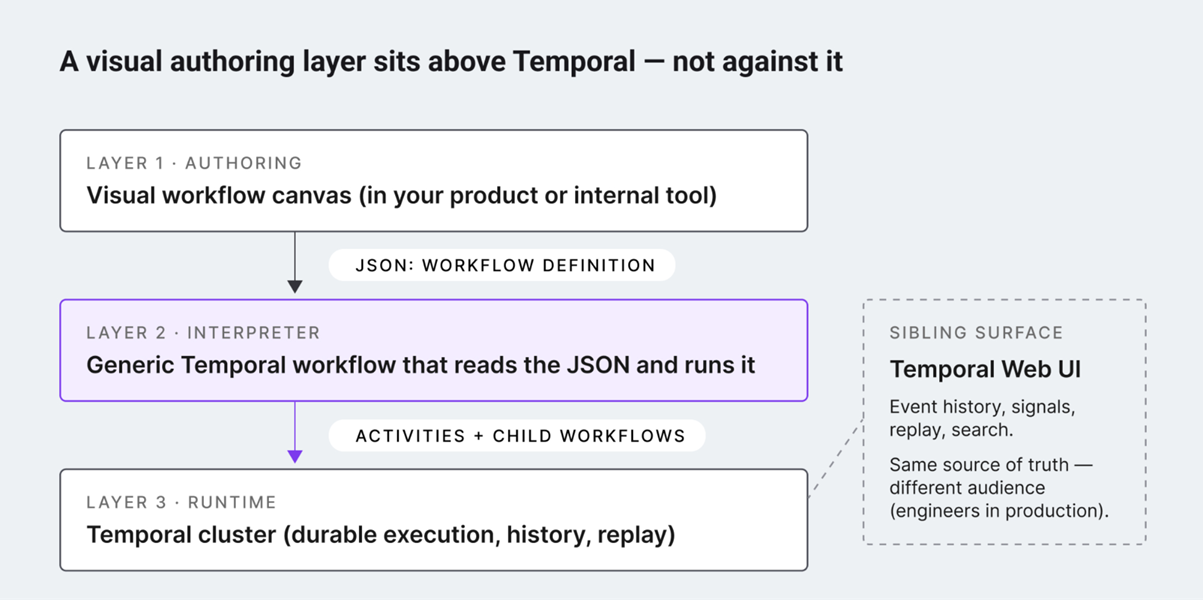
Workflow Builder follows this model. Its React SDK provides the visual authoring surface, including the canvas, configuration interfaces, and workflow editing capabilities. Execution can remain in the application's own backend or connect to a dedicated runtime.
For teams already using Temporal, the Workflow Builder and Temporal integration shows how those parts can work together.
How is a workflow engine different from a job queue?
A job queue is mainly concerned with work waiting to be processed. It helps move individual jobs to available workers and can be an important part of a larger workflow architecture.
A workflow engine keeps track of the broader process around those jobs. A task may run first, its result may determine a branch, another task may need a retry, and later the process might wait for an external event before continuing.
A queue can execute pieces of this flow. The workflow engine maintains the state and progression of the process as a whole.
How is a workflow engine different from a state machine?
A state machine describes possible states and the transitions between them. Workflow engines can use similar concepts, but production execution often requires more than a transition model.
The runtime may need to invoke external services, persist state while waiting, recover after failure, and retain enough history to explain what happened later.
For straightforward application logic, a state machine may be sufficient. Longer distributed processes usually introduce execution concerns that justify a dedicated workflow runtime.
What a workflow engine may still leave you to build
Choosing a workflow engine takes care of execution, but it doesn't automatically give customers a way to create or manage workflows.
A runtime might handle scheduling, retries, state transitions, and failures perfectly well. The interface where users define those workflows is often a separate engineering project.
Here's where the responsibilities typically split:
The exact split depends on the engine. Some platforms include their own designers, while others focus almost entirely on execution.
The missing authoring layer
Teams often call this missing interface a visual layer, authoring layer, studio, or workflow designer.
All 4 terms point to a similar requirement: developers already have a way to run workflows, but customers need a safe, understandable way to build them.
For embedded SaaS products, that distinction matters. An internal engineering tool can expose technical concepts and configuration details. A customer-facing workflow builder needs to work within the product's terminology, permissions, design system, and existing user experience.
Why teams add a visual layer above the engine
Code-first execution can work well for engineering without being suitable for people configuring a process inside the product.
Consider an approval workflow:
New request → check amount → manager approval → complete
A user may need to change the threshold, add another review step, or remove a branch. None of those tasks should require access to worker configuration or deployment code.
The same pattern appears in telecom workflows, AI systems, and internal tools. The backend needs a reliable execution model, while users need a representation of the workflow that matches their domain and level of access.
Recent Workflow Builder conversations show that this requirement often becomes visible after the execution technology has already been chosen. Teams using Temporal or Camunda weren't necessarily searching for another engine. They were looking for a better authoring surface around the runtime they already planned to use.
How a visual editor connects to a workflow engine
A common architecture looks like this:
Visual editor → workflow definition → backend adapter or interpreter → workflow engine
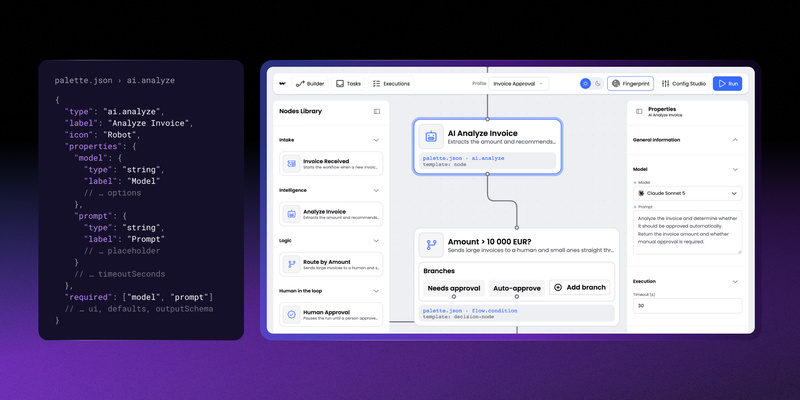
Users create the process visually, and saving the workflow produces structured data such as JSON, BPMN, or another representation understood by the application.
Backend code then maps that definition onto runtime concepts. A visual node may correspond to an API call, an activity, or another executable unit.
Keeping the definition separate from execution gives teams more flexibility. The interface can evolve without rebuilding the runtime around every UI decision, and changes in backend infrastructure don't automatically require a new authoring experience.
Examples of workflow engines
The label "workflow engine" covers products designed for different kinds of work.
These products aren't interchangeable in every architecture. Airflow, for example, solves a different class of problems from a runtime used for customer-facing application workflows.
Teams actively comparing engines can use our existing workflow engine stack map for a deeper breakdown rather than treating this article as another ranking.
What should you look for when choosing a workflow engine?
A useful evaluation starts with the process you need to run and the constraints around it.
Execution model
Look at how workflows are represented and who is expected to define them. A code-first runtime may fit an engineering-owned process, while another environment may benefit from BPMN or a more declarative model.
Durability
Short background tasks have different requirements from workflows that stay open for weeks. Long-running processes put more pressure on state persistence, recovery, and how the engine behaves when dependencies remain unavailable for an extended period.
Human interaction
Approval steps can leave a workflow waiting for days. Teams need to understand how the engine represents this state and how an external action resumes the process when someone finally responds.
Operations
Deployment and maintenance also matter. Some teams prefer a managed service, while others need to self-host because of infrastructure or compliance requirements.
Licensing
Licensing can affect how an engine may be embedded into a commercial product. Hosting rights, production-use restrictions, and distribution terms should be checked before the runtime becomes a core dependency.
Our open-source workflow engine comparison covers this in more detail.
Authoring
One question should be answered early: who will create the workflows?
Developer-owned processes may never need a visual interface. Customer-configurable workflows usually do, and treating authoring as a later UI task can leave a substantial piece of the architecture unresolved until the runtime is already in place.
Do you need both a workflow engine and a workflow builder?
Not every product needs a visual workflow editor. The deciding factor is who creates and maintains the workflows.
Quick checklist: does your product need a workflow builder?
Check which statements describe your product:
- Customers need to create or modify workflows without developer assistance.
- Users should be able to connect actions, conditions, and triggers visually.
- Different customers need different automation logic.
- Workflow configuration is part of your SaaS product's core experience.
- Non-technical users need to understand and troubleshoot their workflows.
- Your team wants to add new workflow actions without redesigning the entire interface.
If several boxes apply: you likely need both a workflow engine and a visual workflow builder.
If none apply: an engine alone may be sufficient, particularly when developers define workflows in code and customers never modify them.
How the two work together
Separating these layers gives teams more flexibility. Engineering can choose a runtime based on reliability, scalability, and execution requirements, while product teams can build an authoring experience that matches their users, terminology, and design system.
What comes after choosing the workflow engine?
Selecting an engine solves the runtime side of the architecture, including execution, state management, waiting, and recovery.
A customer-facing workflow feature still needs decisions around authoring. Teams need to define what users are allowed to change, which concepts should appear in the editor, and how the resulting workflow maps onto backend execution.
For products reaching that point, the next architectural question is often the authoring layer rather than another runtime.
A visual workflow editor such as Workflow Builder provides that interface while leaving execution to the engine chosen for the application.
- What does a workflow engine do?
A workflow engine runs process definitions and keeps track of each running instance. The engine decides which step is ready, coordinates tasks handled by application code or workers, evaluates branches, and applies retry rules after temporary failures. For long-running processes, the engine persists progress so execution can resume after waits or restarts.
- How does a workflow engine differ from a visual editor?
A visual editor works with the definition of a process, while the engine runs instances of that definition. The editor lets users create and configure steps and checks the process before execution. The engine tracks execution state, coordinates tasks, handles runtime failures, and processes events.
- How is a workflow engine different from a job queue or a state machine?
A job queue moves individual jobs to available workers, while a workflow engine tracks the whole process around those jobs, including branches, retries, and waits for external events. A state machine describes states and transitions, but production execution often also needs service calls, persisted state, recovery, and execution history. For simple application logic, a state machine may be enough.
- What are examples of workflow engines?
Common examples include Temporal for durable application processes, Camunda for BPMN-based process orchestration, Inngest for event-driven applications, Restate for durable application services, and Apache Airflow and Prefect for data scheduling and orchestration. These engines aren't interchangeable, because each one targets a different class of problems.
- How do you choose a workflow engine for a SaaS product?
Start with the process you need to run and who will define it. Then compare the execution model, durability for long-running processes, support for human approval steps, managed or self-hosted operations, and licensing terms for embedding in a commercial product. Decide early who will author the workflows, because customer-configurable processes usually need a visual interface.
- When does a product need a visual workflow builder?
A product needs a visual builder when customers create or change processes without developer help, connect actions and conditions visually, or need different automation logic per customer. Developer-owned processes defined in code may need only the engine. Workflow Builder provides the visual authoring layer as a React SDK, while execution stays in your backend or a runtime such as Temporal.
A Content Marketing Specialist with 6 years of IT industry expertise, crafting everything from in-depth ebooks to strategic brand narratives. Weronika understands diverse tech audiences and ensures every piece delivers value in the most accessible way possible.