Temporal Cloud vs self-hosted: choosing infrastructure for customer-built workflows

Temporal Cloud bills for Actions and storage, so workflows waiting weeks for approval still add Active Storage costs. Self-hosting removes the usage bill, but your team runs the infrastructure, upgrades, and incident response. In both models, tenant authorization and payload encryption stay with your application. Workflow Builder connects to either deployment through the same Temporal adapter.
Choosing between Temporal Cloud and self-hosted Temporal affects infrastructure costs, maintenance, and how your SaaS product scales. The decision becomes more complex when customers build their own workflows, especially when executions stay active for weeks or workloads vary between tenants.
Workflow Builder supports both deployment models through its Temporal adapter. In this guide, we'll compare pricing, operational requirements, and tenant isolation to help you choose the right setup for customer-configurable workflows.
Temporal Cloud vs self-hosted: the differences that affect your architecture
Temporal consists of a Service that coordinates Workflow Executions and Workers that run application code. Both deployment models use the same execution concepts, including Activities, Event History, and Task Queues.
Temporal Cloud operates the managed Service. With self-hosted Temporal, your team deploys and maintains the Service alongside its persistence and operational infrastructure.
Your application Workers remain under your control in either environment. They run the code that implements workflow behavior and communicate with the Temporal Service.
For SaaS products, the main differences are easier to evaluate side by side.
Neither option determines the workflow authoring experience customers see. The editor and the application's workflow management features can remain the same.
A managed Service is attractive when the engineering team wants to spend less time operating infrastructure. Self-hosting may be preferable where an organization has established platform operations or requires deployment arrangements that a managed provider cannot accommodate.
The decision also depends on workload characteristics. A product running predictable background jobs creates a different operational profile from a system with large numbers of customer-defined processes waiting for external decisions.
Temporal's production deployment documentation describes both hosting models and the responsibilities involved.
What Temporal Cloud pricing looks like in 2026/2027
Temporal Cloud pricing deserves more attention than a comparison of monthly subscription fees. The current public Pay-As-You-Go model bills for Actions and storage, with additional charges possible for optional services or support arrangements.
According to Temporal's published pricing, checked November 10, 2026, the standard Pay-As-You-Go rates start at:
Volume discounts can reduce Action pricing, with publicly advertised self-service rates reaching $25 per million Actions. Support options and other commercial arrangements can change the overall bill.
Pricing may change, so any production estimate should use the rates applicable to the team's actual Temporal Cloud account.
Actions are more detailed than workflow counts
An Action is a billable operation performed by the Temporal Service. Workflow starts and Activity operations contribute to usage, alongside other categories such as Signals and Updates.
A SaaS application that starts 10,000 workflows doesn't necessarily generate 10,000 billable Actions. Each execution can involve multiple Activities and additional operations associated with its progress.
Workflow Builder introduces its own execution pattern:
- Every graph run becomes a Temporal Workflow Execution.
- Each executed node runs as an Activity.
- The plugin records execution events through additional Activities used by its store integration.
- Human decisions delivered through Workflow Updates also contribute to billable activity.
The exact number of Actions depends on what the graph executes and how the runtime behaves. Retried Activities or additional decisions may increase consumption.
Our Temporal integration guide describes the node-to-Activity mapping and the event-writing behavior, which makes it a useful reference when estimating usage.
For a more accurate forecast, use Temporal Cloud's usage metrics or Billing API after running representative workflows. Temporal documents the Action categories in its Cloud Actions reference.
A waiting approval workflow still uses storage
Long-running approvals deserve their own cost analysis.
Temporal can keep a Workflow Execution open while it waits for a human decision. The Worker doesn't need to remain occupied during the wait, and an idle workflow doesn't generate continuous Activity execution.
The open execution still has Event History stored by Temporal. Temporal Cloud charges for Active Storage associated with open workflows, with costs based on the amount of stored data and how long it remains active. A workflow waiting for approval for several weeks may generate few new Actions during that time while continuing to occupy Active Storage. After completion, its retained history can contribute to Retained Storage costs for the configured retention period.
For SaaS platforms with customer-built workflows, both the volume of open executions and the size of their histories affect the bill.
How do you estimate this cost?
Suppose your product typically has 5,000 approval workflows open at any given time. You measure their combined billable Active Storage at an average of 2 GB throughout a 30-day month.
Using the published rate of $0.042 per GB-hour:
2 GB × 720 hours × $0.042 = $60.48
The example produces an estimated Active Storage charge of $60.48 for that month. It excludes Actions, Retained Storage, and any additional charges.
The 2 GB figure is an illustrative assumption, not a benchmark for Workflow Builder or a claim about the size of 5,000 real executions. Actual storage consumption depends on the event histories and data associated with the workload.
Temporal's usage reporting should be the source for a real estimate. If your workflows contain substantial payloads or produce lengthy histories, the storage profile may look very different.
What does self-hosting cost instead?
Self-hosted Temporal has no Temporal Cloud usage bill, but the operational infrastructure still needs to be funded.
A production deployment typically requires persistence infrastructure and the services needed to coordinate workflow execution. Monitoring and visibility infrastructure also need to be maintained.
Capacity planning must account for workload spikes, especially when SaaS customers can trigger large numbers of workflows independently.
The cost assessment should include the engineering time required for upgrades and incident response. A self-hosted environment may also need additional redundancy and disaster recovery arrangements depending on the product's availability requirements.
For teams already operating Kubernetes and managed databases, some of the required capabilities may fit within existing platform operations. A small engineering team without dedicated infrastructure ownership should account for the effort of acquiring and maintaining that expertise.
One of the harder decisions for SaaS platforms: multi-tenancy
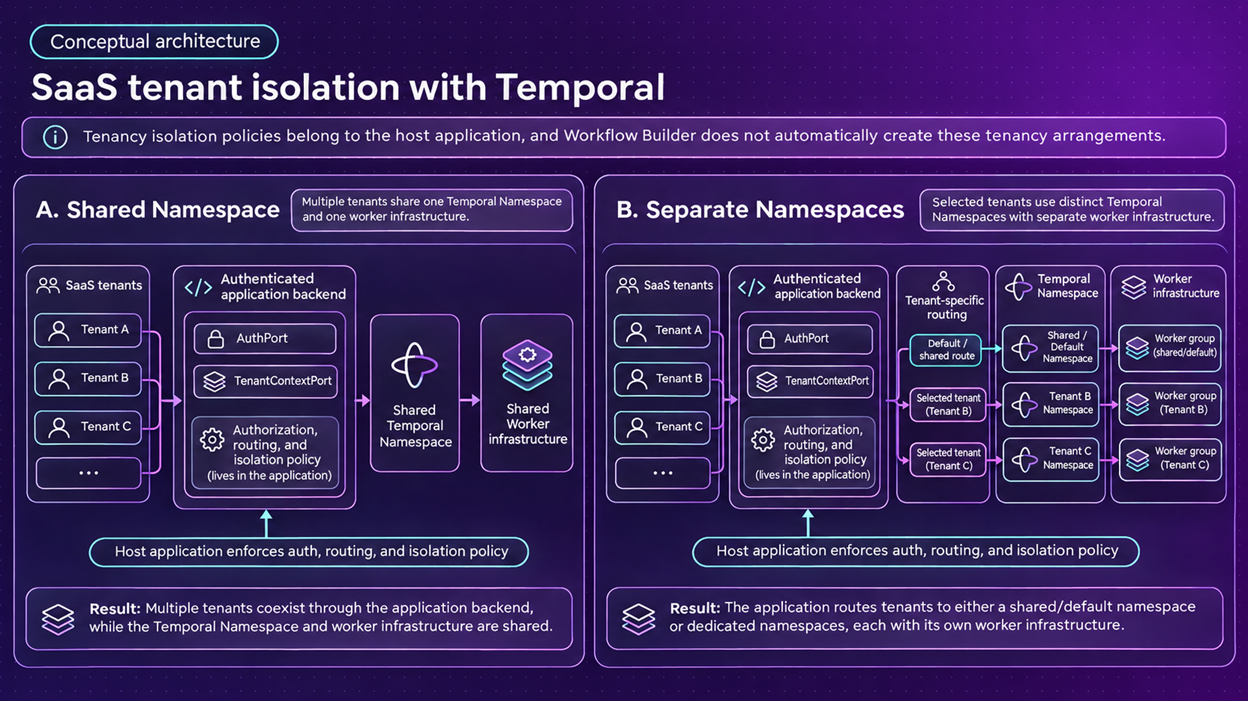
A SaaS application offering customer-defined workflows needs to isolate customer data and execution operations. The appropriate model depends on the application's existing tenancy architecture and the level of separation customers require.
Temporal provides Namespaces as logical isolation boundaries. Task Queues organize how work reaches Workers, while your application decides which customer may create or interact with a particular execution.
There are several possible designs.
Which tenancy model fits your SaaS product?
Shared Namespace with application-level tenant isolation
A practical option for SaaS products managing many customers through shared infrastructure.
- ✅ Fewer Namespaces to administer
- ❌ Requires strong application-level authorization and tenant-aware execution records
Separate Namespaces for selected customers
Worth considering for enterprise or regulated customers that require more explicit isolation.
- ✅ Clearer logical separation between selected customers
- ❌ More Namespace administration and operational configuration
Separate Temporal environments
An option for customers with strict infrastructure or deployment requirements.
- ✅ Greater control over infrastructure separation
- ❌ Higher operational complexity and potentially greater costs
A Task Queue is not a substitute for authorization. Routing work to a particular Worker doesn't establish whether the caller should have access to the workflow or its data.
Similarly, a Namespace boundary cannot replace the customer authorization model implemented by the SaaS application.
How Workflow Builder handles tenant context
Workflow Builder's execution backend exposes 2 extension points relevant to production SaaS applications:
- AuthPort handles authentication and authorization for backend operations.
- TenantContextPort supports tenant identity propagation through the execution layer.
The reference backend is designed for local development and doesn't ship with production tenant isolation enabled. Its allow-all authentication adapter requires explicit opt-in.
Before exposing the backend to customers, teams need to connect their identity provider and authorization rules. The tenant context should remain consistent across workflow definitions and execution operations, including decision submission.
The Temporal configuration can then follow the application's isolation policy.
A platform with thousands of smaller tenants might prefer shared infrastructure with tenant-aware application controls. Customers that require more explicit infrastructure separation may justify different Namespace arrangements.
Workflow Builder doesn't automatically provision a Namespace for each tenant. The repository provides integration points for tenancy, while the deploying application determines how they are used.
Don't overlook payload protection
Execution history can include workflow inputs and other payload data. Temporal's standard data conversion does not automatically provide application-level encryption of sensitive payload contents.
Applications processing confidential customer information may need a Payload Codec to encrypt data before it reaches the Temporal Service.
The decision applies to both hosting models. Self-hosting provides control over where infrastructure runs, while payload encryption can provide an additional protection boundary for data stored by the Service.
The Workflow Builder Temporal guide explicitly notes the need to consider payload encryption when preparing a production integration.
How Workflow Builder connects to either deployment
One advantage of Workflow Builder's Temporal architecture is that the hosting decision doesn't require replacing its graph interpreter.
The Temporal adapter runs customer-defined graphs against a Temporal Service accessible to the application. The same runner supports self-hosted infrastructure and Temporal Cloud.
The reference stack uses environment variables to configure the connection. Both the execution backend and Worker need to connect to the intended Temporal Namespace.
For a Temporal Cloud deployment, the relevant settings include:
The connection configuration also supports TLS and certificate-based authentication. Teams operating a private cluster can supply a custom CA certificate and mTLS credentials.
The backend and Worker must use matching configuration, including the Namespace and Task Queue. A mismatch can leave submitted workflows waiting because no Worker is polling the expected queue.
The reference backend and Worker use a shared connection configuration package, with validation for contradictory TLS settings. Credentials imply TLS, and incomplete certificate pairs are rejected.
Temporal Cloud Namespaces must already exist before the application starts using them.
The Workflow Builder standalone deployment guide documents these settings and includes examples for Cloud and secured external clusters.
What remains in your application
Workflow Builder handles graph interpretation and execution through Temporal, while the host application remains responsible for several parts of the workflow experience:
- Node executors: Your developers implement the operations behind each node, including calls to internal services or external APIs.
- Storage and execution data: The reference backend uses PostgreSQL for workflow definitions and run records, with Server-Sent Events (SSE) for live updates.
- Workflow versions: Published definitions and execution snapshots allow customers to update workflows while existing runs continue using their original graphs.
- Business logic and permissions: Your application controls which operations customers can use and who can access or manage their workflows.
For more on publication and historical definitions, see the workflow versioning guide. The Temporal workflow UI guide covers the visual authoring experience.
Plan for a few execution limits. The current interpreter supports directed acyclic graphs (DAGs) with 1 start node, so loops aren't supported. It also uses wave-based execution with a barrier, meaning a waiting node can delay the next wave even when another branch has finished. Teams building complex parallel approval processes should test those scenarios before deployment.
What self-hosting demands from the engineering team
Self-hosting Temporal gives engineering teams greater control over their infrastructure, but running the Service in production requires more than deploying a cluster.
According to Temporal's self-hosted documentation, teams need to plan for several ongoing responsibilities:
- Infrastructure and scaling: Maintain persistence and visibility infrastructure, monitor Service health, and provision enough capacity for execution spikes.
- Availability and recovery: Prepare for infrastructure failures, configure monitoring, and test recovery procedures.
- Security: Configure authentication and encrypted connections. Organization-level RBAC and audit requirements may need additional infrastructure or application-level controls.
- Upgrades: Coordinate Temporal Server updates with persistence schema changes and test compatibility before deployment.
Capacity planning deserves particular attention in SaaS products where customers create their own workflows. One tenant may generate significantly more execution activity than others, while simultaneous batch operations can put unexpected pressure on Task Queues. Monitoring should cover queue backlogs and failed executions alongside Service health.
Your Workers still need attention, even with Temporal Cloud. Engineering teams remain responsible for deploying application code, tuning concurrency, and managing compatibility with running executions. Workflow Builder's Temporal plugin documents replay compatibility requirements, which should be reviewed before upgrades.
Human approval workflows add another consideration: executions may remain open through Worker restarts or software releases. Workflow Builder uses Temporal Workflow Updates to resume supported waiting nodes when a decision arrives. Our human approval on Temporal guide explains the execution pattern and application responsibilities.
Checklist: choosing the right Temporal deployment for your SaaS product
A decision based exclusively on current infrastructure spending can miss the work required as the product grows.
Use the following checks during architecture planning:
- Execution profile: Estimate how many workflows start each day and how many remain open concurrently.
- History size: Measure the Event History produced by representative customer-defined graphs, including retries and waiting steps.
- Cloud pricing: Model Actions, Active Storage, and Retained Storage using current Temporal Cloud rates.
- Tenant isolation: Decide which customers can share a Namespace and whether any require more explicit separation.
- Security: Identify payload encryption and authorization requirements for workflow data.
- Platform capacity: Assess whether your team can operate and upgrade a production Temporal Service.
- Availability: Define recovery expectations and the infrastructure required to meet them.
- Worker operations: Document deployment procedures and compatibility requirements for long-running executions.
- Cost attribution: Decide whether usage needs to be reported or charged back per tenant.
- Migration: Test whether the same application configuration can connect to the alternative Temporal environment.
A representative test should include an approval workflow that remains waiting through a Worker restart. For Cloud evaluation, capture the resulting Actions and storage usage rather than estimating everything from the number of nodes.
For self-hosted evaluation, inspect Service metrics during execution spikes and practice an upgrade in a non-production environment.
When each deployment makes sense
Temporal Cloud suits SaaS teams that want managed infrastructure and consumption-based pricing. It's particularly attractive when workload patterns are still evolving, although long-running workflows and storage costs need monitoring.
Self-hosted Temporal makes sense for teams with established platform operations or specific infrastructure requirements. It offers greater control but comes with responsibility for scaling and maintenance.
Workflow Builder supports both through the same Temporal adapter, so your application architecture can remain consistent. Moving between environments still requires planning, especially for active executions and their histories.
Build customer-configurable workflows with Workflow Builder
Workflow Builder connects customer-authored workflows to Temporal through an open-source editor, execution backend, and adapter. You keep control of your business logic and infrastructure while Temporal handles durable execution.
Ready to bring workflow automation into your SaaS product? Explore the Temporal integration or talk to the Workflow Builder team about your architecture and deployment options.
- What is the difference between Temporal Cloud and self-hosted Temporal?
Temporal Cloud is the managed Temporal Service: Temporal operates it, manages Service upgrades, and bills for Actions and storage. With self-hosted Temporal, your team deploys and maintains the Service, its persistence, and the monitoring infrastructure. In both models, your team deploys and manages the Workers that run application code.
- How much does Temporal Cloud cost?
According to Temporal's published Pay-As-You-Go pricing, checked November 10, 2026, rates start at $50 per million Actions, $0.042 per GB-hour of Active Storage, and $0.00105 per GB-hour of Retained Storage, with a $0 base monthly platform fee. Support options, volume discounts, and other commercial arrangements change the total, so a production estimate should use the rates on the team's own account.
- What does self-hosting Temporal require from the engineering team?
Teams maintain persistence and visibility infrastructure, plan capacity for execution spikes, and test recovery procedures. They also configure authentication and encrypted connections and coordinate Temporal Server upgrades with persistence schema changes.
- Do workflows waiting for human approval cost money on Temporal Cloud?
Yes. An open Workflow Execution keeps its Event History in Active Storage while it waits, even when it generates few new Actions. After the workflow completes, its retained history can add Retained Storage costs for the configured retention period.
- How should a SaaS product isolate tenants on Temporal?
The main options are a shared Namespace with application-level tenant isolation, separate Namespaces for selected customers, or separate Temporal environments. Namespaces and Task Queues don't replace authorization: the SaaS application still decides which customer may create or interact with an execution.
- Does Workflow Builder work with both Temporal Cloud and self-hosted Temporal?
Yes. The same Temporal adapter runs customer-defined graphs on self-hosted infrastructure and on Temporal Cloud. In the reference stack, the backend and Worker read the connection settings, such as the address, Namespace, and API key, from environment variables, and the configuration supports TLS and mTLS for private clusters.
Content Marketing Specialist who's spent the last decade making tech topics actually readable. With an MA in Brand Communication, Ida has crafted content strategies for several IT companies. Her portfolio spans from Kubernetes tutorials to enterprise software guides, now focusing on data visualization and diagramming solutions.
Articles you might be interested in


Temporal workflow retries, failures, and execution history: an operations guide
An operations guide to failed workflows on Temporal: Retry Policy settings, node-level retry profiles and error policies in Workflow Builder, incomplete runs, execution history, and an investigation checklist.