A clean core, everything else a plugin: how Workflow Builder stays extensible

.jpg)
Workflow Builder keeps its core deliberately small. Undo/redo, copy-paste, auto-layout, edge routing, validation, PDF export, and workflow execution all ship as plugins built with the same public API you use for your own code. Since 2.0, the editor is an npm package – and the plugin API is how you customize it without forking anything.
Workflow Builder is a React SDK for embedding a visual workflow editor in your product, built on React Flow. One problem has followed it from the start: shipping the same editor to different clients, with different feature sets, without the codebase splitting into versions that drift apart.
The architecture that came out of that problem is the subject of this article. An earlier stage of it was the subject of a talk I gave at React Summit – "Plug-and-Play Design: Building Extendable React Applications" – and what's below is its current, verified state in Workflow Builder 2.0.
React Flow gives you a canvas. Extensibility is your problem
React Flow handles rendering and interaction for node-based UIs, and it is the right foundation – it's what Workflow Builder builds on. What React Flow deliberately leaves open is how a product built on top of it stays customizable: where new buttons, panels, and behaviors go, and how they survive the next upgrade.
The default way to customize an editor you don't fully control is to take its source and change it. We know because that's how Workflow Builder itself used to be delivered: as a white-label codebase, adjusted per client – an app you configure like a car. It works, and then the bill arrives: every upgrade is a merge against your own modifications, and each modification carries a reason that lives in the head of whoever made it. The plugin system was born in that era as a build-time technique – features in self-contained folders that could be moved in and out of a client's build.
Workflow Builder 2.0 changed what that system is for. The editor became an npm package, so taking the source and changing it stopped being the delivery model – and the plugin API became the public surface you customize through. The combination is what makes plug-and-play real: the package gives you a core you don't fork, and the plugin API gives you the way in. The rule underneath hasn't changed: the core stays small, and everything else – including our own features – goes through the plugin API.
The core stays clean – even our own features are plugins
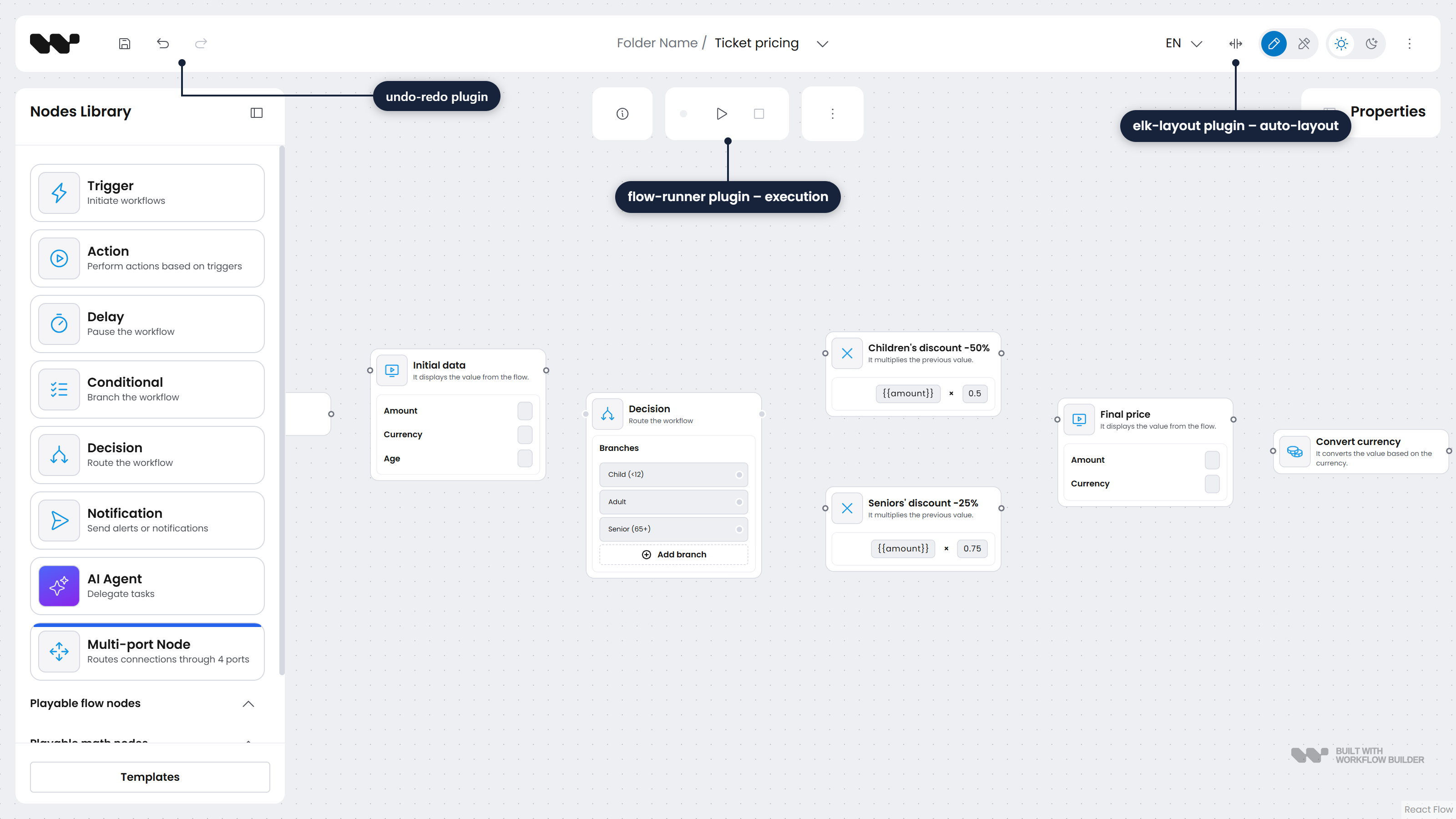
Workflow Builder's built-in features are not core code behind settings switches. They are plugins: undo/redo, copy-paste, orthogonal edge routing with node avoidance, ELK auto-layout, reshapable edges, widgets, validation, PDF export, and Flow Runner – the plugin that puts live workflow execution on the canvas. Each one is built with the same public API your code gets.
That is the contract we hold ourselves to: your plugins use the same API ours do, with no privileged internal channel for first-party features. Building our own features this way is what keeps the contract honest – when a feature needs more than the surface offers, we extend the surface, and every extension point added for a built-in plugin becomes one your plugins get too.
Keeping features out of the core also keeps them out of your bundle. Plugins are opt-in at build level: only the plugins you use end up in the bundle, so a build that doesn't use PDF export doesn't ship PDF export.
How the plugin API works
A Workflow Builder plugin is a synchronous function – literally () => void – passed to <WorkflowBuilder.Root plugins={[...]}>, which invokes each one once on first mount. Configuration handles the declarative side of the editor – the palette, custom node types, templates. Plugins handle what configuration can't: new UI and changed behavior. Everything a plugin does goes through 3 registration calls.
Named slots and component decorators
registerComponentDecorator(slotName, options) mounts your UI into a named slot, or modifies the props of the component hosting it. The editor exposes optional slots at the points where extensions kept landing in real projects: OptionalAppBarControls, OptionalAppBarTools, OptionalAppChildren, OptionalEdgeProperties, OptionalFooterContent, OptionalHooks, and OptionalNodeContent, which receives the nodeId it renders on – enough for per-node badges, overlays, or controls.
Each decorator declares where it renders relative to the slot's host: 'before' (the default), 'after', or 'wrapper', which receives the host as children. A modifyProps function transforms the host's props instead of, or alongside, adding UI. Slots that target a built-in component are typed – the SDK exports a matching *Props type, so a decorator on 'PropertiesBar' or 'DiagramContainer' is checked against the host's real prop shape. Decorating 'DiagramContainer' is, for example, how a plugin registers custom edge types with the diagram.
Function decorators: changing behavior you don't own
registerFunctionDecorator(fnName, options) intercepts a decorable function inside the SDK. A before-decorator observes the arguments or substitutes them via replacedParams; an after-decorator observes the result or replaces it via replacedReturn. Functions like getPaletteData and getTemplates are decorable, so a plugin can filter what the palette shows or inject its own templates without owning either function.
The third call, registerPluginTranslation, merges a plugin's translations into the editor's i18n resources. A plugin's UI localizes with the rest of the app instead of becoming the one hardcoded corner.
The boundary the build enforces
The API above is the runtime half. The build half is what keeps the boundary honest, and it's the older of the two – it's how the white-label builds were assembled, and it still runs our own repo today.
Each plugin is a self-contained folder holding everything the feature needs: components, functions, hooks, styles, and translations. The application references plugins in exactly one place, an aggregator module, and an ESLint rule makes any direct import from a plugin folder an error. Nothing else in the app is allowed to know a plugin exists.
That is what makes adding and removing a feature a folder-level operation. There is no registry file to update or reference list to keep in sync – and because a Vite-level resolver redirects imports of a missing plugin to a no-op stub, a build with the folder deleted still compiles and ships none of that plugin's code.
A working example: a plugin that counts your changes
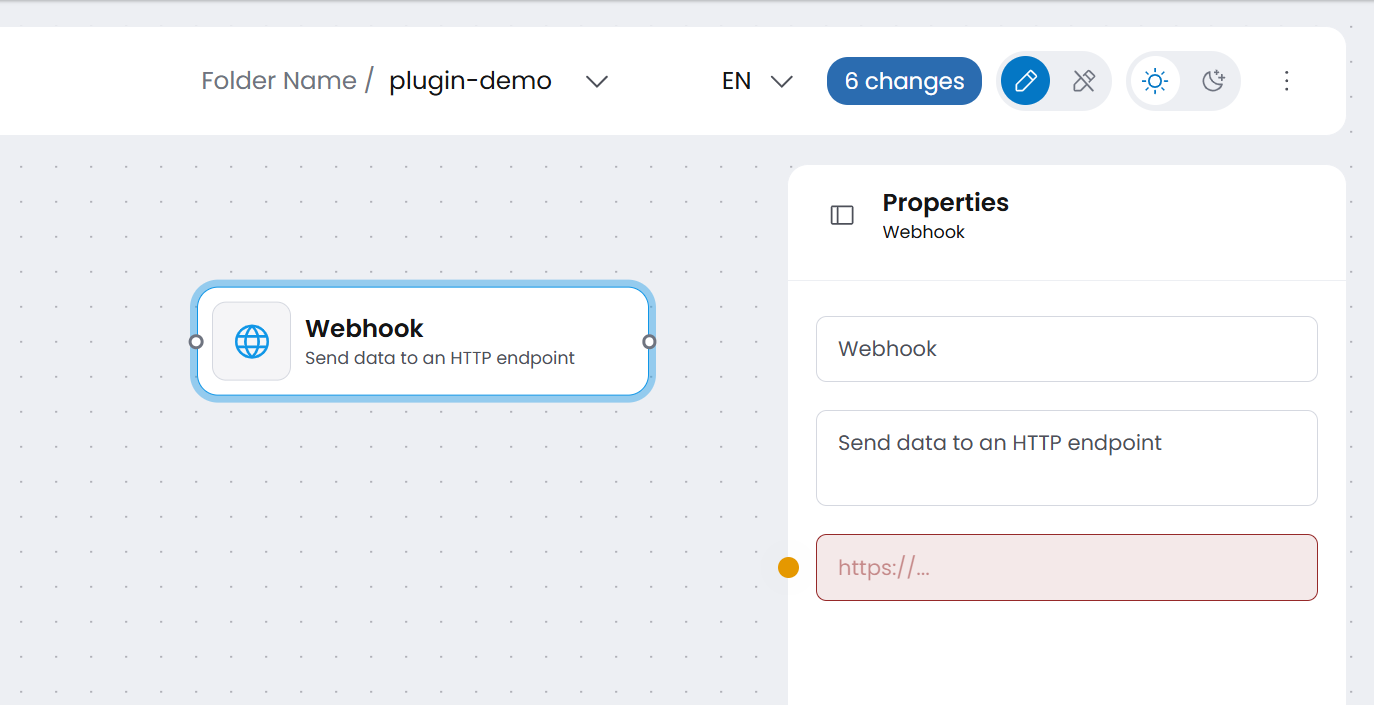
Here is a complete plugin, verified against a fresh Vite app with @workflowbuilder/sdk installed from npm. It does 2 things: mounts a badge into the app bar, and decorates trackFutureChange – the function the editor calls before every meaningful graph change – to count those changes. Drop a node, move it, edit a property: the badge ticks up.
import { useSyncExternalStore } from 'react';
import {
  registerComponentDecorator,
  registerFunctionDecorator,
} from '@workflowbuilder/sdk';

let changesCount = 0;
const listeners = new Set<() => void>();

const subscribe = (listener: () => void) => {
  listeners.add(listener);
  return () => {
    listeners.delete(listener);
  };
};

const ChangesBadge = () => {
  const count = useSyncExternalStore(subscribe, () => changesCount);
  return <span className="changes-badge">{count} changes</span>;
};

export const changesBadgePlugin = () => {
  registerFunctionDecorator('trackFutureChange', {
    name: 'changes-badge',
    callback: () => {
      changesCount += 1;
      listeners.forEach((notify) => notify());
    },
  });

  registerComponentDecorator('OptionalAppBarControls', {
    name: 'changes-badge',
    content: ChangesBadge,
  });
};
Registering it is one prop: <WorkflowBuilder.Root plugins={[changesBadgePlugin]}>. The name field deduplicates registrations; anonymous entries fall back to a content fingerprint and log a dev warning asking you to name them. The full walk-through, including typed modifyProps and translations, is the build-a-plugin guide – and each of the 9 built-in plugins has its own doc page you can read as a working reference.
The tradeoffs
Plugin architecture is not free. Most of its costs, though, land on whoever maintains the plugin system – in Workflow Builder's case, us rather than you.
What it costs us as maintainers:
- Deciding what is core – the line between core and plugin is an architectural call with consequences, and it was not obvious to us either
- Per-feature ceremony – building undo/redo as a plugin was more work than wiring it into the core would have been, and every new feature pays that toll
- Nesting – plugins building on other plugins get tricky; we hit this while iterating on our own features
What it costs you as a consumer is smaller, but real: writing a plugin is more ceremony than dropping a component into code you own – the comparison that matters, though, is against maintaining a fork, not against editing your own source. And the registries are module-global singletons, a documented limitation: name your plugins so deduplication can do its job.
Enforced modularity also pays off in a place we didn't originally design for: AI coding tools. When a feature must live in one folder and the lint rule blocks imports from everywhere else, it is immediately visible when generated code reaches somewhere it shouldn't. The boundary that disciplines a team disciplines a code assistant the same way.
Where Workflow Builder fits
The pattern repeats down the stack. React Flow renders the canvas and leaves the product layer to whoever builds on it. Workflow Builder builds that layer on React Flow's public API – React Flow is a peer dependency, not a fork. Your plugins build on Workflow Builder's public API in turn. Each layer extends the one below without reaching inside it, which is this article's argument applied twice. If you're weighing the layers themselves, we keep an honest comparison of Workflow Builder and React Flow.
The editions sit on the same surface: an Enterprise feature like Flow Runner is a plugin on the same API as Community's undo/redo, not a separate product. And the surface carries production load – teams at Vercom, Athena Intelligence, and Plura AI run Workflow Builder with their own customizations on it. If you're deciding whether to build this layer yourself instead, the build-vs-buy economics of a workflow editor are a separate discussion we've already written up.
- How do you extend Workflow Builder without forking it?
Through the plugin API. A plugin is a function passed to
WorkflowBuilder.Rootthat registers component decorators into named UI slots, function decorators around decorable SDK functions, and translations. Your code never touches editor internals, so upgrades don't break it. The plugin docs list every built-in plugin and extension point. - Can I add custom interactions with nodes in Workflow Builder?
Yes. The
OptionalNodeContentslot renders your component inside every node and receives thenodeId, so per-node badges, buttons, and hover affordances are plugin territory. Combined with function decorators, an interaction can read and change editor behavior, not only display UI. - Can I replace parts of existing behavior using plugins?
Yes, within the decorable surface. Function decorators substitute a function's arguments (
replacedParams) or its result (replacedReturn) – filtering whatgetPaletteDatareturns, for example – andmodifyPropsrewrites the props of built-in components like the properties bar. You change behavior you don't own without patching source. - Are Workflow Builder's own features built as plugins?
Yes. Undo/redo, copy-paste, edge routing with node avoidance, ELK auto-layout, reshapable edges, widgets, validation, PDF export, and Flow Runner (workflow execution) all use the same public API available to your code.
- How is the Workflow Builder core kept small?
Features live in self-contained plugin folders behind one aggregator module, an ESLint rule blocks direct imports from plugin code, and a Vite resolver stubs out missing plugins. Unused plugins are excluded from the build, so only the plugins you use end up in the bundle.
- Do custom plugins survive Workflow Builder upgrades?
Plugins depend only on the public plugin API – named slots, decorable functions, and registration calls – never on editor internals. That public surface is the compatibility contract, which is what keeps upgrades routine.
Mateusz is a Principal Developer and Solutions Engineer at Synergy Codes, where he works on Workflow Builder. With 7+ years of building interactive diagramming tools and data-heavy web applications, he joins client projects from the earliest conversations, shaping requirements into technical roadmaps and estimates, and stays hands-on through development.
Need more information about Workflow Builder?
Talk directly to our experts to discuss features, integration and onboarding options, or custom solutions– get clear answers for your next step.