Embeddable workflow engine for SaaS: what to embed and what to hand to Temporal

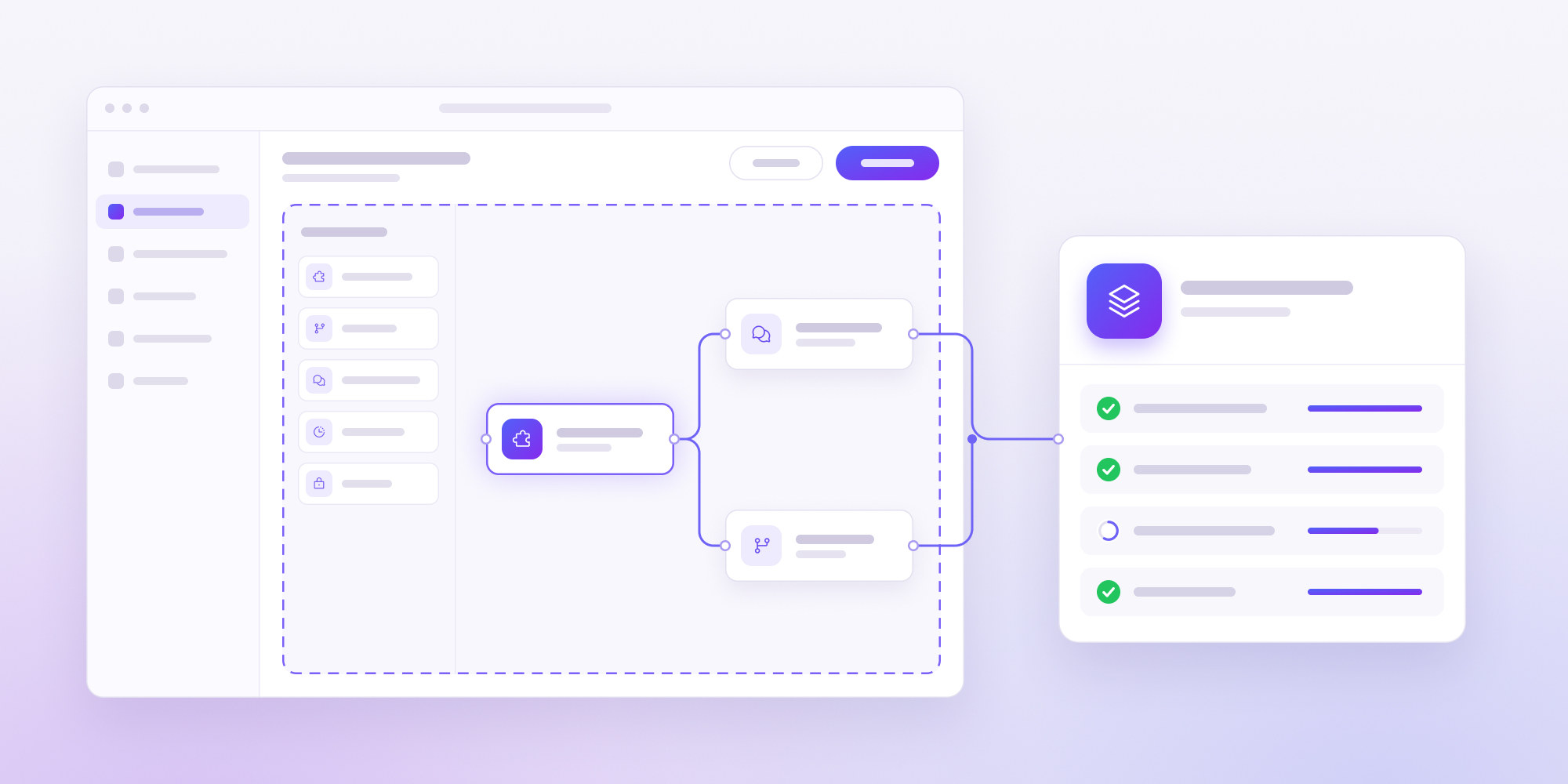
Customer-defined workflows need to survive failures, long approval waits, and software releases. Temporal provides durable execution. Workflow Builder adds the embeddable editor, graph interpretation, a reference backend, and the Temporal adapter. The application team still writes node executors, sets up authentication and tenant isolation, and builds the screens where people approve or reject steps.
An embeddable workflow engine lets a SaaS product offer workflow automation as part of its own application. Customers can define processes using the operations the product supports, while the backend manages how those processes run.
The difficulty lies in choosing what to build. A visual editor may be relatively straightforward to integrate, but customers eventually expect their workflows to survive failures, wait for approvals, and remain traceable after execution. Supporting those requirements introduces infrastructure concerns that extend well beyond the canvas.
Teams evaluating an embedded workflow engine often have to decide whether to develop an execution runtime, adopt an existing engine, or use a framework that connects customer-defined workflows to a proven backend.
Workflow Builder takes the 3rd approach. Its open-source framework includes an embeddable editor, an execution backend, and an adapter that runs workflow definitions on Temporal. The application retains control over its business logic and deployment.
What does an embeddable workflow engine need to do?
The term embedded workflow engine is used for products with very different capabilities. Some provide a visual interface for defining processes. Others expose execution APIs or offer complete automation platforms with hosted infrastructure.
For SaaS applications, the practical requirement is to let customers configure processes within the product's existing environment. Those workflows might manage approvals or coordinate operations across internal services.
In some applications, customers will also need to connect the process to external software.
A procurement application, for example, could expose nodes for checking budgets and requesting approvals. Customers would arrange those operations according to their policies, using permissions and business data already managed by the application.
Once a customer starts a workflow, the system needs to retain its state and execute the configured steps. It must also account for processes that remain open while waiting for an external response. A product with configurable approval chains might have executions lasting several weeks, with multiple software releases occurring before they finish.
The choice of execution engine affects how much infrastructure the SaaS team needs to maintain. Writing a custom runner gives engineers direct control, although it also makes them responsible for recovery after failures and the persistence of workflow state.
Using Temporal provides durable execution infrastructure with support for retries, timers, Workflow Updates, and Event History. The application still needs a way to translate customer-defined processes into operations that its Workers can execute.
A conventional Temporal application often defines its workflow logic in code. An embedded workflow product needs a model that can interpret different customer-authored graphs without deploying a separate Workflow implementation for each definition.
The architecture becomes easier to evaluate once the product team identifies who will create workflows and how much freedom those users need. Engineers configuring a fixed collection of processes can work directly with an SDK. Customers assembling their own approval paths need a definition model that the backend can validate and execute.
If you start with a visual editor, our guide to adding execution to a workflow canvas covers the additional responsibilities introduced when diagrams become executable processes.
Workflow automation in SaaS: various approaches
The options available to a product team depend on how much execution infrastructure the company wants to operate and who is expected to maintain the workflow definitions.
A product with a small number of developer-defined processes may need little beyond an SDK and backend services. A workflow feature designed for end users introduces requirements for graphical authoring and publication controls. Customers will also expect to inspect executions when something fails.
The distinction becomes clearer when examining what the product's customers are expected to configure.
If customers mainly need to connect their CRM or accounting software to other services, connector coverage and OAuth management may dominate the decision. Products like Paragon and Prismatic specialize in embedded integration infrastructure. Both offer capabilities for integrating third-party applications, with their own workflow and configuration features.
A product that needs customers to assemble domain-specific operations has different requirements. Its workflow definitions may involve internal business rules or proprietary services. The engineering team may already have Temporal in production and want to let customers configure workflows against that infrastructure.
For a wider comparison of execution technologies, our open-source workflow engine comparison maps tools according to their architectural layers and licensing models. Our backend workflow engine guide also examines the operating trade-offs between Temporal, Inngest, Restate, and Camunda.
An embedded workflow system will often involve more than 1 of these technologies. Integration infrastructure can supply actions against third-party APIs while a workflow engine coordinates the broader process.
What belongs inside the SaaS application?
An embedded workflow engine needs to work with the product's existing data model and permissions. The application determines which operations customers can configure, who can publish workflows, and how users interact with processes that require their attention.
Workflow definitions and publication
Workflow Builder uses JSON graphs containing typed nodes and their connections. The host application decides which node types to expose, so a CRM might let customers update contact records or assign leads, while an insurance platform could provide claim validation and approval actions.
The React SDK supplies the embeddable canvas and configuration interface. Product teams can customize the editor through its plugin architecture and use JSON Schema to configure property panels from data. Our data-driven workflow editor guide covers the latter approach, while the plugin architecture guide explains how to extend the editor without maintaining a fork.
Once customers begin publishing workflows, the backend needs to manage their lifecycle. Workflow Builder's reference backend supports:
- Draft and published definitions: Customers can edit a workflow before releasing a new version.
- Execution snapshots: Each run retains the graph definition it started with.
- Historical versions: Older definitions remain available for investigating executions that began before later changes.
For example, an approval process may still be waiting for a decision when the customer publishes an updated graph. Existing executions retain their original definitions, while new executions can use the latest published version.
Authentication and tenant boundaries
Workflow definitions and execution records may contain customer-specific business data. The application's authorization model needs to apply when users create workflows, retrieve execution information, or submit decisions.
Workflow Builder's reference backend provides 2 integration points:
The open-source backend includes development defaults, including an allow-all authentication adapter that requires explicit opt-in. Production authentication and tenant isolation must be implemented by the team deploying the application.
Temporal adds infrastructure-level choices. Namespaces can provide logical isolation within Temporal, while Task Queues determine how tasks are routed to Workers. The configuration depends on the application's security and tenancy requirements.
A product serving enterprise customers with strict isolation requirements may choose a different setup from a high-volume SaaS platform using shared infrastructure.
Human decisions within a running process
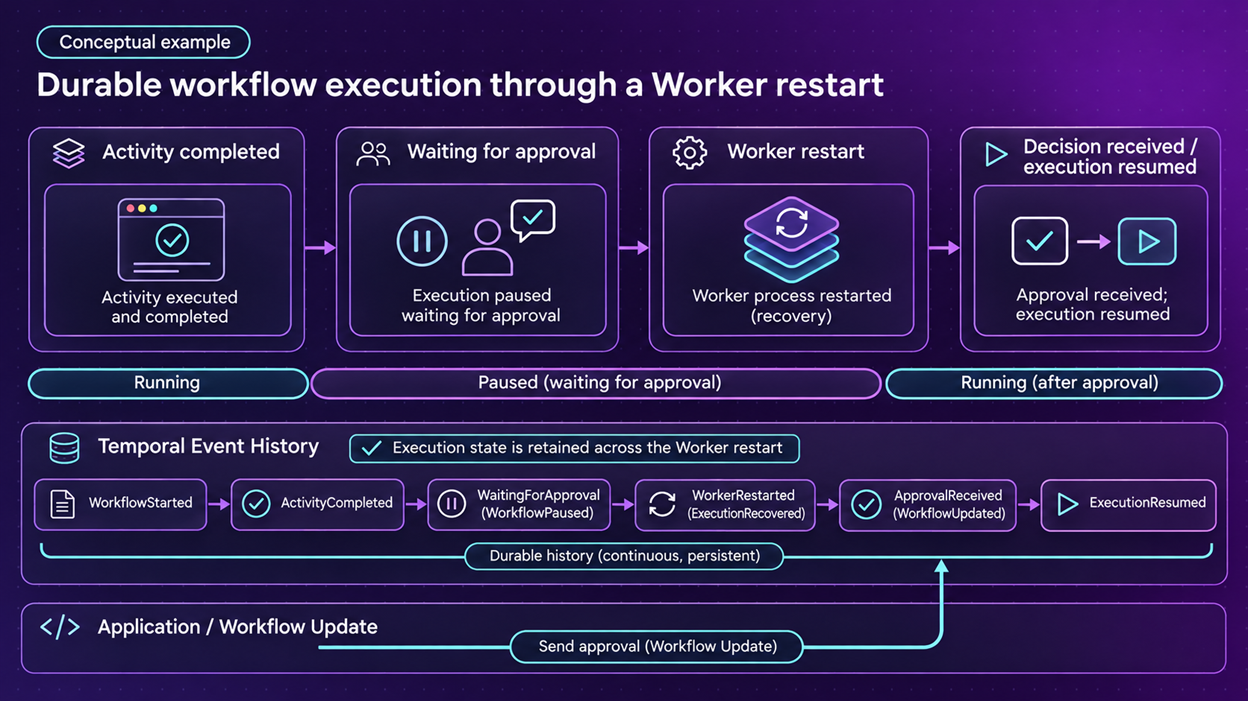
Approval workflows often spend more time waiting for a person than executing automated steps. Temporal can preserve a running workflow while it waits, and Workflow Builder's Temporal plugin supports human decisions through Workflow Updates.
The plugin currently supports approval, approval with corrections, and rejection. Once a decision has been accepted, subsequent attempts to resolve the same waiting node are rejected.
The application still needs to provide the interface through which reviewers act. Depending on the product, the responsibilities may include:
- An approval inbox or another place to review pending decisions
- Permission checks before accepting a decision
- Notifications and business audit records associated with the reviewer
Temporal Event History records execution events, while the application can retain additional information such as reviewer identity and the authorization context.
Workflow Builder's human approval on Temporal guide covers the execution pattern in detail. For teams designing the customer-facing experience, the human-in-the-loop automation guide explores the UI requirements around those decisions.
How Workflow Builder runs customer-defined graphs on Temporal
Workflow Builder's execution architecture uses a generic runner to interpret workflow definitions created by customers. The application makes supported operations available as node types, and the backend converts the authored graph into an executable definition.
The approach follows a DSL-interpreter pattern. A graph is stored as structured data, and a deployed interpreter executes its supported operations through Temporal.
A customer can publish a new definition using existing node types without requiring the engineering team to deploy a new Temporal Workflow implementation for every diagram.
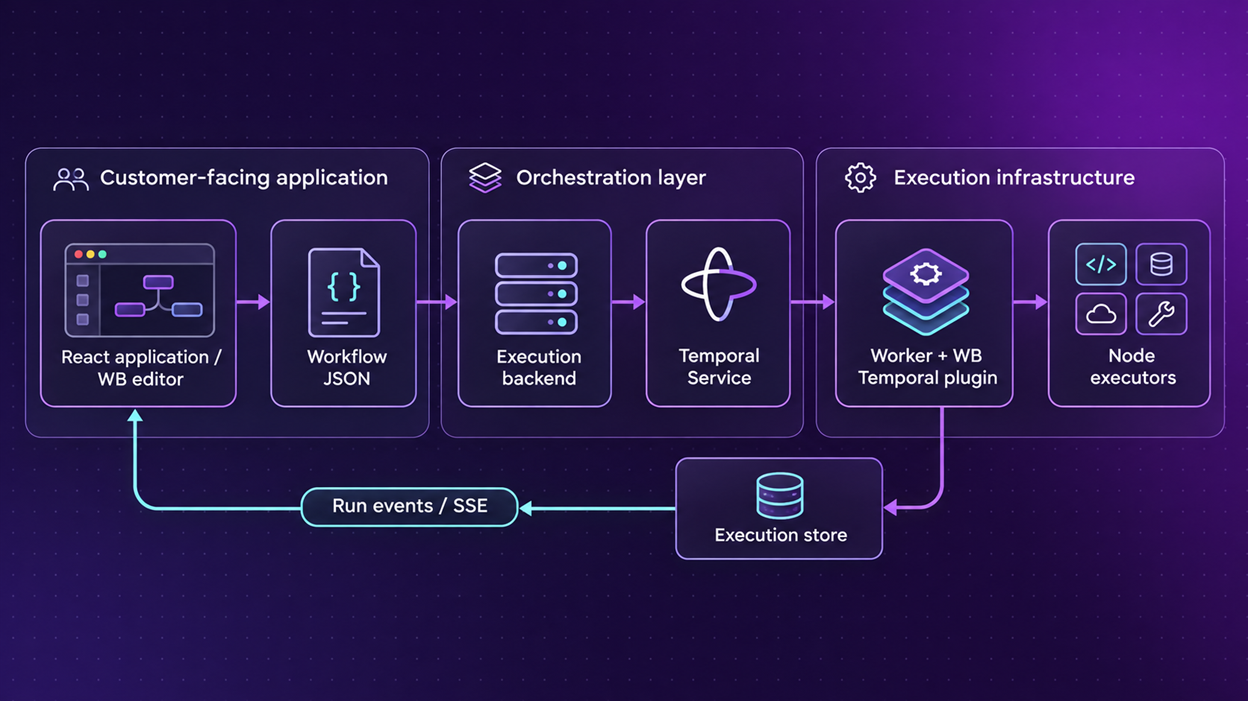
The reference stack includes several components that can be integrated into a SaaS application.
The Temporal plugin runs each graph as 1 Temporal Workflow Execution. Individual graph nodes run as Activities, with an executor function registered for each supported node type.
An application's engineering team writes those executor functions. A node might call an internal service or evaluate a business rule. Once an executor exists, customers can reuse that node type in different workflow definitions.
Execution state, retries, and visibility
Temporal maintains Workflow Event History, while Workers execute the application code registered through the Workflow Builder plugin. The reference backend stores workflow definitions and execution records in PostgreSQL and streams execution updates through Server-Sent Events (SSE).
Developers and product teams can inspect execution activity at different levels:
- Temporal Web UI: View Workflow Event History, with node labels included as Activity Summaries.
- Workflow Builder AI Studio: Track execution progress directly on the canvas, including node states and an event log.
- Reference backend: Access stored execution information and live updates delivered through SSE.
For failure handling, the runner supports configurable retry and timeout profiles per node type. Applications can tailor these policies to their operations, allowing transient failures to be retried while treating non-retryable errors appropriately.
Execution limits to account for
The current graph interpreter has several documented constraints:
- Graph structure: 1 start node and directed acyclic graphs (DAGs). Loops aren't supported.
- Parallel execution: Independent branches can run in parallel, but wave-based traversal uses a barrier. A waiting node may prevent the next wave from starting even after another branch finishes.
- Event History growth: The plugin emits execution events and currently doesn't use Continue-As-New. Large graphs should be evaluated against Temporal's Event History limits.
For implementation details, the Temporal integration guide includes a working integration example. The Workflow Builder SDK overview covers the editor separately.
How much should you hand to Temporal?
Temporal handles the infrastructure needed to maintain execution state over time. Applications can run Activities and recover workflow state after Worker restarts while retaining their recorded execution histories.
In an embedded workflow product, the surrounding application continues to control the operations exposed to customers. It also decides how workflows are published, which users may interact with them, and how execution information appears inside the product.
A responsibility matrix can clarify the implementation scope before development begins.
The likely development effort depends on the product. An application with a limited collection of business operations may need only a relatively small catalog of executors. More work can go into controlling publication rights or exposing execution history to customers.
Products that depend on dozens of third-party services face a different maintenance burden. An execution engine doesn't supply a ready-made catalog of connectors with managed credentials and API compatibility.
Temporal supports self-hosted deployments and Temporal Cloud. In either case, the application deploys its own Workers and maintains the code that processes workflow tasks. Temporal Cloud operates the managed Temporal Service, reducing the operational responsibility for that infrastructure. Self-hosting gives the team more direct control over the service environment and requires the corresponding maintenance capacity. The same Workflow Builder adapter can operate against either deployment model once the application configures its connection and Namespace.
Embedded workflow engine or embedded iPaaS?
Embedded iPaaS products address a substantial part of the integration work that appears in SaaS automation projects. Paragon and Prismatic provide infrastructure for connecting a SaaS product to external applications, including connector tooling and authentication management.
A platform that primarily needs customers to connect external systems may find these capabilities more relevant than building its own workflow execution stack.
For products with proprietary business processes, the evaluation often centers on who controls the workflow definition and how custom operations are implemented.
An application may need to execute its own business rules or coordinate processes that already run on Temporal. In such cases, customer-defined graphs can be represented through domain-specific node types.
Connector maintenance should receive serious attention during evaluation. A customer integration may depend on OAuth authorization, API version changes, and rate limits. Operating these connections across many customer accounts can require ongoing engineering work.
An embedded iPaaS can reduce that burden when a product relies heavily on external integrations.
Workflow Builder and Temporal are more relevant when the application needs a configurable process layer around its own operations. The application can also call an integration provider through node executors, allowing external connector actions to participate in a broader workflow.
The underlying orchestration architecture remains under the product team's control.
For teams comparing execution infrastructure itself, Workflow Builder's guide to backend workflow engines provides another perspective on where Temporal fits among alternatives. The Temporal visual authoring guide explains the additional UI layer needed when customers want to modify workflow definitions directly.
Checklist: what to verify before choosing an embedded workflow engine
A proof of concept should exercise the conditions the system is likely to encounter in production. A successful workflow run gives limited evidence about upgrade compatibility or processes that remain open for several days.
Use 1 representative workflow from your product and check the following:
- Published versions: Start an execution, publish a revised graph and confirm that the original run retains its starting definition.
- Worker recovery: Interrupt a Worker during execution and verify that the workflow resumes correctly after recovery.
- Retry behavior: Trigger a transient Activity failure, inspect the retry policy and check the resulting execution events.
- Human approval: Pause a workflow for a decision, restart the Worker and submit the response through the application's authenticated endpoint.
- Executor compatibility: Update a node implementation and test older graph configurations against its current input and output contracts.
- Authorization: Verify that users from one tenant cannot retrieve another tenant's workflow definitions or submit decisions for its executions.
- Execution visibility: Confirm that developers can inspect Temporal Event History and that customers receive appropriate run-level status information.
- Graph limitations: Test conditional branches and waiting nodes against the interpreter's supported execution semantics.
- Deployment strategy: Review how the team will upgrade Temporal Workers and maintain compatibility with in-flight executions.
The checklist should reflect the product's real operating conditions. A lightweight internal workflow tool and a regulated multi-tenant application will require different levels of validation.
Ownership and long-term maintenance
Workflow Builder's Community Edition is available under Apache 2.0, including the editor, Temporal adapter, and reference backend. Teams can deploy and modify these components without purchasing an Enterprise license. Commercial features and support are available separately.
Maintenance responsibilities depend on the deployment model. Temporal Cloud manages the Temporal Service, while self-hosting places that work on the engineering team. In both cases, the application remains responsible for its Workers, node executors, and custom integrations.
Dependency upgrades also require attention. The Workflow Builder adapter uses Temporal's experimental Plugin API, so teams running long-lived workflows should review replay compatibility before updating it.
See the Community Edition documentation and Temporal setup guide for licensing and implementation details.
Bring customer-defined workflows into your SaaS product
Building workflow automation into a SaaS product shouldn't require your team to develop and maintain its own execution engine. With Temporal handling durable execution, Workflow Builder provides the layer for customers to design workflows, publish new versions, and run supported processes within your application.
Its open-source architecture gives engineering teams control over their node executors and infrastructure, with a reference backend and Temporal adapter to support implementation.
Ready to add customer-configurable workflows to your product? Explore Workflow Builder on GitHub to review the code, or get in touch with our team to discuss your architecture and integration requirements.
- What is an embeddable workflow engine?
An embeddable workflow engine adds workflow automation to a SaaS product, inside the product's own interface. Customers arrange the operations the product exposes, such as budget checks or approval requests, and the backend runs those processes, keeps their state, and recovers runs after failures.
- What does Temporal handle, and what stays with the application?
Temporal provides durable execution with retries, timers, Workflow Updates, and Event History, so run state survives Worker restarts and long waits. The application still decides which operations customers can use, who can publish workflows, and how execution information appears in the product.
- How does Workflow Builder run customer-defined graphs on Temporal?
Workflow Builder stores each workflow as a JSON graph of typed nodes. A generic interpreter runs each graph as 1 Temporal Workflow Execution, and every node runs as an Activity through an executor function that the application's engineers register for that node type. Customers can publish new graphs built from existing node types without a new Temporal Workflow deployment.
- What does the product team still need to build?
The team writes node executors for the operations customers can use, sets up production authentication and tenant isolation, and builds the screens where reviewers approve or reject waiting steps. Workflow Builder's reference backend includes development defaults and 2 extension points, AuthPort and TenantContextPort, while production security stays with the team deploying the application.
- When is an embedded iPaaS a better fit than an embedded workflow engine?
When customers mainly need to connect external systems such as a CRM or accounting software. Embedded iPaaS products like Paragon and Prismatic supply connector tooling and authentication management. Workflow Builder with Temporal fits products where customers configure processes around the product's own operations, and node executors can still call an integration provider.
- Is Workflow Builder open source?
Yes. Workflow Builder's Community Edition is available under Apache 2.0, including the editor, Temporal adapter, and reference backend. Teams can deploy and modify these components without an Enterprise license, and commercial features and support are available separately.
Content Marketing Specialist who's spent the last decade making tech topics actually readable. With an MA in Brand Communication, Ida has crafted content strategies for several IT companies. Her portfolio spans from Kubernetes tutorials to enterprise software guides, now focusing on data visualization and diagramming solutions.
Articles you might be interested in

Temporal workflow retries, failures, and execution history: an operations guide
An operations guide to failed workflows on Temporal: Retry Policy settings, node-level retry profiles and error policies in Workflow Builder, incomplete runs, execution history, and an investigation checklist.